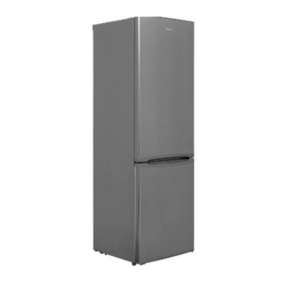
Candy CBL3518E User manual

V

EN ....................................................................................................................... 1
BG ....................................................................................................................... 7
CS ........................................................................................................................ 14
DA ........................................................................................................................ 20
DE ........................................................................................................................ 26
EL ......................................................................................................................... 32
ES ........................................................................................................................ 39
FI .......................................................................................................................... 45
FR ......................................................................................................................... 51
HR ........................................................................................................................ 57
HU ........................................................................................................................ 63
IT .......................................................................................................................... 69
NL ........................................................................................................................ 75
NO ........................................................................................................................ 81
PL ......................................................................................................................... 87
PT ......................................................................................................................... 93
RO ........................................................................................................................ 99
RU ........................................................................................................................ 105
SK ........................................................................................................................ 112
SL ......................................................................................................................... 118
SR ........................................................................................................................ 124
SV ........................................................................................................................ 130
UK ........................................................................................................................ 136
AR ........................................................................................................................ 143

EN 1
EN
Summary
PRODUCT DESCRIPTION .............................................................................................. 2
USE .............................................................................................................................. 3
Use ............................................................................................................... 3
Super Cool function ...................................................................................... 4
Super Freeze function .................................................................................... 4
Eco mode ...................................................................................................... 4
Holiday function ............................................................................................ 5
Defrosting ..................................................................................................... 5
Demo mode .................................................................................................. 5
Error Codes ................................................................................................... 5
In app pairing procedure ............................................................................... 6
Step 1........................................................................................................... 6
Step 2........................................................................................................... 6
Step 3........................................................................................................... 6

EN 2
PRODUCT DESCRIPTION
1
25
4
1. Control Panel
2. Shelves
3. Crisper
4. Freezer Boxes
5. Door rack
* The most energy-saving configuration requires drawers, food box and shelves to be positioned
in the product and fan to be off, please refer to the above pictures.
** The pictures above are only for reference. The actual configuration will depend on the physical
product or statement by the distributor.
Space requirements
The unit’s door must be able to fully open as shown. Spare
enough space for convenient opening of the doors and
drawers.
Keep a distance of at least 50 mm between the side
walls of the product and adjacent parts.
540 mm Cabinet: Width: 934 mm
1051
955
934
1200
140°
Depth: 955 mm
700 mm Cabinet: Width: 1200 mm
Depth: 1051 mm
3
EN 3
USE
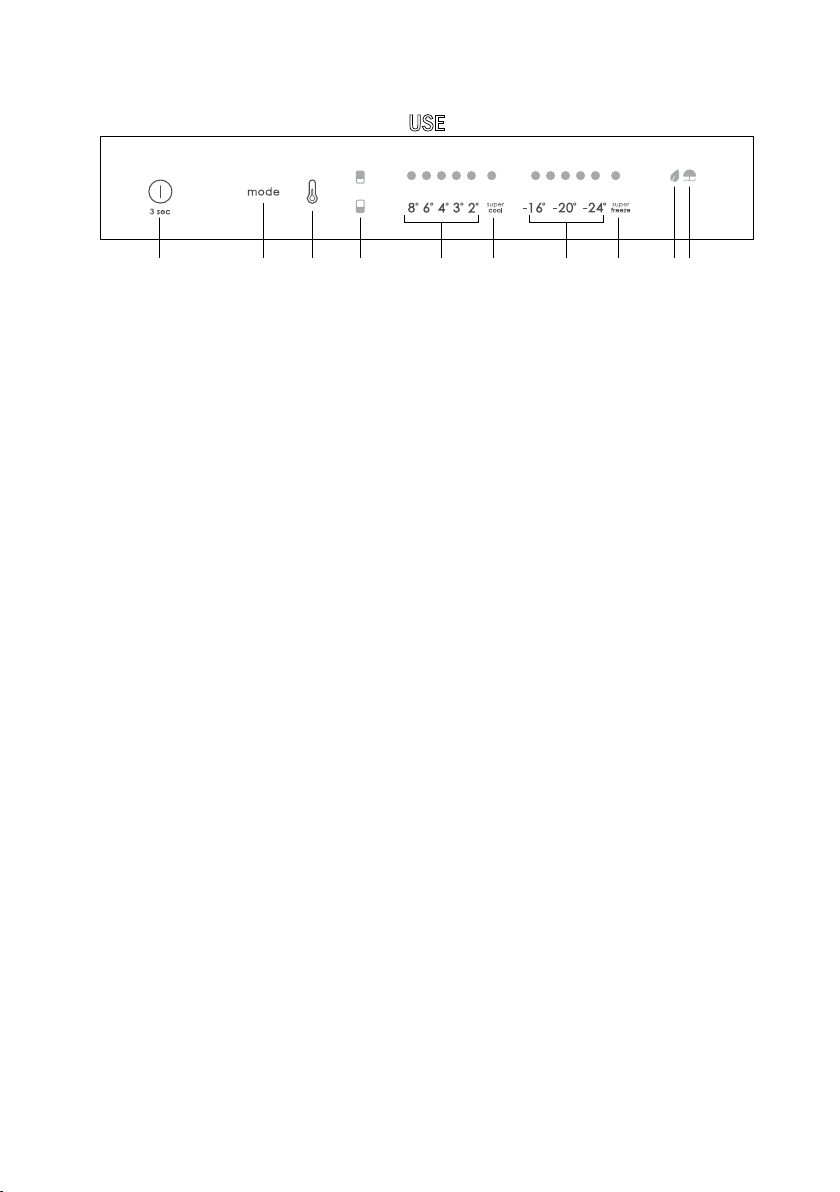
A B C a b c d e f g
A. ON/OFF key, used to switch on/off the appliance
B. Mode key, used to selected the special functions (Eco and holiday)
C. TEMP key, used to selected the fridge and freezer temperature
a. Fridge /freezer area icon, shows which compartment of the appliance is selected
b. Fridge temperature levels, show which is the selected temperature
c. Super Cool icon, shows if the Super Cool function is activated
d. Freezer temperature levels, show which is the selected temperature in the freezer
e. Super Freeze icon, shows if the Super Freeze function is activated
f. Eco mode icon, shows whether the eco mode is activated
g. Holiday function icon, show whether the holiday function is activated
Use •Plug on the appliance and it automatically turns on.
•The temperature can be set with 1 °C sensitivity. It is possible to select a temperature
from 2 °C to 8 °C in the fridge, and from -16 °C to -24 °C in the freezer.
•The temperature will automatically set at 4 °C in the fridge and -18 °C in the freezer.
NOTE: wait at least 2/3 hours before putting food in the appliance, so as to ensure the
temperature inside the fridge.
•To change the temperature, press the TEMP key for 5 seconds, an acoustic signal is made
and the icon of the selected compartment (fridge or freezer) as well as all the temperature
LEDs of the corresponding compartment turn on for 2s, after 2s the selection of the
compartment is confirmed. With the selected compartment icon on, quick press the TEMP
key to change the temperature. When the setting increases, the corresponding LED light
will turn on. An acoustic signal is made every time the TEMP key is pressed and the
temperature is changed, after 5 seconds the selection is confirmed. After 30s without
operation the fridge/freezer icon area turns off, while the LEDs of the selected
temperatures stay on. When the TEMP key is touched again, the icon of the last are
selected (Fridge or freezer) turns on.
•In case of power loss, the last cooling level set will be restored.
•To restore the default setting, at the screen lit, keep pressed the TEMP button, and then
press ON/OFF button 5 times in 5 seconds.
•Under the normal operating condition (in spring and autumn), it is recommended to set the
temperature at 4 °C. In summer when the ambient temperature is high, it is recommended
to set temperature at 6~8 °C, so as to guarantee the fridge and freezer temperatures and
reduce the refrigerator continuous running time; and in winter when the ambient
temperature is low, it is recommended to set temperature at 3~4 °C to avoid frequent
start/stop of the refrigerator.

EN 4
Super Cool function
It is suggested to switch on the Super Cool function if a large quantity of food should be stored (for
example after the purchase). The Super-Cool function accelerates the cooling of fresh food and
protects the goods already stored from undesirable warming. When the function is activated, the
temperature of the fridge is automatically set at 2 °C.
How to use the Super Cool function:
•The function can be activated by long pressing TEMP key to select the fridge compartment,
and then quick pressing the TEMP key until the Super Cool icon led is turned on, or it can
be turned on from the app. When the function is activated, the Super Cool LED is always
ON.
•To exit the Super Cool function, press the TEMP key or turn it off from the app.
•The Super Cool function automatically ends when the function has lasted for more than 12
hours.
•When the Super Cool ends, the icon of the control panel is switched off and the previously
set cooling level is restored.
Super Freeze function
The super freezing function accelerates the freezing of fresh food and protects the goods already
stored from undesirable warming. If a large amount of food has to be freeze, it is recommended to set
the Super-Freeze function on 24h before the usage. When the function is activated, the temperature
is automatically set at -22 °C.
How to use the Super Freeze function:
•The function can be launched by long pressing TEMP key to select the freezer
compartment, and then quick pressing TEMP key until the Super Freeze icon led is turned
on, or it can be turned on from the app. When the function is activated, the Super Freeze
LED is always ON.
•To exit the Super Freeze function, press the TEMP key or turn it off from the app.
•The Super Freeze function automatically ends when the function has lasted for more than
50 hours.
•When the Super Freeze ends, the icon of the control panel is switched off and the previously
set freezing level is restored.
Eco mode
The Eco mode can be activated to optimize the performance of the appliance, whereas obtaining the
best food storage. The Eco mode will automatically set the temperature at 4 °C in fridge and at -18 °C
in the freezer.
How to use the Eco mode:
•The function can be activated from control panel by pressing the “mode” key until the Eco
mode icon turns on (an acoustic signal confirms the selection), or by selecting the function
from the app. When the function is activated, the Eco mode icon is always ON.
•To exit the Eco turn it off from the app or chose another function from the control panel.
•When the Eco Mode ends, the icon of the control panel is switched off and the previously
set cooling levels are restored.

EN 5
Holiday function
The Holiday function can be used to reduce the energy consumption of the appliance, when it is not
used regularly. When the function is on, the LED lights will be off (even if the door is open) and the
fridge will work on low power consumption mode, whereas the freezer will keep working normally.
How to use the Holiday function:
•The function can be activated from control panel by pressing the “mode” key until the
Holiday icon turns on (an acoustic signal confirms the selection), or by selecting the
function from the app. When the function is activated, the Holiday icon is always ON.
•To exit the Holiday function, turn it off from the app or chose another function from the
control panel.
•When the Holiday function ends, the icon of the control panel is switched off and the
previously set cooling levels are restored.
Defrosting
When the layer of frost present in the freezer compartment exceeds 3mm, it is recommended to
proceed with the defrosting as it increases energy consumption.
•Switch off the appliance and disconnect the power cord.
•Remove the frozen food and temporarily place them in a cool place.
•Leave the freezer door open and collect the water on the bottom of the product.
•When defrosting is completed, dry the interior thoroughly.
•Reconnect the power cord and set the desired values.
•Wait a moment and reintroduce the frozen foods.
Demo mode
To enter or exit the demo mode, with the door open, long press the ON/OFF key and simultaneously
quick press the MODE key 5 times (within 5 seconds).
Error Codes
8 °C – 6 °C – 4 °C – 3 °C – 2 °C LED lights turn on sequentially, it means there has been
a communication error between the main control board and the display board. Please, contact
the technical assistance to help solve the problem

EN 6
•Download the hOn app on the stores
Step 2
•Create your account on the hOn App or log in if you already have an account
Step 3
•Follow pairing instructions in the hOn App
APP CONNECTION (Content only)
IN APP PAIRING PROCEDURE
Step 1

BG 7
Резюме
ОПИСАНИЕ НА ПРОДУКТА .................................................................. 8
УПОТРЕБА .................................................................................................. 9
Употреба ...................................................................................................9
Функция „Super Cool“ ..........................................................................10
Функция „Super Freeze“ ......................................................................11
Режим „Eco“ ...........................................................................................11
Функция „Holiday“ ................................................................................ 12
Размразяване .......................................................................................12
Демонстрационен режим ..................................................................12
Кодове за грешки ................................................................................ 12
Процедура за сдвояване с приложението ..................................13
Стъпка 1 ................................................................................................. 13
Стъпка 2 ................................................................................................. 13
Стъпка 3 ................................................................................................. 13

BG 8
ОПИСАНИЕ НА ПРОДУКТА
1. Контролен
панел
2. Рафтове
3. Чекмедже за
по-дълготрайна
свежест
4. Кутии за
замразяване
5. Рафт за врата
1051
955
934
1200
140°
Вратата на уреда трябва да може да се
отваря докрай, както е показано. Оставете
достатъчно място за удобно отваряне на
вратите и чекмеджетата.Спазвайте
разстояние от най-малко 50 мм между
страничните стени на продукта и съседните
части.
540 мм Шкаф: Ширина: 934 мм
Дълбочина: 955 мм
700 мм Шкаф: Ширина: 1200 мм
Дълбочина: 1051 мм
* Най-енергоспестяващата конфигурация изисква чекмеджетата, кутията за
храна и рафтовете да бъдат разположени в продукта и вентилаторът да
бъде изключен, моля, вижте горните снимки.
** Изображенията по-горе са само за справка. Действителната
конфигурация ще зависи от физическия продукт или декларацията на
дистрибутора.
Изисквания за пространство
1
25
4
3
Table of contents
Languages:
Other Candy Refrigerator manuals
Candy
Candy CVDS 5162WN User manual

Candy
Candy CRU 160 E User manual
Candy
Candy CIL 220 EE/N User manual
Candy
Candy CVBNM 6182WH User manual
Candy
Candy CFBD 2450/2E User manual

Candy
Candy CIO225NE User manual

Candy
Candy CHSBSV 5172XN User manual
Candy
Candy CCTOS482WHRU User manual
Candy
Candy 60 COMBI User manual
Candy
Candy CELDP2450 User manual
Candy
Candy COMBI User manual

Candy
Candy CFM 14502W User manual
Candy
Candy CFBL2150N/N User manual

Candy
Candy CCH1T518EX Installation instructions
Candy
Candy COMBI User manual
Candy
Candy CFLE 5485W User manual
Candy
Candy 34001426 CDNE 063 User manual

Candy
Candy CCTOS 542XHN Installation instructions
Candy
Candy CRCN6200 User manual
Candy
Candy 60 COMBI User manual