manuals.online logo
Brands
  1. Home
  2. •
  3. Brands
  4. •
  5. Citizen
  6. •
  7. Watch
  8. •
  9. Citizen C320 User manual

Citizen C320 User manual

Other manuals for C320

1

Other Citizen Watch manuals

Citizen Eco-Drive E784 User manual

Citizen

Citizen Eco-Drive E784 User manual

Citizen J290 Service manual

Citizen

Citizen J290 Service manual

Citizen C650 User manual

Citizen

Citizen C650 User manual

Citizen 9075 User manual

Citizen

Citizen 9075 User manual

Citizen Quartz CTZ-B8025 User manual

Citizen

Citizen Quartz CTZ-B8025 User manual

Citizen E81 Series User instructions

Citizen

Citizen E81 Series User instructions

Citizen JS10 User manual

Citizen

Citizen JS10 User manual

Citizen C710 User manual

Citizen

Citizen C710 User manual

Citizen 0S22 User manual

Citizen

Citizen 0S22 User manual

Citizen 6T15 User manual

Citizen

Citizen 6T15 User manual

Citizen E810 Operating manual

Citizen

Citizen E810 Operating manual

Citizen C720 User manual

Citizen

Citizen C720 User manual

Citizen 8730 User manual

Citizen

Citizen 8730 User manual

Citizen G910 User manual

Citizen

Citizen G910 User manual

Citizen BN7 User manual

Citizen

Citizen BN7 User manual

Citizen H060 User manual

Citizen

Citizen H060 User manual

Citizen H80 Series User manual

Citizen

Citizen H80 Series User manual

Citizen 914 SERIES Manual

Citizen

Citizen 914 SERIES Manual

Citizen 2115 User manual

Citizen

Citizen 2115 User manual

Citizen Eco-Drive CC3067-11L User manual

Citizen

Citizen Eco-Drive CC3067-11L User manual

Citizen JR00 User manual

Citizen

Citizen JR00 User manual

Citizen F56 User manual

Citizen

Citizen F56 User manual

Citizen u680 User manual

Citizen

Citizen u680 User manual

Citizen E010 Operating manual

Citizen

Citizen E010 Operating manual

Popular Watch manuals by other brands

Casio QW 5513 Operation guide

Casio

Casio QW 5513 Operation guide

Piaget 560P Instructions for use

Piaget

Piaget 560P Instructions for use

Armitron pro sport MD0346 instruction manual

Armitron

Armitron pro sport MD0346 instruction manual

West Marine BlackTip 13411293 Instruction Booklet and Care Guide

West Marine

West Marine BlackTip 13411293 Instruction Booklet and Care Guide

Jaeger-leCoultre HYBRIS MECHANICA CALIBRE 184 manual

Jaeger-leCoultre

Jaeger-leCoultre HYBRIS MECHANICA CALIBRE 184 manual

FOREVER iGO PRO JW-200 user manual

FOREVER

FOREVER iGO PRO JW-200 user manual

Relic OS10 quick start guide

Relic

Relic OS10 quick start guide

MyKronoz ZeClock manual

MyKronoz

MyKronoz ZeClock manual

Casio QW-782 General guide

Casio

Casio QW-782 General guide

Strikes and Spares SASM80 E-manual

Strikes and Spares

Strikes and Spares SASM80 E-manual

Christopher Ward C1000 Owner's handbook

Christopher Ward

Christopher Ward C1000 Owner's handbook

Lotus ILMFS01 instruction manual

Lotus

Lotus ILMFS01 instruction manual

Chronos Manufactures Chrono Diamond Thyrso 10400 instruction manual

Chronos Manufactures

Chronos Manufactures Chrono Diamond Thyrso 10400 instruction manual

Pandora WATCH2 quick guide

Pandora

Pandora WATCH2 quick guide

Suunto X6 user guide

Suunto

Suunto X6 user guide

Seiko N830 instruction manual

Seiko

Seiko N830 instruction manual

MotionX 365 user guide

MotionX

MotionX 365 user guide

Aplus GV18 user guide

Aplus

Aplus GV18 user guide

manuals.online logo
manuals.online logoBrands
  • About & Mission
  • Contact us
  • Privacy Policy
  • Terms and Conditions

Copyright 2025 Manuals.Online. All Rights Reserved.

C320 Abbreviated instruction
• To see details of specifications and operations, refer to the instruction manual: C320 instruction manual
English
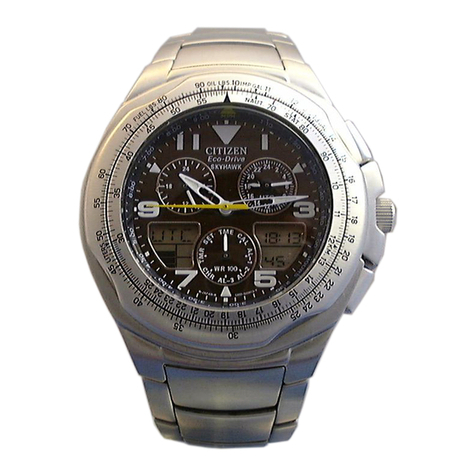
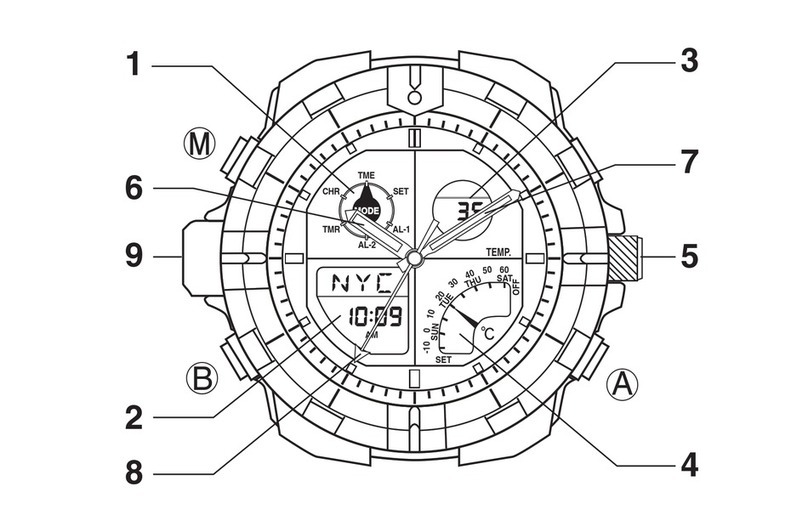
Component identification
UP
H.R.
MODE
DOWN
Function hand
Hour hand
24-hour hand
Button
A
Button
M
Minute hand
Digital display
Mode hand
Button
B
Button
C
Second hand
• Actual appearance may differ from the illustration.
• Refer also to our web page for detail of usage of the scale and bezel on the watch.
(http://www.citizenwatch-global.com/support/pdf/enhanced/e.pdf)
Moving the hands temporarily
You can move the hour and minute hands temporarily to see the digital display
and small dials without their interruption.
• The operation is effective when “H.R.” is indicated on the lower left of the dial.
1.
Press and hold the upper left button Bfor 2 seconds or more.
• Release the button when the hour and minute hands start to move.
2.
Press and release the upper left button Bwhen the hands
went away from what you want to see.
The hands stop.
3.
Pess and release the upper left button Bto finish the
procedure.
The hands returns to time indication.
Setting the time
• The time indicated with the hour, 24-hour, minute and second hands is
synchronized with that on the digital display.
1.
Press and release the lower right button Mrepeatedly to
move the mode hand to point to [TME].
2.
Press and release the upper right button Aor lower left
button Crepeatedly to indicate an area name you want on
the digital display.
3.
Pull out the lower right button M.
The time indication on the digital display starts blinking and the time
becomes adjustable.
4.
Press and release the upper right button Arepeatedly to
change the target to be set.
• Each time you press the button, the target changes as follows:
Summer time Second Minute Hour
12/24-hour
basis
5.
Press and release the lower left button Cto adjust the target.
• Press button
C
in accordance with a reliable time source to adjust the
second.
• Pressing and holding the button changes indication continuously.
• “AM” or “PM” is displayed to indicate AM or PM in 12-hour basis
indication.
• “SUMMER” is displayed when summer time is activate.
• Summer time cannot be activated when “UTC” is chosen for the area.
6.
Repeat steps 4 and 5 to set other targets.
7.
Push in the lower right button Mto finish the procedure.
C320 Abbreviated instruction
Setting the calendar
The calendar of this watch does not have to be adjusted manually until Thursday,
December 31, 2099 including leap years. (perpetual calendar)
1.
Press and release the lower right button Mrepeatedly to
move the mode hand to point to [CAL].
The calendar is indicated on the digital display.
2.
Press and release the upper right button Aor lower left
button Crepeatedly to indicate an area name you want on
the digital display.
3.
Pull out the lower right button M.
The calendar indication on the digital display starts blinking and the
calendar becomes adjustable.
4.
Press and release the upper right button Arepeatedly to
change the target to be set.
• Each time you press the button, the target changes as follows:
Month YearDate Day of week
5.
Press and release the lower left button Cto adjust the target.
• Pressing and holding the button changes indication continuously.
6.
Repeat steps 4 and 5 to set other targets.
7.
Push in the lower right button Mto finish the procedure.
Switching the time of analog and digital sections
The time of the analog section cannot be adjusted directly.
Set the time of the area you want to indicate in the analog section once in the
digital section and then switch the time between the analog and digital sections.
1.
Press and release the lower right button Mrepeatedly to
move the mode hand to point to [TME] or [CAL].
2.
Press and release the upper right button Aand lower left
button Cat the same time.
The time of the digital and analog (hour/minute/24-hour hands) sections
switches.
Using the world time
1.
Press and release the lower right button Mrepeatedly to
move the mode hand to point to [TME] or [CAL].
The calendar is indicated on the digital display when you choose [CAL].
2.
Press and release the upper right button Aor lower left
button Crepeatedly to indicate an area name you want on
the digital display.
The time or calendar of the area you choose is indicated on the digital
display.
Table of time zones and representative areas
• The time zone in the table is based on UTC (Coordinated Universal Time).
• Countries or regions may change time zones for various reasons.
Time
zone Area name Representative area
0UTC
Coordinated Universal
Time
LON
London
+1 PAR
Paris
ROM
Rome
+2 IST
Istanbul
+3 MOW
Moscow
+4 DXB
Dubai
+5 KHI
Karachi
+6 DAC
Dhaka
+7 BKK
Bangkok
+8 SIN
Singapore
HKG
Hong Kong
Time
zone Area name Representative area
+9 TYO
Tokyo
+10 SYD
Sydney
+11 NOU
Noumea
+12 AKL
Auckland
–10 HNL
Honolulu
–9 ANC
Anchorage
–8 LAX
Los Angeles
–7 DEN
Denver
–6 CHI
Chicago
–5 NYC
New York
–4 CCS
Caracas
–3 RIO
Rio de Janeiro
Using the zone-set function
You can hide unnecessary ones in the 23 areas and UTC, which the watch can
indicate the time of; you can also activate/deactivate summer time for those areas
separately.
1.
Press and release the lower right button Mrepeatedly to
move the mode hand to point to [SET].
2.
Pull out the lower right button M.
The digital display starts blinking.
3.
Press and release the upper right button Aor lower left
button Crepeatedly to indicate an area name you want on
the digital display.
4.
Press and release the upper left button Bto select “SET”
(display) or“OFF”(hide) of the area.
• Each time you pres the button, “SET” and “OFF” changes alternately.
• Each time you press button
C
in this step, the summer time setting
changes alternately.
5.
Repeat steps 3 and 4 to set other areas.
6.
Push in the lower right button Mto finish the procedure.

C320 Abbreviated instruction
Correcting the reference position
1.
Press and release the lower right button Mrepeatedly to
move the mode hand to point to [CHR].
2.
Pull out the lower right button M.
The reference position becomes adjustable.
Correct reference positions:
All hands (except the mode hand):
12 o'clock position (straight above)
3.
Press and release the upper left button
Brepeatedly to change the target to
be adjust.
• Each time you press the button, the target changes and digital indication
changes as follows:
Function hand (F_H) → hour, minute and 24-hour hands (H.R.) → second
hand (SEC) → (back to the top)
4.
Press and release the upper right button Aor lower left
button Cto adjust the target.
• Pressing and holding the button move the hands continuously.
5.
Repeat steps 3 and 4 to adjust other targets.
6.
Push in the lower right button Mto finish the procedure.
Resetting the watch - All Reset
1.
Pull out the lower right button M.
2.
Press buttons A, Band Cat the same time.
All the digital indication lights up and the watch is reset.

After All Reset
The watch changes into reference position adjustment status by pressing button
B
. After pressing button
B
, adjust the reference positions referring to steps 3
-6 of Correcting the reference position. After the adjustment, set the time and
calendar.