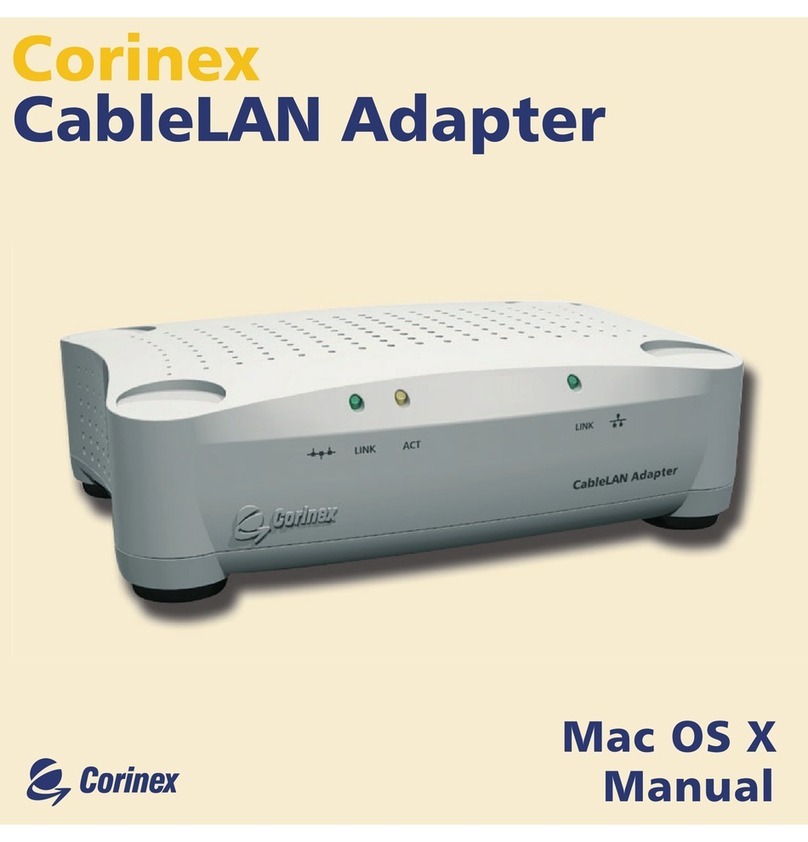
Corinex CableLAN Adapter User manual


The undersigned hereby declares the above specified equipment conforms to the above directives and standards.
Signature: ................................
Printed name: ..........................
Peter Sobotka
Place/Date: ..................
Position/Title: ..............
2003
CEO
Corinex CableLAN Adapter
Model:
Manufacturer:
Corinex Communications Corp.
World Trade Center
404-999 Canada Place
Vancouver B.C.
Canada V6C 3E2
Directives which Conformity is Declared:
EMC: 89/336/EWG
LVD: 73/23/EEC
93/68/EEC
Standards which Conformity is Declared:
EN 55022
EN 55024
EN 61000-3-2/A14
EN 61000-3-3
EN 60950

Signature: ................................
Printed name: ..........................
Peter Sobotka
Place/Date: ..................
Position/Title: ..............
2003
CEO
Corinex CableLAN Adapter
Model:
Manufacturer:
Corinex Communications Corp.
World Trade Center
404-999 Canada Place
Vancouver B.C.
Canada V6C 3E2
This device complies with Part 15 rules. Operation is subject to the following two conditions:
1) this device may no cause harmful interference, and
2) this device must accept any interference received, including interference that may cause
undesired operation.
This equipment has been tested and found to comply with the limits of a Class B digital device,
pursuant to Part 15 of the FCC Rules.
User Warning !
Any changes or modification to said product not expressly
approved by Corinex could void the user's authority to
operate the equipment.
CABLELAN - ETH

This document, as well as the software described in it, is furnished under license and may be used or
copied only in accordance with the terms of the license. The content of this document is furnished
for informational use only, it is subject to change without notice, and it does not represent a
commitment on the part of Corinex Communications Corp.
Corinex Communications Corp. assumes no responsibility or liability for any errors or inaccuracies
that may appear in this document.
It is our policy to enhance our products as new technologies, hardware components, software and
firmware become available; therefore, the information contained in this document is subject to
change without notice.
Some features, functions, and operations described in this document may not be included and sold
in certain countries due to government regulations or marketing policies.
The use of the product or its features described in this document may be restricted or regulated by
law in some countries. If you are unsure which restrictions or regulations apply, you should consult
your regional Corinex office or the authorized reseller.
Published by:
Corinex Communications Corp.
World Trade Center
404-999 Canada Place
Vancouver, B.C.
Canada V6C 3E2
Tel.: +1 604 692 0520
Fax: +1 604 694 0061
Corinex is a registered trademark of Corinex Communications Corp.
Apple, MAC OS X are either registered trademarks or trademarks of Apple Computer, Inc. in the U.S.A.
and/or other countries.
Microsoft, MS-DOS, MS, Windows are either registered trademarks or trademarks of Microsoft
Corporation in the U.S.A. and/or other countries.
All products or company names mentioned herein may be the trademarks of their respective owners.
Copyright (c) 2001-2003 by Corinex Communications Corp.
1
Copyright
Corinex CableLAN Adapter Manual
2003-10-01 ver.1

Content
Copyright ................................................................................... 1
Content ..................................................................................... 2
1. Introduction ............................................................................ 3
1.1 Overview ...................................................................................... 3
1.2 About this Manual ..................................................................... 3
2 Installation Guide ..................................................................... 4
2.1 What this Package Contains ........................................................ 4
2.2 System Requirements ................................................................... 4
2.3 Physical Description ....................................................................... 5
2.4 Installing the CableLAN Adapter ................................................. 7
2.5 Installing the Setup Tool ............................................................. 10
2.6 Testing the Setup ..................................................................... 13
2.7 Running the Setup Tool .............................................................. 13
3 User Guide ..............
...........
..................................................... 14
3.1 Setup Tool User Guide ............................................................... 14
3.2 Corinex CableLAN Adapter ........................................................ 16
3.3 FAQ ........................................................................................... 18
3.4 CableLAN Adapter Specifications ................................................ 19
4 Troubleshooting Guide ........................................................... 21
Content
2
Corinex CableLAN Adapter Manual

Introduction
1.1 Overview
The Corinex CableLAN Adapter is a network interface adapter, using the coaxial cable as a
medium for communications. After successful installation, the indoor CableLAN network
behaves like a traditional LAN for computers. The Corinex CableLAN Adapter supports up
to 14 Mbps network speed.
The product keeps network maintenance cost low and eliminates usage barriers while
there is no need for additional wiring. It is highly integrated and requires no other
external electronic components.
1.2 About this Manual
This Owner‘s Manual is intended to provide sufficient information to help you understand
how to successfully install Corinex CableLAN Adapters to meet your networking needs.
With the information in this manual, you should be able to:
• Analyze your network efficiency
• Plan the configuration of Corinex CableLAN Adapter options
• Install and configure your Corinex CableLAN Adapter according to your plan
• Verify and optimize your Corinex CableLAN Adapters’ performance
1
Introduction
3
Corinex CableLAN Adapter Manual

Installation Guide
2.1 What this Package Contains
When you receive your Corinex CableLAN Adapter, check to be sure that your package
contains:
• Corinex CableLAN Adapter
• AC cord
• Ethernet cable
• Coax T-splitter
• Coax jumper cable
• This manual
• Installation CD
As we are constantly innovating our products, it can happen that we have newer versions
of software tools included on the installation CD. If you want to check (and download)
the latest versions of the software for your Corinex product, go to
www.corinex.com/download
We also advise you to visit our Corinex Authorized Powerline Partners Program web
page (cappp.corinex.com), as you can find there valuable information about complex
applications and installations, along with the partners in your area, who are providing
installation services.
2.2 System Requirements
• A Macintosh or IBM compatible PC
• One available 10/100 Mbps Ethernet port for connection
• CD-ROM drive
• Windows 98/ME/2000/NT/XP, Mac OS X or Linux operating system
2
Installation Guide
4
Corinex CableLAN Adapter Manual

2.3 Physical Description
Front Panel
LED Definition
(LEDs from left to right)
CableLAN
LINK: Green On: Link
ACT: Yellow On: Link
Off: No Link
Blinking: receiving/transmitting data
Ethernet
LINK: Green On: Link
Blinking: receiving/transmitting data
Installation Guide
5
Corinex CableLAN Adapter Manual

Rear Panel
Connectors Definition
(Connectors from left to right)
Power Inlet: The device is equipped with internal power supply
Ethernet LAN Port: For linking computers or other Ethernet devices,
e.g. hub/switch
F type CableLAN
Connector: For the coaxial cable connection
Installation Guide
6
Corinex CableLAN Adapter Manual

2.4 Installing the CableLAN Adapter
To connect the Corinex CableLAN Adapter to your computer, follow the steps listed
below:
1. Plug the supplied AC cord into the Corinex CableLAN Adapter and after that,
into an AC outlet.
2. Plug the coax cable into the Corinex CableLAN Adapter.
3. Unplug the coaxial cable connecting the TV and the TV outlet. Plug the
T-splitter into the TV outlet.
4. Plug the TV coaxial cable into the T-splitter. Plug the CableLAN coaxial cable
into the T-splitter.
5. Plug the Ethernet cable into the Corinex CableLAN Adapter and the Ethernet
slot or card on your PC.
The Corinex CableLAN Adapter is equipped with an automatic switch enabling an
Ethernet slot or card on the PC to be connected to the Adapter via a standard cable or to
connect a cable modem or DSL modem via a "cross cable" to the Adapter.
If there is an existing Docsis (Data Over Cable Service Interface Specifications) system
already installed, special precautions, as described further have to be taken.
It is possible to cut off the Docsis functions and insert the CableLAN at the incoming
node. You can still use the Docsis Modem’s access capacity for Internet communications.
This requires the use of a passive diplexer filter. See the installation example in the
following pictures.
Installation Guide
7
Corinex CableLAN Adapter Manual
Table of contents
Other Corinex Network Card manuals