manuals.online logo
Brands
  1. Home
  2. •
  3. Brands
  4. •
  5. Curtis
  6. •
  7. LED TV
  8. •
  9. Curtis LEDVD1339A User manual

Curtis LEDVD1339A User manual

Other Curtis LED TV manuals

Curtis LEDV1975A3 User manual

Curtis

Curtis LEDV1975A3 User manual

Curtis LEDVD2488A-B User manual

Curtis

Curtis LEDVD2488A-B User manual

Curtis PROSCAN PLDED5066A-C User manual

Curtis

Curtis PROSCAN PLDED5066A-C User manual

Curtis LED1930A User manual

Curtis

Curtis LED1930A User manual

Popular LED TV manuals by other brands

Samsung UE65C8000XK user manual

Samsung

Samsung UE65C8000XK user manual

VESTEL SATELLITE 22PF5045 operating instructions

VESTEL

VESTEL SATELLITE 22PF5045 operating instructions

Tokai TTE-48B4444K user manual

Tokai

Tokai TTE-48B4444K user manual

LG 55UR640S Easy setup guide

LG

LG 55UR640S Easy setup guide

LG 43UF680T-TA owner's manual

LG

LG 43UF680T-TA owner's manual

Bush DLED55UHDSFIRE instruction manual

Bush

Bush DLED55UHDSFIRE instruction manual

Logik L24FED12 instruction manual

Logik

Logik L24FED12 instruction manual

Samsung QE65QN85CATXXN user manual

Samsung

Samsung QE65QN85CATXXN user manual

Samsung 7 Series user manual

Samsung

Samsung 7 Series user manual

Insignia NS-42D240A13 brochure

Insignia

Insignia NS-42D240A13 brochure

Philips 32PFL3207H/12 Specifications

Philips

Philips 32PFL3207H/12 Specifications

LG 49UB850V owner's manual

LG

LG 49UB850V owner's manual

TCL Roku TV 55C807 user guide

TCL

TCL Roku TV 55C807 user guide

LG 43UF690V-ZC manual

LG

LG 43UF690V-ZC manual

Samsung UN50ES6900 Product highlights

Samsung

Samsung UN50ES6900 Product highlights

Philips 55PUT7805 user manual

Philips

Philips 55PUT7805 user manual

Vidao 58V850R user manual

Vidao

Vidao 58V850R user manual

LG 55UF671V owner's manual

LG

LG 55UF671V owner's manual

manuals.online logo
manuals.online logoBrands
  • About & Mission
  • Contact us
  • Privacy Policy
  • Terms and Conditions

Copyright 2025 Manuals.Online. All Rights Reserved.

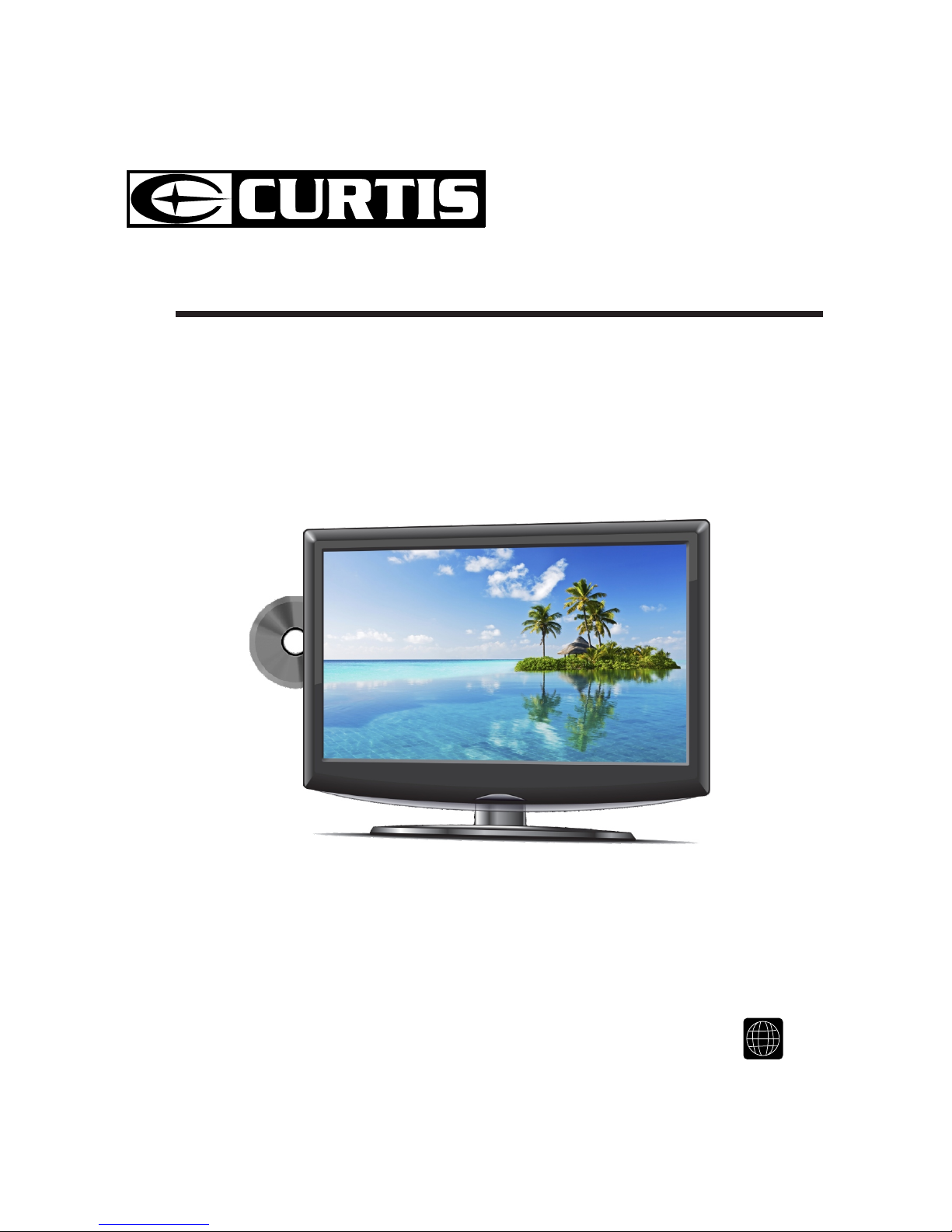
INSTRUCTION MANUAL
Before using the TV, please read this manual thoroughly,
and retain it for future reference.
Model:LEDVD1339A 111
CONTENTS
14
16
18
19
22
25
26
1
2
2
3
4
7
8
3
3
5
9
10
2
8
8
8
9
9
10
10
10
4
6
6
7
11
12
12
12
SAFETY
PRECAUTION
IMPORTANT
SAFETY
INSTRUCTION
MAINTENANCE
ACCESSORIES
GETTING
STARTED
6
CONTROL
REFERENCE
GUIDE
WALL MOUNT
INSTALLATION
INITIAL SETUP
TV SETUP
CONNECTIONS
Remote Control
Front Frame
Back Frame
Side Panel
Antenna Connection
S-Video Connection
AV Connection
Y Pb Pr Connection
HDMI Connection
VGA Connection
Headphone Connection
Power Cord Connection
Putting The Unit On A Proper Place
Source Selection
Turning The Unit On For The First Time
Picture Menu
Audio Menu
Time Menu
Setup Menu
Parental Menu
TV Menu
Zoom Function (For DVD)
1
CONTENTS
27
12
11
13
14
39
15
16
28
31
33
34
37
38
40
41
DISC
FORMATS
CD / DVD
OPERATION
CUSTOMIZING
THE DVD
FUNCTION
SETTINGS
DISPLAY
MODE
SPECIFICATION
TROUBLE-
SHOOTING
GUIDE
Basic Operations
Special Functions
Mp3 / JPEG Playback
PC Formats
Video Formats
DVD Symptom
TV Symptom
SAFETY CLASS :This is an IEC safety class I product
and it must be grounded for safety.
DVD Menu
*
SAFETY PRECAUTION
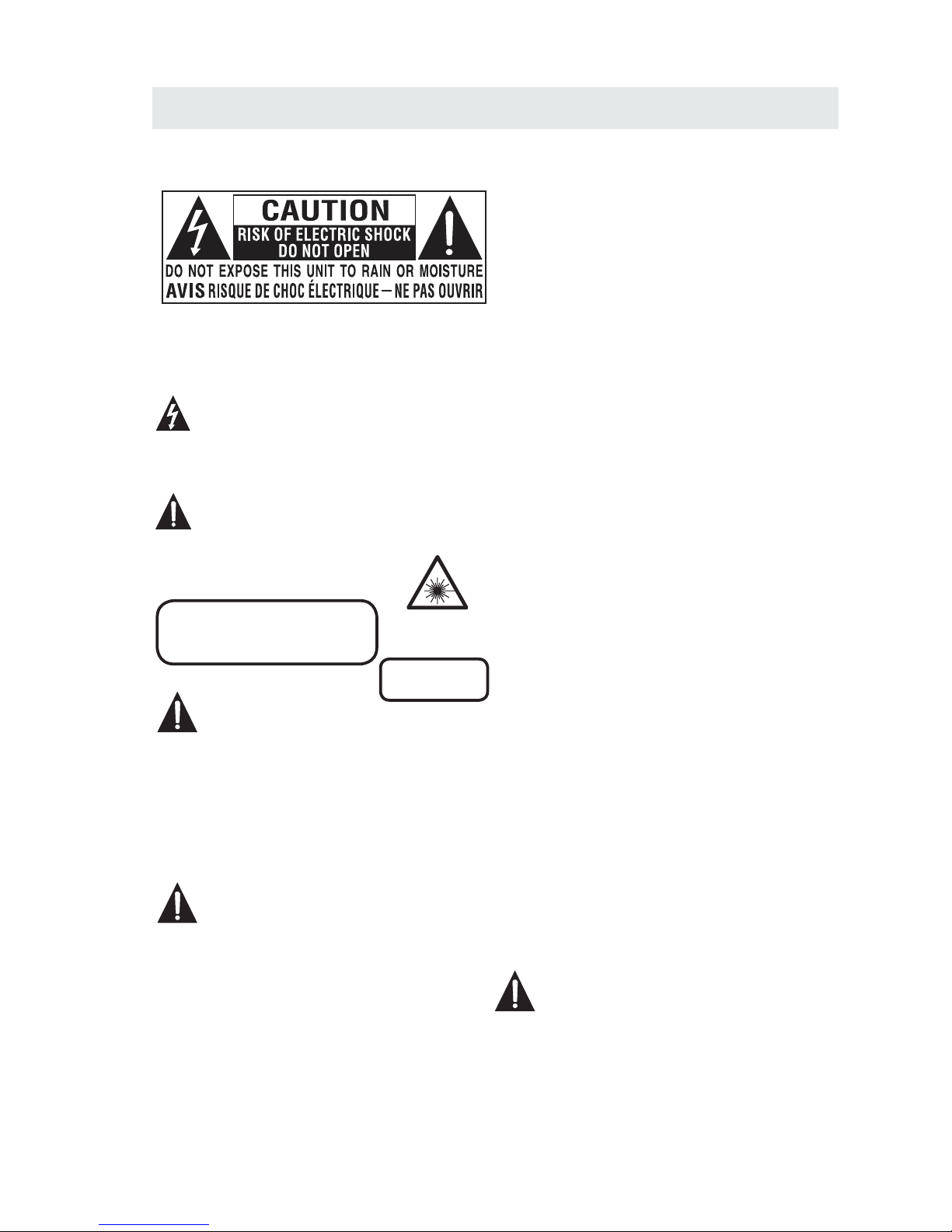
CAUTION
•
•
•
WARNING:
PLACEMENT INFORMATION
SAFETY INFORMATION
CONDENSATION INFORMATION
RATING PLATE LOCATION
FCC STATEMENTS
CLASS 1 LASER
PRODUCT
WARNING:
1
CAUTION MARKING WAS LOCATEDAT BOTTOM
ENCLOSURE OF THEAPPARATUS.
WARNING:TO REDUCE THE RISK OF ELECTRIC
SHOCK,DO NOT REMOVE COVER(OR BACK)
NO USER SERVICEABLE PARTS INSIDE.
REFERS ERVICING TO QUALIFIED SERVICE
PERSONNEL.
The lightning flash with arrowhead symbol,
within an equilateral triangle,is intended to
alert the user to the presence of uninsulated
“dangerous voltage”within the product's enclosure
that may beof sufficient magnitude to constitute a
risk of electric shock to persons.
The exclamation point within an equilateral
Triangle is intended to alert the user to
The presence of important operating and
maintenance (servicing) instructions in the literature
accompanying the appliance.
CAUTION
INVISIBLE LASER RADIATION WHEN
OPEN AND INTERLOCKS DEFEATED
AVOID EXPOSURE TO BEAM
This product
Contains a low
power laser device.
DANGER OF EXPLOSION IF BATTERY IS
INCORRECTLY REPLACED. REPLACE ONLY
WITH THE SAME OR EQUIVALENT TYPE.
USE OF CONTROLS OR ADJUSTMENTS OR
PERFORMANCE OF PROCEDURES OTHER
THAN THOSE SPECIFIED MAY RESULT IN
HAZARDOUS RADIATION EXPOSURE.
•
•
TO REDUCE THE RISK OF FIRE OR ELECTRIC
SHOCK, DO NOT EXPOSE THIS APPLIANCE TO
RAIN OR MOISTURE.
TOREVENT FIRE OR SHOCK HAZARD, DO NOT
EXPOSE THIS UNIT TO RAIN OR MOISTURE. DO
NOT PLACE OBJECTS FILLED WITH LIQUIDS ON
OR NEAR THIS UNIT.
SHOULDANYTROUBLE OCCUR, DISCONNECT
THE AC POWER CORD AND REFER SERVICING
TO A QUALIFIED TECHNICIAN.
Do not use this unit in places that are extremely
hot, cold, dusty or humid.
Do not restrict the airflow of this unit by placing it
somewhere with poor airflow, by covering it with
a cloth, by placing it on bedding or carpeting.
When connecting or disconnecting the AC power
cord, grip the plug and not the cord itself. Pulling
the cord may damage it and create a hazard.
When youare not going to use the unit for a long
period of time, disconnect the AC power cord.
When left in a heated room where it is warm and
damp, water droplets or condensation may form
inside the equipment. When there is condensation
inside the unit, the unit may not function normally.
Let the unit stand for 1-2 hours before turning the
power on or gradually heat the room and let the
unit dry before use.
The rating plate is located on the rear of the unit.
NOTE: This unit has been tested and found to comply
with the limits for a Class B digital device, pursuant
to Part 15 of the FCC Rules. These limits are designed
to provide reasonable protection against harmful
interference in a residential installation.
This unit generates, uses and can radiate radio
frequency energy and, if not installed and used in
accordance with the instructions, may cause harmful
interference to radio communication. However, there
is no guarantee that interference will not occur in a
particular installation. If this unit does cause harmful
interference to radio or television reception, which
can be determined by turning the unit off and on, the
user is encouraged to try to correct the interference
by one or more of the following measures:
- Reorient or relocate the receiving antenna.
- Increase the separation between the unit and
receiver.
-Connect the unit into an outlet on a circuit different
from that to which the receiver is connected.
- Consult the dealer or an experienced radio/TV
technician for help.
Changes or modifications to this
unit not expressly approved by the party responsible
for compliance could void the user authority
to operatethe unit.
•
•
•
•
•

IMPORTANT SAFETY INSTRUCTIONS
MAINTENANCE
CLEANING THE DISC
2
1)Read these instructions.
2)Keep these instructions.
3)Heed all warnings.
4)Follow all instructions.
5)Do not use this apparatus near water.
6)Clean only with a dry cloth.
7)Do not block any ventilation openings.
Install in accordance with the
manufacturer's instructions.
8)Do not install near any heat sources such
as radiators, heat registers, stoves, or
other apparatus (Including amplifiers) that
produce heat.
9)Do not defect the safety purpose of the
polarized or grounding-type plug.
A polarized plug has two blades with one
wider than the other.
A groundingtype plug has two blades
and a third grounding prong.
The wide blade or the third prong is
provided for your safety.
If the provided plug does not fit into your
wall outlet, consult an electrician for
replacement of the obsolete outlet.
10)Protect the power cord from being walked on
or pinched particularly at plugs, convenience
receptacles, and the point where they exit
from the apparatus.
11)Only use attachments / accessories specified
by the manufacturer.
12)Use only with the cart, stand,
tripod, bracket, or table
specified by the manufacturer,
or sold with the apparatus.
When a cart is used, use caution when
moving the cart / apparatus combination to
avoid injury from tip-over.
13)Unplug this apparatus during lightning
Storms or when unused for long periods of
time.
14)Refer all servicing to qualified service
personnel. Servicing is required when the
apparatushas been damaged in any way,
such as the power cord or plug is damaged,
liquid has been spilled or objects have fallen
into the apparatus, the apparatus has been
exposed to rain or moisture, does not operate
normally, or has been dropped.
15)To prevent electric shock, ensure the grounding
pin on the AC cord power plug is securely
connected.
A defective or soiled disc inserted into the unit can cause sound to drop out during
playback.
Handle the disc by holding its inner and outer edges.
·Do NOT touch the surface of the unlabeled side of the disc.
·Do NOT stick paper or tape on the surface.
·Do NOT expose the disc to direct sunlight or excessiveheat.
·NEVER use solvents such as benzine or alcohol to clean the disc.
·Clean the disc before playback. Wipe the disc from the center
outward with a cleaning cloth.
·Do NOT use irregular shaped discs
(example : heart shaped, octagonal, etc.).
They may cause malfunctions.
·Be sure to turn the unit off and disconnect the AC power cord before maintaining the unit.
·Wipe the unit with a dry soft cloth. If the surfaces are extremelydirty,
wipe clean with a cloth that has been dipped in a weak soap-and-water solution and
wrung out thoroughly. Wipe with a dry cloth.
·Never use alcohol, benzine, thinner, cleaning fluid or other chemicals. Do NOT use compressed
air to remove dust..
Before transporting the unit, remove the disc from the disc compartment.
ACCESSORIES
Please check and identify the supplied accessories.
............................................................................................................ .........
................................................................................................................
................................................................................................................
...........................................................................................................
.
GETTING STARTED
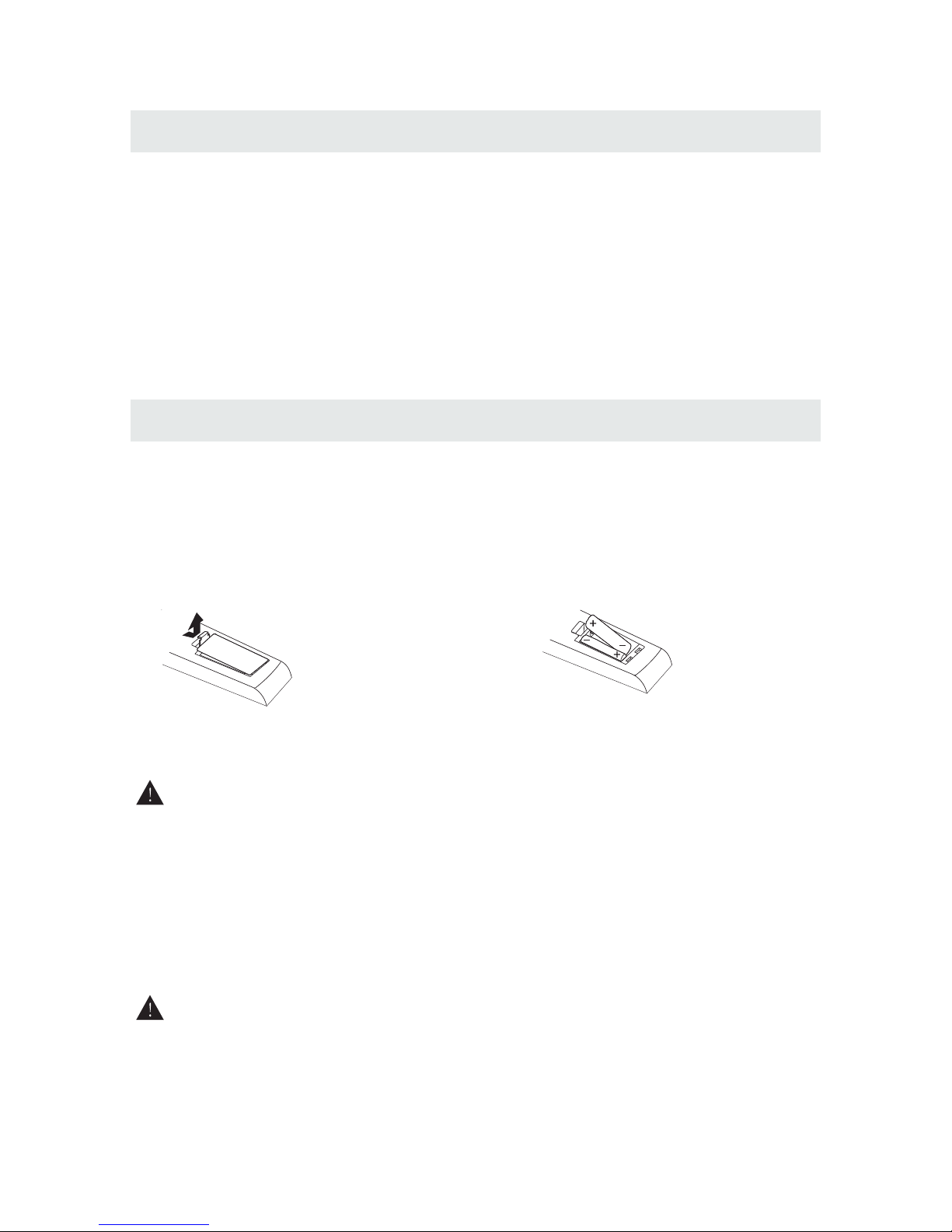
USING THE REMOTE CONTROL
TO INSTALL THE BATTERIES
BATTERY REPLACEMENT
CAUTION
1.Open the battery door. 2. Insert 2 "AA" batteries
.
: Danger of explosion if batter y is incorrectly replaced.
NOTES
, .
WARNING :
3
x 2
x 1
x 1
x 1
x 1
Remote control ..................................................................................................................
Remote control
Battery(AA)
Warranty Card
Instruction Manual
Switching Adaptor
·Point the remote control at the remote sensor located on the unit.
·When there is a strong ambient light source, the performance of the infrared remote sensor
·may be degraded, causing unreliable operation.
·The recommended effective distance for remote operation is about 16 feet (5 meters).
When the batteries become weak, the operating distance of the remote control is greatly
reducedand you will need to replace the batteries.
·If the remote control is not going to be usedfor a long time, remove the batteries to avoid
damage caused by battery leakage corrosion.
·Do not mix old and new batteries. Do not mix ALKALINE, standard (CARBON-ZINC) or
rechargeable (NICKEL-CADMIUM) batteries.
·Always remove batteries as soon as they become weak.
·Weak batteries can leak and severely damage the remote control.
Donotdispose batteriesin a fireBatteries mayexplode or leak
Batteries shall not beexposed toexcessive heatsuch as sunshinefire orthe like
CONTROL REFERENCE GUIDE
4
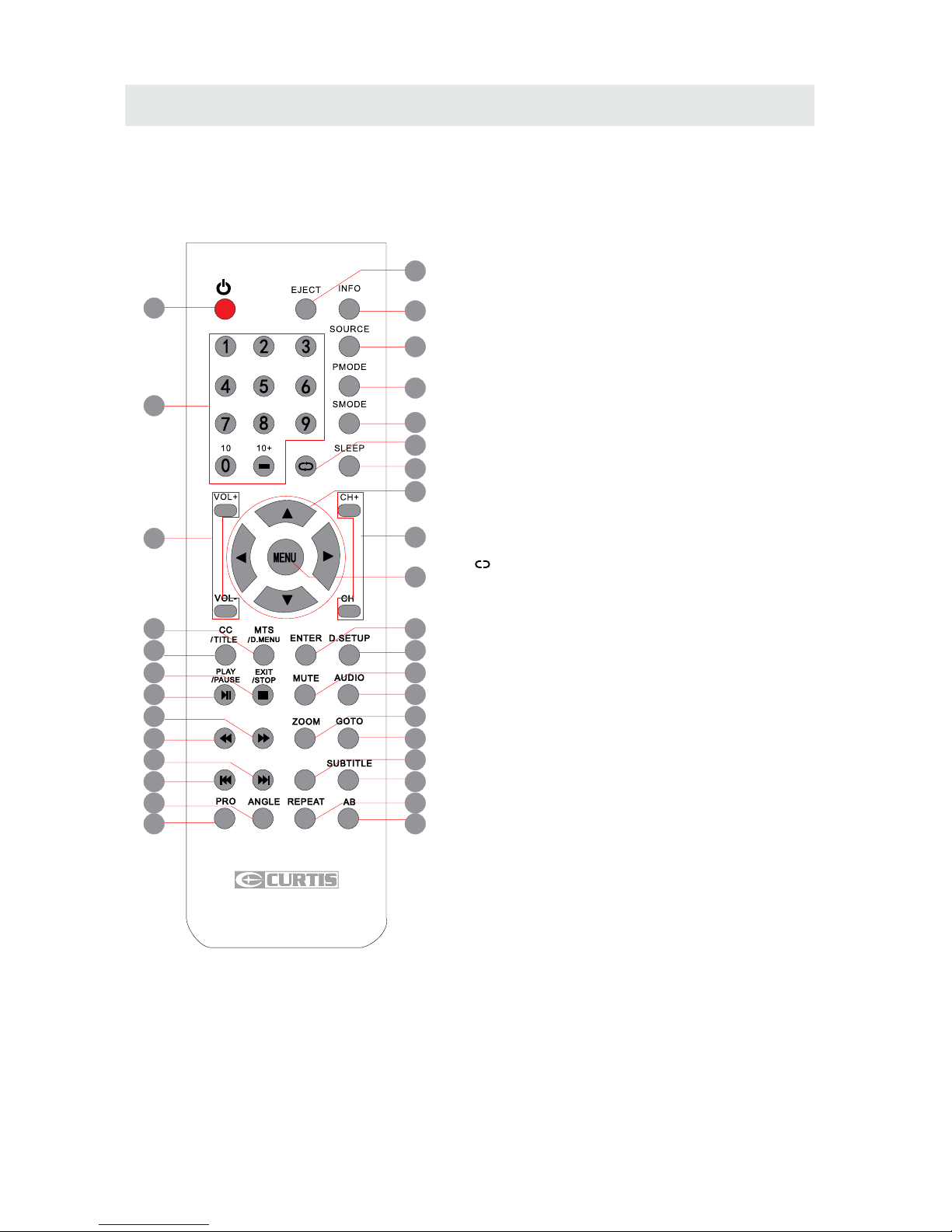
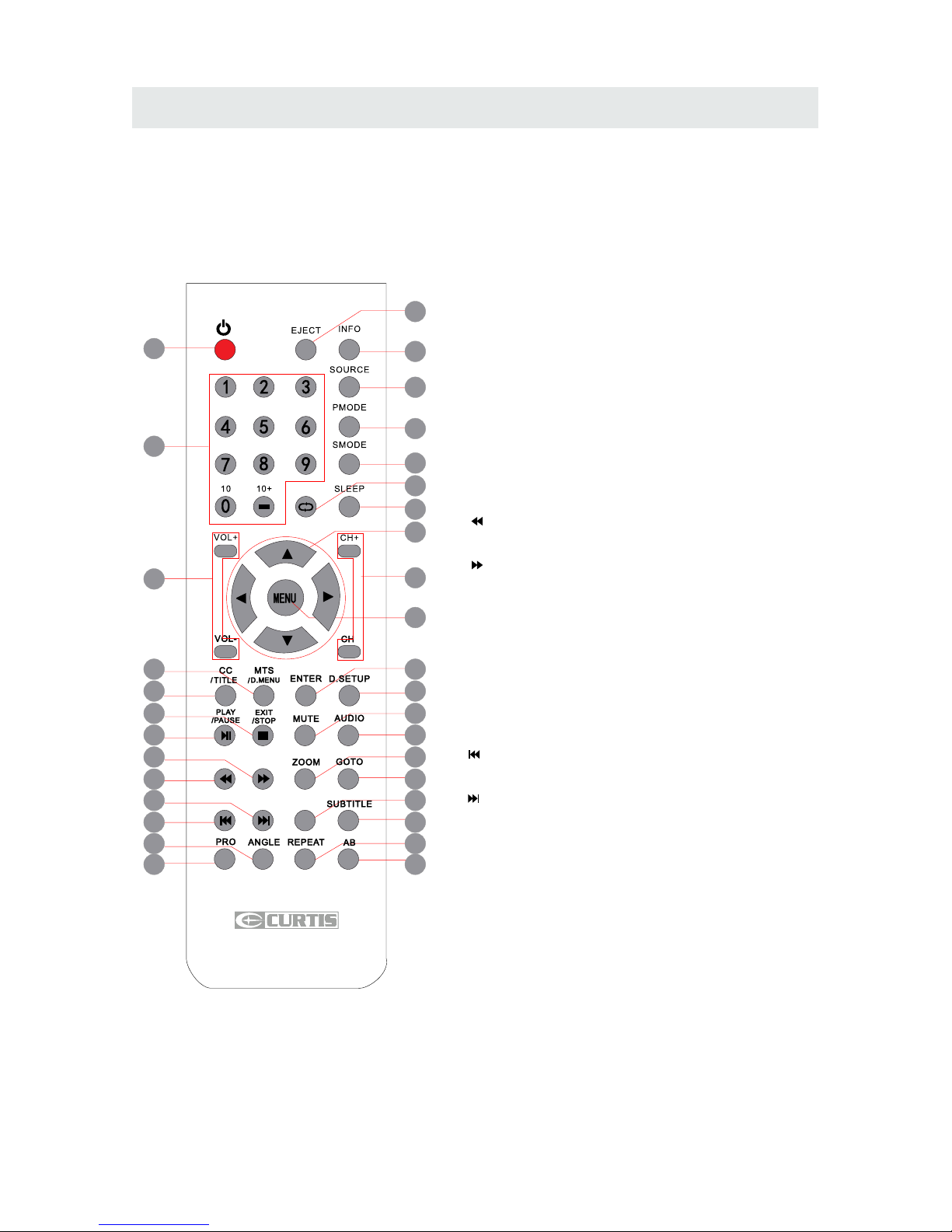
REMOTE CONTROL
1.STANDBY
To switch on the Tv or make the TV into
standby mode.
2.EJECT
To open or close the DVD player loader.
3.INFO
Show the information of the program you are watching.
4.SOURCE
Press this button to select an input source.
5.PMODE
Press this button to select a picture mode for different
picture qualities.
6.SMODE
Press this button to select sound setting for different
sound effects.
7.0-9
Allows you to change the channel of the TV.
8.
Switches back and forth between the current and
previous channels.
9.SLEEP
To select the amount of time before your TV turns
Off automatically.
10.VOL+/VOL-
Increases/Decreases the Volume control.
11.CH+/CH-
Skips to the next/previous channel on TV mode.
12.UP/DOWN/LEFT/RIGHT
Moves the cursor upward/downward/to the left/to the right
when making a selection.
13.MENU
Displays the OSD Menu of the TV.
14.CC
Press the button to enter into the CC mode.
TITLE
To goto the title menu if the DVD disc has a title page.
15.MTS
To change among STEREO, MONO and SAP. If there is no
second language available for the signal received, LCD
Display audio will output to mono.
D.MENU
To show the menu of the DVD disc.
4
5
1
2
3
6
8
9
12
7
11
13
10
15
14
19
18
23
22
27
26
31
30
16
17
20
21
24
25
28
29
32
33
FAVFAV
EPGEPG
Universal Remote Code: 1218
CONTROL REFERENCE GUIDE
5
REMOTE CONTROL
16.ENTER
Enters the function selected.
17.D.SETUP
Press this button to show the DVD SETUP menu.
18.Play/Pause
Press this button to play or pause the DVD you’re watching.
19.Exit
Press this button to exit the on screen display.
Stop
Press this button to stop playing the DVD you’re watching.
20.MUTE
Press this button to mute or restore sound.
21.AUDIO
Press this button to change the audio language of the DVD.
22.
Fast reverse in DVD mode.
23.
Fast forward in DVD mode.
FAV
Press this button to show the favourite channel list on your TV.
24.ZOOM
To select a screen display size on your TV in DVD mode.
25.GOTO
Press this button to start playing the disc program from
the time you want.
26.
Previous chapter in DVD mode.
27.
Next chapter in DVD mode.
28.EPG
Press this button to select the electronic programme guide..
29.SUBTITLE
To show the subtitle for the program you're watching.
30.PRO
To edit the program list of your DVD disc in DVD mode.
31.ANGLE
To select different angles to which the picture suits your
preference.
32.REPEAT
Press this button for repeat the program.
33.AB
Press this button for repeat play point A and B.
4
5
1
2
3
6
8
9
12
7
11
13
10
15
14
19
18
23
22
27
26
31
30
16
17
20
21
24
25
28
29
32
33
FAVFAV
EPGEPG
Universal Remote Code: 1218
CONTROL REFERENCE GUIDE
BACK VIEW
31 424
FRONT VIEW
6
1410
911
238
7
6
5
1.Color LED Screen
2.Remote Sensor
Do not block this sensor or the
remote control will not work.
3.Standby Indicator
Indicates whether the unit is ON
or in STANDBY (OFF) mode.
Light in red: The unit is in STANDBY.
Light: in green:The unit is turned ON.
4. Speakers
1.TV ANTENNA Terminal
2.HEAD PHONE Jack
3.AUDIO IN Jack (Right)
4.AUDIO IN Jack (Left)
5.VIDEO IN Jack
6.S-VIDEO Jack
7.Y / PB / PR Jacks
8.PC AUDIOIN Jack
9.VGA IN Jack
10.HDMI IN Jack
11.DC IN (12V)
SIDE VIEW
CONTROL REFERENCE GUIDE
2. Button
3. Button
4. Button
7. Menu Button
9. CH Button
11. VOL Button
10. VOL Button
5. STANDBY Button
7
1.Disc Door
Insert discs to disc door
Note: When inserting a disc, please
take note of the indication of direction
around the disc door for operation.
(Right direction: put the Mirror side of
the disc against yourself)
Press to start or resume playback of a disc.
Press to Eject a disc.
Press to stop the program of the disc.
Press to display the on-screen TV menu.
Press to change the TV channels and up
highlight selections on the menu screen.
8. CH Button
Press to change the TV channels and down
highlight selections on the menu screen.
Press to adjust the volume up.
Press to adjust the volume down.
Press toturn the unit on and off.
1
Label Towards Back
Label Towards Back
►
▲
STANDBYSTANDBY INPUTINPUT MENUMENU CH-CH- CH+CH+ VOL-VOL- VOL+VOL+
OVER VIEW
2 3 4
5678 9 10 11
▲
►
6. INPUT Button
Press to select the input source of the TV.