
Diamond Digital A111 User manual

A111A111
A111A111
A111
Wireless Card AWireless Card A
Wireless Card AWireless Card A
Wireless Card Adaptordaptor
daptordaptor
daptor
User’s ManualUser’s Manual
User’s ManualUser’s Manual
User’s Manual

2A111 Wireless Card Adaptor
Copyright 2004, Mitsubishi ElectricAustralia Pty. Ltd.All rights reserved.
No part of this publication may be reproduced, transmitted, transcribed, stored in a
retrieval system or translated into any language or computer language, in any form or by
any means, electronic, mechanical, magnetic, optical, chemical, manual or otherwise,
without the prior written permission.
A111 Wireless Card Adaptor 3
Disclaimer
Mitsubishi Electric Australia Pty. Ltd. makes no representations or
warranties, either expressed or implied, with respect to the contents
hereof and specifically disclaims any warranties, merchantability or
fitness for any particular purpose. Further, Mitsubishi Electric Australia
reserves the right to revise this publication and to make changes from
time to time in the contents hereof without obligation to notify any person
of such revision or changes.
Diamond Digital is a registered trademark of Mitsubishi ElectricAustralia Pty. Ltd.
Microsoft and Windows are registered trademarks of Microsoft Corporation.
All other trademarks remain the property of their respective owners.

4A111 Wireless Card Adaptor
Chapter 2 - Installation
Chapter 2
Quick Start
System Requirements
To begin using the A111 Wireless Card Adaptor, you must have the
following minimum requirements:
• Windows 2000 or XP
• Standard PCMCIA Slot Type II
• 128MB system memory or larger
• 300MHz processor or higher
Installation Procedures
Important: Install the A111 WLAN Card utilities before inserting the
A111 card into your computer.
Follow these two easy steps before using the A111 card.
1. Install the A111 WLAN Card Utilities/Driver from the support CD.
2. Insert the A111 card into your computer.
A111 Wireless Card Adaptor 5
Chapter 2 - Installation
Chapter 2
Quick Start
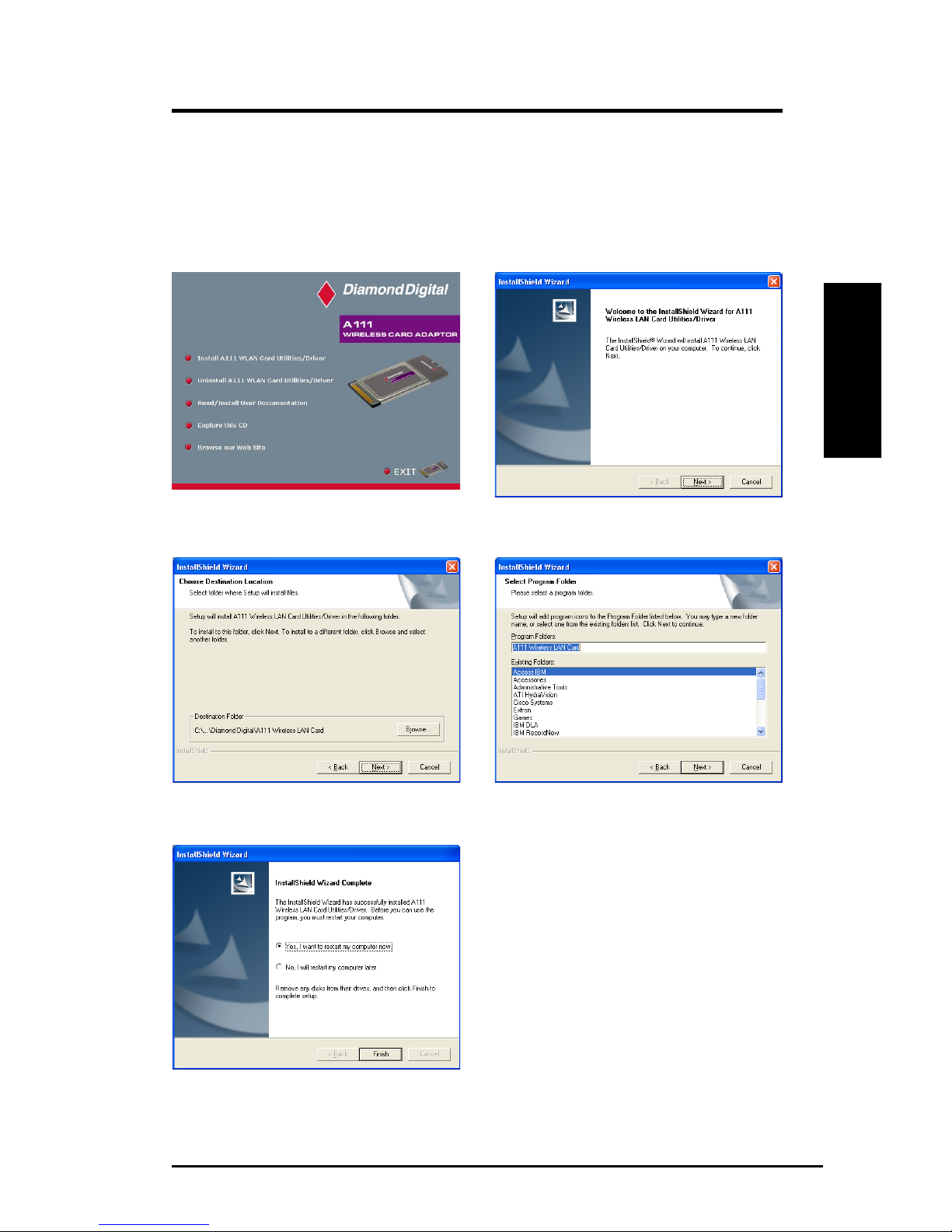
2. Click Next on the Welcome screen.
3. Click Next to use the default Destination Folder
or click Browse to select another folder.
4. Click Next to place icons in the default pro-
gram folder or type another folder name.
1. Click Install A111 WLAN Card Utilities/Driver.
5. When Setup is complete, click Finish to exit
the installation wizard and restart Windows.
Installing the A111 utilities and driverInstalling the A111 utilities and driver
Installing the A111 utilities and driverInstalling the A111 utilities and driver
Installing the A111 utilities and driver
Follow these instructions to install the A111 card utilities and driver.
Insert the support CD and an autorun menu will appear. If your autorun
is disabled, double click SETUP.EXE in the root directory of the support
CD.
6A111 Wireless Card Adaptor
Chapter 2 - Installation
Chapter 2
Quick Start
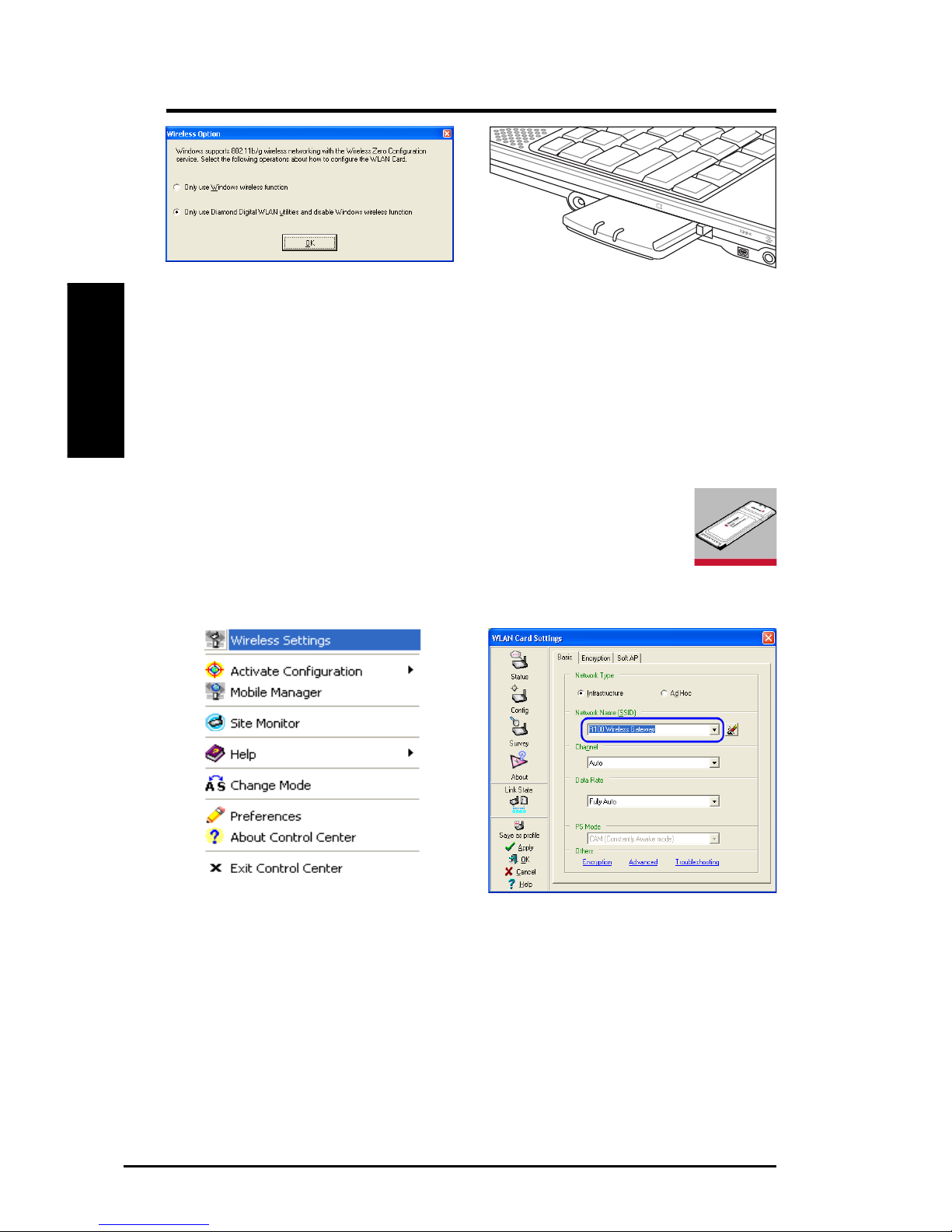
7. Carefully insert the A111 card into your
computer’s PC card slot. Windows will au-
tomatically find and configure the WLAN
card using the drivers installed in the previ-
ous steps.
6. Windows XP users: When the program is
launched for the first time (during Windows
restart), you will be asked which function
to use. Choose the Diamond Digital WLAN
utlities to access the functions listed in
Chapter 3.
Configuring the WLAN utility
After installing the A111 WLAN Card Utilities, you will need
to make some settings before being able to use your wireless
connection. Double-click the WLAN Control Center icon to
start the utility.
1. Right-click the WLAN icon and select
Wireless Settings
2. Set the Network Name (SSID) to the same
name as the SSID set in your wireless ac-
cess point.

A111 Wireless Card Adaptor 7
Chapter 2 - Installation
Chapter 2
Quick Start
6. You can also see the connection quality on
the Connection page. Click OK to exit the
utility.
5. Check the Status page to see the
Association State. It should show
“Connected - xx:xx:xx:xx:xx:xx”.
3. Use Site Survey if you don’t know the name
of your access point(s).
4. Encryption settings must also match those
set in the access point. Ask your network
administrator about the settings if neces-
sary. Click Apply to save your settings

8A111 Wireless Card Adaptor
Chapter 2 - Installation
Chapter 2
Quick Start
Soft AP (Windows XP Only)
Soft AP mode allows the A111 card to act as a virtual access point. The
computerneedsto be connectedto a wirednetworkusing anEthernetconnection
in order to provide network access to WLAN clients.
1. Select Soft AP Mode
3. Enable ICS* and Firewall if desired. Refer to
Windows help for information on “Internet
Connection Sharing”.
2. Drag and drop a wired network connection
next to the globe icon.
4. You can easily switch between SoftAP and
Station mode by right clicking the taskbar
icon and selecting A-S Change Mode.
*ICS is used to share this computer’s Internet connection with the rest of the computers on your
network. When this computer is connected to the Internet, communication to and from the Inter-
net to all the computers on your network are sent through this computer, called the host com-
puter. Other computers can send and receive email and access the Web as if it were connected
directly to the Internet.

A111 Wireless Card Adaptor 9
Chapter 2 - Installation
Chapter 2
Quick Start
Soft AP Access Control and WDS
SoftAP mode allows forAccess Control and WDS configuration.
Access Control
TheAP provides facilities to limit the wireless clients that associate with it and
the data packets that can forward through it. Filters provide network security
or improve performance by eliminating broadcast/multicast packets from the
radio network.
TheAccess Control List (ACL) contains MAC addresses for wireless clients
allowed to associate with the AP. This provides security by preventing
unauthorized access.TheAPalso uses a disallowed address list of destinations.
This feature prevents theAPfrom communicating with specified destinations.
This can include network devices that do not require communication with the
AP or its wireless clients.
Network Range Extension
For multiple WLAN connections, theAP incorporates the powerful WDS
(Wireless Distribution System). WDS allows direct connection, repeating, or
bridging between multiple WLANs through wireless communications instead
of wired connectivity. This way you can extend the coverage of your network
without having to use cables to link theAccess Points. With this advanced
technology, MIS professionals can establish multiple WLANs for optimal signal
reception without wasting cost and time in laying down long winding cables.
Access Control and WDS Settings
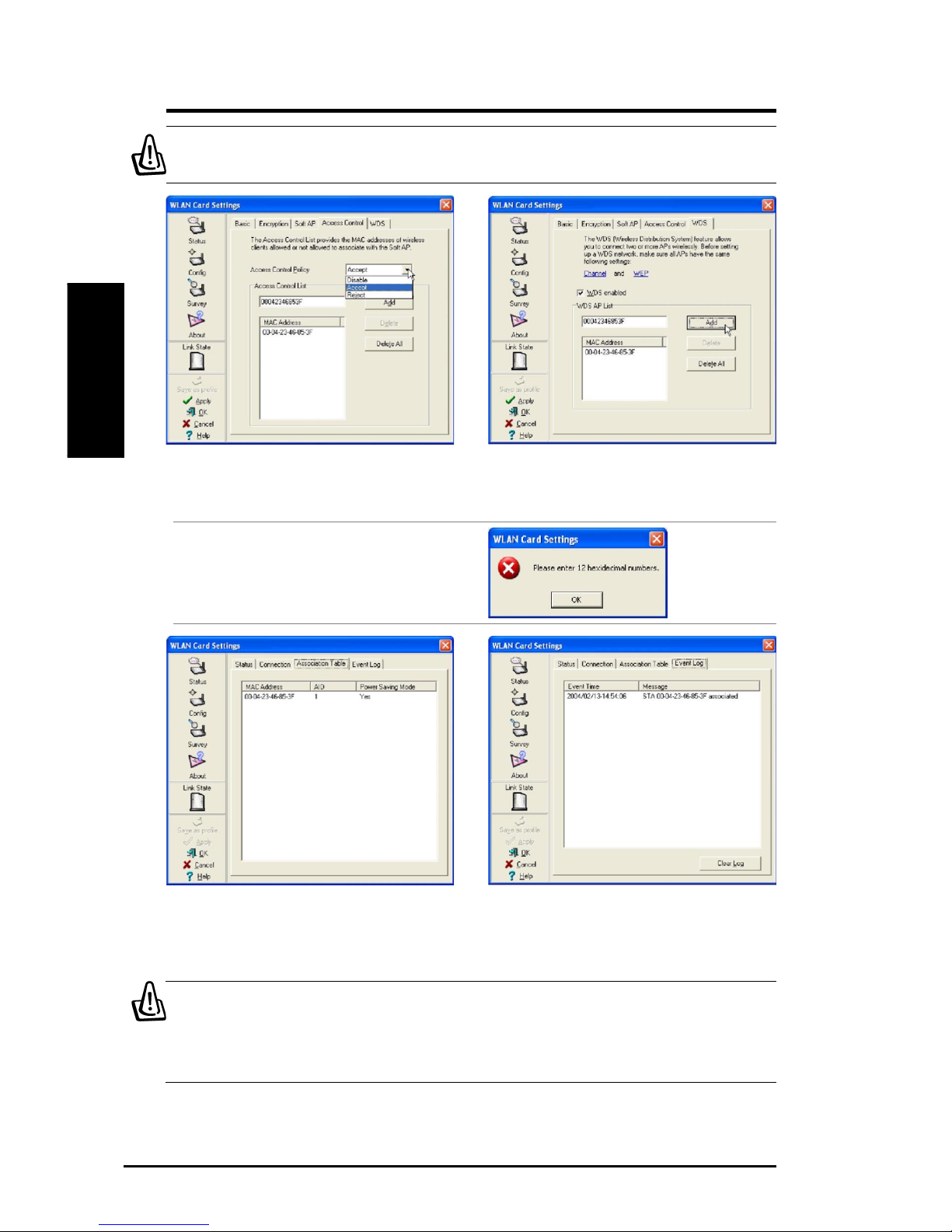
Clicking Apply after configuring Soft AP will
give two extra tabs - Access Control and WDS.
10 A111 Wireless Card Adaptor
Chapter 2 - Installation
Chapter 2
Quick Start
Enter a MAC Address on the Access Control
page and select Accept or Reject or Disable.
Enter a MAC Address on the WDS page and
click Add, then select WDS enabled or uncheck
to disable this function.
Soft AP Mode will also provide two extra tabs
on the Status pages - Association Table and
Event Log. TheAssociation Table shows clients
that are currently connected to the Soft AP.
The Event Log tracks messages associated
with the Soft AP.
IMPORTANT: Before setting up a WDS network, make sure all APs
have the same Channel and WEP encryption settings.
Note: Both the Access Control and WDS
functions require MAC addresses using 12
hexidecimal numbers.
IMPORTANT: If the end points of a chain are connected to each other
a loop is created. Normally it is advised to avoid loops involving
bridges as it can lead to performance breakdowns and broadcast
or multicast storms.
Table of contents

















