manuals.online logo
Brands
  1. Home
  2. •
  3. Brands
  4. •
  5. Eonon
  6. •
  7. Portable TV
  8. •
  9. Eonon 9'' TFT LCD COLOR MONITOR User manual

Eonon 9'' TFT LCD COLOR MONITOR User manual

Other manuals for 9'' TFT LCD COLOR MONITOR

2

Popular Portable TV manuals by other brands

Sony LocationFree LF-X11 operating instructions

Sony

Sony LocationFree LF-X11 operating instructions

Denver DFT-707 instruction manual

Denver

Denver DFT-707 instruction manual

RCA RTV86073 user manual

RCA

RCA RTV86073 user manual

Philips PVD700/37 user manual

Philips

Philips PVD700/37 user manual

Axion AXN-8705 Specifications

Axion

Axion AXN-8705 Specifications

Prestigio PMR-701TV user manual

Prestigio

Prestigio PMR-701TV user manual

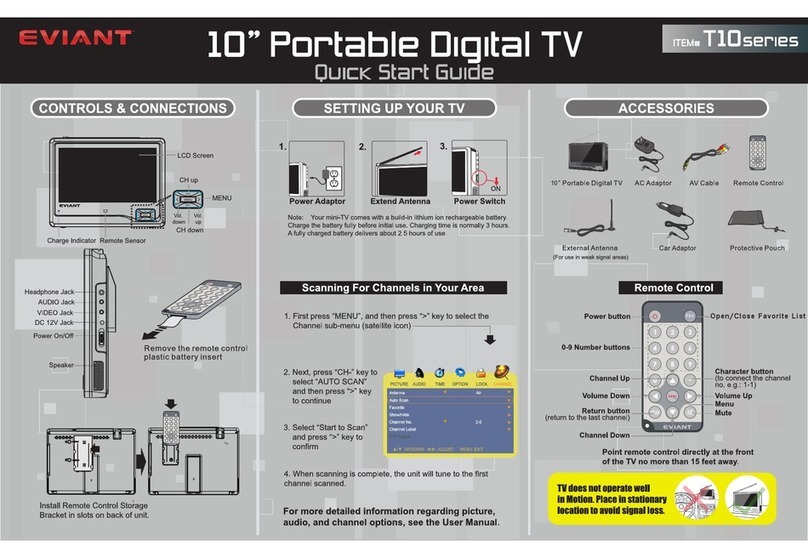
Eviant T10 Series quick start guide

Eviant

Eviant T10 Series quick start guide

Muse M-229 TV user manual

Muse

Muse M-229 TV user manual

Sony Watchman FDL-250T operating instructions

Sony

Sony Watchman FDL-250T operating instructions

Lenoxx Lenoxx Sound TV-504 operating instructions

Lenoxx

Lenoxx Lenoxx Sound TV-504 operating instructions

Sony LocationFree LF-X11 Specifications

Sony

Sony LocationFree LF-X11 Specifications

Casio FV-600P Service manual & parts list

Casio

Casio FV-600P Service manual & parts list

August DTV310 specification

August

August DTV310 specification

August DA701C specification

August

August DA701C specification

Radio Shack Television owner's manual

Radio Shack

Radio Shack Television owner's manual

Sony Watchman FDL-22 Specifications

Sony

Sony Watchman FDL-22 Specifications

Casio TV-770C Service manual & parts manual

Casio

Casio TV-770C Service manual & parts manual

Jensen JDTV-1020 user manual

Jensen

Jensen JDTV-1020 user manual

manuals.online logo
manuals.online logoBrands
  • About & Mission
  • Contact us
  • Privacy Policy
  • Terms and Conditions

Copyright 2025 Manuals.Online. All Rights Reserved.

TFT LCD COLOR TVTFT LCD COLOR TV
Operating instructions
Before operating this set, please read these instructions completely
POWER
MENU
TV/AV
M
O
T
E
E
R
CH-
CH+
TFT LCD COLOR TV
TFT LCD COLOR TV
- 1 -
Welcome your using of our on-board TFT LCD Color TV.
Please carefully read this Instruction for a fully and long-term
using for no troubles. Please well reserve it for future use.
Important Cautions
1. Please ensure that all requirements are meet before
operating.
2. The LCD cannot be installed where sight of driver is
adversely affected against safe operation.
3. If troubles occurred please do not disassemble the LCD
instead of contacting dealers or authorized service center.
For electric shock or other dangers that may be generated
by inside high-pressure parts, the installation or
maintenance must be carried out by professional
maintenance people.
4. Please ensure that dampness and impact are away kept
from.
5. Please do not use alcohol or other chemical cleansers
instead of soft dry cloth to clean dirt on it.
6. Please keep it in -20 C~+60 C and operate it in 5 C~40 C.
o o o o
During running, a few of dots or dark dots may appear, which
is normal other than troubles in source matrix display
technology.
In low temperature, the pictures may be much darker when
power is on, which is not trouble.
Special attention
Considering your safe, please do not watch
TV when driving. Operating or watching
during driving is forbidden under some
countries' laws.
Warning
TFT LCDCOLOR TV TFT LCDCOLOR TV
- 21 - - 2 -
CT-V70W8: NTSC Organic PALOrganic
VL 55.25-163.25MHZ 49.75-160.25MHZ
VH 163.25-469.25MHZ 160.25-464.25MHZ
UHF 471.25-855.25MHZ 471.25-863.25MHZ
1. Extension switch
2. Remote-controlled
receiving window
3. Power switch
4. Menu
5. Function selection
(TV/AV1/AV2)
6. Power indicator light
7. Clock
8. Channel +
9. Channel -
Name: 7-inch TFT LCD COLOR TV
System:
CT-V70W8P: PAL (B/G. H. D/K. I)
CT-V70W8N: NTSC-M
Display device: Color TFT-LCD
Screen dimension: Broad 7-inch
Pixel: 150MW (MAX)
Loudspeaker: Built-in
Back light source: high-brightness cold cathode fluorescent tube
Ports: external connect to antenna input port
Earphone port
Audio output port
USB (audio and video input) Port
External power input port
Power supply: 2 optional power supplies
AC-AC adapter
Vehicle accumulator-vehicle adapter
Power consumption: About 12W
POWER
MENU
TV/AV
M
O
T
E
E
R
CH-
CH+
TFT LCD COLOR TV
TFT LCD COLOR TV
23948
5
6
OPEN
7
1
TFT LCD COLOR TV
Appearance and functions
Descriptions for function keys
12. Specifications and Parameters
TFT LCDCOLOR TV TFT LCDCOLOR TV
- 20 -- 3 -
Please refer to the Body Figure
Fuse 2A
Yellow wire - accumulator of 12V
Black wire -- grounding
Red wire --ACC switch
Green wire - backing-up
control wire White wire - video
frequency V2
Red wire - audio input
Yellow wire - video frequency V1
Antenna input port 1
Antenna input port 2
Please connect backing-up camera head from
V2 white import, when green wire is connected
to backing-up signal lamp (12V); When
backing-up, automatically entered into V2, and
after backing-up, original state returned.
Descriptions Reasons
No pictures
or sounds
AC adapter or vehicle adapter are wrongly
connected.
Uncertified power is under using.
If TV/AV is correctly selected?
No pictures If channel is rightly selected?
Auto reset receiving channel.
Reset channel in other new places.
No sounds If volume is rightly adjusted?
If earphone has been connected?
Signal and mute are under functions.
Poor contact If antenna is rightly adjusted?
If channel is rightly adjusted?
Dark picture If brightness and contrast are rightly adjusted?
If ambient temperature is too low?
Blur picture
or non-stable If antenna is rightly adjusted?
Maybe received local signal is too weak.
Double image If antenna direction is right?
Maybe signals reflected by nearby buildings or
high walls are received.
Blur pots Maybe interfered by electric wave of motors of
vehicles, trains, high-pressure wires and neon
lamps.
No colors If color adjustment is under good state?
For poor signal achromatic in under function
No operation of
remote controller If batteries have been used up?
If receiver has exposed on violent light?
Installation and connection methods
Warning
Figure of installing batteries into remote controller
TFT LCDCOLOR TV TFT LCDCOLOR TV
- 19 - - 4 -
1 2
3
4
5
6
7
98
10
11
(6). Menu
(7). Selection
(8). Volume +
(9). Volume -
(10). Direct channel selection
(11). Digital channel selection
(1). Mute
(2). Power on
(3). Channel +
(4). Channel -
(5). Function selection
(TV/AV1/AV2)
SKIP Function
1. Press MENU for seconds and PRESET mode will appear.
2. Press CH+ or CH- to select SKIP options.
3. Press V+ or V-, the mode will convert in following turns
ON OFF, and programme number set to ON will be set
to SKIP, if you want to close SKIP off, you may first choose
programme number and set SKIP mode to OFF.
4. Press MENU for 2 times or 10 seconds after menu will auto
disappears to return to normal state.
Please connect connector plug of earphone to jack of earphone.
Close down LCD TV: press POWER.
Turn on LCD TV: press POWER or CH+ or CH-.
AUTO POWER OFF: in TV state no signals or operation
carried within 10 minutes, power of TV will be auto closed
down.
Timely Off: Press SLEEP for 0-10 90 minutes and power will
be on.
(1). Press MENU for 3 seconds, and PRESET mode will
appear.
(2). Press MENU again and SET picture will appear.
(3). Press V+ or V- to select normal picture display or up or
down.
Press MIRROR on remote controller or N/R on this set to
select normal picture display or to right or left.
f following phenomena appear, please according to following
methods carry out check before repair asked.
Remote controller
MIRROR
7. Usage of Earphone
8. ON/OFF
9. UP or DOWN for picture
10. To Right or Left
11. Before repair asked
TFT LCDCOLOR TV TFT LCDCOLOR TV
- 5 - - 18 -
1. Standby key (remote control)
1). Functions: standby or to normal state
2). Description:
When power is on, the TV is under standby state.
To push standby key for converting between standby
state and normal state.
During standby state other keys are off except standby
key.
Starting the TV signals of factory will be found.
2. TV/AV (remote control and owned key)
1). Functions: Converting between TV mode and AV mode
2). Description:
With two-way AV input.
To push this key for converting between TV state and
AV state.
Under AV state, if you push numeric keys such as 0-9, -,
-, CH+, CH-, and RECALL, it will be valid return to
relevant TV channel.
3. 0~9 (remote control)
1). Functions: Directly select programme / swiftly select
adjustment items.
2). Description:
For 0~9 programme please directly push 0-9 keys; for
10-255.
Programme please firstly press (- -) key to select double
bits or 3 bits, and then with (0~9) key to log into hundred
bit, tens bit, and ones bit in turn.
If your selection is beyond 255, the key is invalid.
After change, current programme number and the last
time shall be changed and will be auto written into
EEPROM.
For the LCD TV you can use Screen Display to adjust picture
and sound, and set up channel and other characteristics.
Please refer to following required items and set them up.
Preset channel: 256 channels can be memorized
Auto View & Memory
To set up favorable channel
1. Press MENU for 3 seconds then PRESET mode will appear.
2. Press CH+ or CH to select BAND options, and press V+ or
V- to select favorable reset band.
3. Press CH+ or CH to select SEARCH options ahead or
backward from current channel, which should not be
stopped until TV signal received.
4. Press MENU for another 2 times or after 10 seconds menu
will auto disappear to return to normal state.
Fine Tuning for Frequency
1. Press MENU for 3 seconds and PRESET mode will appear.
2. Press CH+ or CH- to select CH options and press V+ or V-
to select favorable Fine-Tuning programme number.
3. Press CH+ or CH- to select FINE TUNE options and press
V+ or V- for continuous fine-tuning until your consent
picture appears.
4. Press MENU for another 2 times or after 10 seconds menu
will auto disappear to return to normal state.
Method 1: Press AUTO of report controller and PRESET mode
will appear, and then pressAUTO for auto view and
memory. The selected channels will be memorized
in programme number for example 1, 2, 3 . After
auto view, the picture shows programme 1.
Method 2: Press MENU for 3 seconds then PRESET will
appear, and then press V+ or V- for auto view and
memory.
3. Key functions and display descriptions 6. Reset Receiving Channel
TFT LCDCOLOR TV TFT LCDCOLOR TV

- 17 - - 6 -
If you select the same number with current programme
number, CPU will reread memory information relevant to
current programme number from EEPROM.
During programme being converted, (0-9) keys may be
used for directly selecting the programme number
required.
4. CH+, CH- / PROGRAMME+; PROGRAMME (remote
control and owned key).
1). Functions: Programme number + / -, selection in menu,
selection of adjustment items, function of calendar.
2). Description:
With CH+ / CH- to change programme number, and
programme number of SKIP ON will be appeared.
If all programme numbers are under SKIP ON state,
push CH+ / CH- key to select programme 0 only. If only
one programme number is under SKIP ON state, push
CH+ / CH- key to select this programme.
If CH+ has arrived at the largest programme number,
push again CH+ to skip to the littlest programme
number; contrary to that if CH- has arrived at the littlest
programme number, push again CH- to skip to the
largest programme number.
After conversion current programme and the last
programme number will be changed and written into
EEPROM.
In full-screen menu, CH+ and CH- are used to select
items in menu (Please refer to related operation
instruction).
In calendar state, with CH+ and CH- to change years.
5. VOL+, VOL- / Volume+, Volume- (remote control and
owned key)
1). Functions:
To control volume; Adjust all items in menu; adjust all
debugging items and months of calendar.
6. Control brightness, color, contrast, and hue
MENU
V- V+
Press MENU key
Choose analog quantity, change in turn i.e.
brightness color contrast hue
Screen display
If the signal is much weak, no matter how you
stretch with the antenna, picture will be bad,
noise, wobbling, and blur spots will show on
the TV, which is not the trouble of TV itself.
Warning
hue is only can be adjusted for NTSC organic
signal.
Warning
7. For the purpose of receiving clearer picture
To control the length, color, and direction of antenna of pull-
rod for the best picture After that please draw back the
antenna one by one.
TFT LCDCOLOR TV TFT LCDCOLOR TV
- 7 - - 16 -
CH- CH+
2
V- V+
2). Description:
When it is used for controlling output value of volume, to
push it one time for increasing / decreasing one step
(output value includes 100 steps).
If output value has reached the top 100, VOL+ is non-
effectual, contrary to which if output value has reached
0, VOL- is non-effectual.
Under Mute State to press VOL- / + to exit.
Under semi-auto search state, to press VOL- / + to
change search direction.
In menu used for adjusting all options.
Under calendar state used for changing months.
6. MUTE (remote control)
1). Functions: Mute
2). Description:
Press MUTE key for sound disappearing again pressing
for exit.
Press Power key and VOL+ / - to exit.
When in MUTE state if no other OSD display, OSD
display of MUTE will be kept.
7. MENU (remote control and owned key)
1). Functions: Enter or exit to main menu.
2). Operation description for MENU key.
After entering main menu, press CH+/CH- for converting
all sub menus
Under auto search or semi-auto search state, press
MENU for stopping.
3). (Trees displayed in following pictures is not exited in
actual OSD).
Press Channel View key
Converted by the turn
of C 99-98-97 Converted by the turn
of C 1-2-3
Long-time press for continuous change, screen displays
1. Four ASPECTs for your favorable selections.
1). Method 1: Press VIEW MODE to choose display mode.
2). Method 2: Press MENU for 3 seconds then PRESET will
be found again.
Press MENU again SET will be found.
Press CH+ or CH- to choose ASPECT items.
Press V+ or V- to choose display mode.
5. Volume Control
Press Volume Key
-
TFT LCDCOLOR TV TFT LCDCOLOR TV
- 15 - - 8 -
VBRIGHTNESS
CONTRAST
COLOR
SHARPNESS
TINT
50
50
50
50
50
I50
50
50
50
Main menu consists of pictures, sounds, setting and time.
Press V+ and V- to select menu required. When a menu is
selected, the icon is extruded, and name of menu and options
of menu will be found at the bottom. Before entering sub-
menus, option shows yellow. After selection, press CH+ and
CH- to enter sub menu, under which, press MENU to return to
main menu state, or you can press CH- in the first option of
menu to return to main menu.
Housing AC
Please provide power source from housing standard power by
AC adapter (please refer to Instruction of Adapter).
Vehicle accumulator (DC 12V)
Please provide power source from vehicle accumulator
through vehicle cigar lighter by vehicle adapter (be applicable
for cathode ground).
1. Connect to power supply, press power switch or CH+ or
CH- to turn on the TV.
2. Press AV/TV to choose signal input sources of TV, AV1 and
AV2.
3. If you choose TV, please pull out antenna of pull-rod.
4. Press Channel View key to choose your favourable
channel.
BRIGHTNESS
CONTRAST
COLOR
SHARPNESS
Picture Menu
Main Menu
4. Power Selection
Please note that:
Please do not connect vehicle adapter to vehicle (for
example trucks or buses) with 24V DC.
Please ensure that only accessary fittings are always
used, otherwise other AC adapters or vehicle adapters
may damage the TV.
If you have for a long time not used the TV, please
draw out vehicle adapter from cigar lighter and pull out
AC adapter from electrical plug on wall, otherwise the
TV may be damaged or vehicle accumulator or battery
package may be used up.
5. Basic operations
TFT LCDCOLOR TV TFT LCDCOLOR TV
- 9 - - 14 -
CHANNEL
PG EXCHANGE
0
0
VOLUME 50
A
U
LANGUAGE
BACKGROUND ENG
ON
S
E
Press CH+ and CH+ to select items required adjusted, and V+
and V- to change parameter of adjusted items, among which
hue is only appeared under NTSC organic. Press MENU to
return to main menu, and parameter is adjusted from 0~100.
Press CH+ and CH- to select items required adjusted, and V+
and V- to change parameter of adjusted items. Press MENU to
return to main menu, and parameter is adjusted from 0~100.
8. Channel Skip
Press V+/V- to control Skip State of current programme,
when you use of CH+/CH- to convert TV channels, if you
choose ON current programme will be skipped; if you
choose OFF current programme will be normally changed.
9. Counterchange between Channels
Press V+ to enter into the said Menu, and with V+/V- to
choose two channels required counterchanged, and then
with CH+ to enter into the third line of the sub-menu, press
V+ for counterchanging.
8. Auto Search
1). Functions: Directly enter into Auto Search State
2). Descriptions: Please refer to the fourth of Auto Search
in menu.
Sound Menu
Set Menu up
TFT LCDCOLOR TV TFT LCDCOLOR TV