
FRC RTU 1 User manual

REV1297NBRTU1.P65
Page 1
TEL ( 516 ) 724-8888 FAX ( 516 ) 360-9727
TOLL FREE
1-800-645-0074
FIRE RESEARCH CORP. 26 Southern Blvd., Nesconset, NY11767
OPERATING INSTRUCTIONS
MODEL : RTU 1
FOR CUMMINS CELECT and CELECT+
ENGINES SERIES M11, N14, L10
REMOTE THROTTLE
FRC s
PRESETPRESET
PRESETPRESET
PRESET
SETTING
IDLE
RTU
s
DECREASE
INCREASE
12001200
12001200
1200

REV1297NBRTU1.P65
Page 2
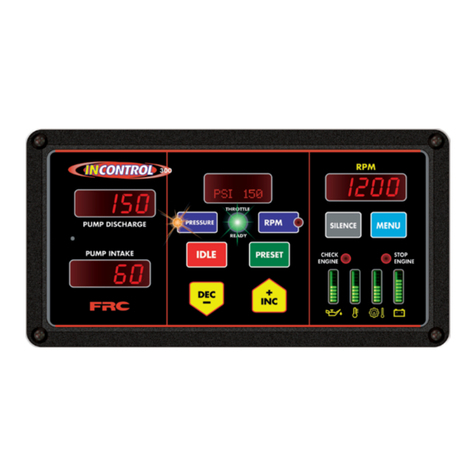
The RTU is a state of the art electronic remote throttle designed for fire apparatus
equipped with the Cummins CELECT and CELECT+ electronic engine control
system. This includes the M11, N14 and L10 series engines. The RTU is connected
to the CELECT or CELECT+ through the J1922 data link via a twisted pair cable.
This arrangement allowes the MP ( master processor ) of the RTU to communicate
with the ECM (electronic control module) of the engine constantly. The RTU can be
used to vary the engine speed through use of the "INCREASE" and "DECREASE"
pushbuttons. A "PRESET" switch allows an operator to quicly bring the engine RPM
to a predetermined value with one press of a button.
An optional high idle kit (PRO-38H) may be purchased that plugs directly into the
RTU that allows engine RPM to be brought to a preselected RPM value through a
toggle switch. Wiring for this option can be found in Fig 7 of this manual.
Introduction:
RTU
Remote Throttle

REV1297NBRTU1.P65
Page 3
Before proceeding with any installation, please check to make sure you have the fol-
lowing components. STOP and call the factory if any components are missing. Com-
ponents supplied are as follows :
1) Throttle controller
2) Extension cable for power
3) Extension cable for J1922 data link
MECHANICAL - installing the display module
The control module can be mounted anywhere on the pump panel. The display module
has a square flange with overall dimensions of 4.25"X4.25". A cutout hole of 3.75" in
diameter is required to fit the cylindrical can of the module into the panel. Insert the
Throttle controller into the cutout hole and locate the four bolt holes. The holes are for
10-32 screws and are set up on a 3.5" bolt square at the four corners of the flange.
MECHANICAL INSTALLATION
(Some units are longer)

REV1297NBRTU1.P65
Page 4
Wiring for the RTU 1 system is very simple. Refer to fig 1 below. All extension cables are
supplied with unique connectors that simplify the interconnections. See fig 2 for cables.
1) Use the extension cable supplied, provide 12VDC and ground to the electronic
module on the wire labeled POWER on the back of the module. Leave the white wire
disconnected until step 3.
2) Connect the cable for the J1922 data link. The J1922 datalink is a data wire consisting
of two wires leading from connector A of the ECM. On more recent Cummins ECMs
(CELECT+), pin 5 on connector A of the ECM is the positive (+) (wire #020) and should
be connected to the RTU's red DATA J1922 wire. Pin 23 is the negative (-) (wire #021)
and should be connected to the RTU's black DATA J1922 wire. The cable used is a
shielded twisted pair cable.
If you have an older Cummins CELECT engine, there may be a 2 pin Packard connector
for the J1922 data link located near the CELECT ECM by the bulkhead. Check that the
positive (+) wire comes from pin 10 on the A connector. The negative (-) comes from pin
20 on the A connector.)
3) The RTU will not be active until you provide 12V to the white wire. This connection
should be wired through the pump engaged interlock and the parking brake for safety. In
this manner, the RTU will not receive an "active" signal until these conditions are met.
4) If HIGH IDLE option was
ordered, refer to Figure 7 for
wiringinstructions.
ELECTRICAL INSTALLATION
NOTE:
HIGH
IDLE
CONTROL MODULE
RTU 1
2
1
1
2
3
3
Power cable
High Idle cable
J1922 data link cable
Refer to Figure 7
CELECT
ECM
RED = 12 VDC
BLACK = GND
WHITE = Interlock.
12VDC signal required
FIG 1.

REV1297NBRTU1.P65
Page 5
HIGH IDLE
J1922
DATA LINK
RED = 12VDC
BLACK = GND
POWER
RTU 1
THROTTLE
Red = 12VDC
Black = GND
White = From INT-110
To J1922 data link
at CELECT ECM
To High Idle inside cab
(see Fig 7)
J1922 data link
12'
12'
5'
Deutsch DT series High Idle
Power
3 pins receptacle
Deutsch DT series
3 pins plug
2 pins Packard plug 2 pins Packard receptacle
Figure 2
EXTENSION CABLES

REV1297NBRTU1.P65
Page 6
Simple to use !
The RTU is engineered with ease of operations in mind. All functions on the control
module are self explanatory. The LED display which shows the desired RPM setting is
easily visible both day and night.
How to operate :
When the RTU is on, the display will show 'IDLE' to indicate that the engine is at idle.
There are 4 pushbuttons on the control module :
1) The "Increase" and "Decrease" switches allow easy selection of desired RPM from
IDLE to maximum governed speed. Depress "Increase" to ramp the engine RPM up,
and depress "Decrease" to ramp the engine RPM down. The RPM will ramp up or
down at 50 RPM increment when pressed momentarily. When the pushbutton is held
down for more than 2 seconds, the RTU will ramp up or down in 100 RPM increments.
Release the pushbutton when desired RPM is reached.
2) The "IDLE" switch will bring engine to idle immediately after operations.
3) The "PRESET" switch ramps engine to the preset RPM quickly and conveniently
with the momentary touch of a single button.
(After the "PRESET" switch is used, the "Increase" and "Decrease" switches can still
be used to change the selected RPM easily.)
How do I change the preset RPM ?
a) Make sure the engine is at idle before proceeding. If the RTU does not display IDLE
in the display window, press the "IDLE" switch.
b) Press the "PRESET" switch with your left thumb and hold it in until the display
begins to flash. With your right hand press the "Increase" or "Decrease" switch to
change the flashing display until it reads the desired RPM.
c) When the desired RPM is obtained, release the "PRESET" switch and the RPM
shown in the window has become the new preset RPM and will be stored in the RTU's
memory.
OPERATING THE RTU

REV1297NBRTU1.P65
Page 7
1) The " IDLE " switch brings engine to idle immediately after operations
2) The " INCREASE " switch ramps engine RPM up
3) The " DECREASE " switch ramps engine RPM down
4) The " PRESET " switch ramps engine to the preset RPM quickly and conveniently.
Figure 3
FUNCTIONS FOR SWITCHES ...
2
3
1
FRC s
PRESETPRESET
PRESETPRESET
PRESET
SETTING
IDLE
RTU
s
DECREASE
INCREASE
12001200
12001200
1200
4

REV1297NBRTU1.P65
Page 8
Specifications:
Dimensions:
Response : Idle to full governed speed
Pressure Recovery : On open/close valve
Max. RPM :
Control Module :
Operational :
Electrical :
Power :
Current :
Microprocessor :
12 VDC
1/2 A continuous
8 Bit single chip MicroComputer
RPM mode : Idle to 2000 RPM
4.25"W X 4.25"H X 3.75"D
3 seconds maximum
1 1/2 seconds
2000 RPM

X-Hi-Idle.p65 rev11Sep97nb
Page 9
If you did not order the optional remote high idle, ensure that the
dummy plug (supplied) is installed on the end of the high idle cable! If
you did not receive a dummy plug, or have lost it, you NEED one!
For wiring instructions, refer to the next page.
All Fire Research PRO and RTU series governors have an additional cable port
labeled “high idle” which can be used to provide a high idle switch at a remote location
on the vehicle. The PRO-38H High Idle Kit provides all the necessary components
needed to hook up this optional switch, including locking potentiometer, dpdt switch,
12V lamp indicator and 12 foot cable.
How do I activate the high idle ?
To activate the high idle, simply toggle the high idle switch to “ON”. The high idle
activated indicator light will go on and the engine will rise to the preset speed (set by
the locking potentiometer).
How do I change the high idle speed ?
Loosen the lock nut on the potentiometer. Use a small screw driver to rotate the poten-
tiometer to raise the RPM. Using the tachometer in the cab as a reference, monitor the
speed of the engine until you reach the desired speed. Once the desired RPM is
reached, tighten the lock nut to lock in the new high idle speed.
WARNING : Turn off high idle before shutting the engine off !
OPTIONAL
HIGH IDLE
OPERATION Part # PRO-38H

X-Hi-Idle.p65 rev11Sep97nb
Page 10
OPTIONAL
HIGH IDLE
WIRING
Black
Red
From Control Module
2500 ohm potentiometer High idle indicator light
GND
High idle ON/OFF switch
White
Supply 12 VDC when the parking
brake is on and the transmission is in
neutral.
Interlock
white wire on the
power cable
Diode
Figure 7
Part # PRO-38H
Note: Some FRC governors require an RPM sensor to be mounted on the drive shaft.
If you have one of these units, be sure that the sensor is mounted on a section of shaft
that spins even when the pump is not engaged or the high idle may not be able to function
except when the pump is in gear. If there is no room to mount the sensor in such a
location, a special “Alternator connection” for RPM signal may be required. This option
may not be available for all devices, so be sure to call FRC for details.
O.K. to pump
Diode
Table of contents
Other FRC Control Unit manuals
Popular Control Unit manuals by other brands

Festo
Festo Compact Performance CP-FB6-E Brief description

Elo TouchSystems
Elo TouchSystems DMS-SA19P-EXTME Quick installation guide

JS Automation
JS Automation MPC3034A user manual

JAUDT
JAUDT SW GII 6406 Series Translation of the original operating instructions

Spektrum
Spektrum Air Module System manual

BOC Edwards
BOC Edwards Q Series instruction manual

KHADAS
KHADAS BT Magic quick start

Etherma
Etherma eNEXHO-IL Assembly and operating instructions

PMFoundations
PMFoundations Attenuverter Assembly guide

GEA
GEA VARIVENT Operating instruction

Walther Systemtechnik
Walther Systemtechnik VMS-05 Assembly instructions

Altronix
Altronix LINQ8PD Installation and programming manual





