manuals.online logo
Brands
  1. Home
  2. •
  3. Brands
  4. •
  5. Gallien-Krueger
  6. •
  7. Amplifier
  8. •
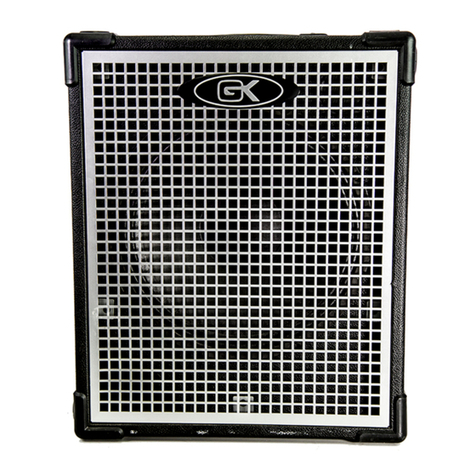
  9. Gallien-Krueger 200MK User manual

Gallien-Krueger 200MK User manual

Other manuals for 200MK

1

Other Gallien-Krueger Amplifier manuals

Gallien-Krueger 200MB User manual

Gallien-Krueger

Gallien-Krueger 200MB User manual

Gallien-Krueger 2000RB User manual

Gallien-Krueger

Gallien-Krueger 2000RB User manual

Gallien-Krueger 400RB series User manual

Gallien-Krueger

Gallien-Krueger 400RB series User manual

Gallien-Krueger Backline 210 User manual

Gallien-Krueger

Gallien-Krueger Backline 210 User manual

Gallien-Krueger MB500 User manual

Gallien-Krueger

Gallien-Krueger MB500 User manual

Gallien-Krueger Backline 112 User manual

Gallien-Krueger

Gallien-Krueger Backline 112 User manual

Gallien-Krueger 115RBH User manual

Gallien-Krueger

Gallien-Krueger 115RBH User manual

Gallien-Krueger PLEX Instruction manual

Gallien-Krueger

Gallien-Krueger PLEX Instruction manual

Gallien-Krueger Backline 115 User manual

Gallien-Krueger

Gallien-Krueger Backline 115 User manual

Gallien-Krueger Fusion 550 User manual

Gallien-Krueger

Gallien-Krueger Fusion 550 User manual

Gallien-Krueger MB FUSION User manual

Gallien-Krueger

Gallien-Krueger MB FUSION User manual

Gallien-Krueger RBS Series User manual

Gallien-Krueger

Gallien-Krueger RBS Series User manual

Gallien-Krueger Legacy Series User manual

Gallien-Krueger

Gallien-Krueger Legacy Series User manual

Gallien-Krueger Microbass MB150E/112 User manual

Gallien-Krueger

Gallien-Krueger Microbass MB150E/112 User manual

Gallien-Krueger ML Series User manual

Gallien-Krueger

Gallien-Krueger ML Series User manual

Gallien-Krueger 2001RB User manual

Gallien-Krueger

Gallien-Krueger 2001RB User manual

Gallien-Krueger MB115 User manual

Gallien-Krueger

Gallien-Krueger MB115 User manual

Gallien-Krueger Neo 1001/212 User manual

Gallien-Krueger

Gallien-Krueger Neo 1001/212 User manual

Gallien-Krueger Microbass MB150S User manual

Gallien-Krueger

Gallien-Krueger Microbass MB150S User manual

Gallien-Krueger Fusion 550 User manual

Gallien-Krueger

Gallien-Krueger Fusion 550 User manual

Gallien-Krueger 200MV User manual

Gallien-Krueger

Gallien-Krueger 200MV User manual

Gallien-Krueger 700RB-II User manual

Gallien-Krueger

Gallien-Krueger 700RB-II User manual

Gallien-Krueger MB115 User manual

Gallien-Krueger

Gallien-Krueger MB115 User manual

Gallien-Krueger Micro Lead series User manual

Gallien-Krueger

Gallien-Krueger Micro Lead series User manual

Popular Amplifier manuals by other brands

Magnat Audio EDITION FOUR Owner's manual/warranty document

Magnat Audio

Magnat Audio EDITION FOUR Owner's manual/warranty document

Inter-m PA-2000A Operation manual

Inter-m

Inter-m PA-2000A Operation manual

Yamaha TX6n owner's manual

Yamaha

Yamaha TX6n owner's manual

Peavey TNT 150 user guide

Peavey

Peavey TNT 150 user guide

Bosch LBB 1903/10 Installation and user instructions

Bosch

Bosch LBB 1903/10 Installation and user instructions

Avocent Emerge DA1200D Installer/user guide

Avocent

Avocent Emerge DA1200D Installer/user guide

Redgum RGi35 operating instructions

Redgum

Redgum RGi35 operating instructions

Cambridge Audio AXA25 user manual

Cambridge Audio

Cambridge Audio AXA25 user manual

Alpine MRP-M200 owner's manual

Alpine

Alpine MRP-M200 owner's manual

Technical Pro H1502UrBT user manual

Technical Pro

Technical Pro H1502UrBT user manual

FMS EMGZ307 operating manual

FMS

FMS EMGZ307 operating manual

Racal Instruments 5601 user manual

Racal Instruments

Racal Instruments 5601 user manual

Valcom V-1094A Technical specifications

Valcom

Valcom V-1094A Technical specifications

Cambridge Audio 851D user manual

Cambridge Audio

Cambridge Audio 851D user manual

QSC 3800 Specifications

QSC

QSC 3800 Specifications

NAD C300 owner's manual

NAD

NAD C300 owner's manual

Rotel RMB-1077 owner's manual

Rotel

Rotel RMB-1077 owner's manual

Peavey Monitor 300 Series operating guide

Peavey

Peavey Monitor 300 Series operating guide

manuals.online logo
manuals.online logoBrands
  • About & Mission
  • Contact us
  • Privacy Policy
  • Terms and Conditions

Copyright 2025 Manuals.Online. All Rights Reserved.

Operating
Instructions
200MK
The Basics
Your new GK Multi-input keyboard amplifier represents the
latest advances technology has to offer. It was designed to give
the working keyboardist all the flexibility and power He/She
needs in a lightweight portable package. With three inputs the
200MK/RK can take a signal of any keyboard from an electric
piano to a programmable synthesizer, and transform it into a fully
produced, controllable sound. The 200MK/RK features treble and
bass controls on each channel as well as chorus and echo. The
200MK/RK also features direct outs and a monitor in for use in
the studio and for live performances. A careful examination of
this manual will help you to get the most from all the special
features this amplifier offers.
Piano Input
The first channel was designed for use with an electric piano. It
features a Built-in compressor for adding sustain and clarity,
chorus and echo on/off and two EQ knobs. This input is a
standard ¼'' jack capable of handling a variety of signal levels up
to 1.5v.
Synth 1&2
The next two inputs were designed to accommodate electronic
synthesizers. They also feature chorus and echo on/off switches
as well as treble and bass controls on each input. These are also
standard ¼'' jacks capable of handling up to 1.5v.
Limiter
The 200MK/RK also features a built-in Limiter for cutting out
unwanted distortion. When playing with the master volume all
the way up the limiter will hold the power amp at full power
without clipping.
Master
The master volume controls the total output of the amplifier from
off to full power.
Footswitch(see accessories)
The footswitch jack is a ¼'' Stereo jack. With the footswitch the
player can turn the chorus and echo on and off individually.
Phones
The phones jack is also a ¼'' Stereo jack. It delivers a stereo
signal for use with high impedance headphones (600 ohms or
greater). Plugging into the headphones jack does not disconnect
the internal speaker. To disconnect the internal speaker use
speaker on/off switch on rear panel.
Line Out
The direct line level out serves two functions in the 200MK/RK.
When in stereo (see mono/stereo switch) the line out acts as the
right side line out for use with the 200MP powered monitor.
When in mono the line out is a regular balanced line out.
Mono/Stereo Switch
The mono/stereo switch will change the line out and direct outs
from mono to stereo. This also changes the headphones jack
from mono to stereo.
Monitor In
This jack allows the input of a monitor send to come in and be
heard through the internal speaker but not through the line out or
direct outs.
Direct Out Right/Left
Two low impedance direct outs are provided for recording or live
performances. When operating in stereo the direct outs are left
and right. When in mono mode both directs are mono.
Int/Ext Speaker Switch
This switch allows the player to turn off the internal speaker for
headphones use or for exclusive extension speaker use.
Ext Speaker Jack
This jack is a standard ¼'' jack for the addition of an external
speaker. With the internal speaker on, an 8ohm load can be
added and with internal speaker off, a 4 ohm load can be added.
Power Switch
The power on/off switch on the 200MK is located on the rear
panel. The power switch on the 200RK is on the front panel
lower right.
Power Cord
The power cord is detachable and plugs into a socket on the rear
panel. IF a replacement cord is used or needed it should be UL
rated at 10amps, 125v; or if using 240v, the cord should be UL
rated at 5amps, 240v.
Fuse
Never operate your MK or RK with any other than the
recommended fuse.
115v operation - type TSC2A
240v operation - type TSC1A
Maintenance
Your new amplifier is rugged. It was built to give you a lifetime
of trouble-free operation. If it is operated with care, your only
maintenance problems should be cleaning. We recommend a
soft damp cloth and mild soap for cleaning outside surfaces.
Your amp can be serviced at any GK authorized service center or
at the GK factory if needed.
Accessories
Effects Footswitch; Stereo Cord; Road Bag (MK,RK) 200MP
MIC Stand Kit (MK); Rack Mount Kit(RK)
Operating Instructions MK/RK
2

200MK 200RK
200MK
Block Diagram
GALLIEN-KRUEGER • 2240 PARAGON DR. • SAN JOSE, CA 95131
US: (408) 441-7970 • FAX (408) 441-8085
EUROPE: 41.42.234520 • FAX: 41.42.239525
200MK &
200RK Specifications
Power@400Hz :100watts into 4ohms at 1%THD
:65watts into 8ohms at 1%THD
Signal-to-noise ratio :>80db
Max Distortion :w/Limiter 35%
Frequency Response :<±1db 20-20khz
Tone Controls : :±15db at 10khz
:±15db at 80khz
Instrument Inputs :Max input level 1.5v rms
:Input impedance 1M ohms
:Input sensitivity 150mv rms
Monitor Input :Input impedance 100K ohms
:Monitor in sens. .5v rms
Direct Out :-25dbm(nom)
Dimensions 200MK 200RK
Weight 24lbs. 10lbs.
Dimensions 13.75''x15''x6'' 1
7.5''x3.5''x6.75''
Speakers 1x12''/1x3.5'' N/A
Speaker Type Pyle N/A
Accessories
Effects Footswitch: Stereo Cord
Road Bag(MK,RK) 200MP
MIC stand Kit(MK): Rack Mount Kit(RK)