EnglishDeutsch
 logo
Brands
  1. Home
  2. •
  3. Brands
  4. •
  5. GE
  6. •
  7. Microwave Oven
  8. •
  9. GE JE940 Use and care manual

GE JE940 Use and care manual

This manual suits for next models

1

Other GE Microwave Oven manuals

GE JET200 Installation instructions

GE

GE JET200 Installation instructions

GE Spacemaker XL JVM1851 User manual

GE

GE Spacemaker XL JVM1851 User manual

GE JEM612G Specification sheet

GE

GE JEM612G Specification sheet

GE JE1240 Use and care manual

GE

GE JE1240 Use and care manual

GE JE1223L User manual

GE

GE JE1223L User manual

GE JEM4JW Use and care manual

GE

GE JEM4JW Use and care manual

GE JEM3072 User manual

GE

GE JEM3072 User manual

GE Profile PVM1790DR User manual

GE

GE Profile PVM1790DR User manual

GE SpacemakerXL JVM1410 User manual

GE

GE SpacemakerXL JVM1410 User manual

GE Hotpoint RE1440H Use and care manual

GE

GE Hotpoint RE1440H Use and care manual

GE PVM9195 User manual

GE

GE PVM9195 User manual

GE Spacemaker JVM1750 User manual

GE

GE Spacemaker JVM1750 User manual

GE DVM1850DM User manual

GE

GE DVM1850DM User manual

GE JES1130 User manual

GE

GE JES1130 User manual

GE JES82TW Use and care manual

GE

GE JES82TW Use and care manual

GE JES1130DSWW Manual

GE

GE JES1130DSWW Manual

GE JE48 Installation instructions

GE

GE JE48 Installation instructions

GE Spacemaker PNM1871 User manual

GE

GE Spacemaker PNM1871 User manual

GE JES922T Use and care manual

GE

GE JES922T Use and care manual

GE JES1851 User manual

GE

GE JES1851 User manual

GE Spacemaker JVM1650BH User instructions

GE

GE Spacemaker JVM1650BH User instructions

GE Profile JE2160BF User manual

GE

GE Profile JE2160BF User manual

GE Spacemaker JVM1750SMSS Manual

GE

GE Spacemaker JVM1750SMSS Manual

GE Spacemaker-3 JEM4KWA Use and care manual

GE

GE Spacemaker-3 JEM4KWA Use and care manual

Popular Microwave Oven manuals by other brands

Samsung CE2815NR null

Samsung

Samsung CE2815NR null

Panasonic NN-S553WF null

Panasonic

Panasonic NN-S553WF null

Daewoo KOG-574R0S Service manual

Daewoo

Daewoo KOG-574R0S Service manual

LG MH7040SS instruction manual

LG

LG MH7040SS instruction manual

Sharp R-895(AL)M Service manual

Sharp

Sharp R-895(AL)M Service manual

Dometic DOTRM13W installation instructions

Dometic

Dometic DOTRM13W installation instructions

Sanyo EM-X680 instruction manual

Sanyo

Sanyo EM-X680 instruction manual

Sharp R-393M quick start guide

Sharp

Sharp R-393M quick start guide

KitchenAid KMCX4510 Use and care

KitchenAid

KitchenAid KMCX4510 Use and care

Smeg S45MCX1 Instructions for use

Smeg

Smeg S45MCX1 Instructions for use

Russell Hobbs RHM2044 user guide

Russell Hobbs

Russell Hobbs RHM2044 user guide

Sunbeam SMW759 owner's manual

Sunbeam

Sunbeam SMW759 owner's manual

Bosch CEG732X.1B User manual and installation instructions

Bosch

Bosch CEG732X.1B User manual and installation instructions

Dometic Roadmate 230 operating manual

Dometic

Dometic Roadmate 230 operating manual

Samsung SJ0396W Owner's instructions

Samsung

Samsung SJ0396W Owner's instructions

Sanyo EM-P494WS Supplement of service manual

Sanyo

Sanyo EM-P494WS Supplement of service manual

Sharp R-240 Operation manual

Sharp

Sharp R-240 Operation manual

Electrolux EMS2840 user manual

Electrolux

Electrolux EMS2840 user manual

https://manuals.online logo
https://manuals.online logoBrands
  • About & Mission
  • Contact us
  • Privacy Policy
  • Terms and Conditions

Copyright 2026 Manuals.Online. All Rights Reserved.

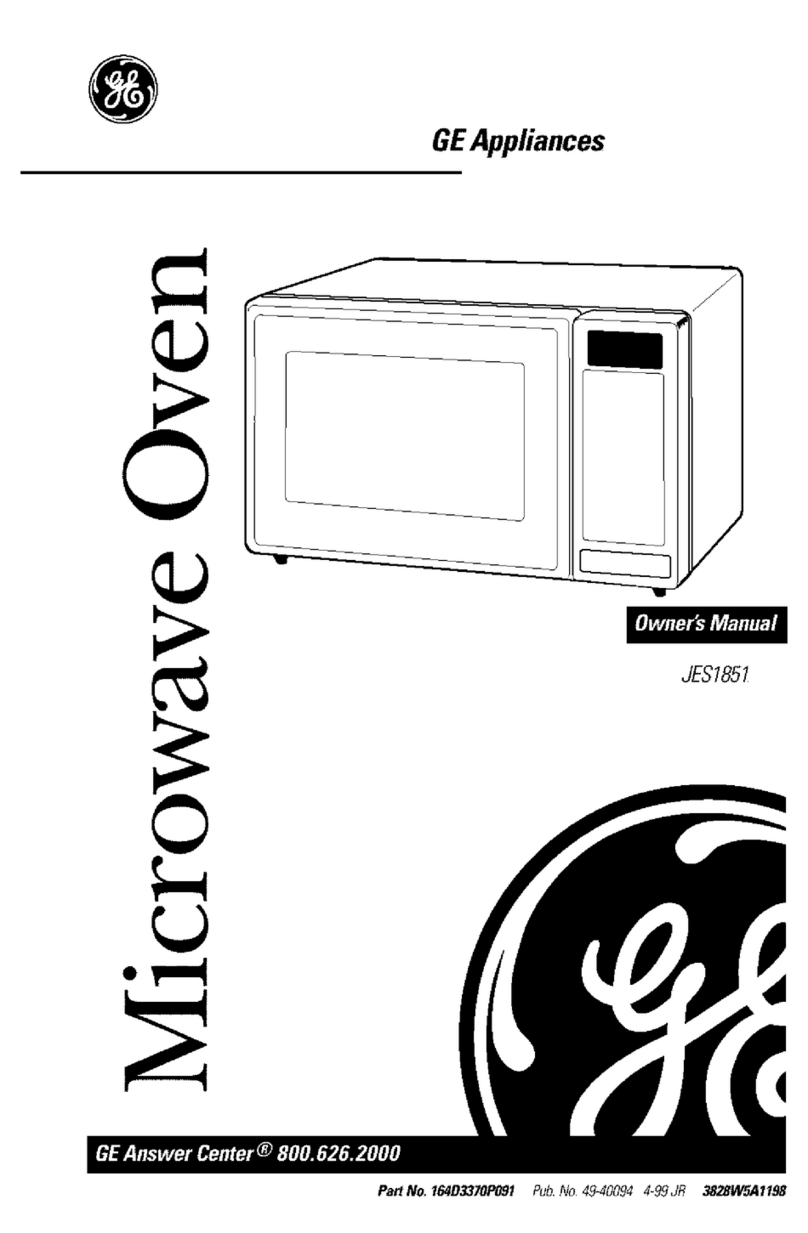
Turntable Microwave Oven
GE Appliances
Models Microwave Power Output
(IEC-705 Test Procedure)
JE940 850 watts
JE1240 900 watts
Use and Care & Cooking Guide
Safety Instructions....................3–5
Precautions to Avoid Possible Exposure
to Excessive Microwave Energy............2
Operating Instructions, Tips
Add 30 Seconds ..........................................12
Aluminum Foil..........................................4, 19
Auto Defrost ..........................................18, 19
Beverage ........................................................15
Child Lock-Out ..............................................10
Clock ..................................................................8
Control Panel...............................................8, 9
Cook ................................................................16
Cooking by Time...................................11, 12
Cooking Complete Reminder ......................7
Cooking Guide ..............................................23
Defrosting by Time ......................................17
Defrosting Guide..........................................22
Delayed Cooking..........................................10
Delay Start/Reminder ................................12
Express Cook ................................................12
Features ............................................................7
Glossary of Microwave Terms..................20
Heating or Reheating Guide ..................21
Hold Time ...................................................10
Microwaving Tips ...........................................6
Kitchen Timer................................................10
Popcorn ..........................................................13
Power Levels.....................................6, 10, 11
Program Cooking............................................7
Reheat.............................................................15
Snacks .....................................................13, 14
Sound .............................................................12
Turntable .................................................3, 4, 7
Problem Solver...............................26
More questions ?…call
GE Answer Center® 800.626.2000
Care and Cleaning............................24
Control Panel ................................................24
Turntable........................................................24
Installation..........................................25
Adapter Plugs ...............................................25
Extension Cords ...........................................25
Grounding Instructions...............................25
Consumer Services...................27
Appliance Registration..................................2
Important Phone Numbers........................27
Model and Serial Number Location...........2
Warranty ........................................Back Cover
HELP US HELP YOU…
Before using your oven, read this guide
carefully.
It is intended to help you operate and maintain your
new microwave oven properly.
Keep it handy for answers to your questions.
If you don’t understand something or need more
help, call:
GE Answer Center®
800.626.2000
24 hours a day, 7 days a week
Write down the model and serial
numbers.
You’ll find them on a label inside the oven.
These numbers are also on the Consumer Product
Ownership Registration Card that came with your
microwave oven. Before sending in this card, please
write these numbers here:
Model Number
Serial Number
Use these numbers in any correspondence or service
calls concerning your microwave oven.
If you received a damaged oven…
Immediately contact the dealer (or builder) that sold
you the oven.
Save time and money. Before you
request service…
Check the Problem Solver in the back of this guide. It
lists causes of minor operating problems that you can
correct yourself.
All these things are normal with your
microwave oven.
• Steam or vapor escaping from around the door.
• Light reflection around door or outer case.
• Dimming oven light and change in blower sound
may occur while operating at power levels other
than high.
• Dull thumping sound while oven is operating.
• Some TV-radio interference might be noticed
while using your microwave oven. It’s similar to
the interference caused by other small appliances
and does not indicate a problem with your
microwave. If you notice this interference, check
that the microwave oven is on a different electrical
circuit, relocate the radio or TV as far away from
the microwave as possible, or check the position
and signal of the receiving antenna.
(a) Do Not Attempt to operate this oven with
the door open since open-door operation can
result in harmful exposure to microwave
energy. It is important not to defeat or tamper
with the safety interlocks.
(b) Do Not Place any object between the oven
front face and the door or allow soil or cleaner
residue to accumulate on sealing surfaces.
(c) Do Not Operate the oven if it is damaged. It is
particularly important that the oven door close
properly and that there is no damage to the:
(1) door (bent)
(2) hinges and latches (broken or loosened)
(3) door seals and sealing surfaces.
(d) The Oven Should Not be adjusted or repaired
by anyone except properly qualified service
personnel.
PRECAUTIONS TO AVOID POSSIBLE EXPOSURE
TO EXCESSIVE MICROWAVE ENERGY
2
Important Safety Instructions
IMPORTANT SAFETY INSTRUCTIONS
Read all instructions before using this appliance.
When using electrical appliances, basic safety
precautions should be followed, including the
following:
WARNING–To reduce the risk of
burns, electric shock, fire, injury to persons
or exposure to excessive microwave energy:
• Read and follow the specific ‘‘Precautions to
Avoid Possible Exposure to Excessive Microwave
Energy’’ on the previous page.
• This appliance must be grounded.
Connect only to properly grounded outlet.
See Grounding Instructions section in the
back of this guide.
• Use this appliance only for its intended use as
described in this guide. Do not use corrosive
chemicals or vapors in this appliance. This
microwave oven is specifically designed to heat or
cook food, and is not intended for laboratory or
industrial use.
• For best operation, plug this appliance into its
own electrical outlet, to prevent flickering of
lights, blowing of fuse or tripping of circuit
breaker.
• Install or locate this appliance only in
accordance with the provided Installation
Instructions.
• Be certain to place the front surface of the
door three inches or more back from the
countertop edge to avoid accidental tipping
of the appliance in normal usage.
• Do not cover or block any openings on the
appliance.
• Do not store this appliance outdoors. Do not use
this product near water—for example, in a wet
basement, near a swimming pool or near a sink.
• This microwave oven is not approved or tested
for marine use.
• Do not immerse power cord or plug in water.
• Keep power cord away from heated surfaces.
• Do not operate any heating or cooking
appliance beneath this microwave oven.
• Do not mount the microwave oven over or near
any portion of a heating cooking appliance.
• Do not store anything directly on top of the
microwave oven surface when the microwave
oven is in operation.
• Do not let power cord hang over edge of table
or counter.
• Do not operate this appliance if it has a
damaged power cord or plug, if it is not
working properly or if it has been damaged
or dropped.
• Do not operate oven without the turntable
and turntable support seated and in place.
• Do not allow turntable to be restricted so the
turntable cannot rotate.
• See door surface cleaning instructions
in the Care and Cleaning section(s) of this guide.
• This appliance should be serviced only by
qualified service personnel. Contact nearest
authorized service facility for examination,
repair or adjustment.
• As with any appliance, close supervision is
necessary when used by children.
• To reduce the risk of fire in the oven cavity:
—Do not overcook food. Carefully attend
appliance if paper, plastic or other combustible
materials are placed inside the oven to facilitate
cooking.
—Remove wire twist-ties and metal handles
from paper or plastic containers before placing
them in the oven.
—Do not use your microwave oven to dry
newspapers.
—Do not use recycled paper products. Recycled
paper towels, napkins and waxed paper can
contain metal flecks which may cause arcing
or ignite. Paper products containing nylon or
nylon filaments should be avoided, as they may
also ignite.
—Do not pop popcorn in your microwave oven
unless it is in a special microwave popcorn
accessory or unless you use popcorn labeled for
use in microwave ovens.
—Do not overcook potatoes. They could dehydrate
and catch fire, causing damage to your oven.
(continued next page)
3
4
IMPORTANT SAFETY INSTRUCTIONS
(continued)
—Do not operate the oven while empty to avoid
damage to the oven and the danger of fire.
If by accident the oven should run empty a
minute or two, no harm is done. However, try to
avoid operating the oven empty at all times—
it saves energy and prolongs the life of the oven.
—Do not use the oven for storage purposes.
Do not leave paper products, cooking utensils
or food in the oven when not in use.
—If materials inside oven should ignite, keep
oven door closed, turn oven off and disconnect
power cord, or shut off power at the fuse or
circuit breaker panel. If the door is opened,
the fire may spread.
• Some products such as whole eggs and sealed
containers—for example, closed jars—will
explode and should not be heated in this
microwave oven. Such use of the microwave
oven could result in injury.
• Avoid heating baby food in glass jars, even
with the lid off. Make sure all infant food is
thoroughly cooked. Stir food to distribute the
heat evenly. Be careful to prevent scalding when
warming formula or breast milk. The container
may feel cooler than the milk really is. Always
test the milk before feeding the baby.
• Do not defrost frozen beverages in narrow
necked bottles (especially carbonated beverages).
Even if the container is opened, pressure can build
up. This can cause the container to burst, possibly
resulting in injury.
• Use foil only as directed in this guide.
TV dinners may be microwaved in foil trays less
than 3/4″ high; remove the top foil cover and
return the tray to the box. When using foil in the
microwave oven, keep the foil at least 1 inch
away from the sides of the oven.
• Cookware may become hot
because of heat transferred
from the heated food.
Pot holders may be needed to
handle the cookware.
• Sometimes, the turntable can become too hot
to touch. Be careful touching the turntable during
and after cooking.
• Foods cooked in liquids (such as pasta) may tend
to boil over more rapidly than foods containing
less moisture. Should this occur, refer to the Care
and Cleaning section(s) for instructions on how to
clean the inside of the oven.
• Thermometer—Do not use a thermometer in
food you are microwaving unless the thermometer
is designed or recommended for use in the
microwave oven.
• Plastic cookware—Plastic cookware designed for
microwave cooking is very useful, but should be
used carefully. Even microwave-safe plastic may
not be as tolerant of overcooking conditions as are
glass or ceramic materials and may soften or char
if subjected to short periods of overcooking. In
longer exposures to overcooking, the food and
cookware could ignite. For these reasons:
1) Use microwave-safe plastics only and use
them in strict compliance with the cookware
manufacturer’s recommendations. 2) Do not
subject empty cookware to microwaving.
3) Do not permit children to use plastic cookware
without complete supervision.
• When cooking pork, follow the directions
exactly and always cook the meat to an internal
temperature of at least 170°F. This assures that,
in the remote possibility that trichina may be
present in the meat, it will be killed and meat
will be safe to eat.
• Do not boil eggs in a microwave oven.
Pressure will build up inside egg yolk and will
cause it to burst, possibly resulting in injury.
• Foods with unbroken outer
‘‘skin’’ such as potatoes, sausages,
tomatoes, apples, chicken livers
and other giblets and egg yolks
(see previous caution) should be
pierced to allow steam to escape
during cooking.

5
SAFETY FACT—Superheated water.
Microwaved water and other liquids do not
always bubble when they reach the boiling point.
They can actually get superheated and not bubble
at all.
Superheated liquid will bubble up out of the cup
when it is moved or when something like a spoon
or tea bag is put into it.
To prevent this from happening and causing
injury, do not heat any liquid for more than 2
minutes per cup. After heating, let the cup stand
in the microwave for 30 seconds before moving
it or putting anything into it.
• Spontaneous boiling—Under certain special
circumstances, liquids may start to boil during or
shortly after removal from the microwave oven.
To prevent burns from splashing liquid, we
recommend the following: before removing the
container from the oven, allow it to stand in the
oven for 30 to 40 seconds after the oven has shut
off. Do not boil liquids in narrow-necked
containers such as soft drink bottles, wine
flasks and especially narrow-necked coffee
cups. Even if the container is opened, excessive
steam can build up and cause it to burst or
overflow.
• ‘‘Boilable’’ cooking pouches and tightly closed
plastic bags should be slit, pierced or vented as
directed by package. If they are not, plastic could
burst during or immediately after cooking,
possibly resulting in injury. Also, plastic storage
containers should be at least partially uncovered
because they form a tight seal. When cooking
with containers tightly covered with plastic wrap,
remove covering carefully and direct steam away
from hands and face.
• Hot foods and steam can cause
burns. Be careful when opening
any containers of hot food,
including popcorn bags, cooking
pouches and boxes. To prevent
possible injury, direct steam away
from hands and face.
• Not all plastic wrap is suitable for use in
microwave ovens. Check the package for
proper use.
SAVE THESE
INSTRUCTIONS
Important Safety Instructions If You Need Service…
IF YOU NEED SERVICE…
To obtain service, see the Consumer Services page in
the back of this guide.
We’re proud of our service and want you to be
pleased. If for some reason you are not happy with the
service you receive, here are three steps to follow for
further help.
FIRST, contact the people who serviced your
appliance. Explain why you are not pleased. In most
cases, this will solve the problem.
NEXT, if you are still not pleased, write all the
details—including your phone number—to:
Manager, Consumer Relations
GE Appliances
Appliance Park
Louisville, KY 40225
FINALLY, if your problem is still not resolved, write:
Major Appliance Consumer Action Program
20 North Wacker Drive
Chicago, IL 60606
6
MICROWAVING TIPS
• Make sure all cookware used in your microwave
oven is suitable for microwaving. Most glass
casseroles, cooking dishes, measuring cups, custard
cups, pottery or china dinnerware which does not
have metallic trim or glaze with a metallic sheen can
be used. Some cookware is labeled ‘‘suitable for
microwaving.’’
• If you are not
sure if a dish is
microwave-safe,
use this test: Place
in the oven both the
dish you are testing
and a glass measuring
cup filled with one
cup water—set the measuring cup either in or next
to the dish. Microwave 1 minute at high. If the dish
heats, it should not be used for microwaving. If the
dish remains cool and only the water in the cup
heats, then the dish is microwave-safe.
• Paper towels, waxed paper and plastic wrap
can be used to cover dishes in order to retain
moisture and prevent spattering. Be sure to vent
plastic wrap so steam can escape.
• Some microwaved foods require stirring, rotating
or rearranging. Check the Cooking Guide.
• Steam builds up pressure in foods which are
tightly covered by a skin or membrane.
Pierce potatoes, egg yolks and chicken livers to
prevent bursting.
If you use a meat thermometer while cooking,
make sure it is safe for use in microwave ovens.
VARIABLE POWER LEVELS (1–10)
Variable power levels add flexibility to your
microwave cooking. The power levels on your

microwave oven can be compared to the surface
units on a range. HIGH (Power Level 10) or full
power is the fastest way to cook and gives you 100%
power. Each power level gives you microwave energy
a certain percent of the time. Power Level 7 is
microwave energy 70% of the time. Power Level 3
is energy 30% of the time.
A high setting (10) will cook faster but may need
additional attention such as frequent stirring, rotating
or turning over. Most of your cooking will be done on
HIGH (Power Level 10). A lower setting will cook
more evenly and with less attention given to stirring
or rotating the food. Some foods may have better
flavor, texture or appearance if one of the lower
settings is used. You may wish to use a lower power
level when cooking foods that have a tendency to boil
over, such as scalloped potatoes.
Rest periods (when the microwave energy cycles off)
give time for the food to “equalize” or transfer heat
to the inside of the food. An example of this is shown
with Power Level 3—the defrost cycle. If microwave
energy did not cycle off, the outside of the food would
cook before the inside was defrosted.
Here are some examples of uses for various
power levels:
POWER LEVEL BEST USES
High 10 Fish, bacon, vegetables,
boiling liquids.
Med-High 7 Gentle cooking of meat and
poultry; baking casseroles
and reheating.
Medium 5 Slow cooking and tenderizing
such as stews and less tender
cuts of meat.
Low 2 or 3 Defrosting without cooking;
simmering; delicate sauces.
Warm 1 Keeping food warm without
overcooking; softening butter.
How to Change Power Level
1. Press MICRO COOK or TIME DEFROST.
2. Select cooking or defrosting time.
3. Press POWER LEVEL.
4. Select desired power level 1–10.
5. Press START.
1
EXPRESS COOK
2
EXPRESS COOK
3
EXPRESS COOK
4
EXPRESS COOK
5
EXPRESS COOK
6
789
0
AUTO
DEFROST
TIME
DEFROST
1
EXPRESS COOK
2
EXPRESS COOK
3
EXPRESS COOK
4
EXPRESS COOK
5
EXPRESS COOK
6
789
0
POWER
LEVEL ADD
30 SEC
KITCHEN
TIMER CLOCK
CLEAR
OFF
START
DELAY
START
SNACKS COOK
MICRO
COOK
POPCORN REHEATBEVERAGE
SOUND
REMINDER
ON/OFF
GUIDE BEHIND DOOR
CONVENIENCE COOKING
7
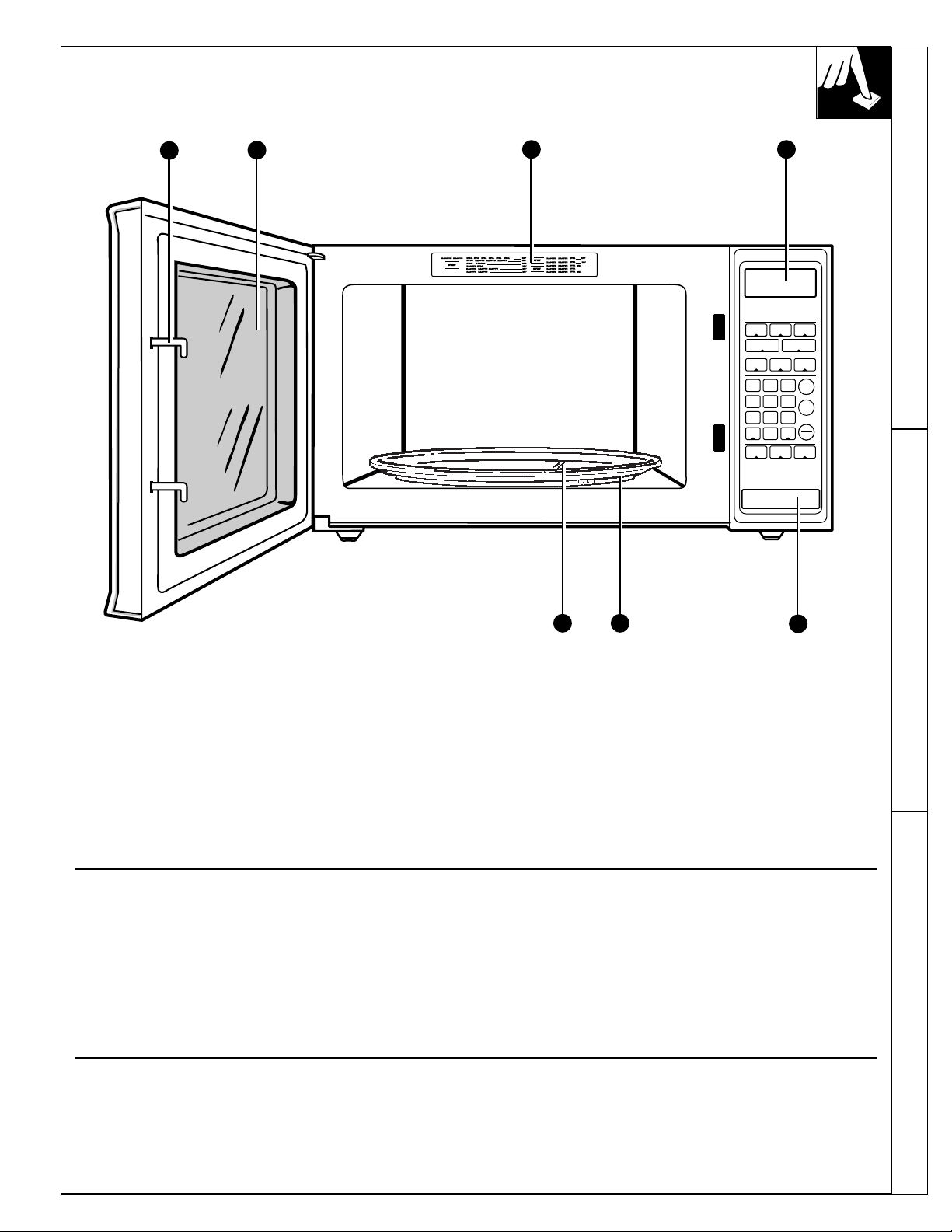
FEATURES OF YOUR OVEN
1. Door Latches.
2. Door Screen. Metal screen permits viewing of
foods and keeps microwaves confined inside oven.
3. Automatic Cooking Guide. Quick reference codes
for many frequently prepared foods.
4. Touch Control Panel and Display. See Your
Touch Control Panel section for instructions.
5. Removable Turntable Support for Cleaning.
Turntable support must be in place when using
the oven.
6. Removable Turntable for Cleaning. Turntable
and support must be in place when using the oven.
The turntable may be removed for cleaning.
7. Door Latch Release. Press latch release button to
open door.
NOTE: Rating plate, oven vent(s) and oven light are
located on the inside walls of the microwave oven.
2
1
7
3 4
Use your Touch Control Panel to Time Defrost or
Micro Cook with choice of power levels from 1
(lowest) to 10 (highest); to Reheat using a preset time
and power level; to cook popcorn using a preset time
and power level; to time kitchen tasks with the Kitchen
Timer; and to set the clock.
Create your own programs to suit your individual
cooking style. For example: use the Kitchen Timer to
delay the start of Micro Cook or program a hold time
between Time Defrost and Micro Cook. Set Micro
Cook for a two-stage program using different times
and power levels.
Program Cooking
Microwaving Tips Variable Power Levels Features of Your Oven
Cooking Complete Reminder
(For Micro Cook and Time Defrost cycles)
To remind you that you have food in the oven, the oven will beep once a
minute until you either open the oven door or touch the CLEAR/OFF pad.
5 6
AUTO
DEFROST
TIME
DEFROST
1
EXPRESS COOK
2
EXPRESS COOK
3
EXPRESS COOK
4
EXPRESS COOK
5
EXPRESS COOK
6
789
0
POWER
LEVEL ADD
30 SEC
KITCHEN
TIMER CLOCK
CLEAR
OFF
START
DELAY
START
SNACKS COOK
MICRO
COOK
POPCORN REHEATBEVERAGE
SOUND
REMINDER
ON/OFF
GUIDE BEHIND DOOR
CONVENIENCE COOKING
ENTER
WEIGHTFOOD
LBS. TEMP
DEF COOK
TIME NO
III
POWER
CODE
SOUND
8
1
212
13
14
15
16
19
17
4
5
7
8
9
10
11
6
3
18
9
Your Touch Control Panel
YOUR TOUCH CONTROL PANEL
The Touch Control Panel allows you to set the oven controls with the
touch of a finger. It’s designed to be easy to use and understand.
1. DISPLAY. Displays time of day, cooking
time, power level being used, cooking mode
and instructions.
2. POPCORN. Touch this pad to cook prepackaged
microwave popcorn weighing 3.0 to 3.5 ounces.
No need to touch START, the oven will start
immediately.
3. BEVERAGE. Touch this pad to heat or reheat a
beverage. No need to touch START, the oven will
start immediately.
4. SNACKS. Touch this pad, a code number and
weight or quantity of food to warm a variety of
snack foods.
5. MICRO COOK. Microwave for a selected
amount of time using automatic Power Level
10 (High).
6. TIME DEFROST. Gentle thawing at automatic
Power Level 3 (Low).
7. EXPRESS COOK. Touch number pads 1
through 5 for 1 to 5 minutes of cooking. No need
to touch START, the oven will start immediately.
8. NUMBER PADS. Touch these pads to program
the microwave.
9. POWER LEVEL. Touch this pad before entering
another power level number if you want to change
from automatic Power Level 10 (High) for
cooking or Power Level 3 (Low) for defrosting.
10. SOUND. Touch the SOUND pad to turn the oven
beeper on or off.
11. KITCHEN TIMER. This feature uses no
microwave energy. It functions as either a kitchen
timer, as a holding period after defrost or as a
delay timer before cooking.

12. REHEAT. Use Reheat for quick reheating of
a variety of foods using different times and
power levels.
13. COOK. Touch this pad, a code number and
weight of food for quick cooking of a variety
of foods using different times and power levels.
14. AUTO DEFROST. Touch this pad and food
weight, then START. The oven automatically
sets power levels and defrosting time.
15. START. After all selections are made, touch this
pad to start the oven.
16. DELAY START/REMINDER. Allows you to
program your oven to begin cooking at a preset
time of day—up to a 12-hour delay. The Reminder
feature can be used like an alarm clock.
17. CLEAR/OFF. When touched, it shuts off the
oven and erases all settings (except time of day).
When held for three seconds, the Child
Lock-Out feature will be activated.
To deactivate, press and hold the CLEAR/OFF
pad for three seconds.
18. ADD 30 SECONDS. Press this pad for 30
seconds of cook time, to add 30 seconds to the
cook time as it’s counting down or for an “instant
on” for 30 seconds.
19. CLOCK. Touch this pad to enter time of day
or check time of day while microwaving. To set
clock, first touch CLOCK pad and then enter time
of day. For example, if time is 1:30, touch number
pads 1, 3 and 0 and ‘‘1:30’’ will appear in display.
Then touch START or CLOCK pad. To reset or
change time, simply repeat above process.
When You Plug in the Oven
The display panel displays “88888”, “18 POWER” and all of the oven
functions. After 15 seconds, all lights disappear and ‘‘RESET’’ appears
in the upper portion. Touch the CLEAR/OFF pad, set the Clock and the
oven is ready for use.
This will happen any time there is a power outage.
The Kitchen Timer has three timing functions:
• It operates as a minute timer.
• It can be set to delay cooking.
• It can be used as a hold setting after defrosting.
The Kitchen Timer operates without microwave energy.
The Kitchen Timer can also be used to program a
“holding time” between microwave cooking functions.
The time can range from one second to 99 minutes
and 99 seconds. A holding or standing time may be
found in some of your own recipes or in a cookbook.
HOW TO USE THE KITCHEN TIMER
Step 1: Touch KITCHEN TIMER pad.
Step 2: Touch number pads 3, 0 and 0 (for 3 minutes
and no seconds).
Step 3: Touch START. Display shows time
counting down. The timer signals when
time is up.
To delay cooking up to 99 minutes and 99 seconds,
touch MICRO COOK and enter cook time. Touch
KITCHEN TIMER and enter number of minutes to
delay cooking. Touch START. Timer will count down

to zero and cooking will begin.
START
KITCHEN
TIMER
Let’s say you want to defrost a frozen casserole for 15
minutes, hold for 10 minutes and then Micro Cook for
25 minutes. Here’s how to do it:
Step 1: Take casserole from freezer and place in oven.
Step 2: Touch TIME DEFROST.
Step 3: Touch pads 1, 5, 0 and 0 for 15 minutes
defrosting time. Defrosting is automatically set on
Power Level 3 but can be changed by touching the
POWER LEVEL pad and the desired power level 1-10.
Step 4: Set standing or hold time by
touching KITCHEN TIMER.
Step 5: Touch 1, 0, 0 and 0 to hold for ten minutes.
Step 6: Touch MICRO COOK.
Step 7: Touch 2, 5, 0 and 0 for 25 minutes of
cooking time.
Step 8: Touch START. As each function is
automatically performed, oven display
shows instructions entered and the function.
When time is up, the oven signals and
flashes “End”.
START
MICRO
COOK
KITCHEN
TIMER
TIME
DEFROST
The Kitchen Timer Using a Holding Time
How to Time a 3-Minute Phone Call Programming Delayed Cooking
How to Defrost, Hold and Micro Cook
CHILD LOCK-OUT
You may lock the control panel to prevent the
microwave from being accidentally started or
used by children.
To lock the controls press and hold the
CLEAR/OFF pad for about three seconds.
The display will show LOCK and then
return to the time of day. A small “L” will
be displayed to remind you that the control
panel is locked.
If anyone tries to use the microwave, the display
will show LOCK.
To unlock the control panel press and hold the
CLEAR/OFF pad for about three seconds.
The display will show the time of day.
CLEAR
OFF
10