EnglishDeutsch
 logo
Brands
  1. Home
  2. •
  3. Brands
  4. •
  5. GE
  6. •
  7. Microwave Oven
  8. •
  9. GE JGHC60GEJ User manual

GE JGHC60GEJ User manual

Other GE Microwave Oven manuals

GE Monogram ZE2160 User manual

GE

GE Monogram ZE2160 User manual

GE JEM3072 User manual

GE

GE JEM3072 User manual

GE JES1138 User manual

GE

GE JES1138 User manual

GE SpacemakerXL JVM1630 User manual

GE

GE SpacemakerXL JVM1630 User manual

GE JVM7195 User manual

GE

GE JVM7195 User manual

GE JES735BJ - 7 cu. Ft. Capacity Countertop Microwave... Reference manual

GE

GE JES735BJ - 7 cu. Ft. Capacity Countertop Microwave... Reference manual

GE JEM31CA User manual

GE

GE JEM31CA User manual

GE Spacemaker JNM1851DMBB User manual

GE

GE Spacemaker JNM1851DMBB User manual

GE JET340D Installation instructions

GE

GE JET340D Installation instructions

GE Spacemaker JVM64 User manual

GE

GE Spacemaker JVM64 User manual

GE WES0930 User manual

GE

GE WES0930 User manual

GE Spacemaker JNM1541SNSS Manual

GE

GE Spacemaker JNM1541SNSS Manual

GE CEB1590SSSS User manual

GE

GE CEB1590SSSS User manual

GE SpacemakerXL JVM1442 User manual

GE

GE SpacemakerXL JVM1442 User manual

GE PEB7226 User manual

GE

GE PEB7226 User manual

GE ZMC3000 Series How to use

GE

GE ZMC3000 Series How to use

GE JX2127SH User manual

GE

GE JX2127SH User manual

GE PVM9215 User manual

GE

GE PVM9215 User manual

GE Spacemaker JVM1530 User manual

GE

GE Spacemaker JVM1530 User manual

GE Profile PVM9005SJSS Manual

GE

GE Profile PVM9005SJSS Manual

GE Spacemaker JVM1871 User manual

GE

GE Spacemaker JVM1871 User manual

GE Appliances PEB1590 User manual

GE

GE Appliances PEB1590 User manual

GE JE1390 User manual

GE

GE JE1390 User manual

GE JEB2167 Series User manual

GE

GE JEB2167 Series User manual

Popular Microwave Oven manuals by other brands

Samsung CE2815NR null

Samsung

Samsung CE2815NR null

Panasonic NN-S553WF null

Panasonic

Panasonic NN-S553WF null

Daewoo KOG-574R0S Service manual

Daewoo

Daewoo KOG-574R0S Service manual

LG MH7040SS instruction manual

LG

LG MH7040SS instruction manual

Sharp R-895(AL)M Service manual

Sharp

Sharp R-895(AL)M Service manual

Dometic DOTRM13W installation instructions

Dometic

Dometic DOTRM13W installation instructions

Sanyo EM-X680 instruction manual

Sanyo

Sanyo EM-X680 instruction manual

Sharp R-393M quick start guide

Sharp

Sharp R-393M quick start guide

KitchenAid KMCX4510 Use and care

KitchenAid

KitchenAid KMCX4510 Use and care

Smeg S45MCX1 Instructions for use

Smeg

Smeg S45MCX1 Instructions for use

Russell Hobbs RHM2044 user guide

Russell Hobbs

Russell Hobbs RHM2044 user guide

Sunbeam SMW759 owner's manual

Sunbeam

Sunbeam SMW759 owner's manual

Bosch CEG732X.1B User manual and installation instructions

Bosch

Bosch CEG732X.1B User manual and installation instructions

Dometic Roadmate 230 operating manual

Dometic

Dometic Roadmate 230 operating manual

Samsung SJ0396W Owner's instructions

Samsung

Samsung SJ0396W Owner's instructions

Sanyo EM-P494WS Supplement of service manual

Sanyo

Sanyo EM-P494WS Supplement of service manual

Sharp R-240 Operation manual

Sharp

Sharp R-240 Operation manual

Electrolux EMS2840 user manual

Electrolux

Electrolux EMS2840 user manual

https://manuals.online logo
https://manuals.online logoBrands
  • About & Mission
  • Contact us
  • Privacy Policy
  • Terms and Conditions

Copyright 2026 Manuals.Online. All Rights Reserved.

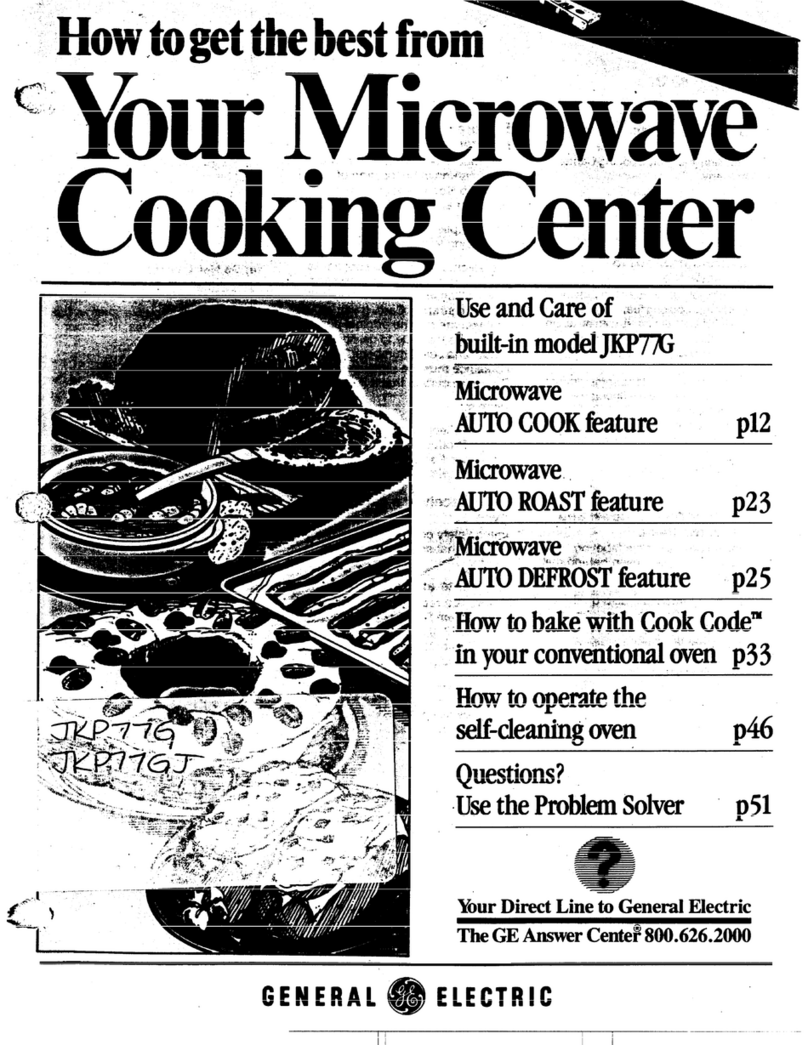
nMicmie CookbgCetir
‘, -.
Contents
Aluminum Foil 6,23 Microwave Oven 8-11
Appliance Registration 2Control Panel 8
Care and Cleaning 19-25 Cooking by Temperature 11
Features 7Cooking by Time 10
Flooring Under Cooking Center 6Defrosting 9
Leveling 6Light Bulb 19
Lift-Up Cooktop 23 Temperature Probe 11,19
Lower Oven 13 Microwaving Tips 6
Air Adjustment 26 Model and Serial Numbers 2
Baking, Baking Guide 15, 16 Precautions 2
Broiling 18 Problem Solver 28,29
Broiling Guide 18 Repair Service 31
Continuous-Cleaning Care 20 Safety Instructions 2-6
Control Settings 13, 14 Surface Cooking 12
Door Removal 21 Burners, Burner Grates 24, 25
Light; Bulb Replacement 13,23 Control Settings 12
Lighting Instructions 13 Cookware Tips 12
Oven Bottom Removal 22 Drip Pans 24,25
Preheating 15, 16 Flame Size 12
Roasting, Roasting Guide 17 Lighting Instructions 12
Shelves 13,~z, 25 Warranty Back Cover
Thermostat Adjustment 27
Timer and Clock 14 GEAmwer Center@
Vent Duct 14 8DiM26.2LWD
Model JGHC60GEJ The electric output
of the microwave oven
in this cooking center
is 650 watts.
GEAppKances
qq+?a?
Help us help you... PRECAUTIONS
Before using yo:~rcooking
center, read this book
carefully.
It is intended to help you operate
and maintain your new cooking
center properly.
Keep it handy for answers to your
questions.
If you don’t understand something
or need more help, write (include
your phone number):
Consumer Affairs
GE Appliances
Appliance Park
Louisville, KY 40225
Write down the model and
serial numbers.
You’ll find them on alabel located
in the burner box under the
cook~op. See page ?.
These numbers are also on the
Consumer Product Ownership
Registration Card that came with
your cooking center. Before
sending in this card, please write
these numbers here:
Model Number
Serial Number
Use these numbers in any
correspondence or service calls
concerning your cooking center.
Be sure your cooking
center is registered.
It is important that we, the
manufacturer, know the location of
your cooking center should aneed
occur for adjustments.
Your supplier is responsible for
registering you as the owner.
Please check with your supplier to
be sure he has done so; also send in
your Consumer Product Ownership
Registration Card. If you move, or
if you are not the original purchaser
please write to us, stating model
and serial numbers. This appliance
must be registered. Please be certain
that it is. >
i
Write to:
GE Appliances
Range Product Service
Appliance Park
Louisville, KY40225
If you received adamaged
cooking center ...
Immediately contact the dealer
(or builder) that sold you the
cooking center.
Save time and money.
Before you request service ...
check the Problem Solver on pages
28 and 29. It lists causes of minor
operating problems that you can
correct yourself.
FOR YOUR SAFETY
If you smell gas: ,
1.Openwindows.
2. Don’t touch
electrical switches:
3.Extinguish any
open flame.
4. Immediately call
your gassupplier.
*Don’t turn electric switches
on or off because sparks may
ignite the gas.
FOR YOUR SAFETY
Donot store or use
gasoline or other
flammable vaporsand
liquids in the vicinity
of this or anyother
appliance.
TO AVOID
POSSIBLE 9
x“
EXPOSURE 7X)
EXCESSIVE
MICROWA~
ENERGY
(a) Do Not Attempt to operate
this oven with the door open since
open door operation can result in
harmful exposure to microwave
energy. It is important not to
defeat or tamper with the safety
interlocks.
@) DO Not Place any object
between the oven front face and
the door or allow soil or cleaner
residue to accumulate on sealing
surfaces.
(c) Do Not C)perate the oven
if it is damaged. It is palnicu}ar}y
important that the oven door close
properly and that there is no
3
f~.
damage to the: .. ,.
%
(1) door (bent) —
(2) hinges and latches (broken or
loosened)
(3) door seals and sealing surfaces.
(d) The Oven Should Not be
adjusted or repaired by anyone except
properly qualified service personnel.
AU these things are normal
with your microwave oven:
●Steam or vapor escaping from
around the door.
●Light reflection around door or
outer case,
cDimming oven light and change
in blower sound may occur while
operating at power levels other
than high.
●Dull thumping sound while oven
is operating.
●Some TV-Radio interference
might be noticed while using your
microwave oven. It’s similar to the
interference caused by other small
appliances and does not indicate a
problem with your oven.
t!
JL
2
IMPORT~T SAFETY INSTRUCTIONS
Read all instructions before
IMPORTANT
SAFETY NOTICE
The California SafeDrinking
Waterand ToxicEnforcement
Act requires the Governor of
California to publish alist of
substancesknownto the state
to cause cancer and requires
businesses to warn customers
ofpotential exposure to such
substances.
Gas appliances can cause
minor exposureto three of these
substances, namely benzene,
formaldehydeand soot, caused
primarily by the incomplete
comiu~$ionof natural gas or LP
fi>]~;~.p:~p+)r Q;;::::,: ~~:::~$.
indicated by abluish rather ;han
ayellowflame, MMminimize
incompletecombustion. Exposure
to these substancescan be
minimized further byventing
with an open windowor using
aventilation fanor hood.
When You Get Your Range
●Wwe the installer show you
the location of the range gas
cut-off’valve and how to shut
it off if’necessary.
@
Have your range installed and
p~op@ grounded by aquaiified
instalkr, in accordance with the
Installation Instructions. Any
adjustment and service shouldbe
performed only byqualified gas
range installers or service
technicians.
●Plug your range into a120-volt
grounded ~ut]et onjycDo not
removethe round grounding
prong from the plug. If in doubt
about the grounding of the home
electrical system,it is your
_& personal r&ponsibW~ and
obligation to have an ungrounded
outlet replaced with aproperly-
,grounded three-prong outlet in
using this appliance.
accordance with the hTational
Electrical Code. Do not use an
extensioncord with this appliance.
●Be sure all packing materials
are removed from the range
beforeoperating it, to preventfire
or smokedamage shouldthe
packingmaterial ignite.
●Be sure your range is correctly
adjusted by aqualified service
technician or installer for the
type of gas (Natural or LP) on
which it is to be used. Yourrange
can be convertedfor either typeof
gas. SeeInstallation Instructions.
●This cooking center is
specifically designed to heat or
cook food. and is not k:ended
for Laboratory or industrial use.
~After prolonged use of a
range, high floor temperatures
may result and many floor
coverings wili not withstand
this kind of use. Never installthe
rangeovervinyl tile or linoleum
that cannot withstand such type of
use. Never install it directly over
interior kitchen carpeting.
Using YourRange
cDon’t ieave children alone or
unattended where arange is hot
or in operation. They could be
seriously burned.
eDon’t Wow anyonetodimb7
stand or hang on the door,
broiler drawer or range top.
‘I’heycould damage the rangeand
eventip it overcausing severe
personal injury.
*C.4LTT’ION:ITEMS OF
INTEREST K’) CHILDREN
SHOULD NOT BE STORED IN
CABINETS ABOVE ARANGE
OR ON THE BACKSPL.4SH
OF .4 RANGE–CHILDREN
CLI.MBINGON THE RANGE
TOREACHITEMS COULD BE
SERIOIJSL}’INJLTRED.
3
●Let burner grates and other
surfaces cool before touching
them or leaving them where
chikh-en can reach them.
●Never wear loose fitting or
hanging garments whiIe using
the appIiance. Flammable
material could be ignited if
brought in contact with flame or
hot ovensurfaces and maycause
severeburns.
●Never use your appliance for
warming or heating the room.
Prolonged use of the range
without adequate ventilation can
be hazardous.
●Do not use water on grease
fires. Neverpick up aflaming
pan. Turn offburner, then
smother flaming pan bycovering
pan completely with well fitting
lid, cookie sheet or flat tray.
Flaming grease outside apan can
be put out bycovering with
baking soda or, if availab]e, with
amulti-purpose dry chemical or
foamtype fire extinguisher.
QDo not store flammable
materials in an oven or near the
Cooktop.
*Do not let cooking grease or
other flammable materials
accumulate in or near the range.
*When cooking pork, followthe
directionsexactlyand alwayscook
the meatto an internaltemperature
of at ieast 170°F.This assures that,
in the remote possibility that
trichina maybe present in the
meat, it will be killed and meat
will be safeto eat.
Microwave Oven:
@
Readand followthe specific
“PRECAUTIONSTOAVOID -
POSSIBLEEXPOSURE TO
EXCESSI?~EMICROWAVE
ENERGY” found on page 2.
@Seedoor surface cleaning ‘-
instructions on page 19.
I>
{contirzuc’d next Jxlg(’ )
IMPORTMT SAFETY INSTRUCTIONS (continued)
●To reduce the risk of fire in
the oven cavity:
–Do not overcook food.
Carefhlly attend appliance if
paper, plastic or other
combustible materials are placed
inside the ovento facilitate
cooking.
–Remove wire twist-ties from
paper or plastic bags before
placing bags in oven,
—Do not use your microwave
oven to dry newspapers.
–Do not use recycled paper
products. Recycledpaper towels,
napkinsand waxpaper can contain
metal flecks which may cause
arcing or ignite. Paper products
containingnylon or nylon
filaments shouldbe avoided, as
theymay also ignite.
—Do not pop popeorri in your
microwave oven unless in a
special microwavepopcorn
accessory or unless you use
popcorn labeled for use in
microwaveovens.
–Do not overcook potatoes.
They could dehydrateand catch
fire, causing damage to your oven.
–Do not operate the oven while
empty to avoid damage to the
oven and the danger of fire. If
byaccident the oven shouldrun
empty aminute or two, no harm
is done. However,try to avoid
operating the ovenempty at all
times—itsavesenergy and
prolongslife ofthe oven.
●If materials inside the oven
should ignite, keep ovendoor
closed. turn ovenoff, and
disconnect the powercod. or
shut offpowerat the fuse or
circuit breaker pane}.
●Some products such as whole
eggs and sealed containers-for
example. closed glassjars—may
explodeand should not be heated
inthis oven.
●Don’t defrost frozen
beverages in narrow necked
bottles (especially carbonated
beverages). Even if the container
is opened, pressure can build up.
This can cause the container to
burst, resulting in injury.
●Use metal only as directed in
cookbook. Foil strips as used on
meat roasts are helpful when used
as shownin cookbook.
TV dinners maybe microwaved
in foiltraysless than 3/4”high;
remove top foil cover and return
tray to box. When using metal in
microwave oven, keep metal at
least 1inch away from sides of
oven.
●Cooking utensils may become
hot because ofheat transferred
from,the heated food. PothoMers
maybe needed to handle the
utensil.
QSometimesYthe cooking tray
can become too hot to touch. Be
careful touching the cooking tray
during and after cooking.
●Foods cooked in liquids (such
as pasta) maytend toboil over
more rapidly than foods
containing less moisture. Should
this occur, refer to page 19for
instructions on howto clean the
inside ofthe oven.
●Thermometer—Do not use a
thermometer in foodyou are
microwavingunless the
thermometer is designedor
recommended for use in the
microwaveoven.
@Remove the temperature
probe from the oven when not
in use. If you leavethe probe
inside.the ovenwithoul inserting
it in foodor liquid, and turn on
microwaveenergjr,it can create
electrical arcing in the o~’en.and
damage ovenvans.
4
●Plastic utensils—Plastic
utensils designed for microwave
cooking are very useful, but
should be used carefully. Even
microwaveplastic may not be as
tolerant ofovercookingconditions
as are glass or ceramic materials
andmaysoftenor char if subjected
to short periods ofovercooking.
Inlongerexposurestoovercooking,
the food and utensils could ignite.
Forthesereasons:1)Use microwave
plastics only and use them in
strict compliance with the utensil
manufacturer’srecommendations.
2) Do not subject empty utensils
to microwaving.3) Do not permit
children to use plastic utensils
without complete supervision.
*Boiling eggs is not
recommended in amicrowave
oven. Pressure can build up
inside eggyolk and maycause it
to burst, resulting in injury.
*Foods with unbroken outer
~~skin3’such as potatoes,
sausages. tomatoes, apples,
chicken livers and other giblets,
and eggyolks (see previous
caution) should be pierced to
allowsteam to escape during
cooking.
●%oilabk$’ cooking pouches
and tightly closed piastie bags
should be slit, pierced or vented
as directed in cookbook. H’they
are not. plastic could burst during
or immediatelyaftercooking,
possiblyresulting in injury. Also,
plastic storage containers should
beat least partially uncovered
because they form atight seal.
When cooking with containers
tightly coveredwith plastic wrap,
removecoveringcarefully and
direct steam awayfrom hands and
face,
●Avoidheating baby food in
glass ~ar~,ei’enwith~u{their lids;
especially meat and egg mixtures.
9
.-
4)

●Spontaneous boiling—Under
certain special circumstances,
liquids may start to boil during or
shortly after removalfrom the
microwaveoven. Toprevent burns
from splashing liquid, stir the
liquid briefly before removingthe
container from the microwave
oven.
Surface Cooking
●Always use the LITE position
when igniting top burners and
makesurethe burnershaveignited.
cNever leave surface burners
unattended at HI flame settings.
Boilovercauses smoking and
greasyspilloversthat may catch
on fire.
●Adjust top burner flame size
so it does not extend beyond the
edge of the cooking utensil.
Excessiveflame is hazardous.
●Use oniy dry pot holders—
moist or damp pot holders on hot
surfacesmay result in burns from
steam.Do not let pot holderscome
near open flames when lifting
utensils. Do not use atowelor
other bulky cloth in place of a
pot holder.
cTo minimize the possibility of
burns, ignition of flammable
materials. and spiHage,turn the
cookwarehandles towardthe side
or back of the rangewithout
extendingoveradjacent burners.
●Always turn surface burner
to OFF before removing utensil.
●Carefully watch foods being
fried at Ilk flame setting.
cNever block the vents (air
openings) of the range. They
providethe air inlet and outlet
which is necessary for the range
to operateproperly with correct
combustion.
*Do not use awok on the
cooking surface if the wok has a
round metal ring which is placed
over the burner grate to support
the wok. This ring acts as aheat
trap which maydamage the
burner grate and burner head.
Also, it may cause the burner to
workimproperly. This maycause
acarbon monoxidelevel above-
that allowedbycurrent standards,
resulting in ahealth hazard.
●Foods for frying should be as
dry as possible. Frost on frozen
foodsor moisture on fresh foods
can cause hot fatto bubble up and
oversides of pan.
●Use least possible amount of
fat for effee~!~-eshallow or deep-
fat frying. FiHin~the pan toofull
offat~an cause s~illoverswhen
foodis added.
●If acombination of oils or
fats wil~be used in frying, stir
together beforeheating, or as
fatsmelt slowly.
●Alwaysheat fat slowly, and
watchas it heats.
●Use deep fat thermometer
whenever possibie to prevent
overheatingfat beyondthe
smokingpoint.
●Use proper pan size—.4void
pans that are unstable or easily
tipped. Select utensils havingfiat
bottoms large enough toproperly
contain foodavoidingboilovers
and spillovers.and large enough
to coverburner grate. This will
both savecleaning and prevent
hazardous accumulations offood,
since nea~’yspattering or
spilloversleft on range can ignite.
Use pans v’ithhandles that can be
easily grasped and remain cool.
@Use only glass cookware that
is recommended for use on gas
burners.
●Keep ali plastics away from
top burners.
●To avoid the possibility of a
burn, always be certain that the
controis for all burners are at
OFF position and all grates are
cool before attempting to
remove agrate.
●When flaming foods under
the hood, turn the fan off. The
fan, if operating, ma~7spread
the flame.
●If range is located near a
window, do not use long curtains
which could blow overthe top
burners and create.afire hazard.
*If YOU smell g~~l WY :~.’t~i~
uas to the range and c~~~ :
5
qualified ser~~icetechnician.
Never use an open flame to locate
aleak.
ll~ti~g, Broiling and
Roasting
●Do not use oven for astorage
area.
●Stand away from the range
when opening the door of ahot
oven. The hot air or steam
which escapes can cause burns
to hands, face and/or eyes.
@Keep oven free from grease
buiMup.
@Place oven shelves in desired
position whi[e oven is cool.
*Pulling out shelf to the shelf
stop is aconvenience in lifting
heavy foods. Ris also a
precaution against burns from
touching hot surfaces of’the
door or oven walls.
cDon’t heat unopened food
containers in the oven. Pressure
could build up and the container
could burst causing an injury.
(cmtimwd next page)
i1
IMPORTANT SAFETY INSTRUCTIONS
8~~stuse~uminumf~i~ *Whenbroiling, if meat is too
anywhere in the oven exceptas
describedinthisbook.Misuse
could result in afire hazard or
damageto the range.
●When using cooking or
roastingbagsinoven,follow
the manuhcturer’s direction.
●UseWdygkwscookwarethat
isrecommended
for use in gas
ovens.
●Alwaysremovebroiler pan
frombroilercompartmentas
soonasyoufinishbroiling.
Grease
left in the Rancan catch
Flooring Under
Cooking Center
Your range, like so many other
household items, is heavy and
can settle into soft floor coverings
such as cushioned vinyl or
carpeting. When moving the
range on this type of flooring,
use care.
Do not install the range over
kitchen carpeting unless you place
an insulating pad or sheet of
l/4-inch-thick plywood between
the range and carpeting.
When the floor covering ends at
the front of the range, the area that
the range will rest on should be
built up with plywood or similar
material to the same level or higher
than the floor covering. This will
allow the range to be moved for
cleaning or servicing.
closetothefla&e,thefatmay
ignite.Trim excessfat toprevent
excessiveflare-ups.
.M&e sure broilerpankh
placecorrectlytoreduce the
possibility ofgrease fires.
●Ifyoushouldhavea grease
fweinthebroilerpan,turn off
oven, and keep door closed to
contain fire until it burns out.
Cleaning YourRange
●Cleanonlypartslistedinthis
UseandCareBook.
●Keeprangecleanandfree
ofaccumulationsofgreaseor
spiI}overswhichmayignite
Leveling the
Cooking Center
Your range must be level in order to
produce proper cooking and baking
results. After it is in its final
location, place alevel horizontally
on an oven shelf and check the
levelness front to back and side to
side. Level the range by adjusting
the leveling legs or by placing
shims under the corners as needed.
Microwaving Tips
?$
●Make su eall cookware used in
your microwave oven is suitable for
microwaving. Most glass casseroles,
cooking dishes, measuring cups,
custard cups, pottery or china
dinnerware which does not have
metallic trim or glaze with ametallic
sheen can be used. Some cookware is
labeled “suitable for microwaving:’
(continued)
If YouNeed Service ($)
●Read“TheProblemSolver”
onpages28and29ofthisbook.
●Don’tattempttorepair
orreplaceanypartofyour
rangeunlessitisspecifically
recommendedinthisbook.All
other servicing should be referred
to aqualified technician.
If you are unsure, use this dish test:
Measure 1cup water in aglass cup.
Place in oven on or beside dish.
Microwave 1-1?4minutes at High
(10). If water becomes hot, dish is
microwave safe. If dish heats, it
should not be used ?or microwaving.
●Paper towels, wax paper, and
plastic wrap can be used to cover
dishes in order to retain moisture
and prevent spattering.
.Some microwaved foods require
stirring, rotating, or rearranging.
Check your cookbook for specific
instructions.
●Steambuilds up pressure in foods
which are tightly covered by askin
or membrane. Pierce potatoes, egg
yolks and chicken livers to prevent
bursting.
6},!
B
.
3
.<.,
\
Features of YourCooking Center Q Q 00 !3 E
1. Door Handle. Pull to open
door. Door must be secureIy
latched for oven to operate.
2. Inside Door Latch. *
3. Window and Metal Shield.
Allows cooking to be viewed while
keepingmicrowavesconfined inoven.
4. Oven Light.
5. Removable Glass Tray. Must
always be in place when operating
the oven.
6. Temperature Probe.
7. Receptacle for Temperature
Probe.
8. Display and Touch Control
Panel.
9. Microwave Oven Vent.
10. Microwave Oven ON& OFF
Buttons.
11. Cooking Guide. Suggested
cooking times for many frequently
prepared foods.
12. Oven Set Knob.
13. Oven Temp Knob.
14. Oven Vent.
15. Oven Interior Light.
16. Oven Light Switch. Lets you
turn interior oven light on, in lower
oven, during cooking when door is
closed.
17. Oven Shelves.
18. Oven Shelf Supports.
19. Removable Oven Door.
20. Removable Oven Bottom.
21. Broiler Pan and Rack.
Model JGHC60GEJ ~
22. Cooktop Light. 28. Minute Timer.
23. Lift-Up Cooktop. 29. Digital Clock.
24. Model and Serial Numbers. 30. Automatic Oven Timer.
Located in burner box under Times lower oven cooking
cooktop .operations.
25. Surface Burner Controls.
26. Surface Burners. Grates and
Chrome Drip Rms. ..
27. Cooktop Light Sv’itch.
7
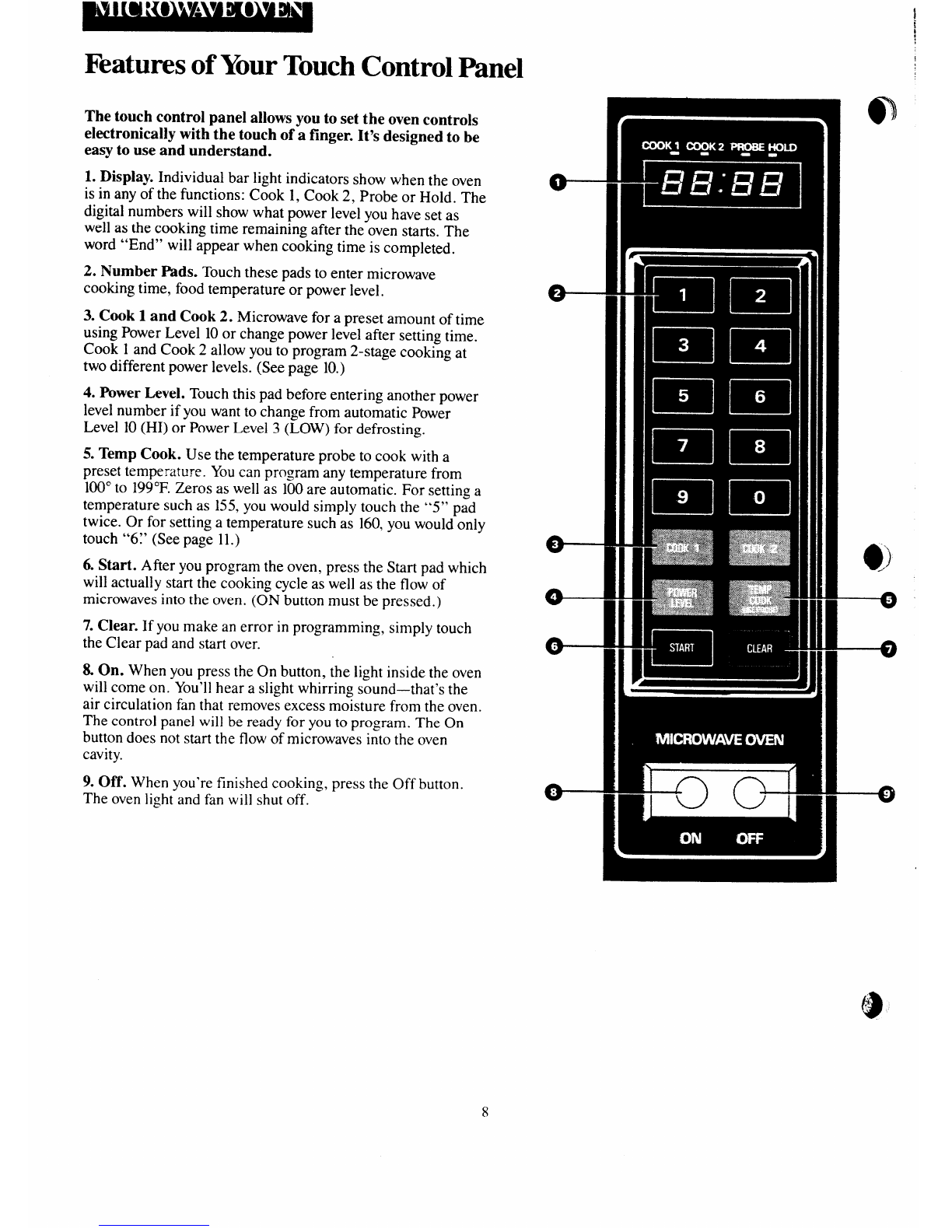
Features of YourTouch Control Panel
The touch control panel allows you to set the oven controls
electronically with the touch of afinger. It’s designed to be
easy to use and understand.
1. Display. Individual bar light indicators show when the oven
is in any of the functions: Cook 1, Cook 2, Probe or Hold. The
digital numbers will show what power level you have set as
well as the cooking time remaining after the oven starts. The
word “End” will appear when cooking time is completed.
2. Number Pads. Touch these pads to enter microwave
cooking time, food temperature or power level.
3. Cook 1and Cook 2. Microwave for apreset amount of time
using Power Level 10or change power level after setting time.
Cook 1and Cook 2allow you to program 2-stage cooking at
two different power levels. (See page 10.)
4. Power Level. Touch this pad before entering another power
level number if you want to change from automatic Power
Level 10(HI) or Power Level 3(LOW) for defrosting.
5. Ternp Cook. Use the temperature probe to cook with a
preset temperature. You can program any temperature from
100”to 199”F. Zeros as well as 100 are automatic. For setting a
temperature such as 155, you would simply touch the “5” pad
twice. Or for setting atemperature such as 160, you would only
touch “67 (See page 11.)
6. Start. After you program the oven, press the Start pad which
will actually startthe cooking cycle as well as the flow of
microwaves into the oven. (ON button must be pressed. )
7. Clear. If you make an error in programming, simply touch
the Clear pad and start over.
8. On. When you press the On button, the light inside the oven
will come on. You’ll hear aslight whirring sound—that’s the
air circulation fan that removes excess moisture from the oven.
The control panel will be ready for you to program. The On
button does not start the flow of microwaves into the oven
cavity.
9. Off. When you’re finished cooking, press the Off button.
The oven light and fan will shut off.
I
8
Defrosting
The defrost function is designed
for speedy thawing of frozen food
and is one of the great advantages
of amicrowave oven.
●Power level 3is recommended
for defrosting.
●See your cookbook for defrosting
help.
To become better acquainted with
the defrost function, defrost frozen
porkchopsbyfollowingthe steps
below.
Step 1:Place al-lb. package of
frozen chops in the oven and
close door.
Step 5: Touch number pad 3.
Display will show 30 indicating
low power level is set in the oven.
Low (30) is the recommended
power ievel for defrosting.
Step 6: Touch START. Time counts
down on display. When cycle is
completed, the oven signals and
“End” appears on display. Touch
CLEAR pad.
Step %Turn package over, close
door and repeat Steps 3through 5
to set remaining half of defrosting
time and touch START.
Step 2. Push the ON button. Oven
light and fan come on but no
microwave energy is used until
you finish programming and
touch START.
Step 8: When you’re all finished
defrosting. press the OFF button.
Step 9: Open door, remove
package and separate chops to
finish defrosting.
Step 3: Select one-half of the total IJef~Os@ ~~p~
defrosting time recommended in
your cookbook. For example.
touch 4, 0and Ofor 4minutes.
—
@Foods frozen in paper or plastic
can bedefrosted ir :he package,
Display shows ‘4:001’
Step 4: Touch IKN3TERLEVEL :*Forevendefrosting,someioods
pad. IXsp]a:shows“H1~’ need-tobe broken up or separa[ed
part of the way through the
defrosting time.
●Family-size, pre-packaged
frozen dinners can be defrosted and
microwave cooked. If the food is in
afoil container, transfer it to a
microwave-safe dish.
●Check your cookbook for other
defrosting tips.
Questions and Answers
QWhen Ipress START. Ihear a
dull, thumping noise. W’hat is it?
A. This sound is normal. It is
letting you know the oven is using a
power level lower than 10(I-U).
Q. Why don’t the defrosting
times in the cookbook seem right
for my food?
A. Cookbook times are averages.
Defrosting time can vary according
to the temperature in your freezer.
Set your oven for the time indicated
in your cookbook. If your food is
still not completely thawed at the
end of that time, reset your oven
and adjust the time accordingly.
Q. Should all foods be completely
thawed before cooking?
.4. Some foods should not be
completely thawed before cooking.
For example, fish cooks so quickly
it is better to begin cooking while it
is stiH slightly frozen.
Q. Can Iopen the door during
defrosting to check on the
progress of my food?
A. Yes. You may open the door at
any time during microwaving. To
resume defrosting. close the door
and press START. The oven begins
operating if time is left on timer. -
If not, reset timer.
.-
(!
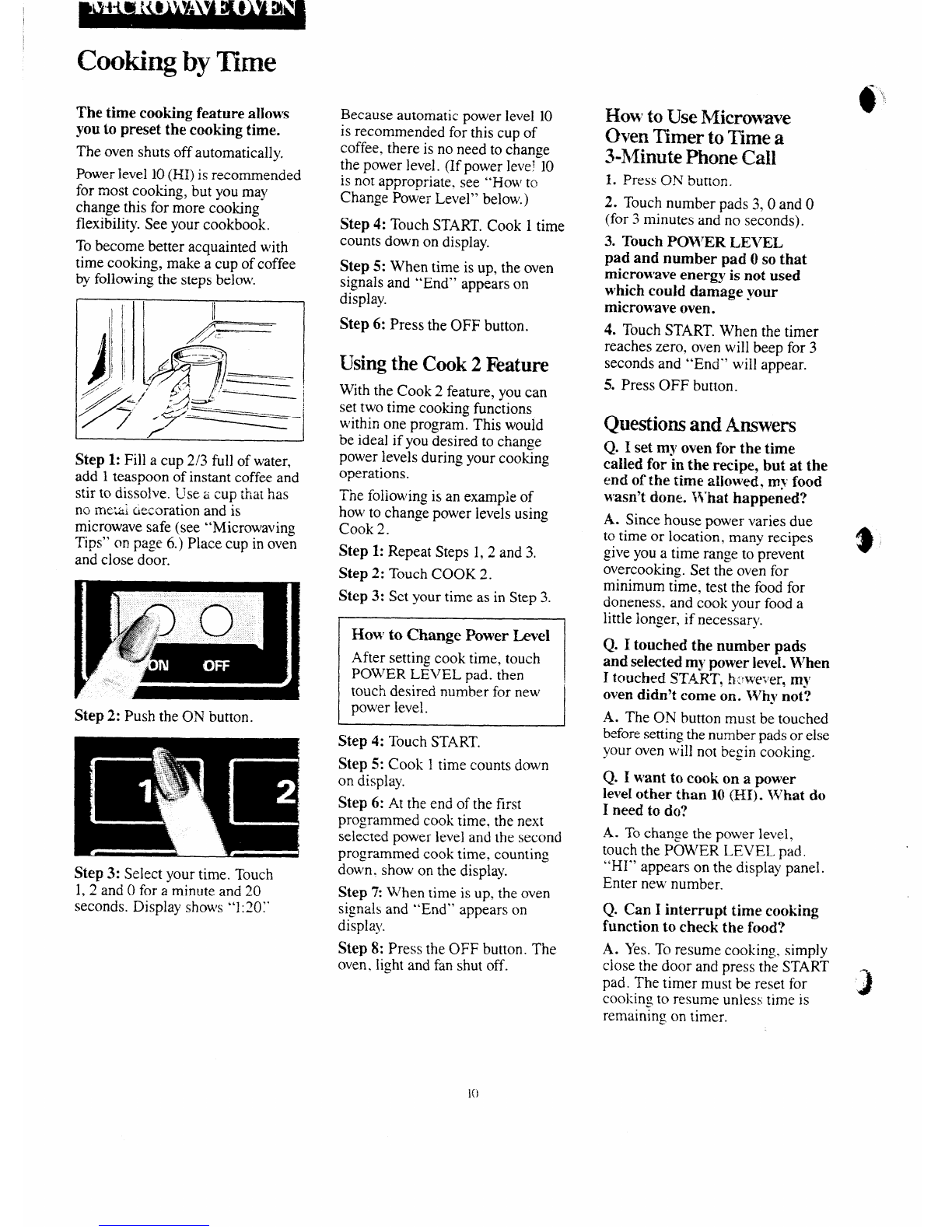
Cooking by Time
The time cooking feature al]ows
YOU~0preset the cooking time.
The oven shuts off automatically.
Power level 10(I-H)is recommended
for most cooking, but you may
change this for more cooking
flexibility. See your cookbook.
To become better acquainted with
time cooking, make acup of coffee
by following the steps below.
Step 1: Fill acup 2/3 full of water,
add 1teaspoon of instant coffee and
stir to dissolve. Use acup that has
no rntxai ciemration and is
microwave safe (see “Microwaving
Tips” on page 6.) Place cup in oven
and close door.
Step 2: Push the ON button.
Step 3: Select your time. Touch
1,2 and 0for aminute and 20
seconds. Display shows “1:20:”
Because automatic power level 10
is recommended for this cup of
coffee. there is no need to change
the power level. (If power level 10
is not appropriate, see “How to
Change Power Level” below.)
Step4: Touch START. Cook 1time
cou-nts down on display.
Step 5: When time is up, the oven
signals and “End” appears on
display.
Step 6: Press the OFF button.
~s~~g the Cook 2Feature
With the Cook 2feature, you can
set two time cooking functions
within one program. This would
be ideal if you desired to change
power levels during your cooking
operations.
The foliowing is an example of
how to change power levels using
Cook 2.
Step 1: Repeat Steps 1.2 and 3,
Step 2: Touch COOK 2.
Step 3: Set your time as in Step 3.
How toChange Power I&vel
After setting cook time, touch
POWER LEVEL pad. then
touch desired number for new
pov’er level.
Step 4: Touch START.
Step 5: Cook 1time counts down
on display.
Step 6: At the end of the first
programmed cook time. the next
sel{cted power level and the second
programmed cook time. counting
down. show on the display.
Step 1When time is up. the oven
signals and “End” appears on
display.
Step 8: Press the OFF button. The
oven, light and fan shut off.
How to Use Microwave
(km Timer to Time a
3-Minute Phone call
1. Press ON button.
2. Touch number pads 3,0 and O
(for 3minutes and no seconds).
3. Touch POV17ERLEVEL
pad and number pad Oso that
microwave energy is not used
which could damage your
microwave oven.
4. Touch START. When the timer
reaches zero. oven will beep for 3
seconds and “End” will appear.
5. Press OFF button.
Questions and Answers
Q. 1set my oven for the time
called for “inthe recipe, but at the
end of the time allowed. my food
wasn’t done. W’hat happened?
A. Since house power varies due
3
to time or location, many recipes f
give you atime range to prevent
overcooking. Set the oven for
minimum time, test the food for
doneness. and cook your food a
little longer, if necessary.
Q. Itouched the number pads
and selected my power level. When
Itouched ST’.4RT, h:wever, my
oven didn’t come on. ~~~hynot?
A. The ON button must be touched
before setting the number pads or else
your oven will not begin cooking.
Q. Iwant@ cook on apower
level other than 10 (HI). W%atdo
1 need to do?
.4. To change the power level,
touch the POWER LEVEL pad.
“HI” appears on the display panel.
Enter new number.
Q. Can Iinterrupt time cooking
function to check the food?
A. Yes. To resume cooking, simply
ciose the door and press the START
J
pad. The timer must be reset for ~
cooking to resume unless time is
remaining on timer.