GearMo GM-U24RS232 User manual


Introduction
Thank you for buying our product!
Please read the manual in detail first before start using this adapter.
Specifications subject to change without notice.
System Requirements
Desktop or notebook computer with an available USB port!
Windows®10 (32-/64-bit) / 8 (32-/64-bit)/ 7 (32-/64-bit) / Vista (32-/64-bit) / XP (32-/
64-bit)
Windows Server® 2003 & 2008 (32-/64-bit) / 2008 R2 / 2012 / 2012 R2
Package Contents:
4-Port or 8-Port Industrial USB to RS-232 Serial Adapter
User Manual
Driver CD
USB 2.0 Type A to B cable
DIN-Rail and wall mount kit
Power adapter for GM-U28RS232 8-Port only
!
Layout:
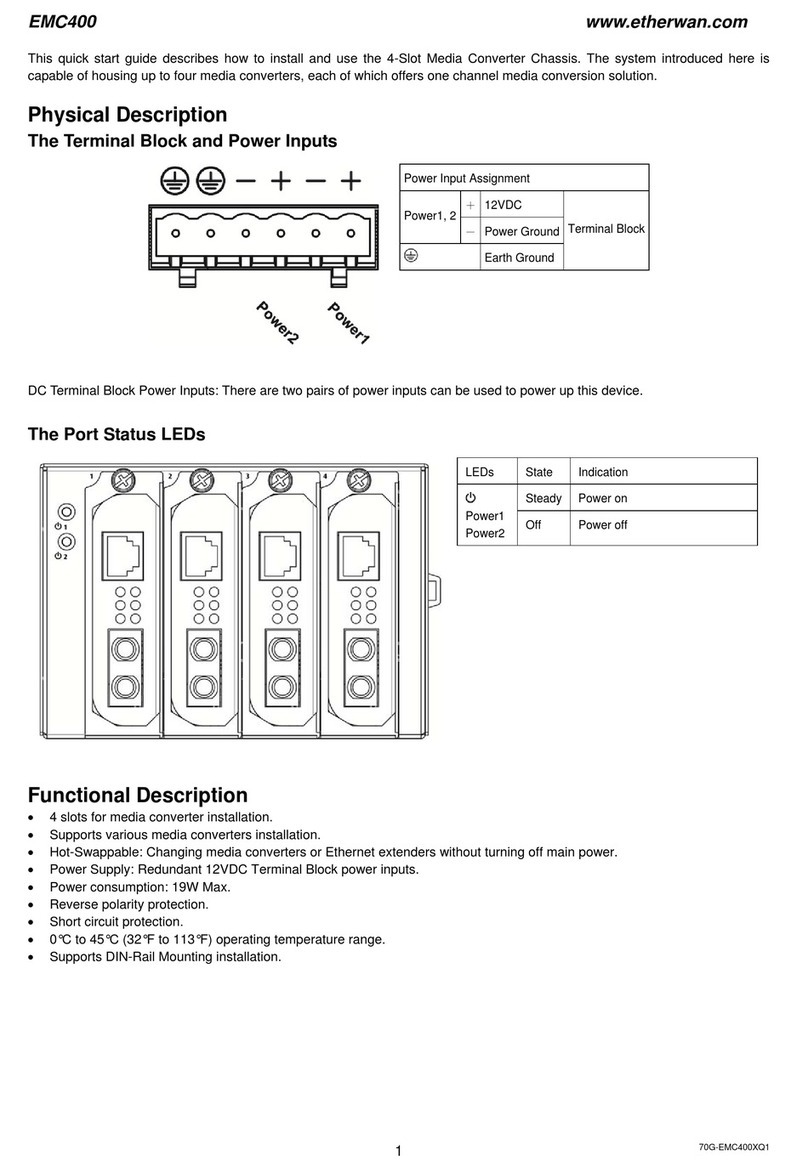
GM-U24RS232 4-Port Industrial USB to RS232 Serial Adapter
2
USB Type-B
Serial Ports x4

3
Power Jack
3 Pin Terminal
Wall Mounting Holes
Din Rail Mounting Holes
USB Type B
Serial Ports x8
Power Jack
3 Pin Terminal Block
Wall Mounting Holes
Din Rail Mounting Holes

DB-9 Pin Assignments
Windows Installation
Note: Connect the adapter to your computer before installing the driver!
Windows10 (32-/64-bit) / Windows 8 (32-/64-bit) / Windows 7 (32-/ 64-bit) /
Server 2008 R2
1. Insert of the driver CD.
2. Right click computer and click Manage.
3. Click Device Manager, double click other devices, depending on the model
purchased, there will be either 4 or 8 Unknown devices displayed.
4. Right click the first listed Unknown device, and click Update Driver Software.
5. In the dialog box that appears, click Browse my computer for driver
software.
6. Browse to folder x86 or x64 on the driver CD, and click Next.
Note: Use x86 folder for 32-bit systems and x64 folder for 64-bit systems.
7. The installation for one serial port is finished.
8. Repeat steps 4 through 7 for the remaining Unknown device(s) to complete
the driver installation. Important: Select the Unknow device in the order that
they appear.
4

9. The Industrial USB to RS-232 Serial is ready for use. !
!
!
Windows Vista (32-/64-bit)
1. Insert the driver CD.
2. At the Found New Hardware window, click Locate and install driver
software (recommended).
3. Click Browse my computer for driver software (advanced).
4. Browse to folder x86 or x64 on the driver CD, and click Next. Note: Use x86
folder for 32-bit systems and x64 folder for 64-bit systems.
5. Click Close to complete the installation.
Windows XP (32-/64-bit) / Server 2008 (32-/ 64-bit) / Server 2003 (32-/64-
bit)
1. Insert the driver CD.
2. At the Found New Hardware Wizard window, click Next.
3. Choose Install from a list or specific location (Advanced), and click Next.
4. Browse to folder x86 or x64 on the driver CD, and click Next.
Note: Use x86 folder for 32-bit systems and x64 folder for 64-bit
systems.
5. Click Finish to complete the installation.
Windows Server 2012 / 2012R2
1. Insert the driver CD.
2. Right click Start, and click Device Manager.
3. Double click Other devices. Depending on the model purchased, there will
be either 4 or 8 Unknown devices displayed.
5

4. Right click the first listed Unknown device, and click Update Driver
Software.
5. In the dialog box that appears, click Browse my computer for driver
software.
6. Browse to folder x86 or x64 on the driver CD, and click Next. Note: Use x86
folder for 32-bit systems and x64 folder for 64-bit systems.
7. The installation for one serial port is finished.
8. Repeat steps 4 through 7 for the remaining Unknown device(s) to complete
the driver installation. Important: Select the Unknow device in the order that
they appear.
9. The Industrial USB to RS-232 Serial is ready for use.
To Verify Windows Installation
1. Go to Device Manager to verify installation. !
For Windows 10 / Windows 8 / Windows 7 / Windows XP / Server 2003 &
2008 R2/ 2000: Right click Computer or My Computer, click Manage, then
click Device Manager. !
For Windows Vista: Right click Computer, click Manage, click Continue,
then click Device Manager.!
For Server 2008: Right click Computer, click Manage, then double click
Diagnostics, and click Device Manager. !
For Server 2012/ 2012 R2: Right click Start, and click Device Manager.
2. Double click Ports(COM & LPT). The new COM ports should be displayed.
6
This manual suits for next models
1
Table of contents
Other GearMo Chassis manuals