manuals.online logo
Brands
  1. Home
  2. •
  3. Brands
  4. •
  5. Hulkman
  6. •
  7. Remote Starter
  8. •
  9. Hulkman Alpha 65 User manual

Hulkman Alpha 65 User manual

Other Hulkman Remote Starter manuals

Hulkman Alpha 85S User manual

Hulkman

Hulkman Alpha 85S User manual

Hulkman Alpha 85 User manual

Hulkman

Hulkman Alpha 85 User manual

Hulkman Alpha 100 User manual

Hulkman

Hulkman Alpha 100 User manual

Hulkman Alpha 100 User manual

Hulkman

Hulkman Alpha 100 User manual

Popular Remote Starter manuals by other brands

FamilyTool FMT002JST instruction manual

FamilyTool

FamilyTool FMT002JST instruction manual

PowerJump LMD-021 user manual

PowerJump

PowerJump LMD-021 user manual

AstroStart 803U user manual

AstroStart

AstroStart 803U user manual

Durite 0-649-20 Leaflet

Durite

Durite 0-649-20 Leaflet

Linear ACCESS AK-21 Installation and programming instructions

Linear

Linear ACCESS AK-21 Installation and programming instructions

Soundstream TARANTULA RS.2 installation guide

Soundstream

Soundstream TARANTULA RS.2 installation guide

Jaycar Electronics MB3752 instruction manual

Jaycar Electronics

Jaycar Electronics MB3752 instruction manual

Ultra Start 72 Series owner's manual

Ultra Start

Ultra Start 72 Series owner's manual

ADS FLASHLOGIC FLRSVW1 Product guide

ADS

ADS FLASHLOGIC FLRSVW1 Product guide

Black Widow Security BW RAS 400 installation manual

Black Widow Security

Black Widow Security BW RAS 400 installation manual

Vector Power City DK080706 Owner's manual & warranty

Vector

Vector Power City DK080706 Owner's manual & warranty

Code Alarm CA-535 owner's manual

Code Alarm

Code Alarm CA-535 owner's manual

EINHELL EGS 3600 Directions for use

EINHELL

EINHELL EGS 3600 Directions for use

Schumacher INSTANT POWER IP-75C owner's manual

Schumacher

Schumacher INSTANT POWER IP-75C owner's manual

EINHELL BT-PS 1000 Directions for use

EINHELL

EINHELL BT-PS 1000 Directions for use

Mazda 0000-8F-H28 installation instructions

Mazda

Mazda 0000-8F-H28 installation instructions

DEI 450ESP owner's guide

DEI

DEI 450ESP owner's guide

Directed Electronics AutoCommand 28624TN Owner's installation guide

Directed Electronics

Directed Electronics AutoCommand 28624TN Owner's installation guide

manuals.online logo
manuals.online logoBrands
  • About & Mission
  • Contact us
  • Privacy Policy
  • Terms and Conditions

Copyright 2025 Manuals.Online. All Rights Reserved.

USER GUIDE
Model: Alpha 65
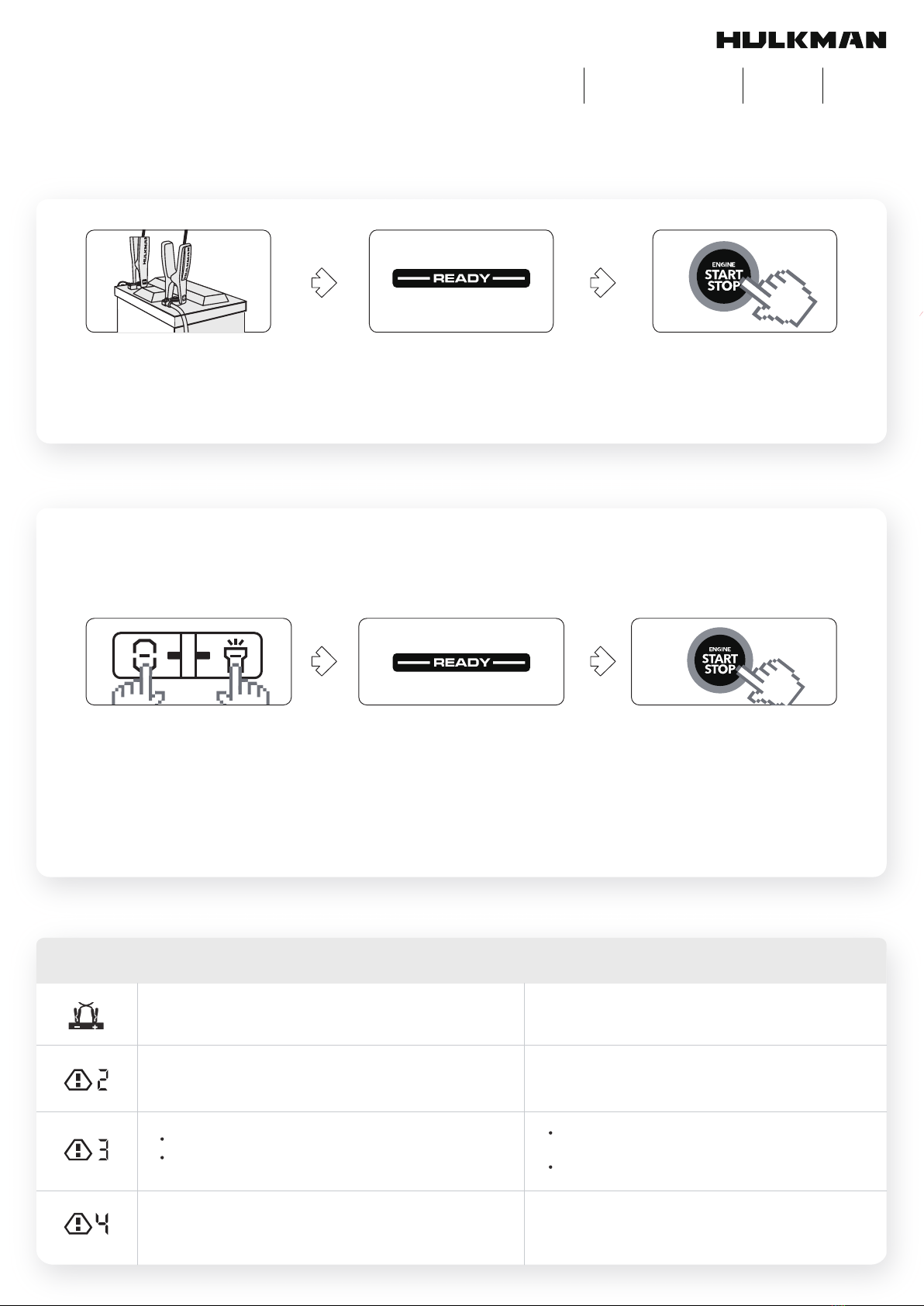
STEPS TO JUMP START YOUR VEHICLE
Insert the jumper cable into the jump
starter and connect the clamps to the car
battery.
‘’READY’’ sign shows on the screen. Start your car engine.
ABOUT THE FORCE START FUNCTION
Step 1
Why the screen shows nothing when you try to start your car ?
3 steps to fix your problem:
Step 2 Step 3
If the screen doesn’t display anything when you have correctly connected the clamps to your car, it means that your battery voltage is
extremely low, you can use the Force Start Function to enter boost mode.
1. Check the clamps connection and the product’s battery is above 20%.
2. Press the Power Button and Flashlight Button simultaneously for 2-3 seconds.
3. The screen shows “READY”, and go back to start engine ignition.
WARNING: WHEN USING THE FORCE START FUNCTION, AUTO-DETECTION AND SAFETY FEATURES WILL BE DISABLED.
ABOUT THE ERROR CODES
Error Code SolutionReason
Reverse the clamps and ensure the correct connection.‘’+’’and ‘’-’’ poles of battery clamps reversed.
The voltage of the car battery is between 2-8V.
The product’s operating temperature is too high / low.
Jump start the battery more than 5 times within 10
minutes, the product will automatically enter the safe
mode.
Press the Power Button and Flashlight Button
simultaneously for 2-3s to start force output.
(Force Start Function)
Please store it back to where the temperature is
between 32°F to 113°F.
The safe mode will be off automatically after 10
minutes waiting. (Please do not turn off the product
during the process)
Charge the device at extremely low or high temperature. Please charge the device at room temperature.
1200A 6.5L 4.0L
PEAK AMPS GAS DIESEL
12,000mAh
BATTERY CAPACITY

ABOUT USB-A OUTPUT PORT
USB-A
1.Plug the cable into the USB-A
output port.
IN/OUT Plug the cable into the USB-C
output port to charge your device.
THE CHARGER INCLUDED IN THE BOX IS A 10W WALL CHARGER. NOTE: 65W WALL CHARGER CAN BE PURCHASED SEPARATELY.
Fully charge your Alpha 65 jump starter in 45 minutes with our patented 65W recharge technology.
2.Press the Power Button.
ABOUT LED FLASHLIGHT
CHARGER YOU ALPHA 65 JUMP STARTER
1.Hold the Flashlight Button for 1-2s.
2.Press briefly to switch the light modes.•50% Lumen Light →100% Lumen Light →White
Strobe Light →White SOS Light
Flashlight
Button
CONTACT US
https://support.hulkman.com 46 Smith Alley, Suite 200 Pasadena, CA 91103 +1 (877) 892-9703 [email protected]