manuals.online logo
Brands
  1. Home
  2. •
  3. Brands
  4. •
  5. ILVE
  6. •
  7. Range
  8. •
  9. ILVE Majestic User manual

ILVE Majestic User manual

Other manuals for Majestic

1

This manual suits for next models

11

Other ILVE Range manuals

ILVE 1739ae Quick guide

ILVE

ILVE 1739ae Quick guide

ILVE UP76 Operating and maintenance manual

ILVE

ILVE UP76 Operating and maintenance manual

ILVE Nostalgie Professional Plus UP60 Operating and maintenance manual

ILVE

ILVE Nostalgie Professional Plus UP60 Operating and maintenance manual

ILVE T90 LVG User manual

ILVE

ILVE T90 LVG User manual

Popular Range manuals by other brands

Samsung FCQ321HTUW Service manual

Samsung

Samsung FCQ321HTUW Service manual

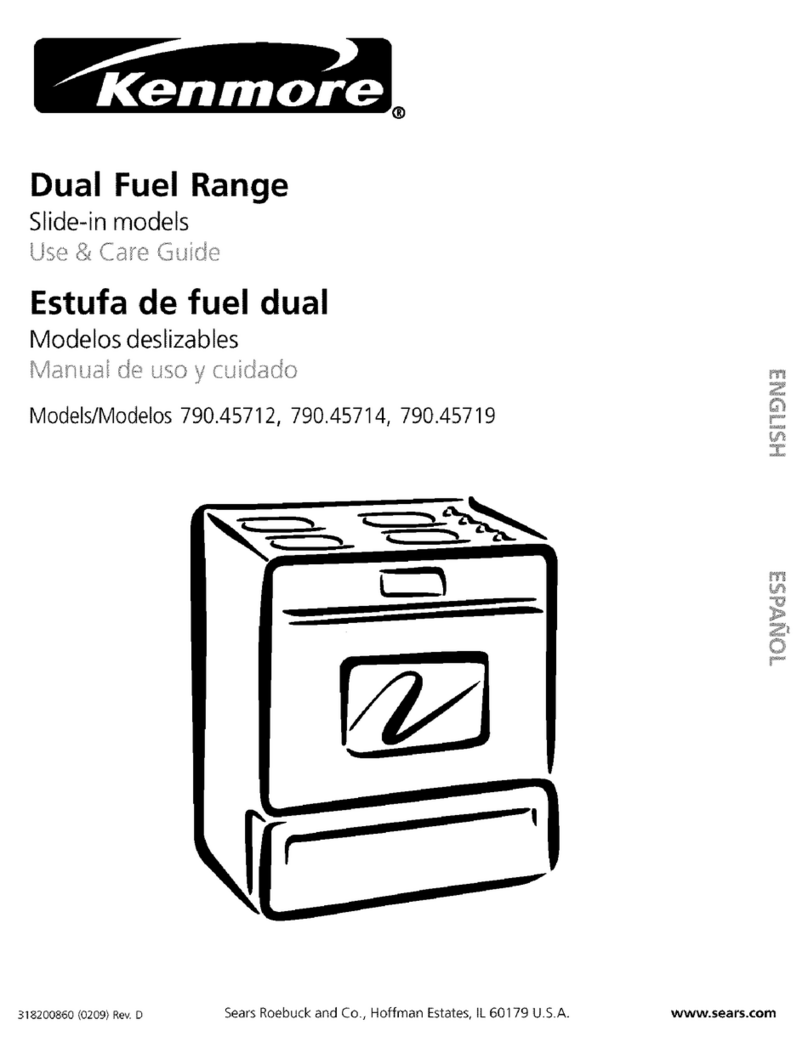
Kenmore 790.45712 Use & care guide

Kenmore

Kenmore 790.45712 Use & care guide

Wolf CHR CHSSR owner's manual

Wolf

Wolf CHR CHSSR owner's manual

Smeg Built-in Microwave Oven Instructions for the user

Smeg

Smeg Built-in Microwave Oven Instructions for the user

Zanussi ZCG054G user manual

Zanussi

Zanussi ZCG054G user manual

Whirlpool 8575985-W Warranty

Whirlpool

Whirlpool 8575985-W Warranty

Frigidaire 316000635 owner's guide

Frigidaire

Frigidaire 316000635 owner's guide

GE JCSS630 quick start guide

GE

GE JCSS630 quick start guide

Samsung NX58M9960P series installation manual

Samsung

Samsung NX58M9960P series installation manual

Hotpoint RB524R Use and care & installation instructions

Hotpoint

Hotpoint RB524R Use and care & installation instructions

Whirlpool Roper FGP305KW3 Use & care guide

Whirlpool

Whirlpool Roper FGP305KW3 Use & care guide

Amana ART6610 SERIES owner's manual

Amana

Amana ART6610 SERIES owner's manual

Maytag MERH770WB Use & care guide

Maytag

Maytag MERH770WB Use & care guide

Fulgor Milano SOFIA Use & care manual

Fulgor Milano

Fulgor Milano SOFIA Use & care manual

Premier EF-4358GH instruction manual

Premier

Premier EF-4358GH instruction manual

Kenmore 790.9010 Series Use & care guide

Kenmore

Kenmore 790.9010 Series Use & care guide

KitchenAid KESC300 Use and care guide

KitchenAid

KitchenAid KESC300 Use and care guide

Frigidaire FFEF3012LS Service data sheet

Frigidaire

Frigidaire FFEF3012LS Service data sheet

manuals.online logo
manuals.online logoBrands
  • About & Mission
  • Contact us
  • Privacy Policy
  • Terms and Conditions

Copyright 2025 Manuals.Online. All Rights Reserved.

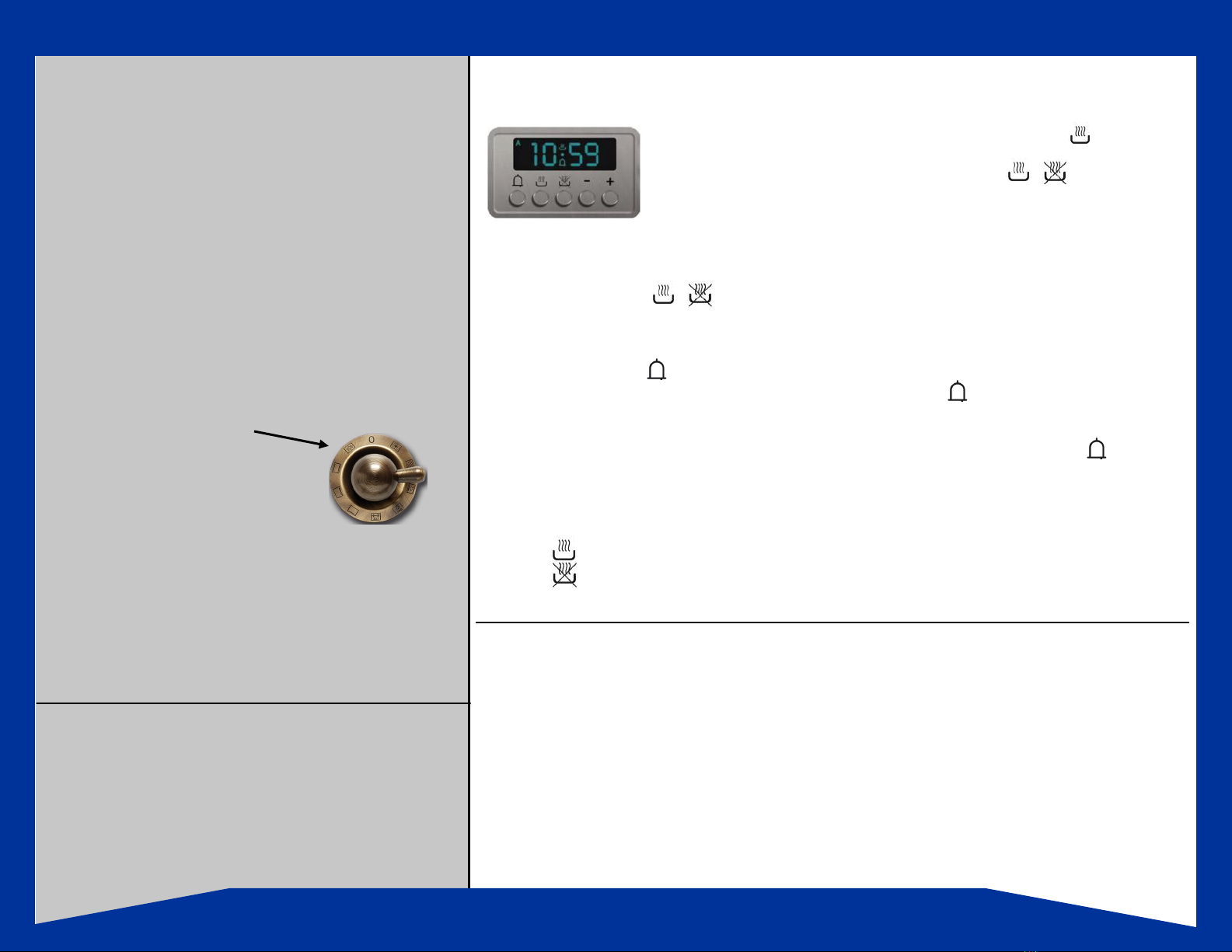
Clock & Timer Control
Always ensure the oven is in manual mode. The pot symbol should be dis-
played. If there is an A in the display, it means that the oven is in auto mode.
To cancel this, you must press both pot symbols simultaneously.
The oven will not operate if it is pre-programmed; it has to be brought back to
manual mode.
1. To Set or Adjust Time:
To enable use of your ILVE oven, you must first set the clock to the correct time.
Press both pot buttons simultaneously and then to adjust the time, press either the plus or
minus - + button accordingly.
2. To Set Alarm:
Hold in the bell button then the + button until required time is reached. If you go past the time,
use the - button to adjust. You will now notice the bell symbol on the display. This highlights
that the alarm is active. To check how much time is remaining to the alarm, press the bell button
again as this will return to the time display. When the alarm goes off, the oven will REMAIN ON and
will ring for 7 minutes unless turned off, which can be done by pressing the bell button .
The tone of the alarm can be adjusted by pressing the minus button - when the alarm is ringing. It
will scroll through 3 available tones. Select the desired tone and this will be your tone going forward.
3. Pre-Programming the Oven:
Press the button. Enter the duration that you want to cook the item for by pressing the + button.
Press the button. Select the time that you wish for the item to Finish cooking , by pressing the +
button. You will then need to select the mode and temperature using the proper knob selection.
Installation
ILVE Ranges feature many advanced cooking components
and safety refinements. However, before using your oven for
the first time, the following installation procedures should be
performed, oven elements need to be heated for the first
time (burned-in) and also a few reminders and “How To’s”.
First Time Start - Up
All removable parts of the oven should be washed with water
and hand dishwashing soap, dried and reassembled.
Burning-in the Elements
It is necessary to burn the protective oils that are used in
manufacturing and shipping from the elements.
1. Set oven temperature control knob to 440  and select
cooking function mode #1 by turning the function
control knob.
2 Allow to burn for 10 to 15 minutes.
3. Repeat Process for cooking modes
2 through 8 in sequence and allow to burn in each mode
for 10 to 15 minutes.
4. Clean oven thoroughly when you have completed the
burn-off process so the oven will be ready for use.
There might be a slight unpleasant odor during the initial
burn off procedure. As a result, it is advisable to open a
door or window in the kitchen during this procedure.
By recessing the upper roof element and extending the cook-
ing racks to the rear of the oven, ILVE has created an oven
interior which on average is 30% larger than ovens of similar
style. These designs features mean more cooking space is
available, so large roasts or four to five racks of food can be
cooked easily.
The ILVE electric oven has a quick start or preheat mode
which allows the oven to heat from 0 –350º F in just 6 to 8
minutes.
Quick Start Guide for your new ILVE Majestic Range
Oven Cooling Fan
ILVE ovens are equipped with a cavity cool-
ing fan. The fan is activated when the ther-
mostat on the control panel reaches 122  .
Air will gently be blown out through the
front vent, just above the oven door handle.
This keeps the interior of the oven housing
cool. This fan will remain on after the ov-
en is shut off until the temperature drops to
104º. Keeping the oven door slightly ajar
will help cool the oven.
Mode of Cooking
When using your ILVE oven you must select, using
separate knobs, both a mode of cooking and a tem-
perature at which to cook. The only exception to this
rule is when using the defrost mode, where no tem-
perature setting is required.
Panel Lights
Temperature is indicated by an ORANGE light. This
light will turn off when desired temperature is reached
and turn on as the oven is warming. Cooking mode
selection is indicated by a GREEN light. This light
should stay on throughout the cooking process.

Cleaning your New ILVE RangeFunctions of the
Majestic
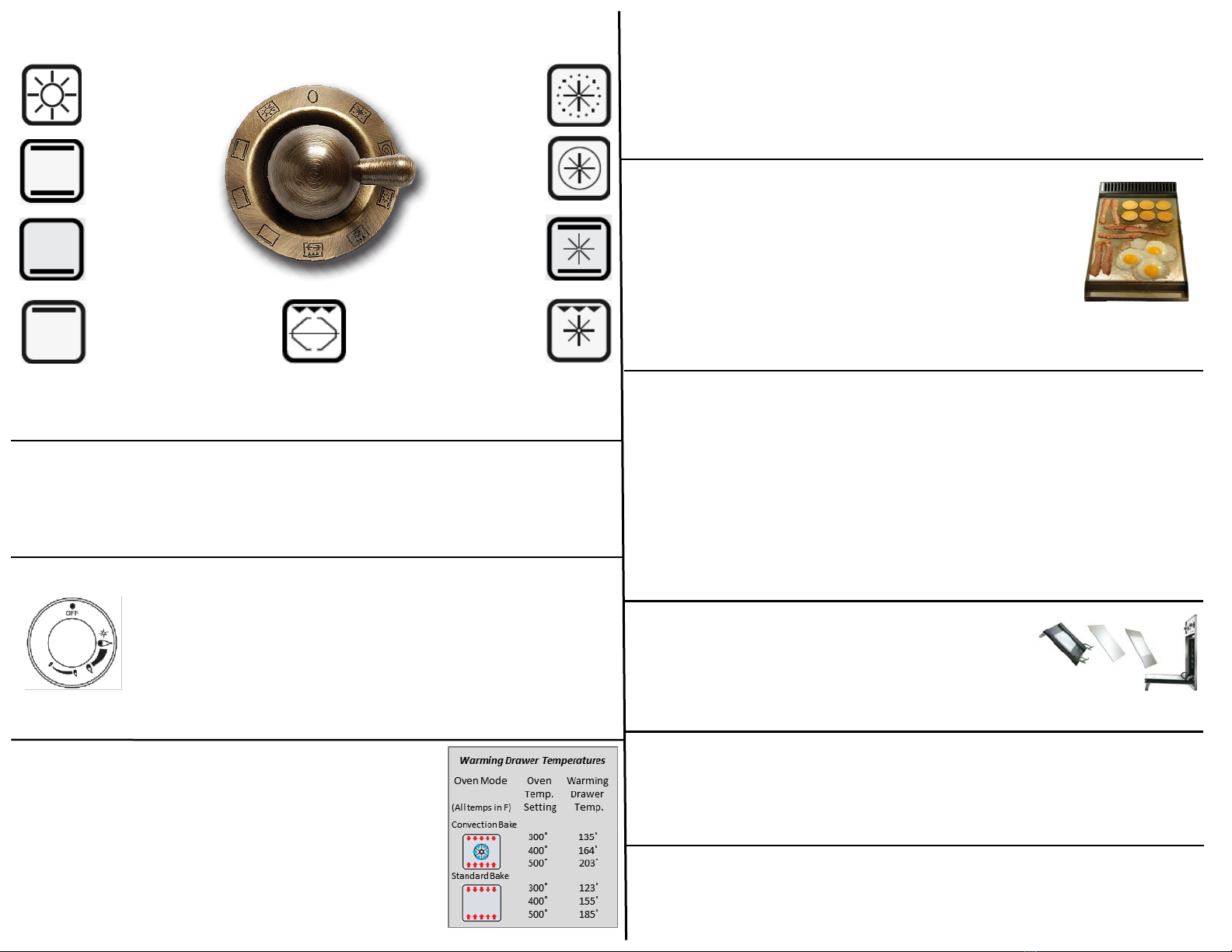
Control Knob
1. Pizza Mode
2. Conventional
Oven Mode
5. Conventional
Grilling Mode
9. Defrost Mode
Quick Start
3. Lower Element
Mode
6. Fan Grill Mode
4. Upper Element
Mode
7. Fan Assist Mode
8. Fan Forced
Mode
See your ILVE Manual - Page 20 for a detailed explanation of each knob function.
Locate the knob by the indicator next to it. Press and turn the knob to the
spark symbol and keep the knob pressed for 10 seconds. Once the burner
ignites, continue turning the knob in an counter-clockwise direction to the
first limit-stop which corresponds to a medium power level. If you press
firmly, you can go past the first stop and the external ring goes out, leaving
just the small center burner lit. To regulate the small center burner to minimum, turn the knob
in a counter-clockwise direction to the limit-stop (MINIMUM). To re-ignite the burner, turn the
knob in a clockwise direction past the limit-stop until you reach the required level.
Grates, Caps & Burners
Grates - should be cleaned once they have cooled. To clean grates, wash with warm
soapy water, then dry immediately. DO NOT use abrasive cleaner like Comet or steel
wool. Grates may discolor over time due to heat, acids or food enzymes. This is natural
and will not affect the performance of the cook top.
Burner Caps - sit on the brass burner and should be removed and washed in warm water.
Burner caps SHOULD NOT be put into cold water while hot as crazing can occur. Always
allow caps to cool completely before cleaning.
Brass Burners - will tarnish to a brown color with use. To clean, wash in warm soapy
water or soak in white vinegar overnight to remove food splatters.
Cook Top
Clean the Stainless Steel Cook top after each use with a soft clean cloth with household
cleaner. Avoid any cleaners which may contain chloride or a chloride compound. For
persistent stains, use warm white vinegar or a NON-ABRASIVE cleaner. Abrasive cleaners
will scratch the stainless steel. You may polish the cook top surface using a metal polish.
Oven Door
The oven door is composed of three sheets of plate glass. The
plate glass parts may be cleaned using paper towels and an ordi-
nary non-abrasive cleaner. The inside glass may be removed to
facilitate cleaning. To remove the door and glass, please see
detailed instructions on page 14 of your ILVE manual.
Warming Drawer
Every ILVE Majestic range has a warming drawer. Located below
the oven is a full-width drawer that captures residual heat from
the oven above and pulls it into the drawer. It’s important to un-
derstand that for the warming drawer to work, the oven must be
turned on. This chart lists the approximate temperature of the
warming drawer at certain oven temperatures.
DO NOT leave any plasc in the warming drawers.
Cleaning the Oven
The secret to cleaning the oven is to wipe spills as soon as they occur. Clean the oven with
hand dishwashing soap and water. You can also soften stubborn dirt and grime by placing a
shallow pan full of water in the oven and turning it on to a high temperature for 45 to 60
minutes. With the grease and grime loosened, you can clean the oven with soap and water.
Lighting the “Dual” Triple Ring Burner
Lighting the Gas Burners
After selecting the burner knob, press the knob controlling the desired burner and turn it to-
wards the left. There will be a clicking sound It is important to press the knob for 10
seconds. In this way the thermocouple bulb overheats and the gas passage is enabled. For
the “Griddle” and “French Top”, controlling knob only needs to be depressed for 2 seconds.
Self-Cleaning Panels (Optional)
If the oven is equipped with self-cleaning catalytic panels, the splashes of fat are trans-
formed into a light powder residue which can then be removed with a damp cloth once the
oven has cooled.
The Griddle Top
We recommend cleaning the plate at the end of each cooking session.
With the plate hot and the flame at minimum, remove the cooking resi-
due using the scraper provided. Pour a small amount of water onto the
plate and, using the scraper, continue cleaning the plate. Once the
water has completely evaporated, repeat the same operation (several
times, if necessary) until the desired result is obtained. It is extremely
important to clean the plate when it is quite hot, so care should be taken. The black
enamel flue may be cleaned with a soft cloth soaked with a solution of lukewarm water
and ammonia. Rinse and dry.