
manuals.online logo
Brands
  1. Home
  2. •
  3. Brands
  4. •
  5. Kendall Howard
  6. •
  7. Keyboard
  8. •
  9. Kendall Howard 1910-3-002-01 User manual

Kendall Howard 1910-3-002-01 User manual

This manual suits for next models

2

Popular Keyboard manuals by other brands

Man & Machine Really Cool + user guide

Man & Machine

Man & Machine Really Cool + user guide

SteelSeries APEX PRO TKL Product information guide

SteelSeries

SteelSeries APEX PRO TKL Product information guide

Vortexgear POK3R user manual

Vortexgear

Vortexgear POK3R user manual

Logitech RUGGED LITE quick start guide

Logitech

Logitech RUGGED LITE quick start guide

Honeywell ADEMCO 5839 Installation and setup guide

Honeywell

Honeywell ADEMCO 5839 Installation and setup guide

PROZIS EZ user manual

PROZIS

PROZIS EZ user manual

Hama AK-120 Operating	 instruction

Hama

Hama AK-120 Operating instruction

Rodgers RK-76 owner's manual

Rodgers

Rodgers RK-76 owner's manual

Logic Controls KB5000 Series user manual

Logic Controls

Logic Controls KB5000 Series user manual

Rapoo E9270P quick start guide

Rapoo

Rapoo E9270P quick start guide

AbleNet Chester Creek USB Keyboard quick start guide

AbleNet

AbleNet Chester Creek USB Keyboard quick start guide

iKey DP-88 Specifications

iKey

iKey DP-88 Specifications

Logitech G413 TKL SE Complete Setup Guide

Logitech

Logitech G413 TKL SE Complete Setup Guide

Ultimate Technology 500 POS user guide

Ultimate Technology

Ultimate Technology 500 POS user guide

Mace MACALLY MERGOKEY user guide

Mace

Mace MACALLY MERGOKEY user guide

iKey KYB-42-KIOSK Specifications

iKey

iKey KYB-42-KIOSK Specifications

Akko MX108 user manual

Akko

Akko MX108 user manual

Viper V770 user manual

Viper

Viper V770 user manual

manuals.online logo
manuals.online logoBrands
  • About & Mission
  • Contact us
  • Privacy Policy
  • Terms and Conditions

Copyright 2025 Manuals.Online. All Rights Reserved.

1
2
QTY 2
Extension
L Brackets
QTY 2
Extension Rails
QTY 1
2-Post Rackmount
Keyboard Tray Assembly
QTY 10
10-32 Cross
Head Screws
QTY 10
10-32 Cross
Head Screws
QTY 2
Extension
L Brackets
QTY 2
Extension Rails
QTY 1
2-Post Rackmount
Keyboard Tray Assembly
Screw Driver
*Only for 4-Post Rackmount Keyboard Tray and Extension Kit*
a) Pull the keyboard forward to
provide more room in the back
of the tray.
b) Using the included 10-32 Cross
Head Screws, secure the
Extension L Bracket to the rear
of the keyboard tray as shown.
c) Repeat on the other side.
3
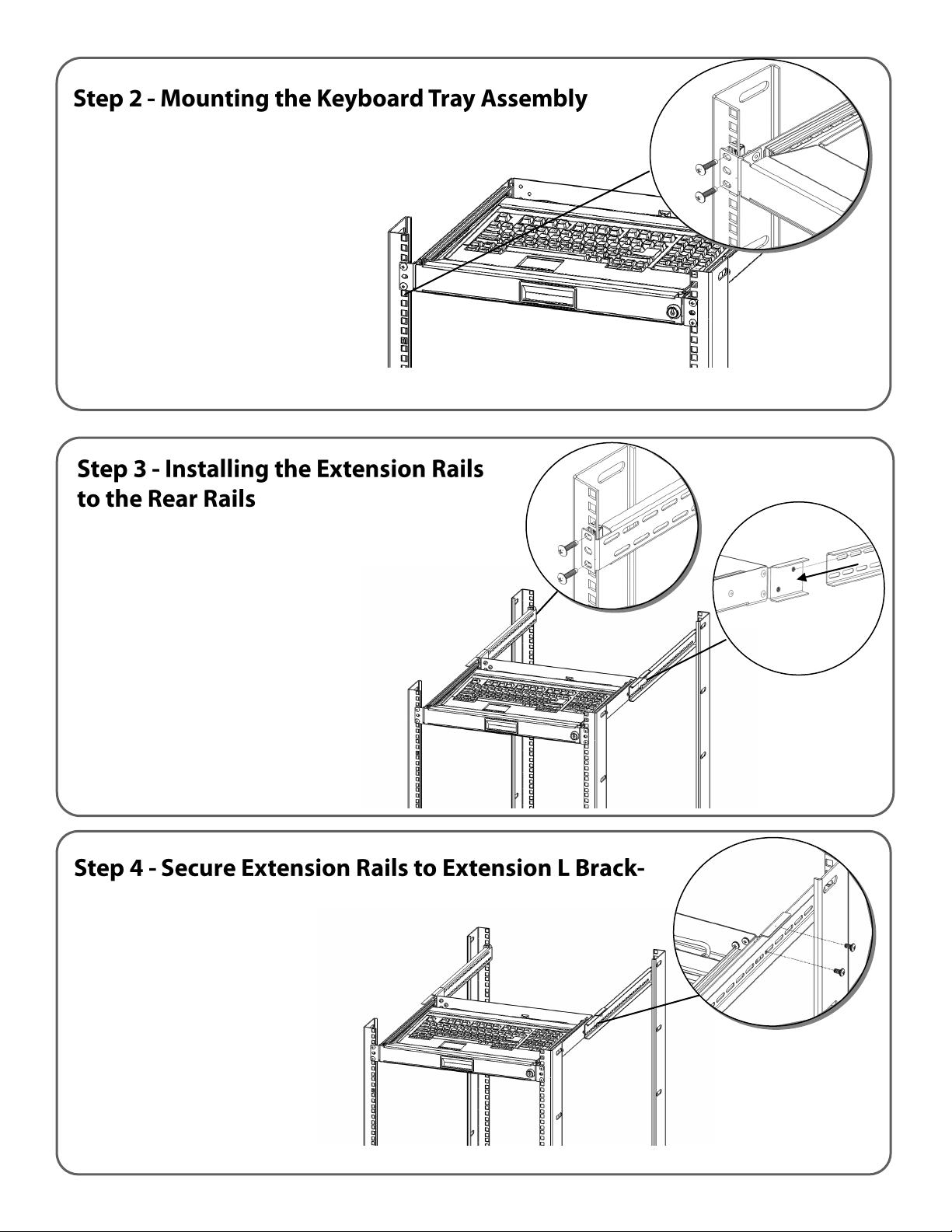
a) Aach the Extension Rails to the
rear rack rails using rack screws
show in Figure 1.(not included)
b) Please note the Extension Rails
will slide inside the Extension L
Brackets as shown in Figure 2.
a) Secure the Extension Rails
to the Extension L Brackets
(Figure 1) using the 10-32
Cross Head Screws
provided.
*Only for 4-Post Rackmount Keyboard Tray and Extension Kit*
*Only for 4-Post Rackmount Keyboard Tray and Extension Kit
Figure 1
Figure 2
Figure 1
a) Using rack screws (not included)
mount the Keyboard Tray on to
your front rack rails as shown
b) For the 2-Post Keyboard Tray
this completes the assembly.
c) For the 4-Post Keyboard Tray
and the Extension Kit please
connue to Step 3. *compable with both cage nut and tapped style rails
















