manuals.online logo
Brands
  1. Home
  2. •
  3. Brands
  4. •
  5. Kicker
  6. •
  7. Car Amplifier
  8. •
  9. Kicker Impulse IX405D User manual

Kicker Impulse IX405D User manual

Other manuals for Impulse IX405D

1

Other Kicker Car Amplifier manuals

Kicker 500ss User manual

Kicker

Kicker 500ss User manual

Kicker ZX550.3 User manual

Kicker

Kicker ZX550.3 User manual

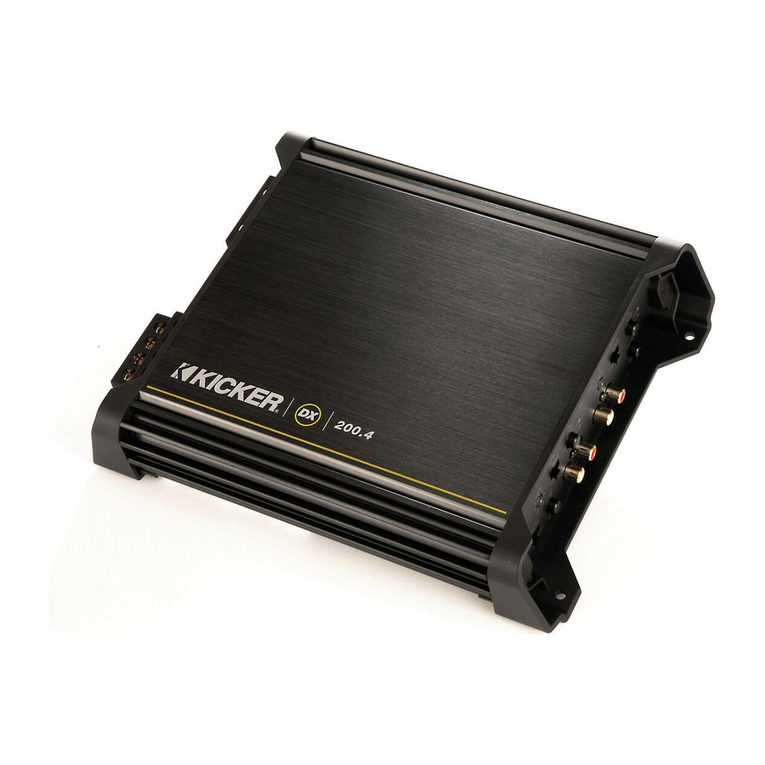
Kicker DX200.4 User manual

Kicker

Kicker DX200.4 User manual

Kicker ZX150.2 User manual

Kicker

Kicker ZX150.2 User manual

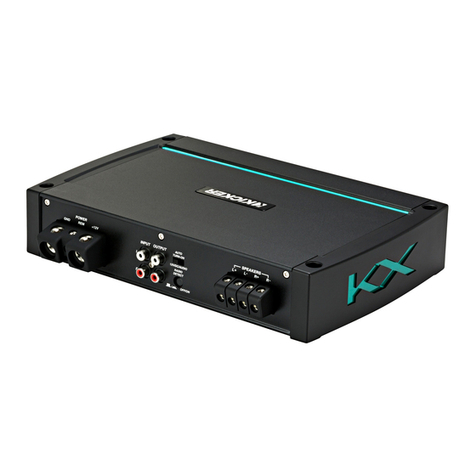
Kicker KX550.3 User manual

Kicker

Kicker KX550.3 User manual

Kicker X50s Competition User manual

Kicker

Kicker X50s Competition User manual

Kicker 50 Si User manual

Kicker

Kicker 50 Si User manual

Kicker IX1000.5 User manual

Kicker

Kicker IX1000.5 User manual

Kicker MX350.4 User manual

Kicker

Kicker MX350.4 User manual

Kicker DX250.4 User manual

Kicker

Kicker DX250.4 User manual

Kicker SoundStages PWRA211 User manual

Kicker

Kicker SoundStages PWRA211 User manual

Kicker KX120.2 User manual

Kicker

Kicker KX120.2 User manual

Kicker ZX300.3 User manual

Kicker

Kicker ZX300.3 User manual

Kicker KX150.2 User manual

Kicker

Kicker KX150.2 User manual

Kicker KX550.3 User manual

Kicker

Kicker KX550.3 User manual

Kicker IX500.4 User manual

Kicker

Kicker IX500.4 User manual

Kicker Impulse IX406 User manual

Kicker

Kicker Impulse IX406 User manual

Kicker Impulse IX254 User manual

Kicker

Kicker Impulse IX254 User manual

Kicker ZX300.1 User manual

Kicker

Kicker ZX300.1 User manual

Kicker KX350.2 User manual

Kicker

Kicker KX350.2 User manual

Kicker DX200.4 User manual

Kicker

Kicker DX200.4 User manual

Kicker DXA125.2 User manual

Kicker

Kicker DXA125.2 User manual

Kicker KX1200.1 User manual

Kicker

Kicker KX1200.1 User manual

Kicker ZX100.2 User manual

Kicker

Kicker ZX100.2 User manual

Popular Car Amplifier manuals by other brands

Boss Audio Systems US140 user manual

Boss Audio Systems

Boss Audio Systems US140 user manual

Boss Audio Systems FNX2000 user manual

Boss Audio Systems

Boss Audio Systems FNX2000 user manual

Pioneer GM-D8500M owner's manual

Pioneer

Pioneer GM-D8500M owner's manual

MTX Thunder Marine TM904 user guide

MTX

MTX Thunder Marine TM904 user guide

MTX Thunder TA Super TA92001 Connection guide

MTX

MTX Thunder TA Super TA92001 Connection guide

Lanier 480-0239 Material safety data sheet

Lanier

Lanier 480-0239 Material safety data sheet

Kenwood KAC-642 instruction manual

Kenwood

Kenwood KAC-642 instruction manual

Sony XM-405EQX Marketing Specifications Product guide

Sony

Sony XM-405EQX Marketing Specifications Product guide

Jensen XA4150 owner's manual

Jensen

Jensen XA4150 owner's manual

Audiopipe AQX-660.2 owner's manual

Audiopipe

Audiopipe AQX-660.2 owner's manual

Clarion APA2001  APA2001 APA2001 Owners & installation manual

Clarion

Clarion APA2001 APA2001 APA2001 Owners & installation manual

Cyfre CHACDMA-819 installation manual

Cyfre

Cyfre CHACDMA-819 installation manual

Sony XM-7547 Service manual

Sony

Sony XM-7547 Service manual

Alpine PDX11000 - Amplifier Review guide

Alpine

Alpine PDX11000 - Amplifier Review guide

Steg Qx Mos 105.4x user manual

Steg

Steg Qx Mos 105.4x user manual

Jensen PS1220M Installation & operation manual

Jensen

Jensen PS1220M Installation & operation manual

Kenwood KAC-8105D instruction manual

Kenwood

Kenwood KAC-8105D instruction manual

Pioneer GM-5000T owner's manual

Pioneer

Pioneer GM-5000T owner's manual

manuals.online logo
manuals.online logoBrands
  • About & Mission
  • Contact us
  • Privacy Policy
  • Terms and Conditions

Copyright 2025 Manuals.Online. All Rights Reserved.

Congratulations! You have just purchased one of the latest in a long line
of exceptional car audio power amplifiers from Stillwater Designs. Your
KICKE IX405D was designed and engineered by the same team which
created many other international award winning KICKE components like the
Z , ZX, DX, and XS-Series amps. It contains a number of cutting-edge features
that let you build an entire car audio system around this single power
component. It will give you years of outstanding performance and
dependability when installed in a properly designed system.
Thanks for buying KICKE . Enjoy.
KICKER IMPULSE AMPLIFIER FEATURES
Separate electronic crossovers are built in for convenience and allow you to
select full range or highpass for front and rear channels as well as lowpass fre-
quencies for the sub output.
The Kicker Impulse IX 05 Amplifier is 2 Ohm stable on all five channels; the
sub out can be bridged to as low as 2 Ohm mono. For connection to the source ,
you have the option of low level RCA inputs or a high level input for use with
radios that don’t have RCA outputs.
Separate KICKEQ bass and treble controls give you the ability to boost low
and high frequencies to tailor the music to your taste. Dash-mounted remote
control lets you adjust bass output levels from your listening position.
Auto-resetting short circuit and overthermal protection circuits are incorpo-
rated to protect the amplifier from failure due to extreme conditions.
State of the art circuitry including MOSFET power supply and glass epoxy cir-
cuit boards are used to ensure many years of trouble free operation.

IMPULSE IX405D
Five-Channel Power Amplifier
2
Wiring
The preferred method of bringing input signal in to the amplifier is with RCA
cables from a quality tape or CD player. A high (speaker) level input signal may also
be used if your factory deck or aftermarket source does not have low level RCA
jacks. It is not recommended to mix high and low level inputs. Engine noise in the
system will probably result.
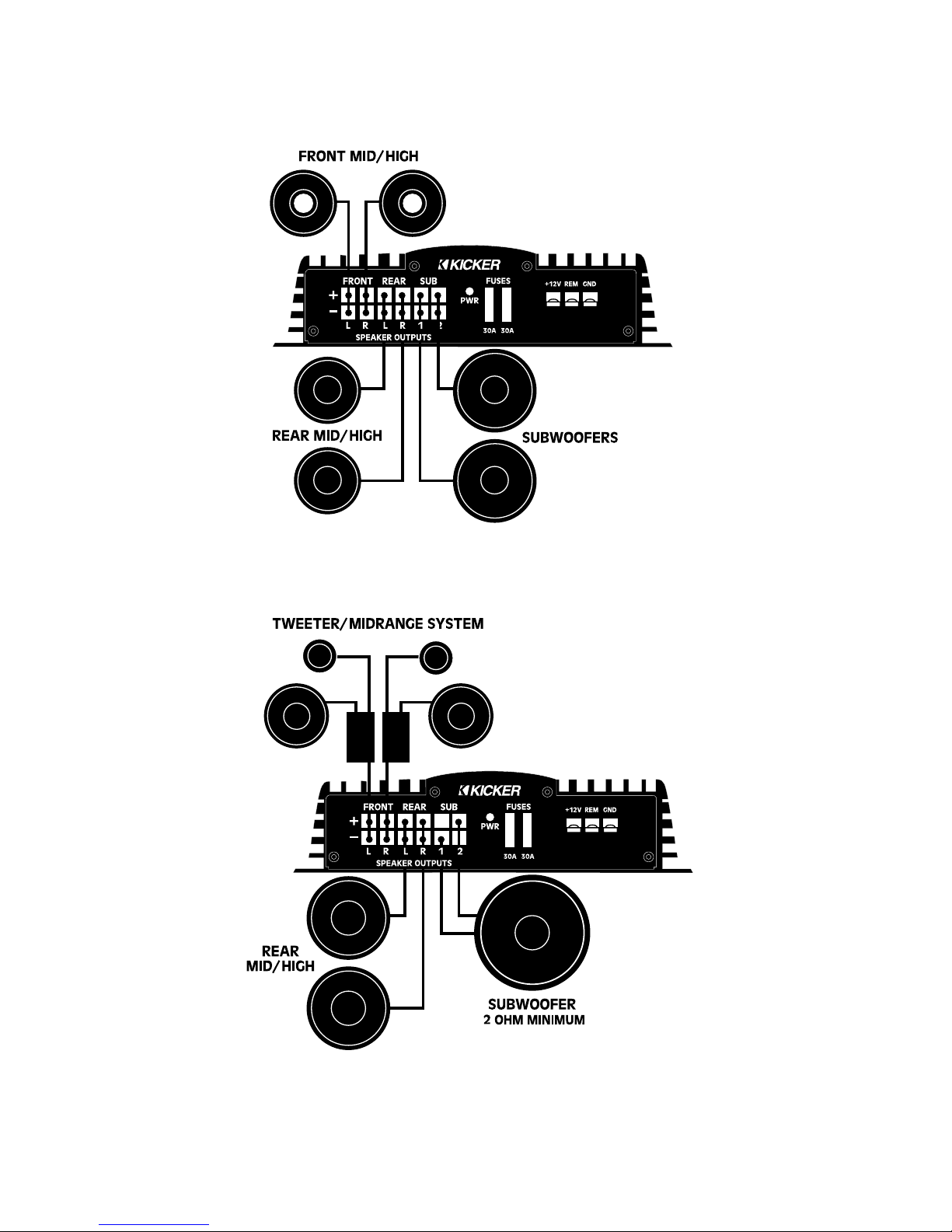
Some of the system possibilities are shown in the System Diagrams section of
this manual.
When working with power connections always hook up the ground wire first
and disconnect the ground wire last. Never make any wiring changes with the
amplifier powered up.
The chassis mounted fuse(s) are in place to protect the circuitry of the
amplifier in the event of major trouble. An in-line fuse must be installed within 18
inches of the battery to protect the power wire used to supply current to the
amplifier. For the Kicker Impulse IX 05D amplifier a fuse value of 60A and 8 gauge
power wire are recommended. If the power wire is longer than 10 feet, we rec-
ommend that the wire size be gauge to reduce losses.
Any time that a power wire goes through a metal panel such as the firewall,
or if there is any chance of abrasion, it is necessary to use a grommet or other
suitable form of protection to avoid shorts.
The ground wire should be at least 8 gauge, as short as possible and
attached to the body of the vehicle. The ground point must be free from paint
and corrosion. We recommend using the same gauge wire for power and ground.
Mounting the IMPULSE Amp ifier
After determining an appropriate mount-
ing location which provides good air circulation
and access to the end panel controls, use the
supplied screws and washers to firmly mount
the amplifier. The amplifier chassis can be
used as a template for the screw locations.
Check to make sure that the mounting screws
will not damage any components on the back
side of the chosen mounting surface.
If a vertical mounting surface is chosen,
we recommend that the heatsink fins run ver-
tically as shown for improved cooling.
The subwoofer remote controller can be
mounted in any convenient location in the
vehicle. It should be within easy reach of the
driver to avoid any dangerous situations while
driving.

3
EXPLANATION OF INPUT OPTIONS FOR THE IMPULSE IX405D
The IX 05D amplifier has five different options for hookup to your source unit.

1. One pair of RCA cables.
2. Two pairs of RCA cables.
3. Three pairs of RCA cables.
. One stereo pair of high level inputs.
5. Two stereo pairs of high level inputs.
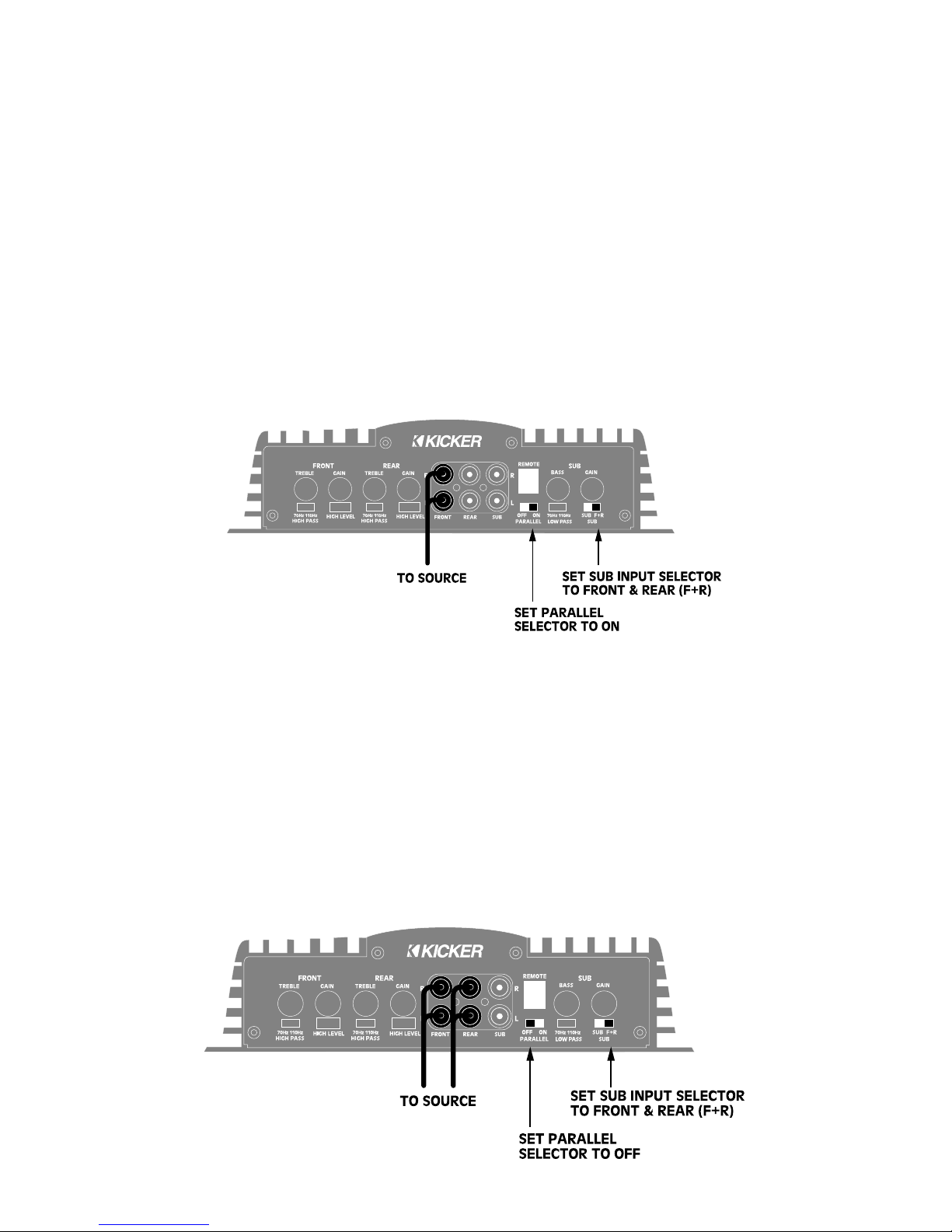
The Parallel input selector switch allows you to select one or two inputs (low level or
high). The sub channel gets its signal from the front and rear inputs, or from separate RCA
jacks, determined by the position of the Sub Channel input switch.
Input Option 1: Using One Pair of RCA Cables
With the Parallel input selector switch in “ON” position, and the Sub input switch in the
“F+R” position, all five channels receive input from the front input RCA’s.
This configuration gives output on all five channels with only one pair of inputs. There
is no fader capability.
Input Option 2: Using Two Pairs of RCA Cables
With the Parallel input selector switch in the “OFF” position, and the Sub input switch
in the “F+R” position, the fader capabilities are enabled and the sub channel gets signals
from both front and rear inputs.
4
Input Option 3: Using Three Pairs of RCA Cables
If the source unit has a separate sub output or if using an external crossover,
use this configuration. With the Parallel input selector in the “OFF” position and
RCA’s plugged into the sub inputs, you have six inputs and five channel outputs,
all separate
Input Option 4: Using a Stereo Pair of igh Level Inputs
With the Parallel input selector switch in “ON” position, and the Sub input
switch in the “F+R” position, all channels receive input from the front high level
inputs. There is no fader capability.
Input Option 5: Using Two Stereo Pairs of igh Level Inputs
With the Parallel input selector switch in the “OFF” position, and the Sub
input switch in the “F+R” position, fader capability is enabled and the sub channel
gets signal from both front and rear inputs.
5
Basic Systems for the IMPULSE Five-Channe Amp ifier
Front & Rear Speakers with Subwoofers
*Front & Rear crossovers set to 70 or 110Hz highpass.
Sub crossover set to 70 or 110Hz owpass.
4 ohm minimum
per subwoofer
6
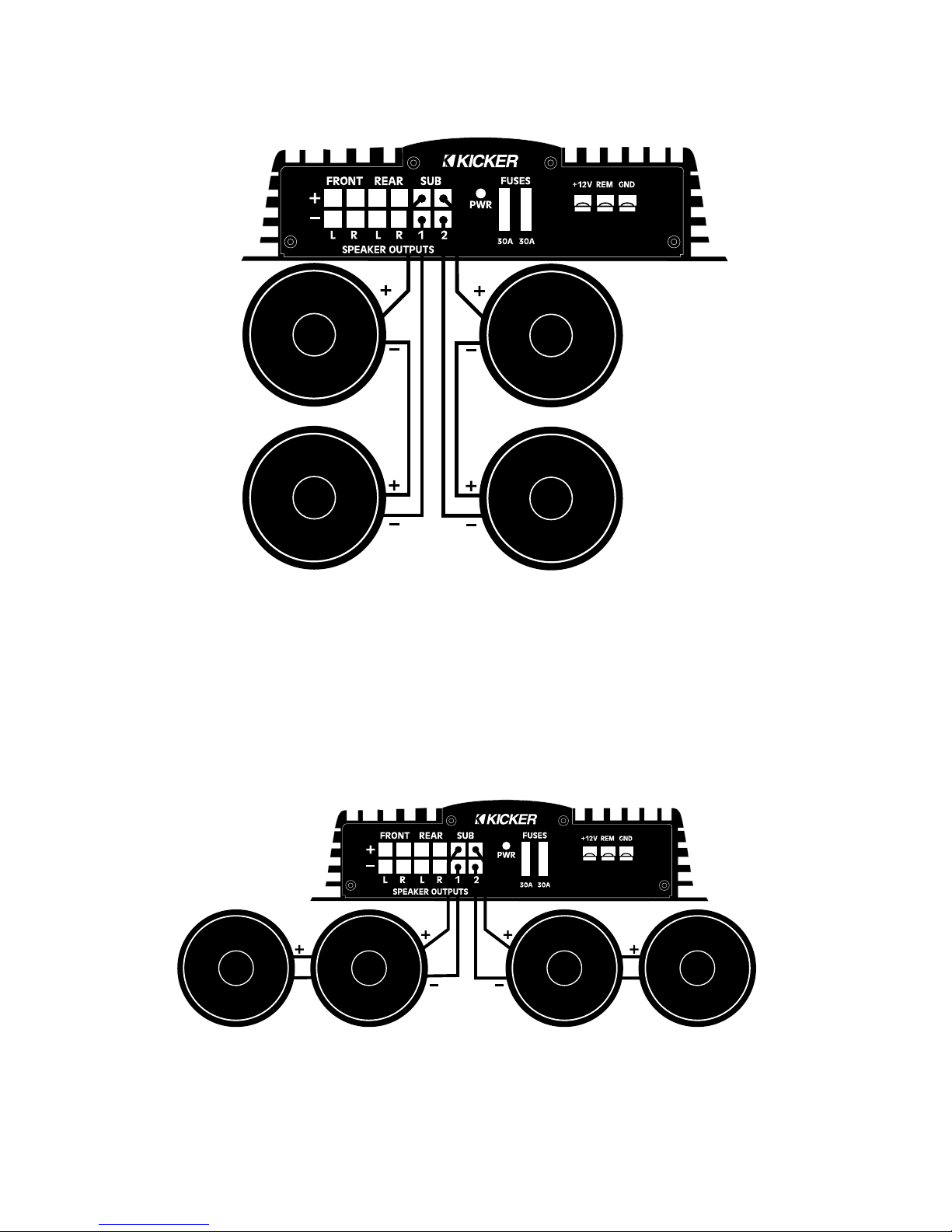
Basic Sub Options for the KICKER IX405D
Your Kicker Impulse IX 05D has a mono/single channel subwoofer output
section . The minimum total load that the subwoofer section will accommodate is
a 2 Ohm load. Four screw terminals are provided for ease of installation when
multiple woofers are being used, but full output can be had by using only one pair
of terminals.
The following diagrams suggest a number of different subwoofer system
possibilities.
Sing e Subwoofer
2 or 4 ohm
Subwoofer
4 or 8 ohm
Subwoofer
Dua Subwoofers
Four 2 Ohm Subwoofers
Four 8 Ohm Subwoofers
7
8
Three DVC Subwoofers
4 ohm minimum
per subwoofer
9
Adjustments and Contro s
Setting Gain Control
The gain control is provided for level matching purposes. The control does
not give the amplifier any more power by turning it up. Its purpose is to adjust
the sensitivity of the amplifier in relation to the output level provided by the
source.
Start with the amp gains set to minimum by turning the controls counter-
clockwise. Turn the source level up until distortion is barely audible. Then turn the
source down slightly. This will typically be at about 85 to 95% of full volume. Raise
the front amplifier gain control until distortion is just audible in the front speak-
ers. Now the deck is matched to the front amplifier channels. Turn the source
down to a realistic listening level.
Turn the rear amplifier gain control up until the desired front/rear balance is
achieved.
Turn the remote subwoofer control all the way up. Turn the sub gain adjust-
ment on the amplifier chassis up to provide the bass level desired.
Note: As the KICKEQ controls are turned up to provide additional bass or tre-
ble, the overall signal goes up. It may be necessary to readjust the gain controls if
the KICKEQ controls are turned up very much.
Setting KICKEQ™ Controls
The Bass and Treble controls on your Impulse Amplifier are provided to help
tune your system for ideal sound quality. After the system is installed and the
vehicle is put back together, do a listening test with music that is typical of the
type you normally listen to.
Initially set the tone controls on the source unit to flat and turn the KICKEQ™
controls fully counter-clockwise. Depending on your personal taste and the speak-
ers used in the system, you may want to increase the high or low frequencies by
turning the KICKEQ™ controls clockwise. Remember that once the vehicle is in
motion there will be an apparent loss of bass due to the masking effect of road
noise. Do not attempt to make adjustments whi e the vehic e is in
motion. It is safer to pull off the road to make changes.
Never change the crossover settings whi e the amp ifier is on. A
loud pop will result which could destroy speakers or cause hearing loss.
10
Troub eshooting
The LED mounted on the end panel of the amplifier lights up in two different
colors depending on the condition of the amplifier. Green indicates that the
amplifier is turned on and no trouble exists. When it turns red this indicates that
the protection circuit has been engaged. The LED on the top of the amplifier
chassis indicates that the amplifier is on. When the protection circuit is engaged,
this LED turns off.
Green power indicator off, no output:
• With Volt Ohm Meter (VOM) check:
1. +12v power terminal
2. Ground terminal
3. Remote turn-on lead
Green power indicator on, no output:
• Check RCA and connections
• Test speaker outputs with known good speaker
• Check function of source unit
• With VOM in AC volts position check RCA for signal
No output from one channel:
• Check RCA and speaker connections for that channel
• Swap RCA connections from left to right
• Swap speaker connections between channels
Red LED protection indicator is lit and there is no output:
Case 1:Amp is very hot
• Thermal protection is engaged. Check for proper impedance at
speaker terminals. Also check location of amplifier to ensure proper
air flow around heatsink.
Case 2:Output resumes momentarily when system is turned off and
back on.
• Short circuit protection is engaged. With VOM check for short
between speaker positive and negative, and between speaker
terminals and ground.
Alternator noise (a whining that varies with engine RPM)
• Make sure that the ground for the source is as short as possible
and connected to bare chassis metal. The stock radio ground may
not be sufficient.
• Check RCA cable routing and condition. Keep RCA cables away from
all power wires.