
Liebert MONITORING OpenComms User manual

MONITORING
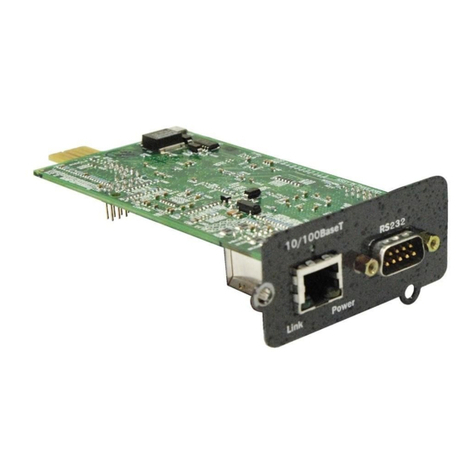
OpenComms NIC
USER MANUAL


i
TABLE OF CONTENTS
1.0 INTRODUCTION. . . . . . . . . . . . . . . . . . . . . . . . . . . . . . . 1
1.1 OpenComms Compatibility . . . . . . . . . . . . . . . . . . . . . . . 2
2.0 INSTALLATION . . . . . . . . . . . . . . . . . . . . . . . . . . . . . . . 5
2.1 Retrofit Kit . . . . . . . . . . . . . . . . . . . . . . . . . . . . . . . . . . . . 5
2.2 Self-Contained Unit . . . . . . . . . . . . . . . . . . . . . . . . . . . . . 5
2.3 User Connections for OpenComms NIC . . . . . . . . . . . . . 6
2.3.1 Network Port . . . . . . . . . . . . . . . . . . . . . . . . . . . . . . . . . . . . 6
2.3.2 BMS Port . . . . . . . . . . . . . . . . . . . . . . . . . . . . . . . . . . . . . . . 6
2.3.3 Configuration Port / Service Terminal . . . . . . . . . . . . . . . . 6
3.0 SYSTEM CONFIGURATION. . . . . . . . . . . . . . . . . . . . . . . 9
3.1 DIP Switch Settings . . . . . . . . . . . . . . . . . . . . . . . . . . . . . 9
3.2 Service Terminal . . . . . . . . . . . . . . . . . . . . . . . . . . . . . . . 9
4.0 OPERATION . . . . . . . . . . . . . . . . . . . . . . . . . . . . . . . . 14
4.1 SNMP . . . . . . . . . . . . . . . . . . . . . . . . . . . . . . . . . . . . . . . 14
4.2 Liebert Global Products MIB. . . . . . . . . . . . . . . . . . . . . 14
4.3 RFC 1628 UPS MIB . . . . . . . . . . . . . . . . . . . . . . . . . . . . 15
4.3.1 SNMP Traps . . . . . . . . . . . . . . . . . . . . . . . . . . . . . . . . . . . 15
4.4 MIB . . . . . . . . . . . . . . . . . . . . . . . . . . . . . . . . . . . . . . . . . 17
4.5 HTTP. . . . . . . . . . . . . . . . . . . . . . . . . . . . . . . . . . . . . . . . 17
4.6 Modbus RTU. . . . . . . . . . . . . . . . . . . . . . . . . . . . . . . . . . 17
4.7 System Reset . . . . . . . . . . . . . . . . . . . . . . . . . . . . . . . . . 17
4.8 Diagnostics . . . . . . . . . . . . . . . . . . . . . . . . . . . . . . . . . . . 18
5.0 MODBUS COMMUNICATIONS AND CONNECTIVITY. . . . . 19
5.1 Implementation Basics . . . . . . . . . . . . . . . . . . . . . . . . . 19
5.1.1 Constraints . . . . . . . . . . . . . . . . . . . . . . . . . . . . . . . . . . . . 19
5.2 Transmission Format. . . . . . . . . . . . . . . . . . . . . . . . . . . 19
5.3 Physical Connection . . . . . . . . . . . . . . . . . . . . . . . . . . . . 20

ii
5.4 Modbus Slave Functions . . . . . . . . . . . . . . . . . . . . . . . . 21
5.4.1 Data Type. . . . . . . . . . . . . . . . . . . . . . . . . . . . . . . . . . . . . . 21
5.4.2 Function Code Support . . . . . . . . . . . . . . . . . . . . . . . . . . . 22
5.4.3 Read/Write Holding Registers (0x03, 0x06, 0x10) . . . . . . 22
5.4.4 Read Input Registers (0x04) . . . . . . . . . . . . . . . . . . . . . . . 22
5.4.5 Read, Set Coil Status (0x01, 0x05, 0x0F) . . . . . . . . . . . . . 22
5.4.6 Read Input Status (0x02) . . . . . . . . . . . . . . . . . . . . . . . . . 23
5.4.7 Error Handling . . . . . . . . . . . . . . . . . . . . . . . . . . . . . . . . . 23
5.5 RTU Framing Examples . . . . . . . . . . . . . . . . . . . . . . . . 24
5.5.1 Read Registers (Function Code 0x03 & 0x04) . . . . . . . . . 24
5.5.2 Write single holding register (Function Code 0x06) . . . . 24
6.0 NIC SETUP AND TESTING. . . . . . . . . . . . . . . . . . . . . . 25
6.1 Jumper Placement . . . . . . . . . . . . . . . . . . . . . . . . . . . . . 25
6.2 Testing the Network. . . . . . . . . . . . . . . . . . . . . . . . . . . . 26
6.3 Service Terminal Troubleshooting . . . . . . . . . . . . . . . . 26
6.4 SNMP Troubleshooting . . . . . . . . . . . . . . . . . . . . . . . . . 26
6.5 Web Troubleshooting . . . . . . . . . . . . . . . . . . . . . . . . . . . 27
6.6 Modbus Troubleshooting . . . . . . . . . . . . . . . . . . . . . . . . 27
7.0 FIRMWARE UPDATES . . . . . . . . . . . . . . . . . . . . . . . . . 28
7.1 Establishing Communication—Necessary
Components . . . . . . . . . . . . . . . . . . . . . . . . . . . . . . . . . . 28
7.2 Establishing Communication—Service Terminal
Settings . . . . . . . . . . . . . . . . . . . . . . . . . . . . . . . . . . . . . . 29
7.3 Firmware Update Procedure . . . . . . . . . . . . . . . . . . . . . 30
8.0 EXTERNAL ENCLOSURES . . . . . . . . . . . . . . . . . . . . . . 33
8.1 Power Connection. . . . . . . . . . . . . . . . . . . . . . . . . . . . . . 33
8.2 Communication Connection. . . . . . . . . . . . . . . . . . . . . . 33
9.0 RETROFIT INSTALLATION . . . . . . . . . . . . . . . . . . . . . . 34
9.1 Environmental Installation . . . . . . . . . . . . . . . . . . . . . . 34
9.1.1 Deluxe System/3 . . . . . . . . . . . . . . . . . . . . . . . . . . . . . . . .34
9.2 System Wiring (SM, AM, AG Microprocessors) . . . . . . 37

iii
9.3 Power Connection (SM, AM, AG Microprocessors). . . . 37
9.3.1 Power Connection (Level 0 and Level 10
Microprocessors) . . . . . . . . . . . . . . . . . . . . . . . . . . . . . . . . 37
9.3.2 Communication Connection (SM, AM, AG
Microprocessor) . . . . . . . . . . . . . . . . . . . . . . . . . . . . . . . . . 38
9.3.3 Communication Connection (Level 0 and Level 10
Microprocessors) . . . . . . . . . . . . . . . . . . . . . . . . . . . . . . . . 38
9.4 Himod (LNA) . . . . . . . . . . . . . . . . . . . . . . . . . . . . . . . . . 38
9.4.1 System Wiring (Himod). . . . . . . . . . . . . . . . . . . . . . . . . . . 39
9.4.2 Power Connection (Himod) . . . . . . . . . . . . . . . . . . . . . . . . 39
9.4.3 Communication Connection (HiMod) . . . . . . . . . . . . . . . . 39
9.5 Mini-Mate2 . . . . . . . . . . . . . . . . . . . . . . . . . . . . . . . . . . . 39
9.6 Emerson Network Power (CEMS100 / LECS15) . . . . . 40
9.7 UPS Installation. . . . . . . . . . . . . . . . . . . . . . . . . . . . . . . 40
9.8 Npower . . . . . . . . . . . . . . . . . . . . . . . . . . . . . . . . . . . . . . 40
9.8.1 Power Connection for NPower . . . . . . . . . . . . . . . . . . . . . 40
9.8.2 Communication Connection for NPower . . . . . . . . . . . . . 40
9.9 7200 UPS . . . . . . . . . . . . . . . . . . . . . . . . . . . . . . . . . . . . 42
9.10 HiPulse UPS. . . . . . . . . . . . . . . . . . . . . . . . . . . . . . . . . . 44
9.11 Static Switch2. . . . . . . . . . . . . . . . . . . . . . . . . . . . . . . . . 46
9.12 STS . . . . . . . . . . . . . . . . . . . . . . . . . . . . . . . . . . . . . . . . . 47
9.13 PDU and DataWave with PMP & EPMP . . . . . . . . . . . 47

iv
FIGURES
Figure 1 Typical installation of OpenComms NIC card . . . . . . . . . . . . . . . 1
Figure 2 Connections . . . . . . . . . . . . . . . . . . . . . . . . . . . . . . . . . . . . . . . . . . 5
Figure 3 Null modem cable diagram . . . . . . . . . . . . . . . . . . . . . . . . . . . . . . 7
Figure 4 NIC main menu in HyperTerminal . . . . . . . . . . . . . . . . . . . . . . . 8
Figure 5 LED locations. . . . . . . . . . . . . . . . . . . . . . . . . . . . . . . . . . . . . . . . 18
Figure 6 Typical maximum installation . . . . . . . . . . . . . . . . . . . . . . . . . . 20
Figure 7 Exceeding maximum specifications . . . . . . . . . . . . . . . . . . . . . . 21
Figure 8 Jumper positions . . . . . . . . . . . . . . . . . . . . . . . . . . . . . . . . . . . . . 25
Figure 9 NIC-ENCL1 internal view. . . . . . . . . . . . . . . . . . . . . . . . . . . . . . 33
Figure 10 Deluxe System 3 NIC installation . . . . . . . . . . . . . . . . . . . . . . . 34
Figure 11 Deluxe System 3 chilled water control cavity . . . . . . . . . . . . . . 35
Figure 12 ICS control cavity. . . . . . . . . . . . . . . . . . . . . . . . . . . . . . . . . . . . . 35
Figure 13 Challenger installation location . . . . . . . . . . . . . . . . . . . . . . . . . 36
Figure 14 Himod NIC installation location . . . . . . . . . . . . . . . . . . . . . . . . . 38
Figure 15 NPower UPS NIC installation . . . . . . . . . . . . . . . . . . . . . . . . . . 41
Figure 16 7200 UPS NIC installation . . . . . . . . . . . . . . . . . . . . . . . . . . . . . 43
Figure 17 HiPulse installation. . . . . . . . . . . . . . . . . . . . . . . . . . . . . . . . . . . 45
Figure 18 STS2 typical NIC location . . . . . . . . . . . . . . . . . . . . . . . . . . . . . . 46
Figure 19 STS2 NIC installation, 800-1000A units . . . . . . . . . . . . . . . . . . 46
Figure 20 STS2 NIC installation, 100 - 600A units . . . . . . . . . . . . . . . . . . 47
TABLES
Table 1 OpenComms availability . . . . . . . . . . . . . . . . . . . . . . . . . . . 3
Table 2 Specifications . . . . . . . . . . . . . . . . . . . . . . . . . . . . . . . . . . . . 4
Table 3 Service terminal navigation . . . . . . . . . . . . . . . . . . . . . . . . 10
Table 4 Exception response . . . . . . . . . . . . . . . . . . . . . . . . . . . . . . .23

Introduction
1
1.0 INTRODUCTION
The OpenComms NIC Card transforms Liebert units into manageable
nodes within your Network, NMS, and BMS systems.
The OpenComms NIC Card contains a standard Ethernet and EIA-485
(2-wire) port designed to support viewing and management through:
•HTTP for Web browsers (I.E. 5.5 or later)
•SNMP (v1, v2c) for network management systems
•Modbus RTU for building management systems (and SiteScan)
For the first time, the system that monitors the status of your comput-
ing, communication and facility infrastructure can comprehensively
monitor your Liebert equipment concurrently.
These standard open protocols allow simple integration into your mon-
itoring system, leveraging prior infrastructure investments and estab-
lished procedures.
Figure 1 Typical installation of OpenComms NIC card
Building
Management
System
SNMP HTTP
Modbus
Air
ETHERNET
UPS
Power
OpenComms NIC
Network
Management
Systems
Internet Web
Browsers

Introduction
2
1.1 OpenComms Compatibility
The OpenComms NIC may be installed and used with these units:
Environmental Units
• Deluxe System3—Advanced Microprocessor with Graphics,
Advanced Microprocessor and standard microprocessor
• Challenger 3000—Advanced Microprocessor with Graphics,
Advanced Microprocessor and standard microprocessor
• Mini-Mate2
• Level 00—Deluxe System3, Challenger 3000
• Level 10—Deluxe System3, Challenger 3000
• Level 05/15 (UK)
•Himod
• Emerson Network Power (CEMS100 / LECS15)
3-Phase UPS
•Npower
• Hiross 7200 (Italy)
• Hiross HiPulse (Italy)
3-Phase Power
• PDU with PMP or EPMP monitoring
• DataWave with PMP or EPMP monitoring
• Static Switch
• Static Switch2
• Static Switch2/PDU
NOTE
All units are manufactured in North America unless otherwise
noted.

Introduction
3
Retrofit Kits are designed specifically for individual units. Consult
your local Emerson and Liebert sales representative for pricing, part
numbers and installation help.
Table 1 OpenComms availability
Unit
Factory
Option
Retrofit
Kit
Retrofit Kit
Part #
Environmental Products
Deluxe System 3 and
ICS Yes Yes NIC-K-SYS3
Challenger Yes Yes NIC-K-CHALL
Mini-Mate2 Yes 1NIC-ENCL1 OR 2
Level 00/05/10/15 Yes NIC
Himod Yes Yes NIC
Emerson Network
Power (CEMS100 /
LECS15)
Yes 3Yes 3Consult sales department
3-Phase UPS
Npower Yes Yes 237OP000NIC8
Hiross 7200 (Italy) Yes Yes 24645114G
Hiross HiPulse (Italy) Yes Yes 24645114d
3-Phase power
PDU DataWave With
PMP or EPMP Yes 1,2 NIC-ENCL1 OR 2
Static Switch Yes 1,2 NIC-ENCL1 OR 2
Static Switch 2 Yes Yes 2STSNIC
1Requires an external enclosure assembly
2Contact your sales / service representative or liebert global services for installation.
3 For Australian units, contact the international sales department @

Introduction
4
Table 2 Specifications
Electrical Requirements
Voltage 18 to 24VAC
50/60 Hz, Single Phase
12 to 36VDC
Power 6VA maximum
Environmental Conditions, °F (°C)
Operating Ambient Temperature 41 to 104 (5 to 40)
Storage Ambient Temperature -4 to 140 (-20 to 60)
Relative Humidity 10% to 90% RH (Non-condensing)
Dimensions, Inches (mm)
Unit Only 7 x 4 x 1.5 (178 x 102 x 38)
As Shipped 9.75 x 7.0 x 2.5 (248 x 178 x 64)
Weight, lb (kg)
Unit Only 0.4 (0.2)
As Shipped 1.3 (0.6)
This manual suits for next models
1
Table of contents
Other Liebert Network Card manuals

Popular Network Card manuals by other brands













Buffalo
Buffalo AirStation WLI-PCM-L11GP user manual

National Instruments
National Instruments NI 9234 operating instructions
Hama
Hama 49276 Operating instruction

Linksys
Linksys WCF54G - Wireless-G Compact Flash Card Product data

Compaq
Compaq Wireless LAN 100 specification

Bose
Bose PowerMatch Dante quick start guide