manuals.online logo
Brands
  1. Home
  2. •
  3. Brands
  4. •
  5. Lochinvar
  6. •
  7. Boiler
  8. •
  9. Lochinvar Knight 50-210 User manual

Lochinvar Knight 50-210 User manual

Other Lochinvar Boiler manuals
Lochinvar KNIGHT XL KBN399 User manual

Lochinvar

Lochinvar KNIGHT XL KBN399 User manual

Lochinvar KNIGHT 080-210 User manual

Lochinvar

Lochinvar KNIGHT 080-210 User manual

Lochinvar SYNC SB 1000 User manual

Lochinvar

Lochinvar SYNC SB 1000 User manual

Lochinvar PB 502 thru 1302 Application guide

Lochinvar

Lochinvar PB 502 thru 1302 Application guide

Lochinvar KNIGHT KBN081 User manual

Lochinvar

Lochinvar KNIGHT KBN081 User manual
Lochinvar KNIGHT WH 55-399 User manual

Lochinvar

Lochinvar KNIGHT WH 55-399 User manual

Lochinvar WH 55 - 399 Guide

Lochinvar

Lochinvar WH 55 - 399 Guide

Lochinvar POWER-FIN PBN2500 User manual

Lochinvar

Lochinvar POWER-FIN PBN2500 User manual

Lochinvar KNIGHT WBN051 User manual

Lochinvar

Lochinvar KNIGHT WBN051 User manual

Lochinvar KNIGHT 400 - 801 Guide

Lochinvar

Lochinvar KNIGHT 400 - 801 Guide

Lochinvar Epic Fire Tube EPC 110-199 Supplement

Lochinvar

Lochinvar Epic Fire Tube EPC 110-199 Supplement

Lochinvar EFFICIENCY+ E B N 150 User manual

Lochinvar

Lochinvar EFFICIENCY+ E B N 150 User manual

Lochinvar Knight 80 - 285 User manual

Lochinvar

Lochinvar Knight 80 - 285 User manual

Lochinvar Knight KB 80 thru 285 Application guide

Lochinvar

Lochinvar Knight KB 80 thru 285 Application guide

Lochinvar KNIGHT 400 - 801 User manual

Lochinvar

Lochinvar KNIGHT 400 - 801 User manual

Lochinvar KNIGHT 50 User manual

Lochinvar

Lochinvar KNIGHT 50 User manual

Lochinvar SYNC SB 1000 Application guide

Lochinvar

Lochinvar SYNC SB 1000 Application guide

Lochinvar Power-Fin User manual

Lochinvar

Lochinvar Power-Fin User manual

Lochinvar Knight 399 User manual

Lochinvar

Lochinvar Knight 399 User manual

Lochinvar Knight XL 400 User manual

Lochinvar

Lochinvar Knight XL 400 User manual

Lochinvar Copper-fin II 402 Guide

Lochinvar

Lochinvar Copper-fin II 402 Guide

Lochinvar Crest 5.0 User manual

Lochinvar

Lochinvar Crest 5.0 User manual

Lochinvar Crest w/RealTime O2 Trim 100 Series User manual

Lochinvar

Lochinvar Crest w/RealTime O2 Trim 100 Series User manual

Lochinvar EcoKnight EKB45CE User manual

Lochinvar

Lochinvar EcoKnight EKB45CE User manual

Popular Boiler manuals by other brands
Ferroli DOMIcompact F 30 D null

Ferroli

Ferroli DOMIcompact F 30 D null
Vaillant uniSTOR VIH SW GB 500 BES operating instructions
Vaillant

Vaillant uniSTOR VIH SW GB 500 BES operating instructions

Radijator BIO max 23.1 instruction manual
Radijator

Radijator BIO max 23.1 instruction manual

Brunner BSV 20 Instructions for use

Brunner

Brunner BSV 20 Instructions for use
Buderus Logamax GB062-24 KDE H V2 Service manual

Buderus

Buderus Logamax GB062-24 KDE H V2 Service manual

Potterton 50e Installation and Servicing Manual
Potterton

Potterton 50e Installation and Servicing Manual

UTICA BOILERS TriFire Assembly instructions
UTICA BOILERS

UTICA BOILERS TriFire Assembly instructions

Joannes LADY Series Installation and maintenance manual

Joannes

Joannes LADY Series Installation and maintenance manual

ECR International UB90-125 Installation, operation & maintenance manual

ECR International

ECR International UB90-125 Installation, operation & maintenance manual
Froling P4 Pellet 8 - 105 installation instructions
Froling

Froling P4 Pellet 8 - 105 installation instructions

Froling FHG Turbo 3000 operating instructions

Froling

Froling FHG Turbo 3000 operating instructions

U.S. Boiler Company K2 operating instructions
U.S. Boiler Company

U.S. Boiler Company K2 operating instructions

Henrad C95 FF user guide

Henrad

Henrad C95 FF user guide

NeOvo EcoNox EF 36 user guide

NeOvo

NeOvo EcoNox EF 36 user guide

Potterton PROMAX SL 12 user guide

Potterton

Potterton PROMAX SL 12 user guide

Eco Hometec EC 25 COMPACT Technical manual

Eco Hometec

Eco Hometec EC 25 COMPACT Technical manual

Viessmann VITODENS 200 Operating instructions and user's information manual

Viessmann

Viessmann VITODENS 200 Operating instructions and user's information manual

Baxi Prime 1.24 installation manual

Baxi

Baxi Prime 1.24 installation manual

manuals.online logo
manuals.online logoBrands
  • About & Mission
  • Contact us
  • Privacy Policy
  • Terms and Conditions

Copyright 2025 Manuals.Online. All Rights Reserved.

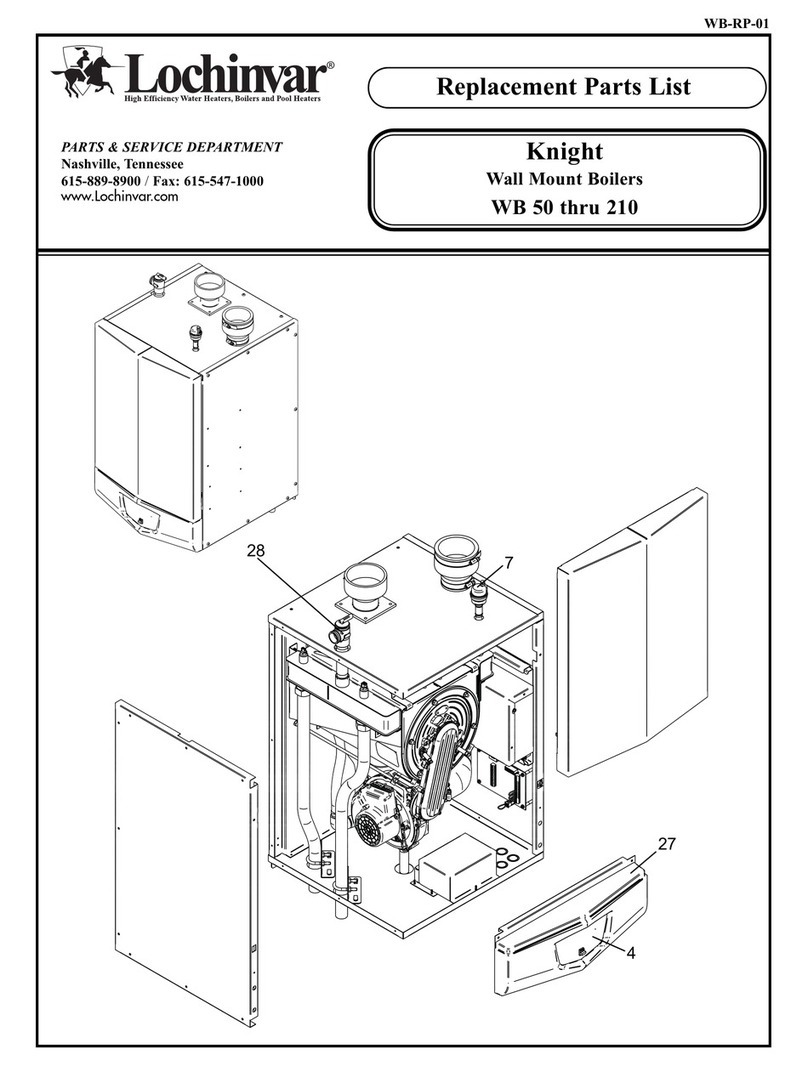
Service Manual
Models: 50 - 210
This manual must only be
used by a qualified heating
installer / service technician.
Read all instructions,
including this manual and the
Knight Wall Mount
Installation and Operation
Manual, before installing.
Perform steps in the order
given. Failure to comply
could result in severe personal
injury, death, or substantial
property damage.
WARNING
Save this manual for future reference.
2
Hazard definitions
The following defined terms are used throughout this manual to bring attention to the presence of hazards of various risk levels
or to important information concerning the life of the product.
DANGER
WARNING
CAUTION
CAUTION
NOTICE
DANGER indicates an imminently hazardous situation which, if not avoided, will result in death or serious
injury.
WARNING indicates a potentially hazardous situation which, if not avoided, could result in death or serious
injury.
CAUTION indicates a potentially hazardous situation which, if not avoided, may result in minor or moderate
injury.
CAUTION used without the safety alert symbol indicates a potentially hazardous situation which, if not
avoided, may result in property damage.
NOTICE indicates special instructions on installation, operation, or maintenance that are important but not
related to personal injury or property damage.
CONTENTS . . . . . . . . . . . . . . . . . . . . . . . . . . . . . . . . . . . . 2
Hazard Definitions . . . . . . . . . . . . . . . . . . . . . . . . . . . . . . . 2
PLEASE READ BEFORE PROCEEDING . . . . . . . . . . . . 3
Handling Ceramic Fiber Materials . . . . . . . . . . . . . . . . . . . 3
When servicing boiler . . . . . . . . . . . . . . . . . . . . . . . . . . 4
Boiler operation . . . . . . . . . . . . . . . . . . . . . . . . . . . . . . 4
Boiler water . . . . . . . . . . . . . . . . . . . . . . . . . . . . . . . . . 4
Freeze protection fluids . . . . . . . . . . . . . . . . . . . . . . . . 4
WHAT IS IN THIS MANUAL . . . . . . . . . . . . . . . . . . . . . . . 5
1. SERVICE
Near Boiler Piping . . . . . . . . . . . . . . . . . . . . . . . . . . . . . . . 6
The Knight Wall Mount Display . . . . . . . . . . . . . . . . . . . . . 7
Control Inputs . . . . . . . . . . . . . . . . . . . . . . . . . . . . . . . . 8
Control Outputs . . . . . . . . . . . . . . . . . . . . . . . . . . . . . . 9
General Operation . . . . . . . . . . . . . . . . . . . . . . . . . . . 10
Sequence of Operation . . . . . . . . . . . . . . . . . . . . . . . . . . 11-12
Display Panel Menu Access . . . . . . . . . . . . . . . . . . . . . . 13
Display Panel Parameter Access . . . . . . . . . . . . . . . . . . 14
Parameter Table . . . . . . . . . . . . . . . . . . . . . . . . . . . . . . . 15-16
Viewable and Changeable Control Parameters . . . . . . . 17-22
2. MAINTENANCE
Maintenance and Annual Startup . . . . . . . . . . . . . . . . . . 23-27
3. TROUBLESHOOTING
Before Troubleshooting . . . . . . . . . . . . . . . . . . . . . . . . . . 28
Check Control Module Fuses . . . . . . . . . . . . . . . . . . . . . 28
Table 3A - Troubleshooting Chart - No Display . . . . . . . . 29
Checking Temperature Sensors . . . . . . . . . . . . . . . . . . . 30
Table 3E - Troubleshooting Chart - Noisy System . . . . . 31
Table 3F - Troubleshooting Chart - Fault Messages . . . . 32-39
Combustion Analysis Procedure . . . . . . . . . . . . . . . . . . . 40
Table 3G - Troubleshooting Chart - Combustion Levels 40
Table 3H - Flue Products . . . . . . . . . . . . . . . . . . . . . . . . . 40
Gas Valve Adjustment Procedure . . . . . . . . . . . . . . . . . . 41
Revision Notes . . . . . . . . . . . . . . . . . . . . . . . . . Back Cover
Contents
Service Manual
Please read before proceeding
Installer – Read all instructions,
including this manual and the Knight
Wall Mount Installation and Operation
Manual, before installing. Perform steps
in the order given.
User – This manual is for use only by a
qualified heating installer/service
technician. Refer to the Knight Wall
Mount User’s Information Manual for
your reference.
Have this boiler serviced/inspected by a
qualified service technician at least
annually.
Failure to comply with the above could
result in severe personal injury, death or
substantial property damage.
When calling or writing about the boiler –
Please have the boiler model and serial
number from the boiler rating plate.
Consider piping and installation when
determining boiler location (see the Knight
Wall Mount Installation and Operation
Manual).
Any claims for damage or shortage in
shipment must be filed immediately against
the transportation company by the
consignee.
3
Handling ceramic fiber materials
REMOVAL OF COMBUSTION CHAMBER LINING
The combustion chamber door insulation in this product contains ceramic fiber material. Ceramic fibers
can be converted to cristobalite in very high temperature applications. The International Agency for
Research on Cancer (IARC) has concluded, “Crystalline silica inhaled in the form of quartz or cristobalite
from occupational sources is carcinogenic to humans (Group 1).”:
Avoid breathing dust and contact with skin and eyes.
• Use NIOSH certified dust respirator (N95). This type of respirator is based on the OSHA
requirements for cristobalite at the time this document was written. Other types of respirators may
be needed depending on the job site conditions. Current NIOSH recommendations can be found on
the NIOSH website at http://www.cdc.gov/niosh/homepage.html. NIOSH approved respirators,
manufacturers, and phone numbers are also listed on this website.
• Wear long-sleeved, loose fitting clothing, gloves, and eye protection.
Apply enough water to the combustion chamber lining to prevent airborne dust.
Remove the combustion chamber lining from the boiler and place it in a plastic bag for disposal.
Wash potentially contaminated clothes separately from other clothing. Rinse clothes washer
thoroughly.
NIOSH stated First Aid.
Eye: Irrigate immediately.
Breathing: Fresh air.
WARNING NOTICE
WARNING
4
Service Manual
Please read before proceeding
When servicing boiler –
• To avoid electric shock, disconnect electrical supply
before performing maintenance.
• To avoid severe burns, allow boiler to cool before
performing maintenance.
Boiler operation –
• Do not block flow of combustion or ventilation air to
the boiler.
• Should overheating occur or gas supply fail to shut off,
do not turn off or disconnect electrical supply to
circulator. Instead, shut off the gas supply at a location
external to the appliance.
• Do not use this boiler if any part has been under water.
The possible damage to a flooded appliance can be
extensive and present numerous safety hazards. Any
appliance that has been under water must be replaced.
Boiler water –
• Thoroughly flush the system (without boiler
connected) to remove sediment. The high-efficiency
heat exchanger can be damaged by build-up or
corrosion due to sediment.
• Do not use petroleum-based cleaning or sealing
compounds in the boiler system. Gaskets and seals in
the system may be damaged. This can result in
substantial property damage.
• Do not use “homemade cures” or “boiler patent
medicines”. Serious damage to the boiler, personnel,
and/or property may result.
• Continual fresh make-up water will reduce boiler life.
Mineral buildup in the heat exchanger reduces heat
transfer, overheats the stainless steel heat exchanger, and
causes failure. Addition of oxygen carried in by makeup
water can cause internal corrosion. Leaks in boiler
piping must be repaired at once to prevent the
introduction of makeup water.
Freeze protection fluids –
• NEVER use automotive antifreeze. Use only inhibited
propylene glycol solutions which are specifically
formulated for hydronic systems. Ethylene glycol is
toxic and can attack gaskets and seals used in hydronic
systems.
Service Manual
5
What is in this manual?
Service
Near boiler piping
• Typical system components
The Knight wall mount boiler display
• Display panel readout, buttons and their functions
Control module inputs
• Control module inputs and options
Control module outputs
• Control module outputs and options
General
• How the boiler operates
• How the control module operates
• Access modes -- user and installer
• Sequence of operation -- Domestic Hot Water
(DHW)/space heating
Control panel menu access
• Accessing programming mode and locating menus
(See separate guide covering the PC interface.)
Control panel parameter access
• Accessing and changing parameters from the display panel
Quick start information -- parameter
table
• An index of available adjustments and readouts, where to
access them and where to find detailed information.
Knight wall mount boiler operation
• A: General
• B: Temperature Setting
• C: Data Logging
• D: Functions
• E: DHW Settings
• F: Outdoor Air Reset Curve
• G: Anti-cycling
• H: Control Modes
• I: Circulation Pumps
• J: Service Notification
Maintenance
• Service and maintenance schedules
• Address reported problems
• Inspect boiler area and boiler interior
• Clean condensate trap
• Check all piping for leaks
• Check air openings
• Flue vent system and air piping
• Check water system
• Check expansion tank
• Check boiler relief valve
• Inspect ignition electrode
• Check ignition ground wiring
• Check all boiler wiring
• Check control settings
• Perform start-up and checks
• Check burner flame
• Check flame signal
• Check flue gas temperature
• General maintenance
• Review with owner
• Cleaning boiler heat exchanger
• Oiled bearing circulators
Troubleshooting
• Troubleshooting table - No display
• Checking temperature sensors
• Sensor tables
• Troubleshooting table - Fault messages displayed on
boiler interface
• Combustion analysis procedure
• Gas valve adjustment procedure
1 Service
6
Service Manual
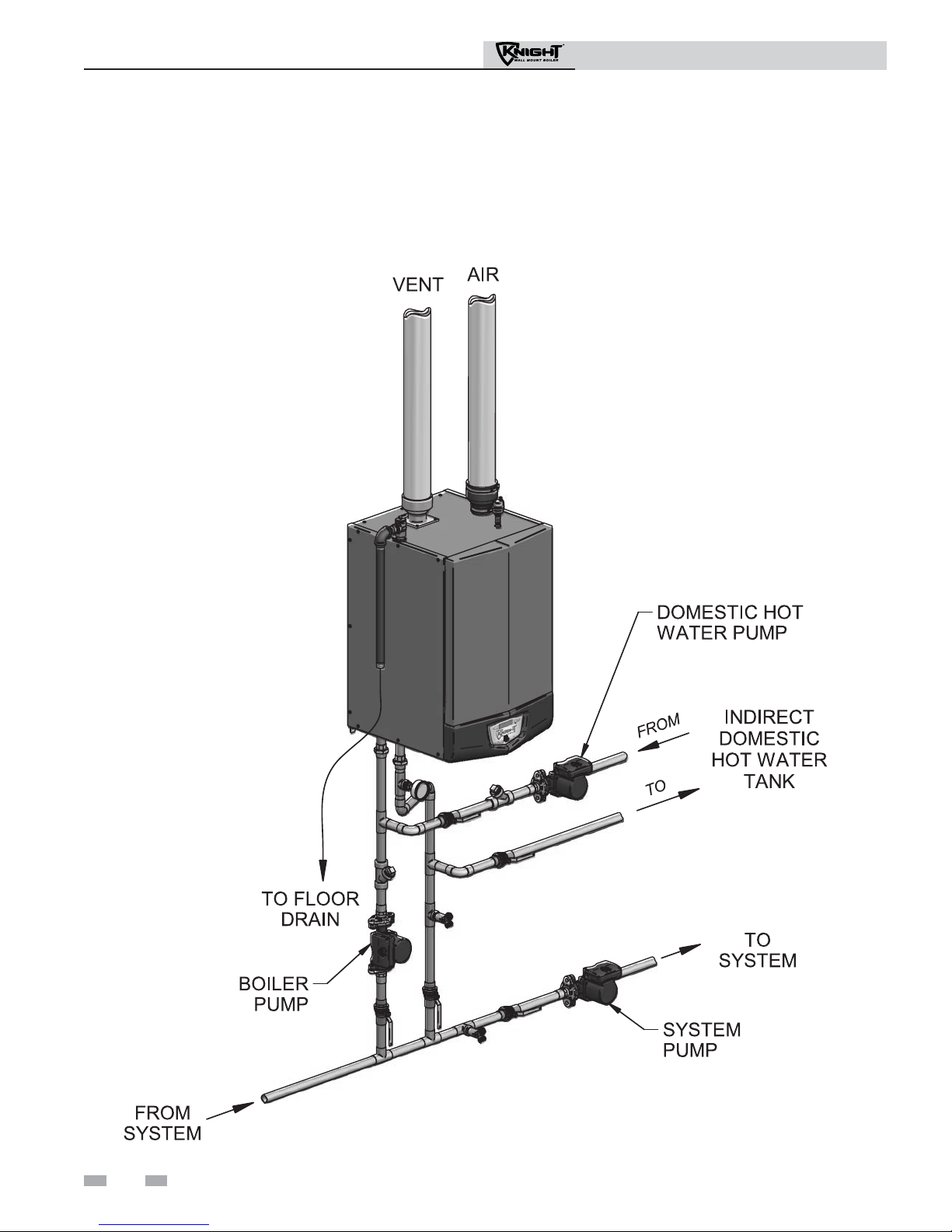
Near boiler piping
This piping reference is included to specify the Near Boiler Piping specific to the Knight wall mount boiler. This piping scheme
is important for proper operation of the SMART SYSTEM control. See the Knight Wall Mount Installation and Operation
Manual for more detailed piping diagrams.
1 Service
Service Manual
7
1 Service (continued)
The Knight wall mount display
1 Service
8
Service Manual
1 Service
GAS PRESSURE SWITCH
DHW THERMOSTAT
ROOM THERMOSTAT /
ZONE CONTROL
FLOW SWITCH
SYSTEM SENSOR
OUTDOOR SENSOR
SEQUENCER / BUILDING
MANAGMENT SYSTEM
LOW VOLTAGE
CONNECTION
BOARD
INLET TEMPERATURE
SENSOR
OUTLET TEMPERATURE /
HIGH LIMIT SENSOR
FLUE GAS SENSOR
FLAME SENSOR
LOW WATER CUTOFF
BLOCKED DRAIN SWITCH
DISPLAY PANEL
PC INTERFACE
SMART CONTROL
MODULE
AIR PRESSURE SWITCH
Control inputs
1 Service
Service Manual
9
1 Service (continued)
Control outputs
1 Service
10
Service Manual
1 Service
General Operation
How the boiler operates
The Knight wall mount boiler uses an advanced stainless steel
heat exchanger and an electronic control module that allows
fully condensing operation. The blower pulls in gas and air
and pushes flue products out of the boiler through the heat
exchanger and flue piping. The control module regulates
blower speed to control boiler firing rate. The gas valve senses
the amount of air flowing into the boiler and allows only the
right amount of gas to flow.
How the control module operates
The Knight wall mount control module receives input from
boiler sensors. The control module activates and controls the
blower and gas valve to regulate heat input and switches
boiler, DHW and system pumps on and off as needed. The
user/installer programs the module to meet system needs by
adjusting control parameters. These parameters set operating
temperatures and boiler operating modes. Boiler operation
can be based on boiler outlet water temperature, boiler return
water temperature or system supply temperature, depending
on the parameter setting.
Sequence of operation
Table 1 shows control module normal sequences of operation
for space heating and DHW operation. The combined
operation sequence is for a typical application, programmed
to provide DHW priority.
Access modes
User
The user can adjust space heating set point using the UP and
DOWN buttons at any time during normal operation. By
entering the USER code (0704), the user can also change
temperature units, time and date, and night setback settings.
In user mode, the following parameters can be viewed but not
changed: Boiler outlet water temperature in DHW mode;
boiler model number; software version; total operating hours,
and total cycles.
Installer
Most parameters are available only to the installer, accessible
only by entering the installer access code (5309).
Saving parameters
To save parameters:
Press the ENTER/RESET button.
To keep parameter settings only for a current operating cycle:
Press the MENU/EXIT button 1 time to return to the
parameter listings; press again to return to the menu listings.