manuals.online logo
Brands
  1. Home
  2. •
  3. Brands
  4. •
  5. Lumi audio
  6. •
  7. Speakers
  8. •
  9. Lumi audio OWM-6BT User manual

Lumi audio OWM-6BT User manual

Other Lumi audio Speakers manuals

Lumi audio WSP-6S User manual

Lumi audio

Lumi audio WSP-6S User manual

Lumi audio OGT-6BT User manual

Lumi audio

Lumi audio OGT-6BT User manual

Popular Speakers manuals by other brands

Electro-Voice LR4S engineering data

Electro-Voice

Electro-Voice LR4S engineering data

Definitive Technology Sound Cylinder user guide

Definitive Technology

Definitive Technology Sound Cylinder user guide

AudioSource LS545 user manual

AudioSource

AudioSource LS545 user manual

Paso C402-T Instructions for use

Paso

Paso C402-T Instructions for use

Altec Lansing 416-8C LF SPEAKER manual

Altec Lansing

Altec Lansing 416-8C LF SPEAKER manual

Kenwood KFC-1072 Servise manual

Kenwood

Kenwood KFC-1072 Servise manual

Peavey ProSys 112 user guide

Peavey

Peavey ProSys 112 user guide

JBL Control Contractor 60 Series installation instructions

JBL

JBL Control Contractor 60 Series installation instructions

Aura STORM-8 owner's manual

Aura

Aura STORM-8 owner's manual

Oontz ANGLE 3 PLUS quick start guide

Oontz

Oontz ANGLE 3 PLUS quick start guide

Electro-Voice LR4A engineering data

Electro-Voice

Electro-Voice LR4A engineering data

Rave RK-650-ICA-B owner's manual

Rave

Rave RK-650-ICA-B owner's manual

Flux Reference Series installation manual

Flux

Flux Reference Series installation manual

Lanzar AQAWBS64BK installation manual

Lanzar

Lanzar AQAWBS64BK installation manual

DAPAudio DCS-6230 manual

DAPAudio

DAPAudio DCS-6230 manual

Aluratek ABS03F quick start guide

Aluratek

Aluratek ABS03F quick start guide

Kenwood KES-5A instruction manual

Kenwood

Kenwood KES-5A instruction manual

Sonance ORIGINAL SERIES instruction manual

Sonance

Sonance ORIGINAL SERIES instruction manual

manuals.online logo
manuals.online logoBrands
  • About & Mission
  • Contact us
  • Privacy Policy
  • Terms and Conditions

Copyright 2025 Manuals.Online. All Rights Reserved.

NOTE:
1: Infrared remote control effective distance >=3m,120
degrees wide Angle.
2: Balance Buttons for better stereophonic effect.
If any one channel has been increased to the maximum, the
other one will be decreased.
5
OWM-6BT
Outdoor
and Indoor
SPEAKER
VOLME TREBLE BASS
RESET
PREV PLAY/PAUSE NEXT
BALANCE
+
ON OFF
POWER
++
-
--
ResetBluetooth Pairing data
(long press for 5s)
Press
Last song
(short press)
Next song
( press)short
Bass minus (short press)
Keep minus (long press)
Treble plus (short press)
Keep plus (long press)
Treble minus (short press)
Keep minus (long press)
Volume plus 1(short press)
Keep plus(long press)
Volume minus 1(short press)
Keep minus(long press)
Left Channel Plus(short press)
Keep plus(long press)
Right Channel Plus(short press)
Keep minus(long press)
Bass-
Treble+
Treble-
Button
Volume+
Volume-
Balance (Left)
Balance (Right)
Prev
(Bluetooth Input only)
Next
(Bluetooth Input only)
Reset
(Bluetooth Input only)
Bass+ Bass plus (short press)
Keep plus (long press)
Remote Control Function Instructions (for )OWM-6A/6BT
Possible Malfunctions and Solutions
Terminal device can’t connect with Bluetooth
The distance between devices is over the maximum distance.
(10 meters generally)
1
2
3
4
1
2
3
No voice when the device is playing
Check if you have touched the “Mute” on the remote control.
The Bluetooth supports only one device connection at a time.
It could be the trouble of terminal itself.
SOLUTION: Clear the pairing history information on the terminal
device and search the Bluetooth again.
SOLUTION: Enter “0000” and confirmed to connect.
If the aforesaid solutions didn’t solve the problem, try to reset
or restart the device.
The “Volume” rotary knob is in the correct position.
Device failure: Amplifier Protection.
SOLUTION: Check the wires for short circuits.
4
SOLUTIONS: Check whether the previous device has disconnected
or not. You can also judge it through the indicator.
The device hasn’t set a password, but you are asked to enter
password while connecting.
SPECIFICATIONS
Model OWM-6BT
Frequency Response (±3db) 65Hz-20kHz
Nominal Impedance 8Ω
RMS Power /
Tweeter
Woofer 6.5" PP Cone
1" Titanium Dome
Sensitivity RCA:2VRMS
Bluetooth:Better [email protected]% BER
Amplifier Power
Product Dimensions
Transformer /
315x222x235 (12.4"x8.7"x9.3")mm
2x30W/8Ω
Function Instructions (for )OWM-6A/6BT
LED Indicator
Blue Flash: Bluetooth pairing
Steady Blue: Bluetooth connected
Steady Green: Wireless Mic connected
Steady Orange: RCA connected
Steady Red: Standby mode
Red Flash: Amplifier Error
1
2
3
4
Turn your device’s Bluetooth function ON and select “BT
Speaker”.
It needs some time for the first time connecting.
Once paired successfully, the LED indicator will become Steady
Blue.
NOTE: OWM-6A can’t pair with 2 devices in the same time.
Audio Input Option
·Bluetooth Input (OWM-6BT only)
·RCA Input (Both OWM-6A and OWM-6BT)
·Wireless Mic Input (additional option)
Bluetooth Input has the priority if both Inputs are connecting:
·The speaker will stay on Bluetooth Pairing mode after power
on for 10s.
·Only if the Bluetooth device stops playing over 8s and a RCA
Input is found, the speaker will switch to RCA Input. (The
Wireless Mic can be used with RCA/Bluetooth simultaneously.)
Bluetooth Connecting Process:
Power the speaker and the LED indicator will flash Blue. That
means it’s available for Bluetooth pairing.

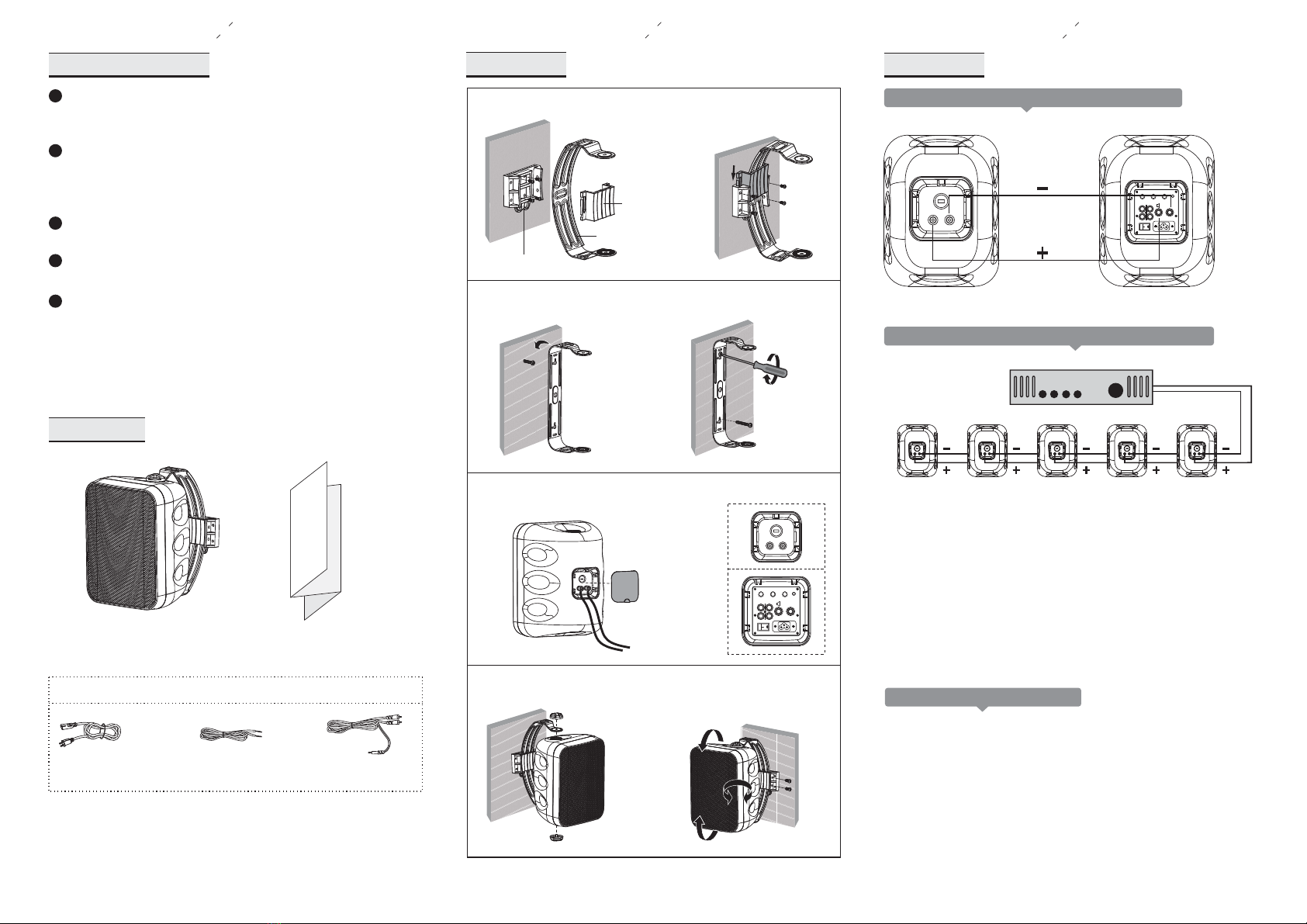
1 2 3
1b.Hang the bracket on the screw.
3.Screw the two knobs.
INSTALLATION
Attach C to A and slide B
into A, then tighten screws.
1a.Attach A to wall by 4 screws.
A
B
C
Fasten the screws after vertical
and horizontal rotation.
2.Wire the cable and cover the rubber.
•
power (wattage).
•An overdriven amplifier clips the waveforms and sends
distortion to the speakers.
•Clipping is usually audible; it may vary from a harsh sound to
a fuzzy or unclear sound.
•If you hear this condition at loud volume levels, turn down the
volume until the distortion is no longer present.
•Damage caused by operating the speakers at distorted volume
levels is not covered by the warranty.
Most speaker damage is caused by amplifiers with too little
Underpowering VS. Overpowering
NOTE: The total number of speakers multiplied by the tap value
cannot exceed the output power (in watts) of the 70V/100V
amplifier. The above example shows 5 total speakers. Using the
16W taps, you will need an amplifier with at least (5) x (16) = 80W.
A good rule of thumb is to select an amplifier with 20% greater
power; in this case, an amplifier that delivers about 100W.
70V/100V
C
5 SPEAKERS CONNECTED IN PARALLEL USING 16W TAPS
Example of 70V/100V System Configuration (for OWM-6T)
Tighten the screws
until fixed.
CONNECTIONS
speaker
PACKING LIST
USER
MANUAL
user manual
SAFETY INSTRUCTIONS
When the speakers are installed on the walls, ensure the
wall structure is reliable and that the speakers are firmly
attached.
1
2
3
4
5
Install the speaker in a location that can structurally support
the weight of the speaker and its mounting hardware.
Otherwise it may result in the unit falling down and causing
personal injury.
Do not listen to sound at a very high level when you are
changing the input source (for example, to tune FM / CD)
Installation or removal of cables should make sure that
the power amp / amplifier device radio is turned off.
Do not use nails, adhesives or other unauthorized devices.
Long-term use and vibrations may cause it to fall easily.
Do not touch or bump the woofer and tweeter. If these are
damaged, the sound will be distorted.
Example of System Configuration (OWM-6/6A/6BT)
speaker wirepower cable 3.5mm jack to RCA
Active version options
AC100-240V
LINE IN LINE OUT
+-
EXTENSION
LOUDSPEAKER
MIN IMPENDANCE
8 OHMS
-14db +14db -14db +14db -14db +14db
TREBLE BASS VOLUME
POWER
POWER
RIGHT
AC100-240V
LINE IN LINE OUT
+-
EXTENSION
LOUDSPEAKER
MIN IMPENDANCE
8 OHMS
-14db +14db -14db +14db -14db +14db
TREBLE BASS VOLUME
POWER
POWER
RIGHT
&^ƚĂƚĞŵĞŶƚ:
ŶLJŚĂŶŐĞƐŽƌŵŽĚŝĨŝĐĂƚŝŽŶƐŶŽƚĞdžƉƌĞƐƐůLJĂƉƉƌŽǀĞĚďLJƚŚĞƉĂƌƚLJƌĞƐƉŽŶƐŝďůĞ
ĨŽƌ ĐŽŵƉůŝĂŶĐĞĐŽƵůĚǀŽŝĚƚŚĞƵƐĞƌƐĂƵƚŚŽƌŝƚLJƚŽŽƉĞƌĂƚĞƚŚĞĞƋƵŝƉŵĞŶƚ
dŚŝƐĚĞǀŝĐĞĐŽŵƉůŝĞƐǁŝƚŚƉĂƌƚϭϱŽĨƚŚĞ&ZƵůĞƐKƉĞƌĂƚŝŽŶŝƐƐƵďũĞĐƚƚŽƚŚĞ
ĨŽůůŽǁŝŶŐƚǁŽĐŽŶĚŝƚŝŽŶƐ
;ϭͿdŚŝƐĚĞǀŝĐĞŵĂLJŶŽƚĐĂƵƐĞŚĂƌŵĨƵůŝŶƚĞƌĨĞƌĞŶĐĞĂŶĚ
;ϮͿƚŚŝƐĚĞǀŝĐĞŵƵƐƚĂĐĐĞƉƚĂŶLJŝŶƚĞƌĨĞƌĞŶĐĞƌĞĐĞŝǀĞĚŝŶĐůƵĚŝŶŐŝŶƚĞƌĨĞƌĞŶĐĞƚŚĂƚ
ŵĂLJĐĂƵƐĞƵŶĚĞƐŝƌĞĚŽƉĞƌĂƚŝŽŶ
FCC Radiation Exposure Statement:
dŚŝƐĞƋƵŝƉŵĞŶƚĐŽŵƉůŝĞƐǁŝƚŚ&ƌĂĚŝĂƚŝŽŶĞdžƉŽƐƵƌĞůŝŵŝƚƐƐĞƚĨŽƌƚŚĨŽƌĂŶ
ƵŶĐŽŶƚƌŽůůĞĚĞŶǀŝƌŽŶŵĞŶƚdŚŝƐĞƋƵŝƉŵĞŶƚƐŚŽƵůĚďĞŝŶƐƚĂůůĞĚĂŶĚŽƉĞƌĂƚĞĚ
ǁŝƚŚ ŵŝŶŝŵƵŵĚŝƐƚĂŶĐĞϮϬĐŵďĞƚǁĞĞŶƚŚĞƌĂĚŝĂƚŽƌΘLJŽƵƌďŽĚLJ