manuals.online logo
Brands
  1. Home
  2. •
  3. Brands
  4. •
  5. Luxi Electronics
  6. •
  7. Receiver
  8. •
  9. Luxi Electronics RPR-110CR User manual

Luxi Electronics RPR-110CR User manual

Popular Receiver manuals by other brands

Televes ZAS HD SAT user manual

Televes

Televes ZAS HD SAT user manual

Realistic DX-75 Operating and service instructions

Realistic

Realistic DX-75 Operating and service instructions

Saris 4620 Assembly instructions

Saris

Saris 4620 Assembly instructions

Mini DTR 206C PVR user manual

Mini

Mini DTR 206C PVR user manual

RF Elements TwistPort manual

RF Elements

RF Elements TwistPort manual

Denon DN-200WS user guide

Denon

Denon DN-200WS user guide

Yamaha RX-V467 owner's manual

Yamaha

Yamaha RX-V467 owner's manual

Russound SaphIR 858 instruction manual

Russound

Russound SaphIR 858 instruction manual

Quasonix RDMS Firmware update procedure

Quasonix

Quasonix RDMS Firmware update procedure

Pioneer XV-HTD1 Service manual

Pioneer

Pioneer XV-HTD1 Service manual

ATZ HDMI-V2-44HE150 manual

ATZ

ATZ HDMI-V2-44HE150 manual

Sony XNV-770BT MyTomTom Specifications

Sony

Sony XNV-770BT MyTomTom Specifications

Grundig STR 7122 TWIN Service manual

Grundig

Grundig STR 7122 TWIN Service manual

Creative Blaster Modem user guide

Creative

Creative Blaster Modem user guide

Panduit ATLONA AT-OME-RX11 installation guide

Panduit

Panduit ATLONA AT-OME-RX11 installation guide

VOLTCRAFT UTPS-40 operating instructions

VOLTCRAFT

VOLTCRAFT UTPS-40 operating instructions

JVC KW-ADV794 instructions

JVC

JVC KW-ADV794 instructions

Litelink VT-1001 operating instructions

Litelink

Litelink VT-1001 operating instructions

manuals.online logo
manuals.online logoBrands
  • About & Mission
  • Contact us
  • Privacy Policy
  • Terms and Conditions

Copyright 2025 Manuals.Online. All Rights Reserved.

Website: www.luxielectronics.com
Email: [email protected]
Phone: +1 (949) 654-2047
Address: Irvine, CA, USA
Document name: RPR-110CR quick start guide Revision: 1.44 Date: 10/20/2014
Specifications are subject to change without notice
Thank you for purchasing the Luxi Electronics® RPR-
110CR Presenter® receiver. Please read through this
manual before using the product.
How the product functions: Think of the daisy chain as
the flow of a river; each transmitter (Tx) connects to a
source device and loads the signal to the river flow; each
receiver (Rx) unloads the signal from the river flow and sends it to the display it is connected to. The
front panel and the RS-232 controls determine which source signal goes to which display.
System diagram:
Power options: This product can draw power from other Presenter products in the chain or from an
optional external power supply.
Captive screw plug termination: The captive
screw plugs for power, RS-232 and contact
controls are supplied with the unit. Separate
the wires about 1” (2.5 cm) long; strip off the
wire insulation precisely 3/16” (5 mm) from
the end. Identify the positive and negative
leads for power; Luxi power supply has a
white stripe on the positive wire. If not sure,
use a multi meter to verify.
RJ45 plug termination: Follow the standard EIA 568B pin out.
Control options: A RS-232 host connected to the rear panel can control all functions of every unit in the
chain. Make sure both DIP switches recessed on the bottom side are in the down (off) position.
Ethernet port: For providing a system wide internet access. Be very careful NOT to plug the Ethernet
cable into the yellow 100s connector or vice versa! Permanent damage may occur.
Front panel LED: Green = this Rx selected; Amber = this Rx not selected; Red = communication error
Minimum system: One Tx and one Rx connected with a short Cat6 cable. Use the minimum system to
test all devices and cables to be used in bigger systems first in order to isolate any potential problems.
Support: Please contact your reseller directly for local support; or Luxi using the contact info above. See
Luxi website for RS-232 commands and user manuals.
Website: www.luxielectronics.com
Email: [email protected]
Phone: +1 (949) 654-2047
Address: Irvine, CA, USA
Document name: RPR-110CR quick start guide Revision: 1.44 Date: 10/20/2014
Specifications are subject to change without notice
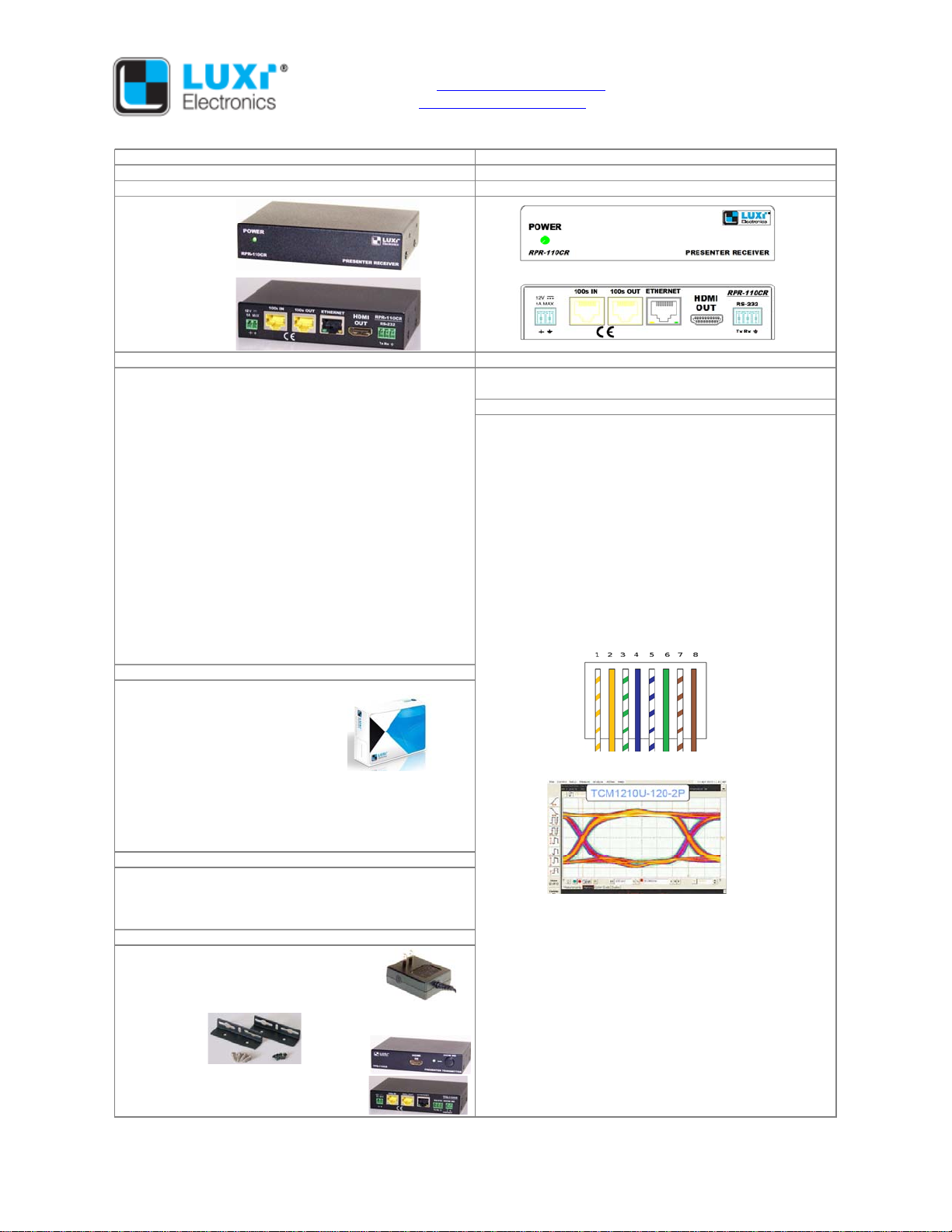
Product Specifications Part Number: 74-020-01
Presenter 110 series receiver Model: RPR-110CR
Product Image Product Drawing
Front
Back
Features and Benefits Mechanical
> Patent pending, revolutionary products to replace the Enclosure material: steel
centralized switching and distribution Enclosure size: 4.29” x 1.00” x 3.00” (10.9 x 2.5 x 7.6 cm)
> Completely scalable; you can add more Tx or Rx boxes Electrical
on the fly for expansion HDMI signal output
> Only 1 Cat6 or Cat5 cable needed to connect the adjacent Maximum data rate: 9 Gbps (3 Gbps per color)
Presenter Tx or Rx; no more heavy clusters of cables; very Maximum pixel clock: 300 MHz
easy cable pull and termination Resolution range: Up to 1080p 48-bit @ 60 Hz, or 3D,
> No compression; full 18 Gbps bandwidth; virtually no or 4k @ 30 Hz
propagation delays Daisy chain system
> Additional control devices can be inserted anywhere in the Luxi proprietary format, digital video, audio, control, Ethernet
daisy chain via RS-232 and power, up to 12 Rx, up to 4 audio streams
> Signals can be transmitted to very long distances with System cables: unshielded Cat6 550 MHz rated 23 AWG
multiple daisy-chained devices up to 110’ (33 m) each solid conductor cables recommanded; Cat5, 5e, 6, 7
span (e.g., 10 spans for up to 330 m) unshielded and shielded cables also usable
> Ethernet port on every Presenter for convenient system Max distance between 2 adjacent devices: Typical 33 m
wide internet access (110’) for WXGA/720p; 18 m (60') for 1080p (depends on
> Remote power capability source and display device performance and signal format)
> Rack mountable, under-table mountable, above-projector RJ45 connector pin configuration: standard EIA 568B pinout
mountable metal enclosures
Package
One piece in one color cardboard box; with captive screw
plugs and quick start guide
no power supply
Electrical test results (1080p 24-bit 60 Hz results below)
Box size: 6.0” x 4.8” x 1.1” (15.3 x 12.2 x 2.8 cm)
Weight: package, 0.63 lb (0.28kg); product, 0.49 lb (0.22kg)
36-pc box size: 15" x 13" x 8" (38 x 33 x 20 cm)
36-pc box weight: 24.5 lb (11 kg)
Connections
Input connectors: 1 HDMI, 1 daisy chain in, 1 Ethernet
Output connector: 1 daisy chain out
Power connector: 2-pin 3.5 mm captive screw receptacle Power: 12 V DC, 0.2 A from external power or other Presenter
Control connectors: 1 RS-232, 1 Show Me Optional power supply:
Other Related Products Auto switching 100-240 V AC input on US plug, 12 V DC
Power supply, 100-240 V in on US plug, 1 A max on bare wires, wall ward type, UL, PSE, CE, FCC
12 V out, P/N 69-002-01 Mounting: Not included. Luxi under desk mount 78-002-01.
compatible with Extron thru desk mount 70-077-02, rack
Under desk mount, P/N 78-002-01 shelf 60-604-21, 60-604-11, 60-604-02, above projector
mount 70-217-01, 70-739-02, 70-734-01, 70-563-03
or equivalent Middle Atlantic models
Regulatory compliance
Safety: CE, cUL, UL (power supply only)
Presenter transmitter, P/N 74-017-01, EMI/EMC: CE, FCC Class A
model RPR-110CR MTBF: 30,000 hours
Warranty: 3 years parts and labor












