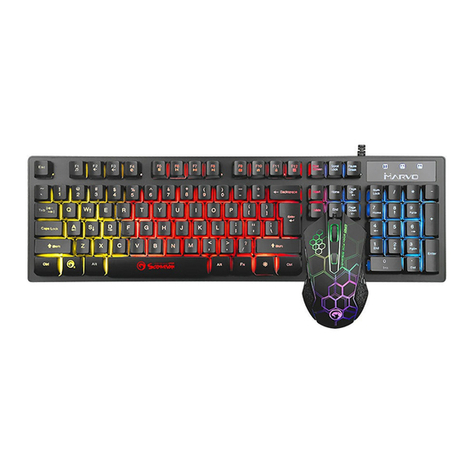
Marvo CM409 User manual

CM409
User Manual • Uživatelský manuál •
Užívateľský manuál • Használati utasítás •
Benutzerhandbuch • Manuel d'utilisation

2
English
3 –10
Čeština
11 –18
Slovenčina
19 –26
Magyar
27 –34
Deutsch
35 –43
Français
44 –52

3
Dear customer,
Thank you for purchasing our product. Please read the
following instructions carefully before first use and keep this
user manual for future reference. Pay particular attention to
the safety instructions. If you have any questions or
comments about the device, please contact the customer
line.
✉www.alza.co.uk/kontakt
✆+44 (0)203 514 4411
Importer Alza.cz a.s., Jankovcova 1522/53, Holešovice, 170 00
Prague 7, www.alza.cz
Product Presentation
Features
•Advanced Anti-Ghosting: Game confident with 19-
key rollover support for enhanced commands
readings.
•Waterproof: Keyboard designed to quickly drain
the liquids in case of accidental spillage.
•Ergonomics: Streamlined mouse shape
accommodates various grip styles.
•On-the-fly: Quick 4-step DPI selection button.
•Big Sound: Closed, over-ear headset design for
powerful bass sounds.
•High-Quality mat: Optimized tracking accuracy for
both laser and optical sensors.

4
•Cool Looks: Multi-color backlight, see-through
character lighting.
Technical Specifications
Keyboard
Keys:
104
Switch type:
Membrane
Switch rating:
10 million presses
Key route:
4.0 ± 0.3 mm
Operating force:
55 ± 7g
Backlight:
3 colors mixed
Interface:
USB 2.0
Cable length:
1.5m
Size:
435 x 128 x 35mm
Headset
Sound:
Stereo
Frequency response:
20 Hz –20KHz
Speaker size:
40 mm
Speaker sensitivity:
105 dB ± 3dB
Speaker impedance:
32 Ω
Microphone type:
Omnidirectional
Microphone size:
6x5 mm
Microphone sensitivity:
-42 dB ± 3dB
Connectors:
3.5 mm x 2
Cable length:
1.8 m

5
Mouse
Sensor:
Optical
DPI:
800-1600-2400-3200
Buttons:
6
Switch rating:
3 million clicks
Backlight:
7 colors
Interface:
USB 2.0
Cable length:
1.5 m
Mousepad
Ideally suited for high sensitivity mouse settings
The anti-sweating design prevents edge warping
Anti-skid rubber base
Size: 287 x 244 x 3 mm
System Requirements
PC system or compatible with the installed sound card, two
USB ports available; Windows 7 or newer operating system.
•Ergo design
•Gaming design
•Advanced anti-ghosting
•Stereo Sound
•3200 DPI Optical/Laser Sensor
•DPI Steps 800/1600/2400/3200

6
Safety Notes
•To prevent possible hearing problems, do not use the
headphones at high volume for long periods of time.
•Keep the equipment dry. Keep away from precipitation,
humidity, all types of liquids and condensation.
•Do not use the product with wet hands.
•Do not use or store the equipment in dusty or dirty
areas.
•Do not store the equipment under high-temperature or
low-temperature conditions (this may damage it).
•Do not drop, knock, or shake the equipment (use may
result in breakage).
Installation
Connect the keyboard and mouse to the available USB ports
on your computer; if the peripherals are used for the first
time wait approx. 15 seconds to install the generic driver.
Each headphone audio jack is colored different (green for
headphones, pink for microphone) or has an icon on it.
Connect each jack to the matching input on the sound card.

7
NOTE: This kit does not have a specialized driver and does
not require one for proper operation and functionality.
Use
Keyboard
Configuring the keyboard and using the special functions is
done by using the various key combinations detailed below.
Multimedia and office functions
FN + F1: open media player
FN + F2: decrease audio volume
FN + F3: increase audio volume
FN + F4: mute
FN + F5: stop media file playback
FN + F6: previous track
FN + F7: play / pause
FN + F8: next track
FN + F9: open the e-mail client
FN + F10: open the internet browser
FN + F1: lock
FN + F12: open the calculator

8
Key-lock functions
: enabled/disable the Windows key
Backlight control functions
Press the LED key to enable/disable the backlight.
: increase brightness
: decrease brightness
Mouse
Press the button below the scroll wheel to change the
sensitivity according to predefined DPI steps.
Troubleshooting
In case of incorrect operation follow the steps below:
•Check the integrity of the connectors.
•Check the connection to your computer.
•Check your computer settings.
•Disconnect and reconnect the equipment; restart
the computer.
If the problem persists, please contact your local seller.

9
Warranty Conditions
A new product purchased in the Alza.cz sales network is
guaranteed for 2 years. If you need repair or other services
during the warranty period, contact the product seller
directly, you must provide the original proof of purchase
with the date of purchase.
The following are considered to be a conflict with the
warranty conditions, for which the claimed claim may
not be recognized:
•Using the product for any purpose other than that for
which the product is intended or failing to follow the
instructions for maintenance, operation, and service of
the product.
•Damage to the product by a natural disaster, the
intervention of an unauthorized person or mechanically
through the fault of the buyer (e.g., during transport,
cleaning by inappropriate means, etc.).
•Natural wear and aging of consumables or components
during use (such as batteries, etc.).
•Exposure to adverse external influences, such as
sunlight and other radiation or electromagnetic fields,
fluid intrusion, object intrusion, mains overvoltage,
electrostatic discharge voltage (including lightning),
faulty supply or input voltage and inappropriate polarity
of this voltage, chemical processes such as used power
supplies, etc.
•If anyone has made modifications, modifications,
alterations to the design or adaptation to change or

10
extend the functions of the product compared to the
purchased design or use of non-original components.
EU Declaration of Conformity
This product complies with the essential
requirements of Directives 2014/30/EU and
2011/65/EU including amendments
2015/863/EU.
WEEE
This product must not be disposed of as normal household
waste in accordance with the EU Directive on Waste
Electrical and Electronic Equipment (WEEE - 2012/19 / EU).
Instead, it shall be returned to the place of purchase or
handed over to a public collection point for the recyclable
waste. By ensuring this product is disposed of correctly, you
will help prevent potential negative consequences for the
environment and human health, which could otherwise be
caused by inappropriate waste handling of this product.
Contact your local authority or the nearest collection point
for further details. Improper disposal of this type of waste
may result in fines in accordance with national regulations.
Table of contents
Languages:
Other Marvo Keyboard manuals