manuals.online logo
Brands
  1. Home
  2. •
  3. Brands
  4. •
  5. Monogram
  6. •
  7. Refrigerator
  8. •
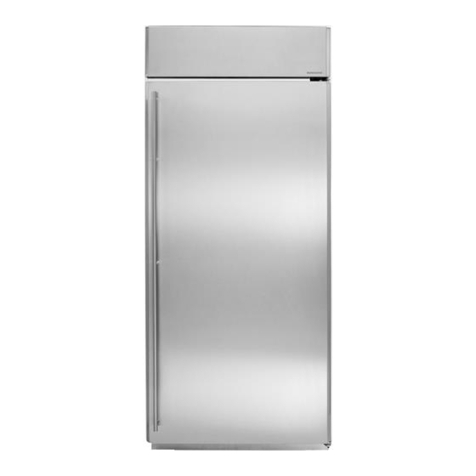
  9. Monogram ZISB42E User manual

Monogram ZISB42E User manual

This manual suits for next models

1

Other Monogram Refrigerator manuals

Monogram ZIFS240HSS Guide

Monogram

Monogram ZIFS240HSS Guide

Monogram ZIS36N User manual

Monogram

Monogram ZIS36N User manual

Monogram ZIDI240 User manual

Monogram

Monogram ZIDI240 User manual

Monogram ZIDI240 Guide

Monogram

Monogram ZIDI240 Guide

Monogram ZIBI240HII User manual

Monogram

Monogram ZIBI240HII User manual

Monogram ZIRS36N LH User manual

Monogram

Monogram ZIRS36N LH User manual

Monogram ZISW36DY User manual

Monogram

Monogram ZISW36DY User manual

Monogram ZDOG240 User manual

Monogram

Monogram ZDOG240 User manual

Monogram 36 Ceramic Cooktop User manual

Monogram

Monogram 36 Ceramic Cooktop User manual

Monogram ZISB36DR User manual

Monogram

Monogram ZISB36DR User manual

Monogram ZPB480D User manual

Monogram

Monogram ZPB480D User manual

Monogram ZICP360NHRH User manual

Monogram

Monogram ZICP360NHRH User manual

Monogram Monogram ZISB360DR User guide

Monogram

Monogram Monogram ZISB360DR User guide

Monogram ZlS360N User manual

Monogram

Monogram ZlS360N User manual

Monogram 36 Ceramic Cooktop User manual

Monogram

Monogram 36 Ceramic Cooktop User manual

Monogram ENERGY STAR ZWE23ESHSS User manual

Monogram

Monogram ENERGY STAR ZWE23ESHSS User manual

Monogram ZIBI240 User manual

Monogram

Monogram ZIBI240 User manual

Monogram ZIFI240 User manual

Monogram

Monogram ZIFI240 User manual

Monogram ZIDI240 User manual

Monogram

Monogram ZIDI240 User manual

Monogram 36 Ceramic Cooktop User manual

Monogram

Monogram 36 Ceramic Cooktop User manual

Monogram ZDOG240 User manual

Monogram

Monogram ZDOG240 User manual

Monogram ZIS480NRF User manual

Monogram

Monogram ZIS480NRF User manual

Monogram ZIDI240 User manual

Monogram

Monogram ZIDI240 User manual

Monogram ZIR36N LH User manual

Monogram

Monogram ZIR36N LH User manual

Popular Refrigerator manuals by other brands

Frigidaire FRS26TS7DW2 Use & care manual

Frigidaire

Frigidaire FRS26TS7DW2 Use & care manual

Fisher Scientific 10ECEEFSA manual

Fisher Scientific

Fisher Scientific 10ECEEFSA manual

Summit FF22BDRSS user manual

Summit

Summit FF22BDRSS user manual

Frigidaire FFRU17B2QWE use & care

Frigidaire

Frigidaire FFRU17B2QWE use & care

Hotpoint ENBGH 19xxx FW operating instructions

Hotpoint

Hotpoint ENBGH 19xxx FW operating instructions

Hitachi R-SG28KPH instruction manual

Hitachi

Hitachi R-SG28KPH instruction manual

Dometic RMH 7390 L operating instructions

Dometic

Dometic RMH 7390 L operating instructions

AEG S71700TSW0 user manual

AEG

AEG S71700TSW0 user manual

Electrolux ENB3669 Instruction book

Electrolux

Electrolux ENB3669 Instruction book

Electrolux ERN 2930 Instruction book

Electrolux

Electrolux ERN 2930 Instruction book

Beko GNE 60520 X user manual

Beko

Beko GNE 60520 X user manual

Jenn-Air JUR248LBES00 Use & care guide

Jenn-Air

Jenn-Air JUR248LBES00 Use & care guide

Dometic RGE 4000 Installation and operating manual

Dometic

Dometic RGE 4000 Installation and operating manual

Dometic L-0191B Brochure & specs

Dometic

Dometic L-0191B Brochure & specs

LG LRBP1031W - 10 Cu. Ft. Cabinet Depth Bottom Freezer... owner's guide

LG

LG LRBP1031W - 10 Cu. Ft. Cabinet Depth Bottom Freezer... owner's guide

Daewoo RN-33 Series user manual

Daewoo

Daewoo RN-33 Series user manual

Haier RF-8888-174 Service manual

Haier

Haier RF-8888-174 Service manual

Blaupunkt 5CK2 Series user manual

Blaupunkt

Blaupunkt 5CK2 Series user manual

manuals.online logo
manuals.online logoBrands
  • About & Mission
  • Contact us
  • Privacy Policy
  • Terms and Conditions

Copyright 2025 Manuals.Online. All Rights Reserved.

Your
Monogram
Ridkigerator
pL!’i3 qy-&k?fxo
ApplianceRegistration... ......2
Care and Cleaning. ........16, 17
Condenser .................lb
DiagnosticCodes . . . . . ........8
Drawers ..................+13
DrawerandCoverRemoval ....14
ElectronicMonitorand
DiagnosticSystem .......,..5-8
DoorAlarm ...............6
SystemCheck—Reset. . . ...6,7
WarmTemperature ..........6
EnergySaverSystem . . ........4
Energy-SavingTips ...........2
Food StorageSuggestions. .....12
StorageTimes. . ... ... .....~
IceDispenser. . . . . . . . . .....9-11
Icemaker .................9-11
Installation . . . . . . . . . . .......18
AdapterPlug . . . . . . . .......18
Clearances .. .. ... .~. .....l8
Electrical Requirements .....18
Grounding ................18
LevelingLegs . . . . . . .......18
Location .................18
WaterSupplytoIcemaker ....18
Light BulbReplacement, .. ...,17
Model anciSerial Numbers .....2
ProblemSolver . . ., . . . ....19-21
QuickServeWSystem .4 ....15
Repair Service .+ . . . . . .......22
Safctyhwlructions ... ... ....$.3
shelves .~~,ll$****$l.. .....15
TempcraturcControls .........4
VacationTips .. .. +.. ..1.,.,+17
Warranly .. .., .. .tBackCo~erer
Water FiltcrAcccssory ........1!
(;F:iiils?3’ercenfe~”@
HelpU$
help‘you. @.
ReadthisbookCarefully.
It is intendedto helpyouoperate
and maintainyournewrefrigerator
properly.
Keepithandy foranswersto your
questions.
If youdon’tunderstandsomething
or need morehelp, write (include
yourphonenumber):
ConsumerAffairs
GE Appliances
AppliancePark
Louisville,KY 40225
Writedownthemodel
andsaid number.
You’llseethem on alabelon the
right side, near thebottomof the
fresh foodcompartment.
These numbers are alsoon the
Consumer Product Ownership
RegistrationCard thatcame with
your refrigerator.
Beforesending in the registration
card, please write thesenumbers
here:
Model Number
Serial Number
Use thesemodel and serial numbers
in any correspondence or service
calls concerning yourrefrigerator.
If you received adamaged
refrigerator, immediatelycontact
the dealer (or builder) that sold you
the refrigerator.
Savetime and money.
BeforeyourequestServicel
check the Problem Solveron
pagcs 19through 21.It listsca~lses
O(minor operating problems that
}J(~uc:~ncorrect j’oursclf.
Eneqgy-swvhigtips -
=
OLocationofyourrefrigeratoris
important.Avoidlocatingitnextto
yourrange, aheatingventor where
the sunwill shinedirectlyon it.
@Don’topen thedoors moreoften
thannecessary.
eClosethedoorsassoonaspossible,
particularly inhot, humid weather.
~KeepEnergy SaverSwitchinthe
OFF positionunlessmoisture
formson the outsideofthe
refrigerator.
eBesure the doorsare closed
tightly.Beforeleavingthehouse
or retiring forthe night, checkto
be surethe doorshaven’tbeen left
openaccidentally.
@Storeonly thosefoodsrequiring
refrigerationin yourrefrigerator.
eWipemoisturefrom bottles and
cartonsbefore puttingthem inthe
refrigerator.
~Keep foodscoveredto reduce -
moist~rebuildupinsidethe
refrigerator.
~If youturn the controlsto the
coldestposition for quick chilling
or freezing, be sureto turn them
back to regular settings.
~Don’tovercrowdyourrefrigerator.
Overcrowdingcan require extra
electrical energy to keep everything
cool.
i
....—————. —:
Readailinstructionsbeforeusingthisappliance.
~m~~—When usingthis
appliance,alwaysexercisebasic
safetyprecautions,includingthe
following:
~Usethisapplianceonly for its
intendedpurpose as described in
thisUse and Care Book.
@Thisrefrigeratormust be
properlyinstalledin accordance
withtheInstallationInstructions
beforeit is used. See grounding
instructionsonpage 18.
@Never unplugyourrefrigerator
bypullingon the powercord.
Alwaysgrip plugfirmly and pull
s~raightout fromthe outlet.
~Repairorreplaceimmediatelyall
electricservice cords that have
becomefrayedor otherwise
damaged. Do notuse acord that
showscracksor abrasion damage
alongitslengthor at either the plug
or connectorend.
~After yourrefrigerator is in
oDeration.do not touch the cold
s&faces, particularlywhen hands
aredamp or wet. Skin mayadhere
totheseextremely cold surfaces.
@Do not placefingers or hands
on the automatic icemaking
mechanism while the refrigerator
isphlggedin. Thjs will helpprotect
!Loufrompossibleinjury.It willalso
preventintcrfcrenccwith themoving
pallsof thee.~ectormechanism,or
withthe hcatmgciemcntthat
releasesthecubes.
oDon’trefreezefrozenfoods
whichhavethawedcompletely.
The UnitedStatesDepartmentof
Agriculture in Homeand Garden
BulletinNo. 69 says:
“...Youmaysafelyrefreezefrozen
foodsthathavethawedif theystill
containice crystalsor ifthey are
stillcold—below40”F.
“...Thawedground meats,poultry
or fish thathaveany off-odoror
off-colorshouldnotbe refrozenand
shouldnot be eaten. Thawedice
cream shouldbe discarded. If the
odor or color ofanyfood ispoor or
questionable, getrid of it. The food
maybe dangerousto eat.
“Evenpartialthawingand refreezing
reduce the eatingqualityof foods,
particularly fruits, vegetablesand
prepared foods.The eating quality
ofred meats is affectedlessthan
that ofmany other foods. Use
refrozenfoodsas soonas possibleto
saveas much of their eatingquality
as you can;’
.If your old refrigeratoris still
around the house but not in use,
be sure to removethe doors. This
will reduce the possibilityof
danger to children.
@Disconnectpowerto your
refrigerator: -
—.
A. Beforemakinganyrepairs. ~-—
Note:Westronglyrecommend =
~*-
that anyservicingbe performed -q
~u.
byaqualifiedindividual.
B. Beforecleaning. ~$?--
-.
C. Beforereplacingaburned-out =
lightbulb,powertotherefrigerator ~‘
shouldbedisconnectedatthefuse ~e~
box or circuitbreaker inorder to ~
avoidcontactwithalivewire ~.
fdament,(Aburned-outlightbulb
maybreak whenbeingreplaced.)
Note:Thning freezercompartment
temperaturecontrolto OFF
positiondoesnotremovepower
to thelightcircuit.
@Do notoperateyourrefrigerator
inthe presenceofexplosivefumes.
SAVE
BEwm
Refrigerator
SetTemperatureControls
Yourrefrigeratorhas twoup-front
controlsthatletyouregulatethe
temperatureinthe fresh foodand
freezercompartments.
One control, with settingsfrom 1
through9, is locatedat the upper
leftin the fresh food compartment.
The other control, with settings
from 1through 9plus OFF, is
located at the upper right near the
top of the freezer compartment.
9isthe coldest setting, 1is the
warmest.
INITIALLY,SET BOTH
CONTROLS AT5.
Forcoklcr or warmer temperatures,
adjust the desired compartment
control one number at atime.
IMPORTANT: When initially
settingcontrols,or adjustingthem,
allow 24 hours f’ortemperatures
to stabilize.
Note: Tut*ningthe f’l*eezercontrol
totheOK’Fposition”stops cooiing
in WITH coillp:ll”tlllellts-fl’es~~
food AND f’rtx!xer—but(10(?sIlot
shut off”power tothe refrigerator.
HowtoTestTemperatures
Usethemilktestforthefreshfood
compartment.Placeacontainerof
milkonthetopshelfinthefresh
foodcompartment.Check itaday
later.If themilk istoowarmor too
cold,adjustthetemperaturecontrols.
Usethe ice creamtestfor the
freezercompartment. Place a
containerof icecream inthe center
ofthe freezercompartment.Check
it afteraday.If it’stoohard or too
soft,adjustthetemperaturecontrols.
Alwaysallow24 hoursfor
the refrigeratorto reachthe
temperatureyouset.
EmagySaverSwitch
The Energy SaverSwitchis
locatedacrossfrom the fresh
foodtemperaturecontrol.
Toreducethe amount of
electricity requiredto operate
your refrigerator,pushswitch
to the OFF position.
This turns off heaters inyour
refrigeratorthat preventmoisture
from formingon the outside.
Withthe heatersturned off, there
isachancethatmoisturemayform
cmthe outsideofyourrefrigerator,
especiallywhentheweather is
humid. The humidityis mostlikely
tobe high inthe summer, inthe
early morninghours, and in homes
whichare notair conditioned.
Over an extendedperiod oftime,
moisturethat formson theoutside
maycausedeteriorationofthepaint
finish.It willbe importantto protect
thefinishbyusingappliancepolish
waxasdescribedonpage 16.
SET HERE IF MOISTURE .
APPEARS ON EXTERIOR Wp OFF
Whenthe EnergySaverSwitch
ispushedtothe left,electricity
flowsthroughthelowwattage
heaterswhichwarmthe outside
ofthecabinetand, under most
conditions,preventtheforming
ofmoistureor waterdroplets.
NoDefrosting
It isnotnecessaryto defrostthe
freezeror freshfoodcompartments.
Althoughyour refrigerator is
designed and equippedto defrost
itselfautomatically,some frost
on packages isnormal.
&DiagnosticSystem
Itkeepsan~y~On
foryou.
.
31
“J ~
6@@
DOOR OPEN STATUS NORMAL ~/= POWER ~~ DEFROST
CHECK
WARM TEMPERATURE RESET ~~ FREEZER r/ICEMAKER L_[ CONTROLS
7?-’
OO:~RAL~~M C{;;;;D ICE
LIGHT PUSHCRADLESBELOW CUBES
vv\
7@
@Red signallightflashes totell What thesecodesmean—and when your refrigerator
youwhen either door is open. what to do whenthey appear—is is firstpluggedin...
@G summarizedonthe insideofthe
reen signallighttellsyouthat freezer compartmentdoor and All panel lightscome on for five
theDoor Alarm beeper hasbeen explainedmore thoroughlyon seconds, abeep sounds,and lights
setto sound after either door has the followingpages. go off exceptas follows:
open 30 seconds. @Status Check Resetpadputsa ePF flashes in the display.Touch
‘6 Red signallighttells youwhen STATUSCHECK-RESET pad to
reviewofthe electronic diagnosis erase it.
f;eezer fo;dkeeping temperature is
abovenormal.
@G reen lightedword NORMAL
indicatesthat no failurehas been
detccteclby thediagnostic system.
@F]ashinggreendiagnos[ic
codes in the displaywarn you
ushcn:
IEl
f“rozenfooclsshoulc]bc
L’ht!ckd!
D
I+ power has been interrupted.
D
Hicmalwr my not be operating
[)J”O[M21-[Y.
.I
--m
-1-
-- I’l”CCZCI’Lx)n[rol
my noxi to bc
.—.
offivecoded functionsat your
fingertipand also allowsyouto
erase codes from display.
@Electronic control allowsyou
to turn nightlightin water-and-ice
dispenser on and off.
@Electronic control allowsyou
to select icecubes or crushed ice,
and green signallightconfirms
yourchoice.
oGreen word NORMAL glows.
~Red WARMTEMPERATURE
lightglowsif freezer compartment
temperature ishigher than normal.
It goesoffwhen proper foodkeeping
temperature is reached.
~Door alarm beeper is activated
and green lighton DOOR ALARM
pad glows.
eCRUSHED ice selection light
glows.
eRed DOOR OPEN lightflashes if
either door is open, goesout when
doors are shut.
@Night light in water-and-ice
dispenser isoff.
—
—
-
Eamw-.
~-
-
—
—.——
——
-
EiwT
—w .–
EEm-
—.
—
——
~OMl~~Ol?&~iagnostic !!$y!dHIl(continued)
HowtoSetthe
DoorAlarm
Youdon’thaveto set thevisual
alarm. Aslongas eitherdoor is
open, the red DOOR OPEN signal
lightflashes.
IDOOROPEN III
IWARM TEMPERATURE 0
If the greensignallighton the
DOOR ALARM pad isglowing,
the beeper alarmis set. If it’snot,
touch thepad toturn it on.
3DOORALARM cl-
.IGHT II
If either door isopen for more than
30seconds,arecurringbeepsounds.
The lightgoes out and the beeping
stops when youclose thedoor.
There are times when you’llwant
the Door Alarm beeper turned
of’f.When you’rerearranging alot
of’food, forexample. Justtouch the
paci,The green lightwill go out
and the beeping will stop.
Deactivating the Door Alarm
beeper does not turn the red DOOR
OPEN lightoff—itkeeps flashing
until the door isclosed.
WhytheRedWaIUm
TemperatureLightGIows.
Atfirst, it’sprobablybecauseyour
newlyinstalledrefrigeratorhasn’t
completelycooleddownyet. Wait
afewhoursfor ittocool, andthen
the lightwillgo out.
WARM TEMPERATURE II
I1
Fromthen on, the red lightwill
glowwhenevertemperaturesinside
gettoohigh forproper foodstorage.
If thishappens, openthe doors
onlywhen absolutelynecessary,
and closethem asquicklyas
possible.
As soonas insidetemperatures
return to normal, the lightgoesout.
---
HowtheElectronic
MonitorandDiagnostic
SystemWorks.
The wordNORMAL islighted
in green exceptwhen afailurehas
been detected.
The STATUSCHECK-RESET -
pad has two functions:
1. Youcan touchthe STATUS
CHECK-RESET pad and get a
reviewofthe electronic diagnostic
codes in order oftheir priority.
2. Youcan touch the STATUS
CHECK-RESET pad to erase three
flashingcodes immediately and
two codes after the condition that
caused them to flash has been
corrected (seepage 7).
~OllitO~ &~i~~O!#i~ !!@s~~~ (continued) ——
TheElectronicMonitorand
DiagnosticSystemalertsyouwhen
somethingstartsto go wrong.
U’adiagnosticcode appearson
thedisplay,something needs
specialattention. Togetyour
attention,thedisplaycode flashes
untilyou erase it. The first6
flashesare accompaniedbybeeps.
Ifrnore than onecoded function
requiresattentionat the same
time, the one withthe highest
priority willbe displayedfirst.
Pressing theSTATUSCHECK-
RESET pad willevaluateallother
coded functions.If the NORMAL
displayis litduring the displaying
ofacode, that functionis operating
properly.
Pressing the STATUSCHECK-
RESET pad willerase three codes
immediately—~~ Cland CC
TheDE and FFcodes can only be
erased by touching the STATUS—CHECK-RESETpad after the
—condition that caused the code to
flash has beencorrected.
Thisflashingcode tellsyouIthe
powerto the refrigeratorhas
been interruptedformore than2
seconds. Check theconditionof
foodin both the fresh foodand
freezer compartments.Touch
STATUSCHECK-RESET pad
to erase code.
There is no fault withthe
refrigeratorwhenPF’code
flashes.
This flashingcodetellsyou
something’swrongwiththedefrost
system—keepdoorsclosedto
retaincoldand callfor service.
Code flashesuntilproblemis
corrected.
This flashingcode tells you to
check youl”frozen rood. Has any
of i[st:lr[edto thaw? Ap;]ckagc
maybc holding the f’rcczcr
~.(~lnpartmcntdoor open, Don’t
(}pcll(hc door””
Ill(}rc oflcn (hall
:ihsolutclyntxwssarywhile this
c(NJcis displ;iycd.“Ibuching (I1C
S’i’ATUSCH;C!GRES13T ixd
;IIIL21’the fl?wcr Compartnlcn[
[~’llli)~r:ltl]rc
hW Wt LllWd to
11[)1711:11\vill L’rilsc the L’ode,
This {lashingcocictellsyouto This flashingcode tells you to
check the automatic icemaker. check temperature controls and
Ice clumps inthe storage bin may adjust them if necessary. (See
havestalled the iccmaker. Follow directions on page4.) Touch
corrective memures described on STATUSCHECK-RESET pad
page 21.If Ivatcrsupply to the to erase code. If code reappears
iccmaket.is not connected or not
turned (In. Ilxikcsure manual
iccm:lkerswi[ch is in the OFF
position (see page 10).Code stops
flashing whcll pmhlcm iscorrcctcd
t)r STATUSCHECK-RESET pad
isttluchcd.
7
~onitor d%Diagnosticf@?kxBI (continued)
SignalLightsand
Diagnostic(h&5
Whatthey mean, andwhat
to do whentheyalertyou, is
summarizedon this panel.
on the insideof the freezer
compartmentdoor.
IDISPLAY EXPLANATION /RECOMMENDED ACTION
1/ \I\
RESET
ALL SYSTEMS
n
TO CHECK SYSTEM ....TOUCH STATUS
OPERATING STATUS CHECK .... LOOK FOR“NORMAL” READOUT
NORMALLY CHECK DURING EACH CODE DISPLAY
II DOOF?OPEN IDOORS NOT COMPLETELYCLOSED .... CHECK FOROPEN BINS ....
PACKAGES MAY BE BLOCKING DOOR
IWARM TEMPERATURE ~THIS MAY OCCUR WHEN REFRIGERATORIS FIRSTTURNED ON
OR DOORS LEFTOPEN TOO LONG
IGJ .
‘ORETA’NcOLD--cALLFORsERv’cE’FNEc
CHECK FORTHAWING OFFROZEN FOODS .... LIMIT DOOR OPENINGS
J
II PF POWER POWER HAS BEEN OFFFORSOME PERIOD OFTIME ....
CHECK CONDITION OF FOOD .... TOUCH RESET
1: J1 )
1( 1
II[/ ICE MAKER CHECK ICE BIN FOR BLOCKAGE .... TOUCH RESET ....
IFCODE APPEARS AGAIN, CALL FOR SERVICE
(>r—
dE DEFROST LIMIT DOOR OPENINGS TO RETAIN COLD .... CALL FOR SERVICE 7
~[ CT CONTROLS 1
CHECK TEMPERATURE CONTROLS .... ADJUST IF NECESSARY .... TOUCH
RESET .... IF CODE REAPPEARS WITHIN 4HRS. CALL FORSERVICE /
[SEEYOUR USE AND CARE BOOK FORCOMPLETE INSTRUCTIONS
——.............. -J
—gg
‘%av
s
k&WaterDispenser
AutomaticLm-nakerand
Ice&WaterDispenser
Yourrefrigeratorhasan automatic
icemakerandacustomdispenser
thatdispenseschilledwater,ice
cubesand crushedice throughthe
freezercompartmentdoor. Here’s
howtheywork.
Water flowsfrom the household
supply througha
(1)dual solenoidvalveto the
(2)water reservoir and to the
(3)automatic icemaker as needed.
Wateris frozen in the
(4)cube mold and ejected intothe
(5)storagebin where arnotor-
poweredauger movescubes
forwardinto the dispensing unit.
Whenyou touch the CUBES padon
frontof freezer compartment door,
icecubes will dispense through
chuteindoor when cradleispressed.
JVhenyou touch the CRUSHED
pad, baffle in housing channels
cubes through the crusher and
crushed ice fallsthrough chute into
~iasswhen cradle is pressed.
;hilled water from reservoir flows
through the
(6) tubing in the door and is
~iispensedwhen the cradle is
pressed.
(7)Alight switch turns the night
Iightin the dispenseron Or off
ivhenthe LIGHT pad is touched.
ImportantFactsabout
YourIce&WaterDispenser
oYouricemti~erWill
produceeight
cubespercycle—approximately
120cubes ina24-hour period-
dependingon freezercompartment
temperature,room temperature,
numberofdoor openingsand other
useconditions.
QIntermittentdispensingof ice is
nornud. If ice flowintcrruptiOnis
more than brief, iceclump(s)may
bethecauseandshouldbe removed
followinginstructionsbelowand
on page 11.
UIAvoidoverfillingglasseswith
iceand using narrowor extra-tall
giasses. This canjam the chuteor
causethe door in the chuteto freeze
shut. Periodicallyopen the freezer
compartmentdoor and lookdown
intothe chute. If ice is blocking
the chute, pokeit through with
awoodenspoon.
@To help keep bits of ice from
being sprayedbeyondthe glass,
place glass closeto ice chute—
but not so close that it blocks
outcomingice.
~Ice should not be dispensed into
thin glasses,fine china or delicate
crystal—they can crack or chip
from the combinedpressureof your
handpressing them againstthe
cradle and ice dropping into
the container.
@Ice should be dispensed before
filling glass with soda or other
beveragemixes. This will prevent
splashing which is annoyingand
which, if the splash reaches the ice
and water selector switch, could
cause it to stick or bind.
@Beverages and foods should not
be quick-chilled in the ice storage
bin. Cans, bottles or food packages
in the storage bin may cause the
icemaker to malfunction.
@Ice other than that produced
by your icemaker should not be
added to the icestorage bin—it
may not crush or dispense well.
BeforeUsingYour
kemaker andDispenser
If youuscyourrcl’rigcratorbefore
the watercormcctionismwic,raise
the iccaccessdoor and makesure
the iccmakcr!’cclcrarm isinthe
OFF (up)positionas shown1JC1OW,
-AL
~~
--------
~,ceacce9~
t ~~
-, door
J.4
l<; “‘:”” ,Cemaker
--- —-—----
‘1
1,
I I I
in
When water supplyhas been
connected to icemaker,movefeeler
arm to ON (down)position.
Depress water dispenser cradle
for abouttwo minutesto remove
trapped air from the water line and
to fillwaterreservoirautomatically.
Ice cube mold automatically fills
with water after coolingto freezing
temperatures. First cubes normally
freeze after severalhours.
NOTE: With anewly-installed
refrigerator, allowabout 24 hours
for the freezer compartment to cool
down to the proper ice-making
temperature. (continuednextpage)
9
-–.
—.
——
-—
u
—= —-——-
W
—.
~--
-
=
~--
—
-
-.
w-
—.
~
-—
—
~
-
-.
—
—
—
-
RaEi
-- --
—=
IBmw-
—W
E&%z?K.-
—-
Ea13M— —
Fzx?az -
WJErs4i!
=-– ---
W#m
E%sw--
—VK
!.wwri ‘- –
Ice4%ChilledWater
once YourIcernakerand
DispenserAreinoperation
Throwaw:lythe first fbw batchesof’
icecubes (f6or 24 cubes). This
will flushtnva>any impuritiesin
thewater Iinc.Do the samething
af’tcrvacationsor cxtcndcdpcrio(.is
when iceisn’tused.
Discard thef’irsthalf’dozen
glassfu[sofwater in the kitchen
sink, ‘1’hiswilleliminatethe
s]ight “plastic” tastetempomrily
impmtcdto the water bythe water
reservoir.
Keep icelevelto keep immker
productive.Cubes ejected into an
empty storagebin will pile up close
to the icemakerand push the f’eeler
arm up tothe OFF pmition
prematurely when the bin isonly
partially full. Open the iceaccess
door, reach in, levelthe cubes by
hand and icemaking will resume.
Keepingcubesdistributed even]y
will allowthe icemaker toproduce
enough iceto fi]lthe bin to its
maximumcapacity.
caution:
Under certain rare
circumstances, ice cubes
may be discolored, usual~y
appearing with agreen-bluish
hue. The cause ofthis unusual
discoloration is apparently clue
to acombination of factors
such as certain characteristics
of 1ocalwaters, household
plumbing and the accumulation
of copper salts in an inactive
water supply line which feeds
the icernaker. Continued
consumption of suchdiscolored
ice cubes may be injurious to
health. If such discoloration is
observed, discard the ice cubes
and contact your GE Factory
Service Center or an authorized
Customer Care@servicer.
@F’orice, touchCUBfM(w
CI?[JSHI:6)pad!1“’01”Wa[cl”,
simply posit i(m gl:!ss IWll{!il(ll
words‘*CHII-LIZDWA’J’ER:’
I~—-—”’---–-””’” “
11”
...... I,., ❑’+.,*.,,-4 .-
+*
.,, ”!“. ,0, ., 1. . .. ,, ,,.,! ! , . .
1L___-.-. . . ... . . -. m., -..
,...!,, ,1 ,,,., , , .<>..., ; ,, ..,’ .’ .,-
... ..!,.!,,.. ,., 1’ ,::~‘$,, $-,,,, :,V.,,,, :!,’-,
~{..... ,..:!).. ,“;’, , .,..,,.,,,.
.,,,. $,1 a,, I . ~,’,
—.——.—.——-———
.
.
—-2-I
~m-ds‘\
——..—--------------------
!$omclimesnmoundof’snowwill
f’ormon thvdoorinthe iw chutcc
Thisconditionisnormal,and
USUldly
OCCUI”SwhenyOUhave
dispensedcrushedicercpcatwilyf
The snowwil]eventuallycvfipf)l”al~t
When DispensingWater...
The WMWsystm 19rovidcs
illl~~l’oxilll~ltclysixsmx!cssiw!
6-OUINX?glassf’uls,Afterthis,
sevcraiI1OU1OSmustbcidk)wcdlbr
the ncwwaterreservoirsupplyto
cool, Ybuprobablywill notdrain
011thechillcclwaterf’rornthe
reservoiron asingleoccasion,
-—
TheflB*stglassof?waterdif+pcnsd _
nmYbe warmerthanthefollowing
on&. This is normal.
‘Dispensedwaterischilled, not
iced. For colder water,simply
add crushed iceor cubes bcf’orc
dispensingwater.
~Grip glassor othercontainer
gentlynear rim and press rim
firmly againstice or water
dispensercradle.
Neverputfingers or other
objectsintothe icecrusher
dischargeopening.
10 ,