Owner’s Manual
9
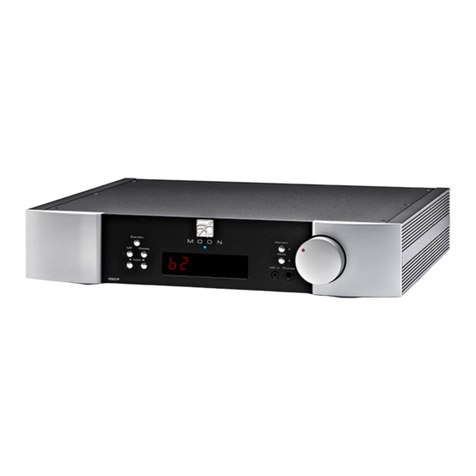
The two (2) buttons labeled ◄INPUT ►allow you to
sequentially scroll, either forward (►) or backward (◄)
through all of the available inputs. Depending on
whether or not the DAC option is installed, the order of
the inputs is as follows going forward (►): Basic Unit:
“A1”, “A2” and “B1”; DAC option installed: “A1”, “A2”,
“B1”, “D1”, “D2”, “D3” and “D4”
The above abbreviations correspond to the labeling of
the rear panel inputs. “A1”, “A2” and “B1” are intended
for use with any type of source component that outputs
an analog signal: “A1” and “A2” for single-ended sources
using RCA connectors; “B1” for balanced sources using
XLR connectors. If you have installed the DAC option,
“D1”, “D2”, “D3” and “D4” will appear after “B1”.
The “Mute” button mutes the output signal to the
headphone outputs, as well as both the fixed and
variable line output connectors (refer to the section
entitled “Rear Panel Connections” for further details). As
well, the volume level setting will no longer appear in
the display widow. Pressing the “Mute” button a second
time will reinstate the volume back to its previous level.
When the output signal is muted, the red LED to the
right will repeatedly flash on and off. Note: Adjusting
the volume level while the “Mute” function is active will
immediately de-activate the “Mute” function.
The Nēo 430HA is Energy Using Product (EuP)
compatible. This is a European standard that effectively
limits the off and standby power consumption to no
more than 0.5W. When the EuP function is active, the
unit will automatically turn off after 20 minutes of
inactivity. The “Mute” button allows you to activate and
de-activate the EuP function as follows; press and hold
the “Mute” button for approximately 3 seconds to
toggle EuP on (default setting) or off. The display will
show "EuP" or "No EuP", respectively, whenver the EuP
setting changes. The EuP setting is maintained when
the 430HA is both powered down and placed into
“Standby” mode.
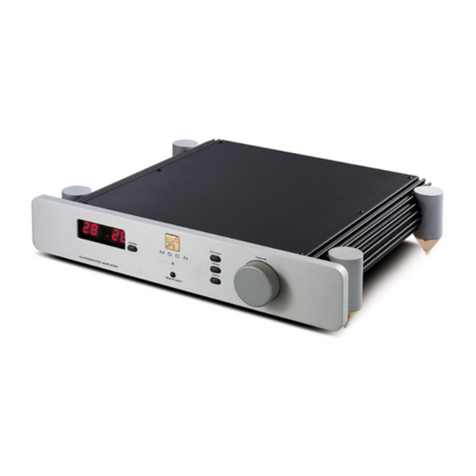
The “MP” button (for Media Player) has its input
connection located above the headphone jack for easy
access. It uses a 1/8” mini-jack connector which is the
most common type of connection found on portable
media players. When selected, the corresponding red
LED, located to the right of the button, will illuminate.
When the “MP” input is in use the display window
automatically turns off. The “Display” button allows you
to turn the digital display on and off.
The rotary “volume” control determines the volume
level, which ranges from ‘0.0dB’ (no output) to ’80.0dB’
(full output). This control does not function like a typical
volume: When you rotate the dial, either clockwise to
raise the volume or counter-clockwise to lower the
volume, you are actually engaging a precision optical
encoder which selects very high quality metal-film
resistors that the audio signal passes through. The result
is a proprietary volume circuit, called M-eVOL2 that
doesn’t degrade the audio signal regardless of the
setting, unlike all potentiometer based circuits. Since
this circuitry operates in a fully balanced differential
mode, no noise is introduced to the audio signal. The
Nēo 430HA Headphone Amplifier provides a range of
five-hundred and thirty (530) unique volume settings.
This is achieved as follows: Within the 0.0dB to 30.0dB
range, you can increase and decrease the volume in
1.0dB steps. From the 30.0dB to 80.0dB range, you can
increase and decrease the volume by either 0.1dB or
1.0dB steps; By rotating the volume control slowly, the
level will change by 0.1dB increments. A quicker
rotation will change the volume in 1.0dB increments.
Note: It is normal to hear a faint clicking sound between
each step when adjusting the volume. This is the result of
the volume circuit being optimized for sound quality.
There are three (3) different headphone outputs located
on the front panel of the Nēo 430HA. The first is the
“Phones” jack, located directly below the “MP in” jack.
This is used for connecting a pair of single-ended stereo
headphones to the 430HA. The input connector uses a
standard single-ended ¼” TRS jack.
The two other headphone outputs are hidden behind
the right side of the display window. To expose them,
simply slide the display window to the left. This is done
by placing one of your fingers into the contoured
groove, located on the far right side of the window, and
gently sliding it to the left until it stops moving; when
the groove is vertically aligned to the blue indicator
LED. You will now see three (3) female XLR connectors;
The left and middle sockets are 3-pin XLR connectors,
intended for use with a pair of dual-mono fully balanced
headphones equipped with two 3-pin XLR male
connectors. The right socket is a 4-pin XLR connector,
intended for use with a pair of fully balanced
headphones equipped with one 4-pin male connector.
When none of these three XLR connectors are in use,
you should close the display window; this is done by
placing one of your fingers onto the left side contoured
groove and gently sliding it to the right until it stops
moving.