manuals.online logo
Brands
  1. Home
  2. •
  3. Brands
  4. •
  5. MSI
  6. •
  7. Motherboard
  8. •
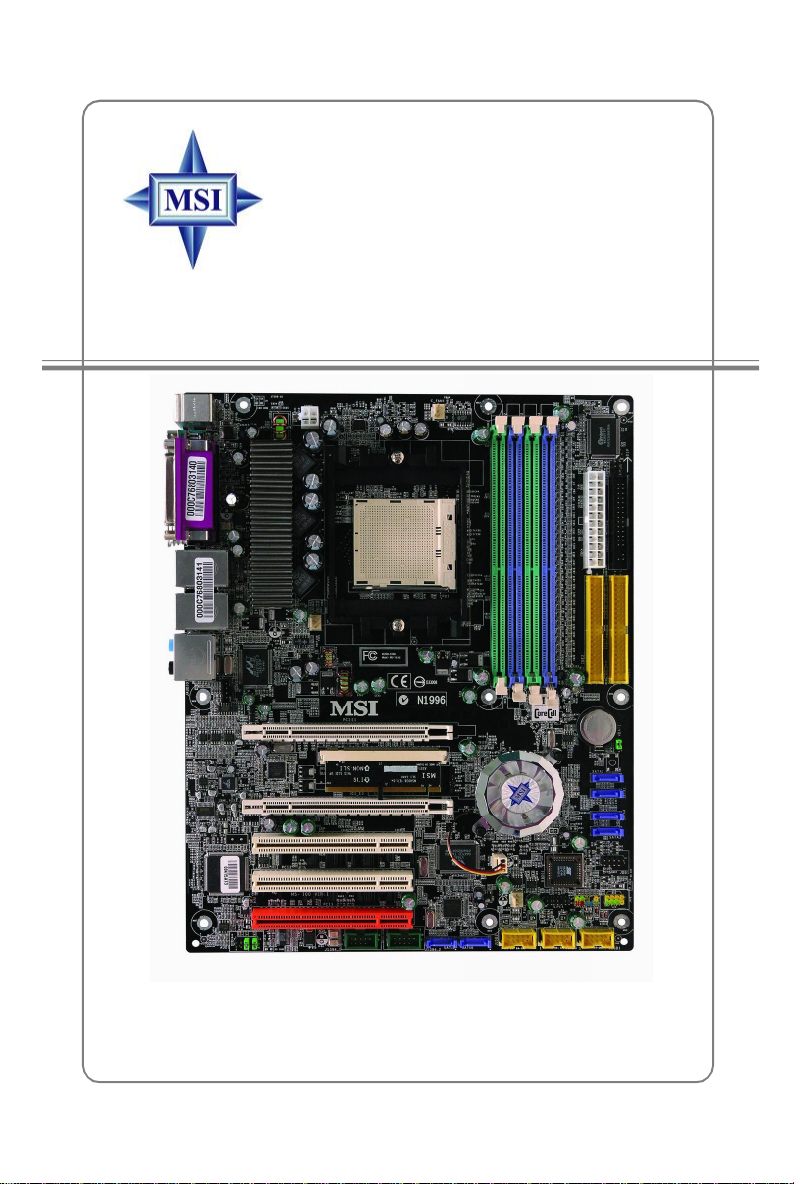
  9. MSI K8N SLI Platinum User manual

MSI K8N SLI Platinum User manual

This manual suits for next models

2

Other MSI Motherboard manuals

MSI H6M-E33 (G3) User manual

MSI

MSI H6M-E33 (G3) User manual

MSI PRO B760-P WIFI User manual

MSI

MSI PRO B760-P WIFI User manual

MSI ms 7529 Quick start guide

MSI

MSI ms 7529 Quick start guide

MSI 880GMA-E53 Series User manual

MSI

MSI 880GMA-E53 Series User manual

MSI B450I GAMING PLUS AC User manual

MSI

MSI B450I GAMING PLUS AC User manual

MSI MS-7521 (v2.X) User manual

MSI

MSI MS-7521 (v2.X) User manual

MSI Z270 gaming M3 User manual

MSI

MSI Z270 gaming M3 User manual

MSI H110M PRO-VD User manual

MSI

MSI H110M PRO-VD User manual

MSI B560-A PRO User manual

MSI

MSI B560-A PRO User manual

MSI MS-6161 User manual

MSI

MSI MS-6161 User manual

MSI PRO B760M-G DDR4 User manual

MSI

MSI PRO B760M-G DDR4 User manual

MSI IA-Q45 User manual

MSI

MSI IA-Q45 User manual

MSI H97M ECO User manual

MSI

MSI H97M ECO User manual

MSI MS-7516 User manual

MSI

MSI MS-7516 User manual

MSI H61MA-E35 (B3) User manual

MSI

MSI H61MA-E35 (B3) User manual

MSI P6NGM series User manual

MSI

MSI P6NGM series User manual

MSI B560-A PRO User manual

MSI

MSI B560-A PRO User manual

MSI Z170A SLI PLUS User manual

MSI

MSI Z170A SLI PLUS User manual

MSI MS-6377 User manual

MSI

MSI MS-6377 User manual

MSI A320M GRENADE User manual

MSI

MSI A320M GRENADE User manual

MSI H61MU-E35 series User manual

MSI

MSI H61MU-E35 series User manual

MSI MS-7392 User manual

MSI

MSI MS-7392 User manual

MSI Z590 PRO Wi-Fi User manual

MSI

MSI Z590 PRO Wi-Fi User manual

MSI IM-Q35 Series User manual

MSI

MSI IM-Q35 Series User manual

Popular Motherboard manuals by other brands

Gigabyte MNJ190I-FH user manual

Gigabyte

Gigabyte MNJ190I-FH user manual

Biostar HI-FI-Z87X-3D Setup manual

Biostar

Biostar HI-FI-Z87X-3D Setup manual

Atmel SAM9753PIA-DK user guide

Atmel

Atmel SAM9753PIA-DK user guide

Coapt GEN2 Handbook

Coapt

Coapt GEN2 Handbook

Supero SUPER P4DL6 user manual

Supero

Supero SUPER P4DL6 user manual

Cypress CY3210-PSoCEVAL1 quick start guide

Cypress

Cypress CY3210-PSoCEVAL1 quick start guide

ASROCK B660M-HDV manual

ASROCK

ASROCK B660M-HDV manual

Fujitsu D2831 Short description

Fujitsu

Fujitsu D2831 Short description

Industrial Computers ADE-6050 user manual

Industrial Computers

Industrial Computers ADE-6050 user manual

Asus TUF Z270 MARK 2 manual

Asus

Asus TUF Z270 MARK 2 manual

DFI NB71-BC user manual

DFI

DFI NB71-BC user manual

ASROCK H61 Pro BTC user manual

ASROCK

ASROCK H61 Pro BTC user manual

Norco POS-7893 user manual

Norco

Norco POS-7893 user manual

Intel DG965MS specification

Intel

Intel DG965MS specification

Asus B85M-VIEW PAKER user manual

Asus

Asus B85M-VIEW PAKER user manual

Asus P5G41T-M LX V2 user manual

Asus

Asus P5G41T-M LX V2 user manual

Gigabyte GA-K8VT800-RH user manual

Gigabyte

Gigabyte GA-K8VT800-RH user manual

Gigabyte Z790M AORUS ELITE user manual

Gigabyte

Gigabyte Z790M AORUS ELITE user manual

manuals.online logo
manuals.online logoBrands
  • About & Mission
  • Contact us
  • Privacy Policy
  • Terms and Conditions

Copyright 2025 Manuals.Online. All Rights Reserved.

i
MS-7100(v1.X)ATXMainboard
K8NSLIPlatinum&
K8NNeo4Platinum/SLI
G52-M7100X2
ii
ManualRev:1.1
ReleaseDate:Dec.2004
FCC-BRadioFrequencyInterferenceStatement
Thisequipment hasbeen testedandfoundtocomplywiththelimitsforaclassB
digital device,pursuanttopart15ofthe FCCrules.Theselimitsaredesigned to
providereasonableprotection againstharmful interferencewhentheequipmentis
operated inacommercial environment.Thisequipmentgenerates,usesandcan
radiateradiofrequencyenergyand,if notinstalledand usedinaccordancewiththe
instructionmanual,maycauseharmfulinterferencetoradiocommunications.Operation
ofthisequipment in aresidentialarea islikelytocauseharmful interference, inwhich
casetheuserwill berequiredtocorrecttheinterferenceathisownexpense.
Notice1
Thechangesormodificationsnotexpresslyapprovedbythepartyresponsiblefor
compliancecould void theuser sauthoritytooperatetheequipment.
Notice2
Shielded interfacecablesandA.C.powercord,if any,mustbeusedin orderto
complywiththeemissionlimits.
VOIRLANOTICED INSTALLATIONAVANT DERACCORDERAURESEAU.
Micro-StarInternational
MS-7100
ThisdevicecomplieswithPart15oftheFCCRules.Operationissubjecttothe
followingtwoconditions:
(1)thisdevicemaynotcauseharmful interference,and
(2)thisdevicemustacceptanyinterferencereceived,includinginterferencethat
maycauseundesiredoperation
iii
CopyrightNotice
The materialin thisdocumentistheintellectualpropertyof MICRO-STAR
INTERNATIONAL.Wetakeeverycarein thepreparationof thisdocument, butno
guaranteeisgivenastothe correctness of itscontents.Ourproductsareunder
continualimprovementand wereservetherighttomakechangeswithoutnotice.
Trademarks
Alltrademarksarethepropertiesoftheirrespectiveowners.
AMD,Athlon™64 and Athlon™FXareregisteredtrademarksofAMDCorporation.
Intel®andPentium®areregisteredtrademarksofIntelCorporation.
PS/2and OS®/2areregistered trademarks of InternationalBusinessMachines
Corporation.
Microsoftisaregistered trademarkofMicrosoft Corporation.Windows®98/2000/NT/
XPareregistered trademarks ofMicrosoftCorporation.
NVIDIA, theNVIDIAlogo,DualNet,and nForceareregisteredtrademarksortrade-
marksof NVIDIACorporationin theUnitedStatesand/orothercountries.
Netware®isaregisteredtrademarkofNovell,Inc.
Award®isaregisteredtrademarkofPhoenixTechnologiesLtd.
AMI®isaregistered trademarkofAmerican MegatrendsInc.
Kensingtonand MicroSaverareregistered trademarks of theKensingtonTechnology
Group.
PCMCIAand CardBusareregisteredtrademarks of thePersonalComputerMemory
CardInternationalAssociation.
RevisionHistory
Revision RevisionHistory Date
V1.1 FirstreleaseforPCB1.X Dec.2004
withnVIDIAnForce4SLI (Platinum)
iv
1. Alwaysread thesafetyinstructionscarefully.
2. KeepthisUser sManualforfuturereference.
3. Keepthisequipmentawayfromhumidity.
4. Laythisequipmentonareliableflatsurfacebeforesetting itup.
5. Theopeningsontheenclosureareforairconvectionhenceprotectstheequip-
mentfromoverheating.Donotcovertheopenings.
6. Makesurethevoltageofthe powersourceand adjust properly110/220Vbe-
foreconnectingtheequipmenttothepowerinlet.
7. Placethepowercordsuchawaythatpeoplecannotstepon it. Donotplace
anythingoverthepowercord.
8. AlwaysUnplugthe PowerCordbeforeinsertinganyadd-on cardormodule.
9. All cautionsand warningsontheequipmentshouldbenoted.
10. Neverpouranyliquidintotheopeningthatcoulddamageorcauseelectrical
shock.
11. If anyof thefollowing situationsarises, gettheequipmentcheckedbyaservice
personnel:
†Thepowercordorplug isdamaged.
†Liquidhaspenetratedintotheequipment.
†Theequipmenthasbeenexposedtomoisture.
†Theequipment hasnot workwell oryoucannotget itworkaccording to
User sManual.
†Theequipmenthasdroppedanddamaged.
†Theequipmenthasobvioussign of breakage.
12.Donotleavethisequipmentin anenvironmentunconditioned,storage
temperatureabove 600 C(1400F),itmay damagetheequipment.
SafetyInstructions
CAUTION:Dangerofexplosionifbatteryisincorrectlyreplaced.
Replaceonlywiththesameorequivalenttyperecommended bythe
manufacturer.
TechnicalSupport
Ifaproblemariseswithyoursystemandnosolutioncanbeobtainedfromtheuser s
manual,pleasecontactyourplaceofpurchaseorlocal distributor.Alternatively,
pleasetrythefollowinghelp resourcesforfurtherguidance.
†VisittheMSIhomepage &FAQsitefortechnical guide,BIOSupdates,driver
updates,and otherinformation: http://www.msi.com.tw & http://www.msi.
com.tw/program/service/faq/faq/esc_faq_list.php
†Contactourtechnicalstaffat: support@msi.com.tw
v
CONTENTS
FCC-B RadioFrequencyInterferenceStatement.........................................................iii
CopyrightNotice..............................................................................................................iii
RevisionHistory..............................................................................................................iii
SafetyInstructions.........................................................................................................iv
TechnicalSupport..........................................................................................................iv
Chapter1.GettingStarted....................................................................................1-1
MainboardSpecifications...................................................................................1-2
MainboardLayout................................................................................................1-5
Packing Contents.................................................................................................1-6
Chapter2.HardwareSetup..................................................................................2-1
Quick ComponentsGuide...................................................................................2-2
Central ProcessingUnit:CPU.............................................................................2-3
CPUInstallationProceduresforSocket 939.............................................2-4
Installing AMDAthlon64/Athlon64FXCPUCoolerSet.............................2-5
Memory.................................................................................................................2-7
Introduction toDDRSDRAM.......................................................................2-7
DIMMModuleCombination...........................................................................2-7
Recommended MemoryCombinationList..................................................2-8
Installing DDRModules................................................................................2-9
PowerSupply....................................................................................................2-10
ATX24-Pin PowerConnector: JPWR1....................................................2-10
ATX12VPowerConnector:JPWR2........................................................2-10
Important NotificationaboutPowerIssue.................................................2-11
BackPanel.........................................................................................................2-12
MouseConnector(Green)/KeyboardConnector(Purple)..................2-12
IEEE1394 Port(optional)............................................................................2-12
SerialPortConnector................................................................................2-13
USBConnectors........................................................................................2-13
LAN(RJ-45)Jack......................................................................................2-14
AudioPortConnectors..............................................................................2-14
ParallelPortConnector:LPT1...................................................................2-15
Connectors........................................................................................................2-16
FloppyDiskDriveConnector:FDD1.........................................................2-16
FanPowerConnectors:C_FAN1/S_FAN1/ S_FAN2/ NB_FAN1.......2-16
HardDiskConnectors:IDE1/IDE2...........................................................2-17
ChassisIntrusionSwitchConnector:JCI1..............................................2-17
vi
SerialATA/SerialATARAIDConnectorscontrolledby
nForce4SLI:SATA1/SATA2/SATA3/ SATA4;....................................2-18
SerialATA/SerialATARAIDConnectorscontrolledby
SiliconImagesSATARAID:SATA5/ SATA6(onlyforK8NNeo4 Platinum/
SLI)..............................................................................................................2-18
CD-InConnector:JCD1.............................................................................2-18
FrontPanel Connectors:JFP1/JFP2......................................................2-19
FrontUSBConnectors:JUSB1/JUSB2/ JUSB3...................................2-19
FrontPanelAudioConnector:AUD1........................................................2-20
IrDAInfraredModule Header: JIR1...........................................................2-20
IEEE 1394 Connectors:J1394_1/J1394_2 (optional)...........................2-21
D-Bracket™2Connector:JDB1..............................................................2-21
NVSLI (Scalable LinkInterface)connector:PCI_E4..............................2-24
Button.................................................................................................................2-27
ClearCMOSButton: SW1..........................................................................2-27
Slots....................................................................................................................2-28
PCIExpress Slots:PCI_E1&PCI_E3........................................................2-28
PCI(Peripheral ComponentInterconnect)Slots:PCI1~3........................2-28
PCIInterruptRequestRouting...................................................................2-29
Chapter3.BIOSSetup............................................................................................3-1
EnteringSetup.....................................................................................................3-2
Selecting theFirstBoot Device..................................................................3-2
Control Keys................................................................................................3-3
GettingHelp..................................................................................................3-3
TheMainMenu.....................................................................................................3-4
StandardCMOSFeatures...................................................................................3-6
AdvancedBIOSFeatures...................................................................................3-8
AdvancedChipsetFeatures.............................................................................3-11
IntegratedPeripherals.......................................................................................3-12
PowerManagementSetup...............................................................................3-17
PNP/PCIConfigurations.....................................................................................3-20
H/WMonitor.......................................................................................................3-22
Cell Menu............................................................................................................3-24
LoadFail-Safe/OptimizedDefaults..................................................................3-30
BIOSSetting Password....................................................................................3-31
Chapter4.IntroductiontoDigiCell.....................................................................4-1
Main......................................................................................................................4-2
Introduction:.................................................................................................4-2
vii
H/WDiagnostic....................................................................................................4-4
Communication.....................................................................................................4-5
SoftwareAccessPoint.......................................................................................4-6
Terminology..................................................................................................4-6
Access PointMode.....................................................................................4-7
WLANCardMode........................................................................................4-8
LiveUpdate..........................................................................................................4-9
MEGASTICK.......................................................................................................4-10
BasicFunction...........................................................................................4-10
Non-Unicodeprogramssupported...........................................................4-12
CoreCenter(forAMDProcessor)...................................................................4-14
Poweron Agent.................................................................................................4-16
PowerOn...................................................................................................4-16
PowerOff /Restart...................................................................................4-17
StartWith....................................................................................................4-17
AutoLogin..................................................................................................4-18
Chapter5.IntroductiontoCreative SoundBlaster.......................................5-1
Using 2-, 4-,6-&8-ChannelAudioFunction...................................................5-1
Installing theCreativeAudioDriver....................................................................5-6
InstallationforWindows2000/XP..............................................................5-6
SoftwareConfiguration......................................................................................5-8
SURROUNDMIXER.......................................................................................5-9
SPEAKERSETTINGS................................................................................5-10
MEDIASOURCEPLAYER...........................................................................5-12
EAXCONSOLE..........................................................................................5-13
GRAPHICEQUALIZER...............................................................................5-17
Chapter6. nVidiaRAIDIntroduction..................................................................6-1
Introduction..........................................................................................................6-2
SystemRequirement...................................................................................6-2
RAIDArrays.................................................................................................6-2
SummaryofRAIDConfigurations..............................................................6-2
RAIDConfiguration...............................................................................................6.3
BasicConfigurationInstructions................................................................6-3
Setting UptheNVRAIDBIOS......................................................................6-3
InstallingtheRAIDDriver(forNon-bootableRAIDArray)................................6-7
NVIDIARAIDUtilityInstallation............................................................................6-7
Installing theRAIDDriver(forbootableRAIDArray)...............................6-9
Initializing and Using theDiskArray.........................................................6-10

viii
RAIDDrivesManagement.................................................................................6-12
Chapter7. SiliconImageSATARAID5TM Introduction.....................................7-1
Introduction..........................................................................................................7-2
RAID-RedundantArrayof Independent Disks........................................7-2
RAID0(Striping)..........................................................................................7-2
RAID1(Mirroring)........................................................................................7-2
JBOD(Just Bunchof Disks).......................................................................7-2
CreatingandDeletingRAIDsetswithBIOSUtility............................................7-3
MainMenu....................................................................................................7-3
Help Window................................................................................................7-4
PhysicalDriveInformation..........................................................................7-4
LogicalDriveInformation............................................................................7-4
CommandLine..............................................................................................7-4
CreatingRAIDGroups.................................................................................7-5
Creating SpareDrive....................................................................................7.6
CreatingJBOD..............................................................................................7-7
DeletingRAIDGroups,SpareDrive,andJBOD........................................7-7
RebuildRAID1Set......................................................................................7-8
Resolving Conflicts......................................................................................7-8
LowLevelFormatting................................................................................7-11
LogicalDriveInformation...........................................................................7-11
ReservedDriveand Setting SizeforRAIDSet,SpareDrive,orJBOD7-12
InstallingtheRAIDDriver..................................................................................7-13
Install DriverinWindowsXP/2000........................................................7-13
Chapter8.Installation ofNVIDIASystemDriver............................................8-1
NVIDIASystemDriverInstallaion........................................................................8-2
1-1
GettingStarted
Chapter1.Getting
Started
Thankyouforchoosingthe K8NSLI Platinum&K8NNeo4
Platinum/SLI (MS-7100)v1.XATXmainboard. TheK8NSLIPlati-
num&K8NNeo4Platinum/SLI mainboardsarebased on nVIDIA
nForce™4SLI chipset foroptimalsystemefficiency.Designedtofit
the advanced AMD
K8Athlon 64 FX/ Athlon64 processor,the
K8NSLI Platinum&K8NNeo4Platinum/SLI mainboardsdelivera
high performanceand professionaldesktopplatformsolution.
GettingStarted
1-2
MS-7100 ATXMainboard

CPU
†SupportsSocket-939forAMDK8Athlon 64FX/Athlon64(Socket939)processor
†Supportsupto4000+AthlonFX55, orhigherCPU
(ForthelatestinformationaboutCPU,pleasevisit http://www.msi.com.tw/program/
products/mainboard/mbd/pro_mbd_cpu_support.php)
Chipset
†nVIDIAnForce4SLI
-HyperTransport linktotheAMDAthlon64/Athlon64 FXCPU
-HyperTransportsupportingspeedup to1GHz(2000MT/s)
-Supports2PCIExpress x16/x1interface
-TwoindependentSATAcontrollers,forfourdrives
-DualFast ATA-133 IDEcontrollers
-IEEE802.3nVIDIAMACfor1000BASE-T
Main Memory
†Supportsdualchannel,eightmemorybanks DDR 266/333/400,usingfour184-
pinDDRDIMMs
†Supportsamaximummemorysizeupto4GB
†Supports2.5vDDR SDRAMDIMM
(Fortheupdatedsupporting memorymodules, pleasevisit http://www.msi.com.tw/
program/products/mainboard/mbd/pro_mbd_trp_list.php.)
Slots
†TwoPCIExpress x16slots(supportsPCIExpress Busspecificationv1.0a
compliant)
†2ndPCIExpress x16slot(PCI_E3)iscompatiblewithPCIExpressx1
†Three 32-bitMasterPCIBusslots,includesoneorangeslotwhichisreserved
asacommunicationslot.
†Support3.3V/5VPCIbusInterface
On-BoardIDE
†AnIDEcontrolleron the nVIDIA nForce4SLIchipsetprovidesIDEHDD/CD-ROM
withPIO,BusMasterandUltraDMA66/100/133 operationmodes
†Can connect upto4IDEdevices
On-BoardSATA
†NVRAIDsupports4SATAIIports(SATA1-4). Transferrateisup to300 MB/s.
SupportsRAID0,0+1andJBODmode.
†Silicon Image’sSATARAIDsupportsanother2SATAII ports(SATA5/6). Transfer
rateisup to300 MB/s.SupportsRAID0&1mode(onlyforK8NNeo4Platinmu/
SLI).
MainboardSpecifications