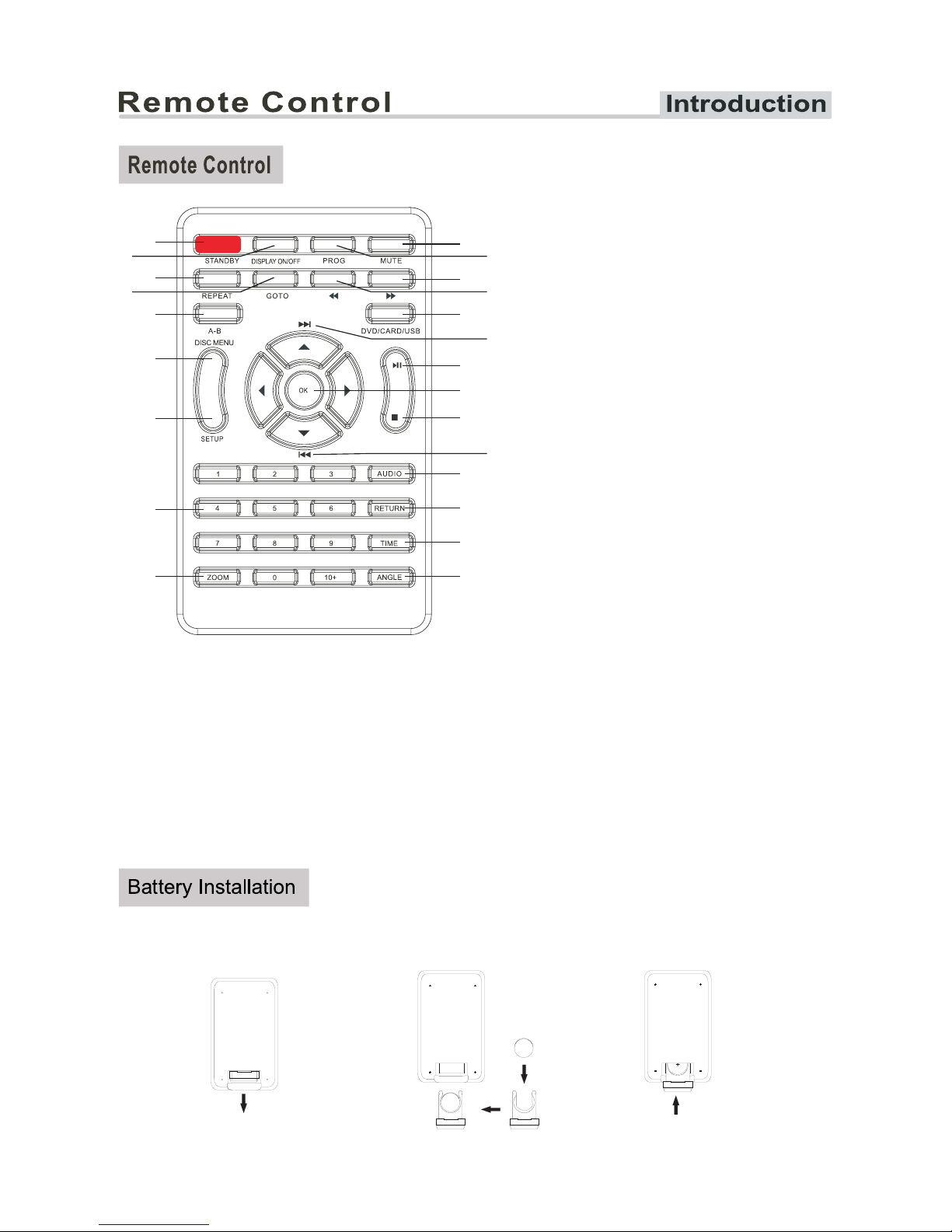
1.Pull out the clear film from the battery compartment to start using the remote control.
2.Slide out the battery bracket to change the battery.
1
3
5
6
7
8
9
4
210 11
12
14
16
18
20
21
22
23
13
15
19
17
1.STANDBY
Turns the power on or restores the
DVD player to standby mode.
2.DISPLAY ON/OFF
Press to open or close the display
3.REPEAT
Change the repeat mode.
4.GOTO
Goto a specific play time /point on a DVD.
5.A-B
Press to repeat a specified section of a
loaded DVD.
7.SETUP
Press to access the setup menu.
8.0-9/10+ Number Keys
9.ZOOM
To enlarge a picture on the screen.
10.
Cuts and restores the volume.
11.PROG
Permits programming of aesquence of
DVD chapters to be played.
12.F.FWD
To perform fast forward playback.
13.F.RWD
To perform fast reverse playback.
6.DISC MENU
During DVD,playback,press MENU to return to
the program menu.
14.DVD/USB/CARD
Switches between DVD or USB and CARD modes.
15.NEXT
To skip to the next title/chapter/track.
16.PLAY/PAUSE
Starts playing or pauses a disc.
17.DIRECTION (▲▼◄►)/OK
Press to navigate a loaded DVD menu or the
setup menu and make selections.
18.STOP
Press to stop a DVD or CD during play.
19.PREV
To skip to the previous title/chapter/track.
20.AUDIO
To change the audio mode
21.RETURN
To return to the previous menu
23.ANGLE
Accesses different camera angles.
22.TIME
Press this key to display the current time on
7
For Customer Services & Spare Parts please call 01204 664 084 Opening times: Monday – Friday 9am until 5pm
MUTE
+
+
the display, and put a full stop after display.