ー7ー
HOW TO CHARGE
THE PRODUCT
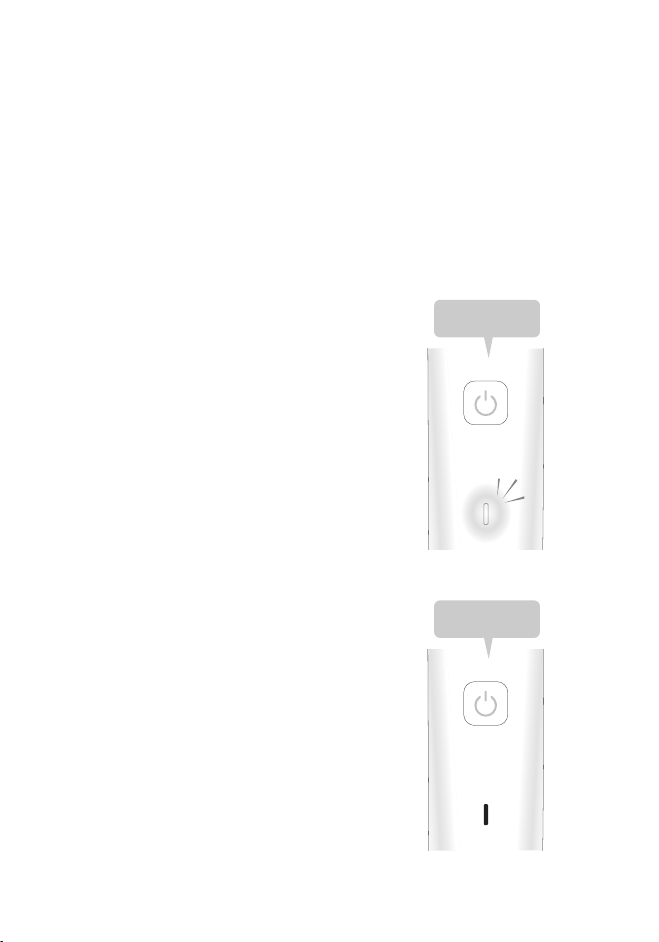
While charging, the red-light lamp under the power button flashes, and when the
charging is complete the white light turns on.
①Insert the USB cable into the charging port located at the bottom of the unit.
②Plug into an AC adaptor (sold separately) or a USB outlet.
③Upon completion of charging, please remove the USB cable from the unit.
The time needed to charge the unit: approximately 5 hrs (Charging time may vary
depending on the battery remaining level and usage environment.)
Operating hour once charged: 1 ~1.5 hour
※There is no automatic power-off function.
・When the battery is charged for the first time or has not been used for six months or more, the
charging time may change. The charging lamp may not blink for the first few minutes, and the
usable time of the product may be shortened. In such cases, charge for at least 8 hours.
・The recommended charging temperature is between 0’ C to 35 ‘C. Beyond the recommended
temperature, the charging time may vary and battery performance may decrease.
・There is no problem in charging the battery every time, but it is recommended to charge the battery
after the remaining battery is exhausted. The charging life of the battery varies depending on the
conditions of use and storage.
・ If the battery is not used for more than half a year, the battery will deteriorate. (E.g. fluid leakage) So
please fully charge it once every six months.
・Charging for more than 5 hours does not affect the unit.
Charging: Red light blinking
Completion of charging: White
light lit
Low battery: Red light blinking
※Red light blinking during use
indicates low battery
Insert the cable with
the grooved section
facing upwardly
※Never charge the unit when the charging port is wet.
Power・
Charging lamp