TABLE OF CONTENTS
1EQUIPMENT DESCRIPTION………………………………………………………
1.1 …………………………………………………………… 1INTRODUCTION ……..................
.......1
1.2 ….…………………….……….………………….… 1ETSI INFORMATION ..............
2 ………………………………………… 2CONTROLS AND LCD DISPLAY ....................
2.1 ……….……………….…………………….…… 2BASE STATION PANEL ..............
2.2 ( )…………..……………………..……… 4BASE STATION PANEL REAR ................
2.3 ………………….……………………………………………...… 5HANDSET ............
2.4 ……..………………………………..….…… 6LIQUID CRYSTAL DISPLAY .............
3 …………………….……………………………….….……. 7INSTALLATION ...................
3.1 ………………………………………….…… ..SUPPLIED ACCESSORIES ............
3.2 …………………………………………………………….…… 7LOCATION ...........
7
3.3 ………………….………….……………………..… … 8CONNECTIONS … ..............
11
3.4 ………..……..………………………………… 9MOUNTING THE RADIO ...............
3.5 / .…………………..……ANTENNA MOUTING THE EME EXPOSURE ................
3.6 …………………………………………….. 11MOUNTING THE HANDSET ..............
4 ………………………….………………………….… 12BASIC OPERATION ...................
4.1 …….………………..……………. 12TRANSMISSION AND RECEPTION ..............
4.2 ……………………….……………………………………. 12BAND SWITCH ..............
124.2.1 ………………………………………………………USA AND INT MODE
4.2.2 ( ) ………………….……………………………………MEMO FAV MODE .....
4.3 ( ) ……………………….………….… 13SAVE MEMORY FAV CHANNELS ..............
13
4.4 - - ( )………………………………….. 13TRANSMIT TIME OUT TIMER TOT ..............
4.5 ………………………………………………………..……………… 13SCAN ...........
4.6 ………………………………………………………..…………… 14WATCH ............
4.6.1 ……………………………………………….…………… 14DUAL WATCH .....
4.6.2 ……………………………………………………..………… 14TRI WATCH ....
4.7 ……………………………..…………………… 14POSITION INDICATION .............
15
5 ………………..………………….… …15DIGITAL SELECTIVE CALLING .....................
5.1 ………………………………………………….….…….. 15GENERAL .........................
5.1.1 MARITIME MOBILE SERVICE IDENTITY ….…………….…… . 15....... .......
5.1.2 ?……………………….. 15HOW CAN I OBTAIN A MMSI ASSIGNMENT ......
5.2 ………………………………………………………… .DSC CALL TYPES .............
5.2.1 ……………………………...……………..… 17SEND A DISTRESS CALL ......
18
5.2.2 …….………………………………….…… 17SEND AN ALL SHIP SCALL ......
5.2.3 ……………….………………………………..…SEND A GROUP CALL …..
5.2.4 ( )………………………….…... 19MAKE A ROUTING CALL INDIVIDUAL …..
5.2.4.1 ……………...……. 19MANUALLY SENDING AN INDIVIDUAL CALL ..
20
20
20
21
21
5.2.4.2 ………………………………….…20SENDING AN INDIVIDUAL CALL
5.2.4.3 ACKNOWLEDGEMENT OF AN INDIVIDUAL INCOMING CALL...
5.2.5 ………………………………………………………………... 20LAST CALL ....
5.2.6 .…………. … .SEND AN INDIVIDUAL CALL USING THE CALL LOG . .....
5.2.7 ….….…SEND AN INDIVIDUAL CALL USING THE DISTRESS LOG ......
5.2.8 POS REQUEST AND POS REPLY……………………………...……… .......
5.2.8.1 ……………………….…………………………………POS REQUEST
5.2.8.2 ……………………………………………………………...21POS REPLY
Navicom RT-550BT Navicom RT-550BT
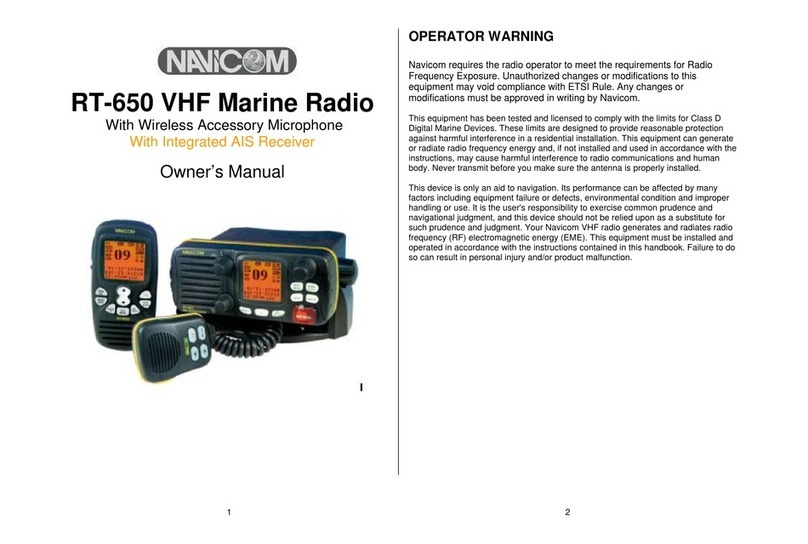
OPERATOR WARNING
Navicom requires the radio operator to meet the requirements for Radio
Frequency Exposure Unauthorize.d changes or modifications to this
equipment may void compliance with ETSI Rule Any changes or.
modification must approved in writing by Navicom.
This equipment has been tested and licensed to comply with the limits for Class
D Digital Marine Devices These limits.are designed to provide reasonable
protection against harmful interference in a residential installation This equipment.
can generate or radiate radio frequency energy and if not installed and used in,
accordance with the instructions may cause harmful interference to radio,
communications and human body Never transmit before you make sure the.
antenna is properly located.
This device is only an aid to navigation Its performance can be affected by many.
factors including equipment failure or defects environmental condition and,
improper handling or use It is the user s responsibility to exercise common. '
prudence and navigational judgement and this device should not be relied upon,
as a substitute for such prudence and judgement Your Navicom VHF radio.
generates and radiates radio frequency RF electromagnetic energy EME This( ) ( ).
equipment must be installed and operated in accordance with the instructions
contained in this handbook.Failure to do so can result in personal injury and or/
product malfunction.