manuals.online logo
Brands
  1. Home
  2. •
  3. Brands
  4. •
  5. Obdmate
  6. •
  7. Barcode Reader
  8. •
  9. Obdmate om520 User manual

Obdmate om520 User manual

Other manuals for om520

3

Popular Barcode Reader manuals by other brands

Microscan HS-2D user manual

Microscan

Microscan HS-2D user manual

SICK CLV62x Online help

SICK

SICK CLV62x Online help

Datalogic Gryphon GBT4200 Quick reference guide

Datalogic

Datalogic Gryphon GBT4200 Quick reference guide

WaveMark SmartWand SW1500 manual

WaveMark

WaveMark SmartWand SW1500 manual

Zebex Z-3191BT Quick connection guide

Zebex

Zebex Z-3191BT Quick connection guide

RTscan RT211 Integration guide

RTscan

RTscan RT211 Integration guide

Motorola SYMBOL DS6707 Product reference guide

Motorola

Motorola SYMBOL DS6707 Product reference guide

Godex BP300 user manual

Godex

Godex BP300 user manual

Godex RT800i Series user manual

Godex

Godex RT800i Series user manual

Generalscan X Series quick start guide

Generalscan

Generalscan X Series quick start guide

POSMicro Datalogic PowerScan D7100 manual

POSMicro

POSMicro Datalogic PowerScan D7100 manual

NCR RealPOS user guide

NCR

NCR RealPOS user guide

Motorola SE3300 Integration guide

Motorola

Motorola SE3300 Integration guide

Nordson CBC 5100 manual

Nordson

Nordson CBC 5100 manual

Motorola Symbol LS3008 Product reference guide

Motorola

Motorola Symbol LS3008 Product reference guide

Meec tools OBD-II / VAG operating instructions

Meec tools

Meec tools OBD-II / VAG operating instructions

SICK CLP 100 operating instructions

SICK

SICK CLP 100 operating instructions

Royal Tag SA I-Read user manual

Royal Tag SA

Royal Tag SA I-Read user manual

manuals.online logo
manuals.online logoBrands
  • About & Mission
  • Contact us
  • Privacy Policy
  • Terms and Conditions

Copyright 2025 Manuals.Online. All Rights Reserved.

www . autophix . com
OBDMATE OM520
User’s Manual
www.auobd2.com
www.auobd2.com
Email: [email protected] MSN: [email protected]
Skype: auobd2.com Yahoo: [email protected]
Phone number: 86-15972933706
Table of Contents
1. Safety Precautions and Warnings . . . . . . . . . . . . . . . . . . . . . . . . . . . . . . 2
2. General Information . . . . . . . . . . . . . . . . . . . . . . . . . . . . . . . . . . . . . . . . 3
2.1 On-Board Diagnostics (OBD) II. . . . . . . . . . . . . . . . . . . . . . . . . . . . . 3
2.2 Diagnostic Trouble Codes (DTCs) .. . . . . . . . . . . . . . . . . . . . . . . . . . 3
2.3 Location of the Data Link Connector (DLC) . . . . . . . . . . . . . . . . . . . 4
2.4 OBD II Readiness Monitors . . . . . . . . . . . . . . . . . . . . . . . . . . . . . . . 5
2.5 OBD II Monitor Readiness Status. . . . . . . . . . . . . . . . . . . . . . . . . . . 6
2.6 OBD II Definitions. . . . . . . . . . . . . . . . . . . . . . . . . . . . . . . . . . . . . . . 6
3. Using the Scan Tool . . . . . . . . . . . . . . . . . . . . . . . . . . . . . . . . . . . . . . . . 8
3.1 Tool Description OM520. . . . . . . . . . . . . . . . . . . . . . . . . . . . . . . . . . 8
3.2 Specifications . . . . . . . . . . . . . . . . . . . . . . . . . . . . . . . . . . . . . . . . 9
3.3 Accessories Included . . . . . . . . . . . . . . . . . . . . . . . . . . . . . . . . . . . . 9
3.4 Code Lookup . . . . . . . . . . . . . . . . . . . . . . . . . . . . . . . . . . . . . . . . . . 10
3.5 System Setup . . . . . . . . . . . . . . . . . . . . . . . . . . . . . . . . . . . . . . . . 11
3.6 Tool Info. . . . . . . . . . . . . . . . . . . . . . . . . . . . . . . . . . . . . . . . . . . . 16
3.7 Tool Self - Test . . . . . . . . . . . . . . . . . . . . . . . . . . . . . . . . . . . . . . . 16
4. OBD II Diagnostics . . . . . . . . . . . . . . . . . . . . . . . . . . . . . . . . . . . . . . . . 18
4.1 Read Fault Codes. . . . . . . . . . . . . . . . . . . . . . . . . . . . . . . . . . . . . 18
4.2 Eras Fault Codes .. . . . . . . . . . . . . . . . . . . . . . . . . . . . . . . . . . . . 20
4.3 View Data Stream. . . . . . . . . . . . . . . . . . . . . . . . . . . . . . . . . . . . . 21
4.4 View Freeze Frame . . . . . . . . . . . . . . . . . . . . . . . . . . . . . . . . . . . . . . 24
4.5 I/M Readiness . . . . . . . . . . . . . . . . . . . . . . . . . . . . . . . . . . . . . . . . 24
4.6 Current Trip Info.. . . . . . . . . . . . . . . . . . . . . . . . . . . . . . . . . . . . . . . 25
4.7 O2 Sensor Test. . . . . . . . . . . . . . . . . . . . . . . . . . . . . . . . . . . . . . . . 27
4.8 On-Board Monitor Test . . . . . . . . . . . . . . . . . . . . . . . . . . . . . . . . . . 28
4.9 EVAP System Test. . . . . . . . . . . . . . . . . . . . . . . . . . . . . . . . . . . . . . 30
5. Warranty and Service . . . . . . . . . . . . . . . . . . . . . . . . . . . . . . . . . . . . . . 34
5.1 Limited One Year Warranty. . . . . . . . . . . . . . . . . . . . . . . . . . . . . . . 34
5.2 Service Procedures . . . . . . . . . . . . . . . . . . . . . . . . . . . . . . . . . . . . . 34
4.10 Vehicle Info. . . . . . . . . . . . . . . . . . . . . . . . . . . . . . . . . . . . . . . . . . 31
4.11 Modules Information . . . . . . . . . . . . . . . . . . . . . . . . . . . . . . . . . . . 32
4.12 Unit Of Measure .. . . . . . . . . . . . . . . . . . . . . . . . . . . . . . . . . . . . . . 32
1
www.auobd2.com
www.auobd2.com
Email: [email protected] MSN: [email protected]
Skype: auobd2.com Yahoo: [email protected]
Phone number: 86-15972933706
1. Safety Precautions and Warnings
To prevent personal injury or damage to vehicles and/or the scan tool, read this
instruction manual first and observe the following safety precautions at a
minimum whenever working on a vehicle:
Always perform automotive testing in a safe environment.
Wear safety eye protection that meets ANSI standards.
Keep clothing, hai r, hands , tool s, test equi pment , etc. away from all movi ng or
hot engine parts.
Operate the vehicle in a well ventilated work area: Exhaust gases are
Poisonous.
Put blocks in front of the drive wheel s and nev er leav e the vehi cl e una ttend ed
while running tests.
Use extreme caution when working around the ignition coil, distributor cap,
igni tion wires and spark pl ugs . Thes e compon ent s cr eat e haz ar dou s vo ltage s
when the engine is running.
Put the transmi ssion in PARK (for automat ic transmission) or NEU TRAL (for
manual transmission) and make sure the parking brake is engaged.
Keep a fire ex tingu isher su itabl e for gas oline/ ch emi ca l/electrical fires nea rby.
Don 't connect or discon ne ct any test equipme nt whi le the ignition is on or the
engine is running.
Keep the scan tool dry, clean, free from oil/water or grease. Use a mild
detergent on a clean cloth to clean the outside of the scan tool, when
Necessary.
Do not attempt to operate or observe the tool while driving a vehicle.
Operating or observing the tool will cause driver distraction and could
cause a fatal accident.
2
www.auobd2.com
www.auobd2.com
Email: [email protected] MSN: [email protected]
Skype: auobd2.com Yahoo: [email protected]
Phone number: 86-15972933706
2. General Information
2.1 On-Board Diagnostics (OBD) II
The first generation of On-Board Diagnostics (called OBD I) was
developed by the California Air Resources Board (CARB) and
implemented in 1988 to monitor some of the emission control components
on vehicles. As technology evolved and the desire to improve the On-
Board Diagnostic system increased, a new generation of On-Board
Diagnostic system was developed. This second generation of On-Board
Diagnostic regulations is called "OBD II".
The OBD II system is designed to monitor emission control systems and
key engine components by performing either continuous or periodic tests
of specific components and vehicle conditions. When a problem is
detected, the OBD II system turns on a warning lamp (MIL) on the vehicle
instrument panel to alert the driver typically by the phrase “Check Engine”
or “Service Engine Soon”. The system will also store important information
about the detected malfunction so that a technician can accurately find and
fix the problem. Here below follow three pieces of such valuable
Information:
1) Whether the Malfunction Indicator Light (MIL) is commanded 'on' or
'Off';
2) Which, if any, Diagnostic Trouble Codes (DTCs) are stored;
3) Readiness Monitor status.
2.2 Diagnostic Trouble Codes (DTCs)
OBD II Diagnostic Trouble Codes are codes that are stored by the on-
board computer diagnostic system in response to a problem found in the
vehicle. These codes identify a particular problem area and are intended to
provide you with a guide as to where a fault might be occurring within a
vehicle. OBD II Diagnostic Trouble Codes consist of a five-digit
alphanumeric code. The first character, a letter, identifies which control
system sets the code. The other four characters, all numbers, provide
additional information on where the DTC originated and the operating
conditions that caused it to be set. Below is an example to illustrate the
structure of the digits:
3
www.auobd2.com
www.auobd2.com
Email: [email protected] MSN: [email protected]
Skype: auobd2.com Yahoo: [email protected]
Phone number: 86-15972933706
DTC Example
P 0 5 2 0
Systems
B = Body
C = Chassis
P = Powertrain
U = Network
Last two digits identify individual
component within the system
Code Type
Generic (SAE):
P0
B0
C0
U0
Manufacturer Specific:
P1, P2
B1, B2
C1, C2
U1, U2
Sub-systems
1 = Fuel and air metering
2 = Fuel and air metering
3 = Ignition system or engine misfire
4 = Auxiliary emissions controls
5 = Vehicle speed control and idle controls
6 = Computer output circuits
7 = Transmission controls
Figure 1-2: Explanation of a diagnostic trouble code.
2.3 Location of the Data Link Connector (DLC)
The DLC (Data Link Connector or Diagnostic Link Connector) is the
standardized 16-cavity connector where diagnostic scan tools interface
with the vehicle's on-board computer. The DLC is usually located 12
inches from the center of the instrument panel (dash), under or around the
driver's side for most vehicles. If the Data Link Connector is not located
under the dashboard, a label should be there revealing its location. For
some Asian and European vehicles, the DLC is located behind the ashtray
and the ashtray must be removed to access the connector. If the DLC
cannot be found, refer to the vehicle's service manual for the location.
Figure 1-3: The DLC connector (left) can be found in the area of
the car interior seen at right (black arrow).
4
www.auobd2.com
www.auobd2.com
Email: [email protected] MSN: [email protected]
Skype: auobd2.com Yahoo: [email protected]
Phone number: 86-15972933706
2.4 OBD II Readiness Monitors
Readiness Monitors are indicators used to find out if all of the emissions
components have been evaluated by the OBD II system. They are running
periodic tests on specific systems and components to ensure that they are
performing within allowable limits.
currently, there are eleven OBD Readiness Monitors (or l/M Monitors)II
defined by the U.S. Environmental Protection Agency (EPA). Not all
monitors are supported by all vehicles and the exact number of monitors in
any vehicle depends on the motor vehicle manufacturer’s emissions
control strategy.
Comtinuous Monitors – Some of the vehicle components or systems are
continuously tested by the vehicle’s OBD system, while others are testedII
only under specific vehicle operating conditions. The continuously
monitored components listed below are always ready:
1. Misfire
2. Fuel System
3. Comprehensive Components (CCM)
Once the vehicle is running, the OBD system is continuously checkingII
the above components, monitoring key engine sensors, watching for
engine misfire, and monitoring fuel demands.
Non-Continuous Monitors – Unlike the continuous monitors, many
emissions and engine system components require the vehicle to be
operated under specific conditions before the monitor is ready. These
monitors are termed non-continuous monitors and are listed below:
1. EG R Syst em - exha ust Gas Reci rcul ation for reduci ng gr eenhouse gase s.
2. O2 Sensors - monitor and adjust air/fuel mixture.
3. Catalyst - reduces exhaust emissions.
4. Evaporative System - monitors the integrity of the fuel tank system.
5. O2 Sensor Heater - brings O2 sensor to correct operating temperature.
6. Secondary air - reduces exhaust emissions.
7. Heated Catalyst - brings catalyst to correct operating temperature.
8. A/C system - monitors system for freon leaks.
5
www.auobd2.com
www.auobd2.com
Email: [email protected] MSN: [email protected]
Skype: auobd2.com Yahoo: [email protected]
Phone number: 86-15972933706
Components that have been OBD II tested will be reported as “OK”. The
purpose of recording readiness status is to allow inspectors to determine if
the vehicle’s OBDII system has tested all the emissions systems. This is
handy to know before bringing vehicle to a state emissions testing facility.
The powertrain control module (PCM) sets a monitor to “OK” after an
appropriate drive cycle has been performed. The drive cycle that enables a
Monitor and sets readiness codes to “OK” varies for each individual
monitor. Oncce a monitor is set as “OK”, it will remain in this state. A
number of factors, including erasing of diagnostic trouble codes (DTCs)
with a code reader or a disconnected battery, can result in Readiness
Monitors being set to “INC” (incomplete). Since the three continuous
monitors are constantly evaluating, they will be reported as “OK” all of the
time. As long as there are no DTCs stored in memory, the vehicle is
running in accordance with the OBD II guidelines. If testing of a particular
supportes non-continuous monitor has not been completed or not tested,
the monitor status will be reported as “INC” (incomplete).
In order for the OBD monitor system to become ready, the vehicle should
be driven under a variety of normal operating conditions. These operating
conditions may include a mix of highway driving and stop and go, city type
driving, and at least one overnight-off period. For specific information on
getting your vehicle’s OBD monitor system ready, please consult your
vehicle owner’s manual.
2.6 OBD II Definitions
Powertrain Control Module (PCM) – the OBD II terminology for the on-
board computer that controls the engine and the drive train.
Malfunction Indicator Light (MIL) – Malfunction Indicator Light (Service
Engine Soon, Check Engine) is a term used for the light on the instrument
panel. It is to alert the driver and/or the repair technician that there is a
problem with one or more of vehicle’s systems and may cause emissions
to exceed federal standards. If the MIL illuminates with a steady light, it
indicates that a problem has been detected and the vehicle should be
serviced as soon as possible. Under certain conditions, the dashboard
light will blink or flash. This indicates a severe problem and flashing is
2.5 OBD II Monitor Readiness Status
OBD II systems must indicate whether or not the vehicle’s PCM’s
monitoring has completed testing on each emission component.
6

www.auobd2.com
www.auobd2.com
Email: [email protected] MSN: [email protected]
Skype: auobd2.com Yahoo: [email protected]
Phone number: 86-15972933706
Enabling Criteria – Also termed Enabling Conditions. They are the
vehicle-specific events of conditions that must occur within the engine
before the various monitors will set, or run. Some monitors require the
vehicle to follow a prescribed “drive cycle” routine as part of the enabling
criteria. Drive cycles vary among vehicles and for each monitor in any
particular vehicle.
OBD II Drive Cycle – A specific mode of vehicle operation that provides
conditions required to set all the readiness monitors applicable to the
vehicle to the “ready” condition. The purpose of completing an OBD II drive
cycle is to force the vehicle to run its onboard diagnostics. Some form of a
drive cycle needs to be performed after DTCs have been erased from the
PCM’s memory or after the battery has been disconnected. Running
through a vehicle’s complete drive cycle will “set” the readiness monitors
so that future faults can be detected. Drive cycles vary depending on the
vehicle and the monitor that needs to be reset. For vehicle specific drive
cycle, consult the vehicle’s Owner’s Manual.
Freeze Frame Data – When an emissions related fault occurs, the OBD II
system not only sets a code, but also records a snapshot of the vehicle
operating parameters to help in identifying the problem. This set of values
is referred to as Freeze Frame Date and may include important engine
parameters such as engine RPM, vehicle speed, air flow, engine load, fuel
pressure, fuel trim value, engine coolant temperature, ignition timing
advance, or closed loop status.
intended to discourage vehicle operation. The vehicle onboard diagnostic
system can not turn the MIL off until necessary repairs are completed or
the condition no longer exists.
DTC – Diagnostic Trouble Codes (DTC) these identify which section of the
emission control system has malfunctioned.
7
www.auobd2.com
www.auobd2.com
Email: [email protected] MSN: [email protected]
Skype: auobd2.com Yahoo: [email protected]
Phone number: 86-15972933706
3. Using the Scan Tool
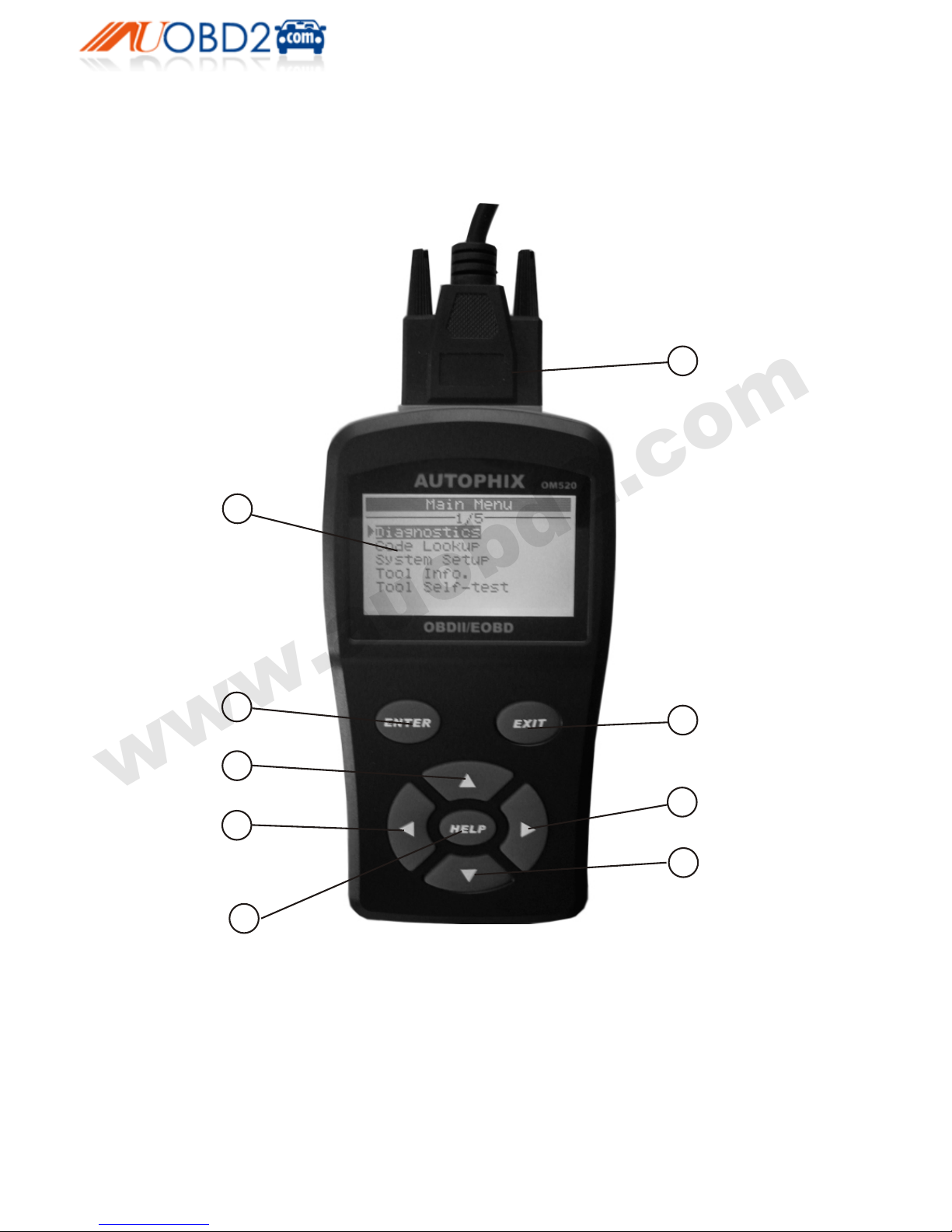
3.1 Tool Description - AutoPhix OM 520
1
23
6
4
5
8
7
9
1. LCD DISPLAY – Indicates test results. Backlit, 128 x 64 pixel display
with contrast adjustment.
2. ENTER BUTTON – Confirms a selection (or action) from a menu.
3. EXIT BUTTON – Cancels a selection (or action) from a menu or returns
to the menu. It is also used to setup system, exit DTC Lookup screen.
8
www.auobd2.com
www.auobd2.com
Email: [email protected] MSN: [email protected]
Skype: auobd2.com Yahoo: [email protected]
Phone number: 86-15972933706
4. LEFT SCROLL BUTTON – When looking up DTC definitions, moves
to previous character and views additional information on previous screens
if DTC definition covers more than one screen; deselect all marked
PID data . Updates DTC library when pressed.
5. RIGHT SCROLL BUTTON – When looking up DTC definitions,
moves to next character and views additional information on next screens
if DTC definition covers more than one screen; selects/deselects PID data.
6. UP SCROLL BUTTON – Moves up through menu and submenu
items in menu mode. When more than one screen of data is retrieved,
moves up through the current screen to the previous screens for additional
data.
7. DOWN SCROLL BUTTON – Moves down through menu and
submenu items in menu mode. When more than one screen of data is
retrieved, moves down through the current screen to next screens for
additional data.
8. HELP BUTTON – Provides help information when pressed.
9. OBD II CONNECTOR – Connects the scan tool to the vehicle’s Data
Link Connector (DLC).
3.2 Specifications
1) Display: Backlit, 128 × 64 pixel display with contrast adjustment
2) Operating Temperature: 0 to 60°C (32 to 140 F°)
3) Storage Temperature: -20 to 70°C (-4 to 158 F°)
4) External Power: 8.0 to 18.0 V power provided via vehicle battery
5) Dimensions:
Length Width Height
166 mm (6.48”) 88 mm (3.45”) 30 mm (1.16”)
6) NW: 0.48kg (1.06lb), GW: 0.62kg (1.36lb)
3.3 Accessories Included
1) OB D II cable – Provides powe r to tool and commu nicates between tool and
vehicle.
9
www.auobd2.com
www.auobd2.com
Email: [email protected] MSN: [email protected]
Skype: auobd2.com Yahoo: [email protected]
Phone number: 86-15972933706