
Oreck WS-7013U User manual
WS-7013U
Wireless 433 MHz
Temperature Station
Instruction Manual
Register your product
on the web at:
WWW.ORECK.COM

TABLE OF CONTENTS
Topic Page
Inventory of Contents 2
Quick Setup 3-5
Detailed Setup Guide
Battery Installation 5-7
Setting the Time 7-8
Selecting Units of
Measurement 8
Features
Minimum and
Maximum Temperatures 9
Resetting Minimum and
Maximum Temperatures 9
Mounting 9-10
Troubleshooting 10-12
Maintenance and Care 12
Specifications 13-14
Warranty Information 14
1

INVENTORY OF CONTENTS
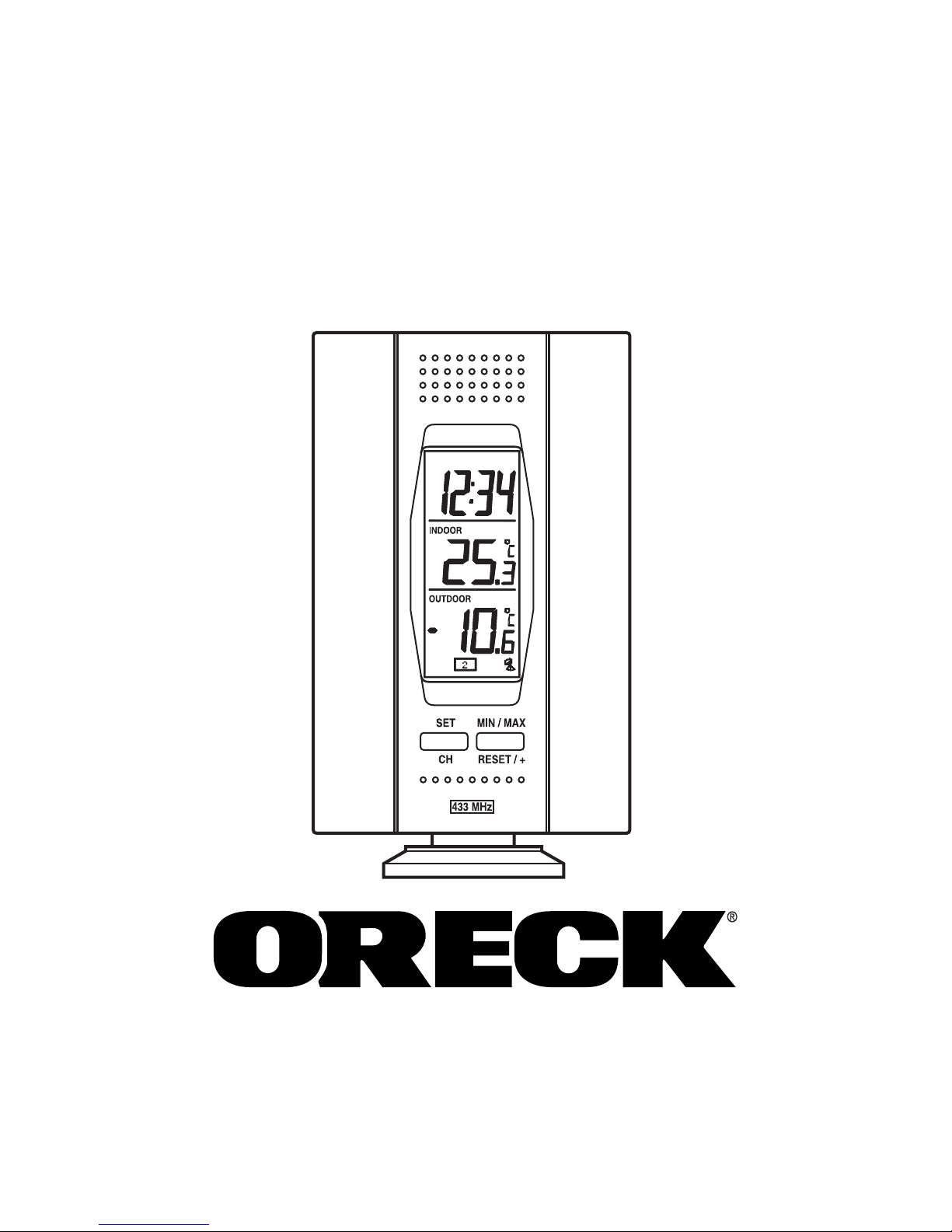
1. The indoor temperature station (Figure 1)
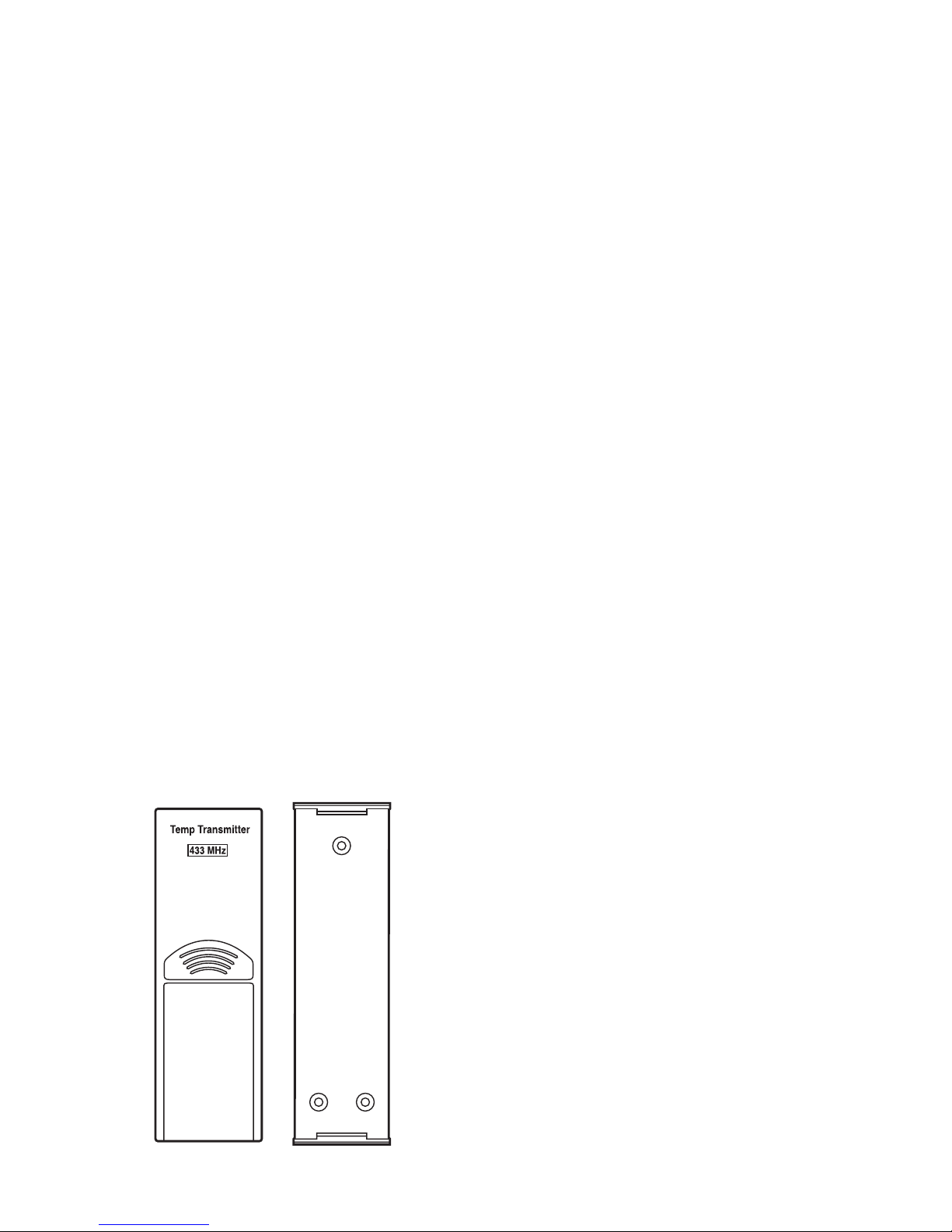
2. The remote temperature sensor (TX6U) and
mounting bracket (Figure 2)
3. (3) 1/2" Philips screws
4. One strip of double sided adhesive tape
5. Instruction Manual and Warranty Card
6. (2) AAA 1.5V batteries
7. (2) AAA 1.5V batteries
ADDITIONAL EQUIPMENT
1. Philips screwdriver (not included)
Figure 1
Figure 2
2

QUICK SETUP
Hint: Use good quality Alkaline Batteries and
avoid rechargeable batteries.
1. Have the indoor temperature station and
remote temperature sensor 3 to 5 feet apart.
2. Batteries should be out of both units for 10
minutes.
3. Place the batteries into the remote temperature
sensor first then into the indoor temperature
station.
(All remote temperature sensors must be
started before the indoor temperature station)
4. DO NOT PRESS ANY BUTTONS FOR
10 MINUTES.
In this time the indoor temperature station and
remote temperature sensor will start to talk to each
other and the display will show both the indoor
and outdoor temperature. If the indoor
temperature station does not display both
temperatures after the 10 minutes please retry the
set up as stated above. After both the indoor and
outdoor temperatures are displayed for 10 minutes
you can place your remote temperature sensor
outdoors and set the time.
The remote temperature sensor has a range of
80 feet and should be placed in a dry, shaded area.
3

Any walls the signal will have to pass through
will reduce distance. An outdoor wall or window
will have 20 to 30 feet of resistance and an interior
wall will have 10 to 20 feet of resistance. Your
distance plus resistance should not exceed
80 feet in a straight line.
NOTE: Fog and mist will not harm your
remote temperature sensor, but direct rain must
be avoided. To complete the setup of your indoor
temperature station after the 10 minutes have
passed, please follow the steps below:
1. To set the time, press and hold the "SET"
button for 5 seconds.
Note: A"12h" or "24h" will appear on the top
line. ("12h" for AM/PM, "24h" for military
time)
a. To change between "12h" and "24h" press
and release the "MIN/MAX" button.
b. When you have your choice shown on the
display press and release the "SET" button
once.
2. Degrees Fahrenheit will now show.
a. To change between Fahrenheit and Celsius,
press and release the "MIN/MAX" button.
b. When you have your choice shown on the
display press and release the "SET" button
once. 4
3. The hour will now be flashing.
a. Press and release the "MIN/MAX" button
until the correct hour is shown.
Note: When in the 12h mode "PM" is
displayed under the word "TIME" during PM
hours. During the AM hours this area will be
blank.
b. When the correct hour is shown, press and
release the "SET" button once.
4. The minutes will now be flashing.
a. Press and release the "MIN/MAX" button
until the correct minutes are displayed.
Press and release the SET button once
more to complete the setup.
DETAILED SETUP GUIDE
I. BATTERY INSTALLATION
A. REMOTE TEMPERATURE SENSOR
1. Remove the mounting
bracket.
2. Remove the battery cover.
3. Observing the correct
polarity, install (2) AA
batteries—make sure they
do not spring free, or
start-up problems may
occur. Replace the cover.
5

B. INDOOR TEMPERATURE STATION
Note: After the batteries are installed, DO NOT
press any buttons. This may interfere with the
signals, causing temperatures to register
incorrectly.
1. Remove the battery cover on the backside.
To do this, push the cover upward and
pull it out.
2. Observing the correct polarity, install
(2) AAA batteries.
3. Replace the battery cover.
4. Wait 10 minutes or until both the indoor
and outdoor temperatures are shown on the
indoor temperature station.
Battery
Cover
6

5. The indoor temperature station should now
show: "-:- -" in the TIME LCD, and
temperatures in the INDOOR and
OUTDOOR LCD’s.
II. TIME
A. SETTING THE TIME
1. Press and hold the
"SET" button for
5 seconds, "12h" will appear in the
TIME LCD.
2. Press and release the "MIN/MAX" button to
select either 12h time (am/pm) or 24h time.
3. Press and release the "SET" button 2 times,
the hour will flash in the upper left corner.
7

4. Press and release the "MIN/MAX" button to
set the hour.
5. Press and release the "SET" button to move
to the minute setting.
6. Press and release the "MIN/MAX" button
to set the minutes.
7. Press and release the "SET" button to
activate the clock.
Note: When in 12h mode, there is only a
"PM" display, which appears under "TIME."
If there is no display, then it is in AM mode.
Make sure you set the time accordingly.
III. UNITS OF TEMPERATURE MEASURE
A. SELECTING UNITS OF MEASUREMENT
1. Press and hold the "SET" button for
5 seconds until "12h" or "24h" appears in
the TIME LCD.
2. Press and release the "SET" button again,
"°F" will appear in the TIME LCD.
3. Press and release the "MIN/MAX" button
to shift between °F and °C.
4. Press and release the "SET" button twice to
activate settings.
8

IV. FEATURES
A. MINIMUM AND MAXIMUM
TEMPERATURES
1. Press and release the "MIN/MAX" button.
"MIN" appears in the temperature LCDs and
the recorded minimum temperatures are
displayed.
2. Press and release the "MIN/MAX" button to
toggle to the maximum temperatures. The
time of occurrence of the value for outdoor
temperature will also flash.
B. RESETTING THE MINIMUM AND
MAXIMUM TEMPERATURES
1. To reset both the minimum and maximum
temperatures—press and hold the "RESET/+"
button for 4 seconds.
V. MOUNTING
Note: To achieve a true temperature reading,
avoid mounting in direct sunlight. We
recommend that you mount the remote
temperature sensor on an outside North-facing
wall. The sending range is 80 feet; obstacles
such as walls, concrete, and large metal objects
will reduce the range. Test the system by
placing both units in their desired location
9
Table of contents
Popular Weather Station manuals by other brands











National Geographic
National Geographic VA Colour RC instruction manual
Levenhuk
Levenhuk Discovery Report WA40 quick start guide

Instant Transmission
Instant Transmission MA 10410 instruction manual

Lutron Electronics
Lutron Electronics PHB-318 Operation manual

WAREMA
WAREMA EWFS Weather station eco Operating and installation instructions
TFA
TFA 30.3013.IT instruction manual