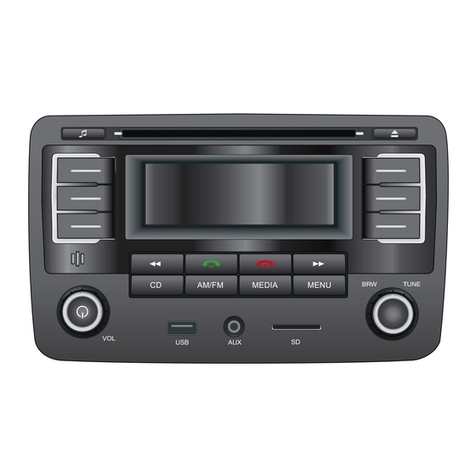
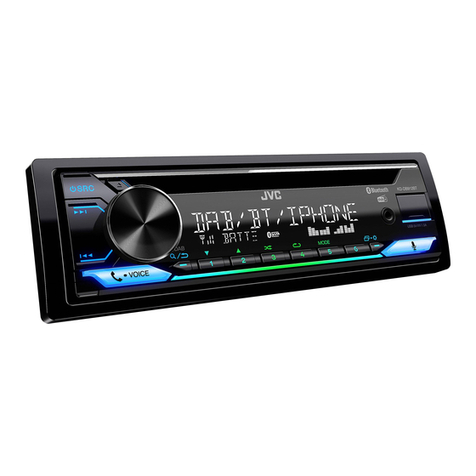
9. SRC AND PTY (PROGRAM TYPE) BUTTON
Press the SRC button to change among tuner (radio), disc (when a disc is
loaded), USB (when an USB stick is inserted) and AUX mode.
10. BAND BUTTON
During radio mode:
Press this button briefly to select the radio broadcasting band you would
like to hear. The AM/FM band is toggled cyclically through the tuning bands:
->FM 1-> FM 2 -> FM 3 -> MW 1->MW 2 ->
During MP3 file in disc, or USB mode:
Press this button to turn to display the time slider of current track played.
<-->NEWS<-->AFFAIRS<-->INFO<-->SPORT<-->EDUCATE<-->DRAMA
<-->CULTURE <-->SCIENCE<--> VARIED<-->POP M< -->ROCK M
<-->EASY M<-->LIGHT M<--> CLASSICS<-->OTHER M<-->WEATHER
<--> FINANCE <-->CHILDREN<-->SOCIAL<-->RELIGION<-->PHONE IN
<-->TRAVEL<-->LEISURE<-->JAZZ<-->COUNTRY<-->NATION M
<-->OLDIES<-->FOLK M<-->DOCUMENT<-->TEST < -->ALARM
After selecting one of the PTY programs, press >>| or |<<,it will automatically
search for the station of the PTY program. If the station of the PTY program
does to exist, it will display PTY NONE and then return back to the previous radio.
11. APS BUTTON
1) In RADIO mode:
Press this button briefly to display for 5 seconds the preset station on LCD.
Press and hold this button to enter in APS mode, the radio searches from the
current frequency and checks the signal strength level until 6 stations are found.
And then the 6 stations frequencies are preset to the corresponding preset
memory numbered bank.The auto-storage operation is implemented in the
each selected band. When the auto-storage operation is finished, the radio
executes the Preset Scan.
2) During MP3 file in disc, or USB/SD mode:
In SD, USB or MP3/WMA disc playback mode, press APS button, it is activated
as cyclical selecting song mode as follows:
-> TRACK SERIAL NUMBER SEARCH
-> FIRST CHARACTER SEARCH
-> DIRECTORY SEARCH
A) In TRACK SERIAL NUMBER SEARCH mode, the LCD will display 001--- and
flash the biggest digit 0 that the SD card, USB or MP3/WMA disc contains. Rotate
the VOL knob to select the number of the flashing digit from 0 ~ 9. Then press SEL
button to confirm and flash next smaller digit 0. With the same means, select the
number of the flashing digit. After finishing inputting the number of all flashing
digit, press BND button to play the track of the corresponding number.
8).STERE/MONO
Select STEREO mode to improve the sound effect ,Select MONO mode to
decrease noise and make the sound more clear when the station signal is weak.
9).INVOL: The radio switches to last volume setting when the unit switches off.
B) In FIRST CHARACTER SEARCH mode, the LCD will display A**-- and flash the
first character. Rotate the VOL knob to input character by the order of A~Z and 0~9.
Press SEL button to confirm and flash the next character. With the same means,
select the character of the flashing place. After finishing inputting all the 3 characters,
press BND button and then matched files will be scrolling on the LCD by rotating
the VOL knob. Finally press the BND button to play the track. If there is not any file
matched, NO MATCH will be displayed and then it will return to the beginning of
this track search mode for inputting again.
C) In DIRECTORY SEARCH mode, the LCD will display the root folder(if there
is not the root folder, it will find a root folder named ROOT). Rotate the VOL knob
to select your desired folder and press BND button to play the first track in the
selected folder.
Press and hold the INT button to play the 10 first seconds of each track in desired
folder, and D-INT indicator will be displayed on LCD. To disable the INTRO function,
press again INT button and current track will be playing normally, and INT OFF
indicator disappears from LCD.
3) Press RPT button once to play the current track repeatedly, and the RPT ONE
indicator displays LCD.
During MP3/WMA disc, SD or USB mode, press and hold the RPT button to play
the current folder repeatedly, and the D-RPT will be visible on the LCD display.
In REPEAT mode, press RPT button again to disable the REPEAT function and
RPT OFF displays on LCD.
4) Press the RDM button to play all tracks on disc in a random order, and RANDOM
indicator displays on LCD.
In RDM mode, press RDM button again to stop playing in random order and the
LCD will display RDM OFF.
Press and hold the RDM button to play the current folder in random order, and
the D-RDM will be visible on the LCD display.
12-17. PRESET STATION MEMORY AND TOP/>||, INT, RPT, RDM BUTTONS
a)During radio mode
Go to any preset station by pressing one of the 6 preset station (1-6).if one of
these buttons is pressed for more than 2 seconds , the stations currently being
listened to will be memorized into the selected preset button.
b)During disc, SD or USB mode:
1) Press the TOP/ >|| button briefly to interrupt the playback of the disc, SD orUSB.
Press again to resume normal playback of the disc, SD or USB.
Press the TOP/>|| button and hold for approximately 0.5 seconds to play the
first track of the disc, SD or USB.
2)Press the INT button to play the first 10 seconds part of each track ,and the
INTRO will be visible on the LCD display
5)Press the 5 and 6 button to move up and down 10 tracks at a time .
When the remaining total tracks are less than10,both buttons are inactive .
Press and hold the 5 and 6 buttons to select next or previous folder to be played.