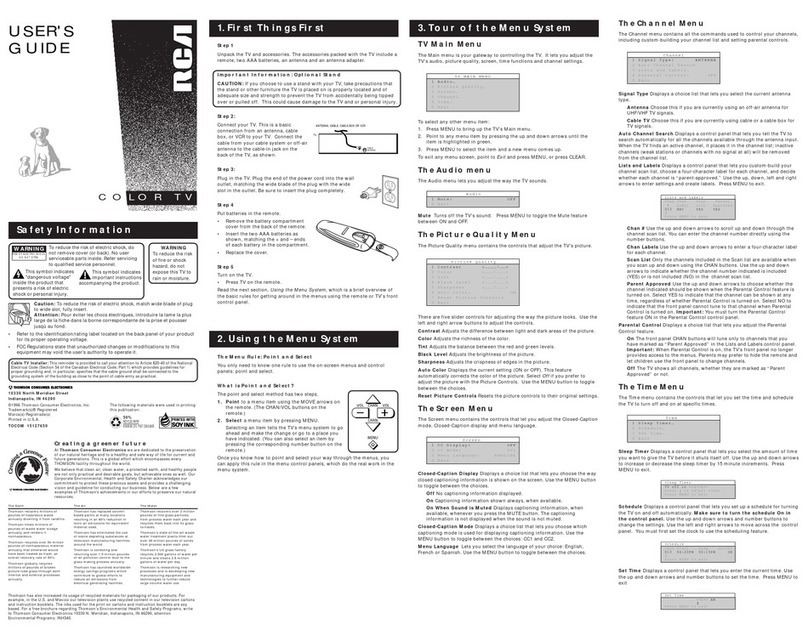
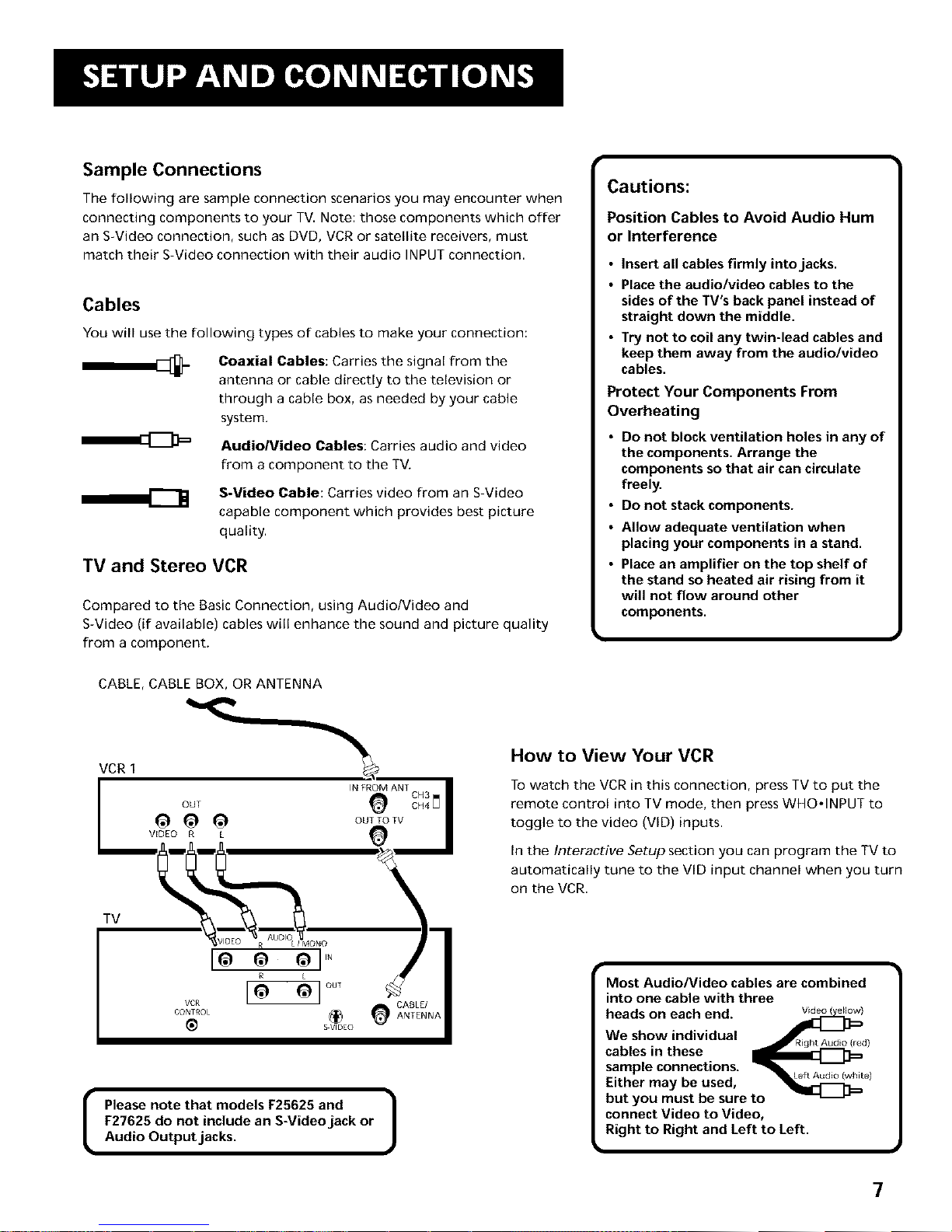
Sample Connections
The following are sample connection scenarios you may encounter when
connecting components to your TV. Note: those components which offer
an S-Video connection, such as DVD, VCR or satellite receivers, must
match their S-Video connection with their audio INPUT connection.
Cables
You will use the following types of cables to make your connection:
Coaxial Cables: Carries the signal from the
antenna or cable directly to the television or
through a cable box, as needed by your cable
system.
AudioNideo Cables: Carries audio and video
from a component to the TV.
S-Video Cable: Carries video from an S-Video
capable component which provides best picture
quality.
TV and Stereo VCR
Compared to the Basic Connection, using Audio/Video and
S-Video (if available) cables will enhance the sound and picture quality
from a component.
Cautions:
Position Cables to Avoid Audio Hum
or Interference
• Insert all cables firmly into jacks.
•Place the audio/video cables to the
sides of the TV's back panel instead of
straight down the middle.
•Try not to coil any twin-lead cables and
keep them away from the audio/video
cables.
Protect Your Components From
Overheating
•Do not block ventilation holes in any of
the components• Arrange the
components so that air can circulate
freely•
•Do not stack components.
•Allow adequate ventilation when
placing your components in a stand•
•Place an amplifier on the top shelf of
the stand so heated air rising from it
will not flow around other
components•
CABLE, CABLE BOX, OR ANTENNA
VCR I _..
OUT IN FROM_ANT OH3
I 1_ 1_ 1_ OUTTOTV II
I v'_° R _ _d
_v,oEo .... _A_0o%No I
/
CABLE/CONTROL (_ ANTENNA
S VIDEO
IPlease note that models F25625 and |
F27625 do not include an S-Video jack or J
Audio Output jacks.
How to View Your VCR
To watch the VCR in this connection, press TV to put the
remote control into TV mode, then press WHO,INPUT to
toggle to the video (VID) inputs.
In the Interactive Setup section you can program the TV to
automatically tune to the VlD input channel when you turn
on the VCR.
Most Audio/Video cables are combined |
into one cable with three
J
heads on each end.
We show individual _4Y --
• _ RFqht AudFo([e_RightAudio (red)
cables in these
sample connections. _ --
•Left Audio (white)
Either may be used,
but you must be sure to
connect Video to Video,
Right to Right and Left to Left.
m
7