manuals.online logo
Brands
  1. Home
  2. •
  3. Brands
  4. •
  5. Samsung
  6. •
  7. Speakers
  8. •
  9. Samsung HW-M4500 Installation instructions

Samsung HW-M4500 Installation instructions

Other manuals for HW-M4500

13

This manual suits for next models

1

Other Samsung Speakers manuals

Samsung HW-MS6501 User manual

Samsung

Samsung HW-MS6501 User manual

Samsung MX-ST40B Installation instructions

Samsung

Samsung MX-ST40B Installation instructions

Samsung HT-SB1G User manual

Samsung

Samsung HT-SB1G User manual

Samsung HW-Q800T Installation instructions

Samsung

Samsung HW-Q800T Installation instructions

Samsung EO-SG928 User manual

Samsung

Samsung EO-SG928 User manual

Samsung HW-T550 Installation instructions

Samsung

Samsung HW-T550 Installation instructions

Samsung EO-SG510 User manual

Samsung

Samsung EO-SG510 User manual

Samsung HW-K550 User manual

Samsung

Samsung HW-K550 User manual

Samsung HW-H450 User manual

Samsung

Samsung HW-H450 User manual

Samsung ACSP100BBE User manual

Samsung

Samsung ACSP100BBE User manual

Samsung HW-J8501R User manual

Samsung

Samsung HW-J8501R User manual

Samsung HW-J6500R User manual

Samsung

Samsung HW-J6500R User manual

Samsung WAM3501 User manual

Samsung

Samsung WAM3501 User manual

Samsung HW-MS6500 User manual

Samsung

Samsung HW-MS6500 User manual

Samsung HW-K450 User manual

Samsung

Samsung HW-K450 User manual

Samsung HW-J250 User manual

Samsung

Samsung HW-J250 User manual

Samsung HW-JM4000C User manual

Samsung

Samsung HW-JM4000C User manual

Samsung HW-K850 User manual

Samsung

Samsung HW-K850 User manual

Samsung EO-SG710 User manual

Samsung

Samsung EO-SG710 User manual

Samsung HW-N950 Installation instructions

Samsung

Samsung HW-N950 Installation instructions

Samsung HW-J7500R User manual

Samsung

Samsung HW-J7500R User manual

Samsung HW-B430 User manual

Samsung

Samsung HW-B430 User manual

Samsung HW-J8500 User manual

Samsung

Samsung HW-J8500 User manual

Samsung Harman/Kardon HW-N850 Installation instructions

Samsung

Samsung Harman/Kardon HW-N850 Installation instructions

Popular Speakers manuals by other brands

Electro-Voice LR4S engineering data

Electro-Voice

Electro-Voice LR4S engineering data

Definitive Technology Sound Cylinder user guide

Definitive Technology

Definitive Technology Sound Cylinder user guide

AudioSource LS545 user manual

AudioSource

AudioSource LS545 user manual

Paso C402-T Instructions for use

Paso

Paso C402-T Instructions for use

Altec Lansing 416-8C LF SPEAKER manual

Altec Lansing

Altec Lansing 416-8C LF SPEAKER manual

Kenwood KFC-1072 Servise manual

Kenwood

Kenwood KFC-1072 Servise manual

Peavey ProSys 112 user guide

Peavey

Peavey ProSys 112 user guide

JBL Control Contractor 60 Series installation instructions

JBL

JBL Control Contractor 60 Series installation instructions

Aura STORM-8 owner's manual

Aura

Aura STORM-8 owner's manual

Oontz ANGLE 3 PLUS quick start guide

Oontz

Oontz ANGLE 3 PLUS quick start guide

Electro-Voice LR4A engineering data

Electro-Voice

Electro-Voice LR4A engineering data

Rave RK-650-ICA-B owner's manual

Rave

Rave RK-650-ICA-B owner's manual

Flux Reference Series installation manual

Flux

Flux Reference Series installation manual

Lanzar AQAWBS64BK installation manual

Lanzar

Lanzar AQAWBS64BK installation manual

DAPAudio DCS-6230 manual

DAPAudio

DAPAudio DCS-6230 manual

Aluratek ABS03F quick start guide

Aluratek

Aluratek ABS03F quick start guide

Kenwood KES-5A instruction manual

Kenwood

Kenwood KES-5A instruction manual

Sonance ORIGINAL SERIES instruction manual

Sonance

Sonance ORIGINAL SERIES instruction manual

manuals.online logo
manuals.online logoBrands
  • About & Mission
  • Contact us
  • Privacy Policy
  • Terms and Conditions

Copyright 2025 Manuals.Online. All Rights Reserved.

HW-M4500 / HW-M4501
FULL MANUAL
Imagine the possibilities
Thank you for purchasing this Samsung product.
To receive more complete service, please register
your product at www.samsung.com/register
ENG - ii
SAFETY INFORMATION
SAFETY WARNINGS
TO REDUCE THE RISK OF ELECTRIC SHOCK, DO
NOT REMOVE THE COVER (OR BACK).
NO USER-SERVICEABLE PARTS ARE INSIDE.
REFER SERVICING TO QUALIFIED SERVICE
PERSONNEL.
CAUTION
RISK OF ELECTRIC SHOCK.
DO NOT OPEN.
This symbol indicates that high voltage
is present inside. It is dangerous to make
any kind of contact with any internal
part of this product.
This symbol indicates that important
literature concerning operation and
maintenance has been included with
this product.
Class II product : This symbol indicates
that it does not require a safety
connection to electrical earth (ground).
AC voltage : This symbol indicates that
the rated voltage marked with the
symbol is AC voltage.
DC voltage : This symbol indicates that
the rated voltage marked with the
symbol is DC voltage.
Caution, Consult instructions for use :
This symbol instructs the user to consult
the user manual for further safety
related information.
WARNING
•To reduce the risk of re or electric shock, do
not expose this appliance to rain or moisture.
CAUTION
•TO PREVENT ELECTRIC SHOCK, MATCH WIDE
BLADE OF PLUG TO WIDE SLOT, FULLY
INSERT.
•This apparatus shall always be connected to a
AC outlet with a protective grounding
connection.
•To disconnect the apparatus from the mains,
the plug must be pulled out from the mains
socket, therefore the mains plug shall be
readily operable.
•Do not expose this apparatus to dripping or
splashing. Do not put objects lled with
liquids, such as vases on the apparatus.
•To turn this apparatus off completely, you
must pull the power plug out of the wall
socket. Consequently, the power plug must
be easily and readily accessible at all times.
Wiring the Main Power Supply
Plug (UK Only)
IMPORTANT NOTICE
The mains lead on this equipment is supplied with
a moulded plug incorporating a fuse. The value of
the fuse is indicated on the pin face of the plug
and if it requires replacing, a fuse approved to
BS1362 of the same rating must be used.
Never use the plug with the fuse cover removed.
If the cover is detachable and a replacement is
required, it must be of the same colour as the fuse
tted in the plug. Replacement covers are
available from your dealer. If the tted plug is not
suitable for the power points in your house or the
cable is not long enough to reach a power point,
you should obtain a suitable safety approved
extension lead or consult your dealer for assistance.
ENG - iii
However, if there is no alternative to cutting off the
plug, remove the fuse and then safely dispose of
the plug. Do not connect the plug to a mains
socket as there is a risk of shock hazard from the
bared exible cord. Never attempt to insert bare
wires directly into a mains socket. A plug and fuse
must be used at all times.
IMPORTANT
The wires in the mains lead are coloured in
accordance with the following code:– BLUE =
NEUTRAL BROWN = LIVE As these colours may not
correspond to the coloured markings identifying
the terminals in your plug, proceed as follows:– The
wire coloured BLUE must be connected to the
terminal marked with the letter N or coloured
BLUE or BLACK. The wire coloured BROWN must
be connected to the terminal marked with the
letter L or coloured BROWN or RED.
WARNING : DO NOT CONNECT EITHER WIRE TO
THE EARTH TERMINAL WHICH IS MARKED WITH
THE LETTER E OR BY THE EARTH SYMBOL ,
OR COLOURED GREEN OR GREEN AND YELLOW.
PRECAUTIONS
1. Ensure that the AC power supply in your
house complies with the power
requirements listed on the identication
sticker located on the back of your product.
Install your product horizontally, on a
suitable base (furniture), with enough space
around it for ventilation (7~10 cm). Make sure
the ventilation slots are not covered. Do not
place the unit on ampliers or other
equipment which may become hot. This unit
is designed for continuous use. To fully turn
off the unit, disconnect the AC plug from the
wall outlet. Unplug the unit if you intend to
leave it unused for a long period of time.
2. During thunderstorms, disconnect the AC
plug from the wall outlet. Voltage peaks due
to lightning could damage the unit.
3. Do not expose the unit to direct sunlight or
other heat sources. This could lead to
overheating and cause the unit to
malfunction.
4. Protect the product from moisture (i.e.
vases), and excess heat (e.g. a replace) or
equipment creating strong magnetic or
electric elds. Unplug the power cable from
the AC wall socket if the unit malfunctions.
Your product is not intended for industrial
use. It is for personal use only. Condensation
may occur if your product has been stored in
cold temperatures. If transporting the unit
during the winter, wait approximately
2 hours until the unit has reached room
temperature before using.
5. The battery used with this product contains
chemicals that are harmful to the
environment. Do not dispose of the battery
in the general household trash. Do not
expose the battery to excess heat, direct
sunlight, or re. Do not short circuit,
disassemble, or overheat the battery.
Danger of explosion if the battery is replaced
incorrectly. Replace only with the same or
equivalent type.

ENG - iv
ABOUT THIS MANUAL
The user manual has two parts: this simple paper USER MANUAL and a detailed FULL MANUAL you can
download.
USER MANUAL
See this manual for safety instructions, product installation,
components, connections, and product specications.
FULL MANUAL
You can access the customer support centre by scanning the
QR code. To see the manual on your PC or mobile device,

download the manual in document format from the website.
(http://www.samsung.com/support)
Design and specications are subject to change without prior notice.
CONTENTS
01 Checking the Components 2
Inserting Batteries before using the Remote Control (AA batteries X 2) ------------------------- 2
02 Product Overview 3
Top Panel / Front Panel of the Soundbar ------------------------- 3
Bottom Panel of the Soundbar ------------------------- 4
03 Connecting the Soundbar 5
Connecting Electrical Power ------------------------- 5
Connecting the Soundbar to the Subwoofer ------------------------- 6
– Automatic connection between the subwoofer and the Soundbar ------------------------- 6
– Manually connecting the subwoofer if automatic connection fails ------------------------- 7
04 Connecting to your TV 9
Method 1. Connecting with a Cable ------------------------- 9
– Connecting a TV using an HDMI Cable ------------------------- 9
– Connecting using an Optical Cable ------------------------- 10
ENG - v
Method 2. Connecting Wirelessly ------------------------- 11
– Connecting a TV via Bluetooth ------------------------- 11
05 Connecting an External Device 13
Connecting using an HDMI Cable ------------------------- 13
Connecting using an Optical or Analogue Audio (AUX) Cable ------------------------- 14
06 Connecting a USB 15
07 Connecting a Mobile Device 17
Connecting via Bluetooth ------------------------- 17
Using the Samsung Audio Remote App ------------------------- 20
– Installing the Samsung Audio Remote App ------------------------- 20
– Launching the Samsung Audio Remote App ------------------------- 20
08 Using the Remote Control 21
How to Use the Remote Control ------------------------- 21
Adjusting the Soundbar volume with a TV remote control ------------------------- 24
Using the Hidden Buttons ------------------------- 25
Output specications for the different sound effect modes ------------------------- 25
09 Installing the Wall Mount 26
Installation Precautions ------------------------- 26
Wallmount Components ------------------------- 26
10 Software Update 28
Updating Procedure ------------------------- 28
If UPDATE is not displayed ------------------------- 29
11 Troubleshooting 30
12 Licence 31
13 Open Source Licence Notice 31
14 Important Notes About Service 31
15 SpecicationsandGuide 32
Specications ------------------------- 32
ENG - 2
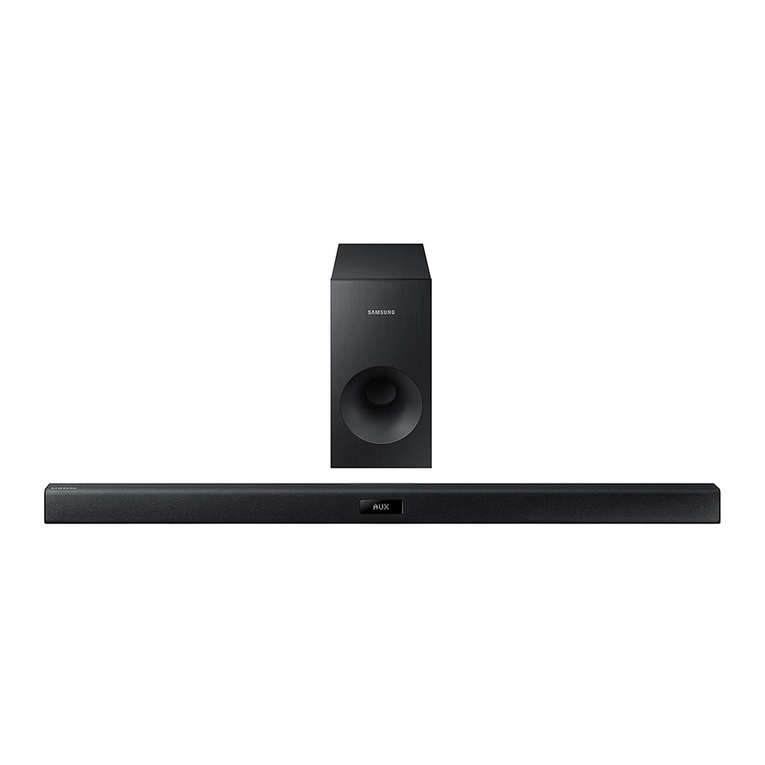
01 CHECKING THE COMPONENTS
Surround
VOL WOOFER
SOUNDBAR
SOUND
MODE
Bluetooth
POWER
Soundbar Main Unit Subwoofer Remote Control / Batteries
1 3
Power Cord (Subwoofer) AC/DC Adapter (Main Unit)
2Connect the AC plug to the adapter
until you hear a “snapping” sound to
ensure they are securely fastened.
AC Plug
(Depending on the country and
model)
Do not detach the AC plug from the
adapter (it will not be removed once it
has been attached).
•The power connection steps are labelled (1, 2, 3). For more information about power
connections, see page 5.
•For Soundbar wall mounting components, see page 26.
•HDMI cable is sold separately. To purchase, contact a Samsung Service Centre or Samsung
Customer Care.
•The appearance of the accessories may differ slightly from the illustrations above.
Inserting Batteries before using the Remote Control (AA batteries X 2)
Slide the battery cover in the direction of the arrow until it is completely removed. Insert 2 AA batteries
(1.5V) oriented so that their polarity is correct. Slide the battery cover back into position.
ENG - 3
02 PRODUCT OVERVIEW
Top Panel / Front Panel of the Soundbar
Position the product so
that the SAMSUNG logo
is located on the top.
󱂖
󱂓󱂔󱂕
󱂓(Power) Button
Turns the power on and off.
󱂔
-/+ (Volume) Button
Adjusts the volume.
•When adjusted, the volume level appears on the Soundbar’s front display.
󱂕
(Source) Button
Selects the source input mode.
Input mode Display
Optical Digital input D.IN
ARC (HDMI OUT) input D.IN TV ARC (Auto conversion)
AUX input AUX
HDMI input HDMI
BLUETOOTH mode BT
USB mode USB
•To turn on “BT PAIRING” mode, change the source to “BT” mode, and then press and hold the
(Source) button for more than 5 seconds.
󱂖Display
Displays the product’s status and current mode.
•When you plug in the AC cord, the power button will begin working in 4 to 6 seconds.
•When you turn on this unit, there will be a 4 to 5 second delay before it produces sound.
•If you want to enjoy sound only from the Soundbar, you must turn off the TV’s speakers in the Audio
Setup menu of your TV. Refer to the owner’s manual supplied with your TV.
ENG - 4
Bottom Panel of the Soundbar
HDMI IN
5V 0.5A
HDMI OUT
(TV-ARC)
AUX IN
DC 19V
OPTICAL IN
DC 19V
5V 0.5A
HDMI IN
HDMI OUT
(TV-ARC)
AUX IN
OPTICAL IN
5V 0.5A
󱂓󱂖
󱂘
󱂔󱂗
󱂕
󱂓AUX IN
Connect to the Analogue output of an external device.
󱂔OPTICAL IN (D.IN)
Connect to the digital (optical) output of an external device.
󱂕DC 19V (Power Supply In)
Connect the AC/DC power adapter.
󱂖
HDMI IN
Inputs digital video and audio signals simultaneously using an HDMI cable.
Connect to the HDMI output of an external device.
󱂗HDMI OUT (TV-ARC)
Connect to the HDMI (ARC) jack on a TV.
󱂘(5V 0.5A)
Connect a USB device here to play music les on the USB device through the Soundbar.
•When disconnecting the power cable of the AC/DC power adaptor from a wall outlet, pull the plug.
Do not pull the cable.
•Do not connect this unit or other components to an AC outlet until all connections between
components are complete.
ENG - 5
03 CONNECTING THE SOUNDBAR
Connecting Electrical Power
Use the power components (1, 2, 3) to connect the units to electrical outlets in the following order:
1.) Subwoofer 2.) Soundbar Main Unit. See the illustrations below.
•For more information about the required electrical power and power consumption, refer to the
label attached to the product. (Label : Bottom of the Soundbar Main Unit)
AUX IN
DC 19V
OPTICAL IN
DC 19V
DC 19V
(Power Jack)
Bottom of the
Soundbar Main Unit
ID SET
POWER
POWER
Rear of Subwoofer
1Power Cord
Connecting
Electrical Power
3 AC/DC Adapter
2 AC Plug
ENG - 6
Connecting the Soundbar to the Subwoofer
When the subwoofer is connected, you can enjoy rich bass sound.
Automatic connection between the subwoofer and the Soundbar
When you turn the power on after connecting the power cables to the Soundbar and subwoofer, the
subwoofer is automatically connected to the Soundbar.
•When auto pairing is complete, the blue indicators at the top of the subwoofer turn on.
LED Indicator Lights on the top of Subwoofer
LED Status Description Resolution
Blue
On Successfully connected
(normal operation) -
Blinking Recovering the connection
Check if the power cable to the main
Soundbar unit is connected properly or
wait for a while. (If blinking persists, try
manually connecting the subwoofer.
See page 7.)
Red On
Standby (with the Soundbar
main unit turned off)
Check if the power cable to the main
Soundbar unit is connected properly.
Connection failed Connect again. See the instructions for
manual connection on page 7.
Red and
blue Blinking Malfunction See the contact information for the
Samsung Service Centre in the manual.