manuals.online logo
Brands
  1. Home
  2. •
  3. Brands
  4. •
  5. Savant
  6. •
  7. Speakers
  8. •
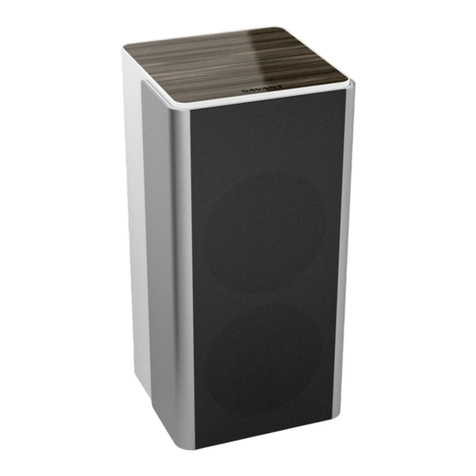
  9. Savant Smart SPK-SUR3WS Series User manual

Savant Smart SPK-SUR3WS Series User manual

Other Savant Speakers manuals

Savant HST-STUDIO55WS-SUR User manual

Savant

Savant HST-STUDIO55WS-SUR User manual

Savant IP Audio Micro Aperature-4 User manual

Savant

Savant IP Audio Micro Aperature-4 User manual

Savant Smart SPK-SUR3WS Series User manual

Savant

Savant Smart SPK-SUR3WS Series User manual

Savant EDG-4-AVB Series Quick reference guide

Savant

Savant EDG-4-AVB Series Quick reference guide

Popular Speakers manuals by other brands

Electro-Voice LR4S engineering data

Electro-Voice

Electro-Voice LR4S engineering data

Definitive Technology Sound Cylinder user guide

Definitive Technology

Definitive Technology Sound Cylinder user guide

AudioSource LS545 user manual

AudioSource

AudioSource LS545 user manual

Paso C402-T Instructions for use

Paso

Paso C402-T Instructions for use

Altec Lansing 416-8C LF SPEAKER manual

Altec Lansing

Altec Lansing 416-8C LF SPEAKER manual

Kenwood KFC-1072 Servise manual

Kenwood

Kenwood KFC-1072 Servise manual

Peavey ProSys 112 user guide

Peavey

Peavey ProSys 112 user guide

JBL Control Contractor 60 Series installation instructions

JBL

JBL Control Contractor 60 Series installation instructions

Aura STORM-8 owner's manual

Aura

Aura STORM-8 owner's manual

Oontz ANGLE 3 PLUS quick start guide

Oontz

Oontz ANGLE 3 PLUS quick start guide

Electro-Voice LR4A engineering data

Electro-Voice

Electro-Voice LR4A engineering data

Rave RK-650-ICA-B owner's manual

Rave

Rave RK-650-ICA-B owner's manual

Flux Reference Series installation manual

Flux

Flux Reference Series installation manual

Lanzar AQAWBS64BK installation manual

Lanzar

Lanzar AQAWBS64BK installation manual

DAPAudio DCS-6230 manual

DAPAudio

DAPAudio DCS-6230 manual

Aluratek ABS03F quick start guide

Aluratek

Aluratek ABS03F quick start guide

Kenwood KES-5A instruction manual

Kenwood

Kenwood KES-5A instruction manual

Sonance ORIGINAL SERIES instruction manual

Sonance

Sonance ORIGINAL SERIES instruction manual

manuals.online logo
manuals.online logoBrands
  • About & Mission
  • Contact us
  • Privacy Policy
  • Terms and Conditions

Copyright 2025 Manuals.Online. All Rights Reserved.

SPK-SUR3WSx-xx | 009-1883-00 | 191106 1 of 2 45 Perseverance Way, Hyannis, MA 02601
Copyright 2019 Savant Systems, LLC Savant.com | 508.683.2500
Minimum Support Requirements
Software
Release da Vinci 9.2
Regulatory
Safety and
Emissions
FCC Part 15B C Tick UL CE
RoHS Compliant
Box Contents
(2) WiSA Surround Speaker (SPK-SUR3WSx-xx)
(1) Speaker (093-3166-xx)
(1) Standard Grille (093-3173-xx)
(1) Power Cord (064-0480-xx)
(1) Quick Reference Guide (this document)
Optional Accessories (Sold Separately)
(1) Speaker Stand (SPK-SUR3STAND-xx)
Specifications
Environmental
Temperature 32° to 104° F (0° to 40° C)
Humidity 10% to 90% Relative Humidity (non-condensing)
Dimensions and Weight with Grille
Height 10.29 in (26.14 cm)
Width 4.84 in (12.29 cm)
Depth 4.68 in (11.89 cm)
Weight 5 lb (2.26 kg)
Power
Input Power 120/240V AC (50/60 Hz) 1.0A
Standby Power
Consumption 1.5 W
Max Operating Parameters
Sensitivity 87 dB
Frequency
Response 80hz- 40kHz +/- 0.5 dB, speaker output
Streaming Quality Up to 24 bit / 96kHz high-resolution audio
Networking
Supported
Standards
WiSA
Rear and Top Panel
C
A
B
AAC Power
Input 120/240V AC Power input
BStatus LED
O: Resetting, or is powered up and is booting
the embedded firmware.
Green Fast Blinking: Ready for pairing.
Green Slow Blinking: Audio is being streamed.
Green: Connected to WiSA Soundbar.
Amber: Audio is muted.
Amber Slow Blinking: In Standby mode, or is
resetting.
Amber Fast Blinking: Reconnecting to WiSA
device.
CReset
Button
Hold this button for 10 seconds to cause the
speaker to disconnect and forget any WiSA
device it is connected to.
Note: This puts the device into Associate
Mode.
Savant® Smart Series WiSA Surround Speakers [SPK-SUR3WSx-xx]
Quick Reference Guide

SPK-SUR3WSx-xx | 009-1883-00 | 191106 2 of 2 45 Perseverance Way, Hyannis, MA 02601
Copyright 2019 Savant Systems, LLC Savant.com | 508.683.2500
Associate Mode
This indicates the WiSA Sub has not been paired to any WiSA transmitting device. For information on how to pair the Smart Audio WiSA Sub
with a WiSA transmitting device, review the WiSA Setup Guide (009-1903-xx).
Installation with Stand
The speaker can be installed with or without the optional stand (sold separately).
1. Remove the two screws on the rear panel.
2. Plug the power cord into the 120/240V power cord input and thread the power cord port through the stand and out of the base.
3. Place the SPK-SUR3WSx-xx against the stand and attach it with the securing screws.
1
2
3
The WiSA logo, WiSA, WiSA Ready, and WiSA Certified are trademarks, or certification marks of WiSA LLC. Third-party trade names, trademarks
and product names are the intellectual property of their respective owners.