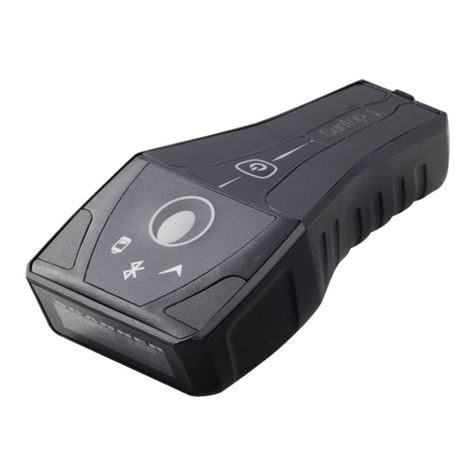
Suntop BT-10 User manual

!
!
!
! !
!
!
!
!
!
BT#10!
+!WEDGESCAN!
!!!!!!!!!The!smart!wireless!Bluetooth!scanner!
!
User!Manual!!
!"#$"%&'()*+,)-".%/0()
!

!
"!
BT#10+'WEDGESSCAN:'THE'SMART'WIRELESS'BLUETOOTH'SCANNER' 4!
PACKAGE'CONTENTS' 5!
INTENDED'USE' 5!
REQUIREMENTS' 5!
USING'BT#10'+'WEDGESCAN'FOR'THE'FIRST'TIME' 6!
ADDITIONAL'BARCCODE'DEVICE'PROGRAMING'REQUIREMENT'10!
HOW'TO'TURN'ON/EXIT'THE'WEDGESCAN+'BT#10'10!
DETAILED'INSTRUCTIONS'ON'OPERATING'BT#10'SCANNER'DEVICE'11!
RESETTING!BT?10!DEVICE
'12!
CHARGING!BT?10!DEVICE
'12!
DETAILED'INSTRUCTIONS'ON'OPERATING'BT#10'+WEDGESCAN'BLE'APP' 13!
DETAILED'INSTRUCTIONS'ON'WEDGESCAN'APP'FLOATING'SWITCH'OPTIONS'14!
OTHER'WEDGESCAN'BLE'APP'FUNCTIONS'15!
OTHER'WEDGESCAN'APP'FUNCTIONS'16!
CUSTOMER'SERVICE'CONTACT'17!
GENERAL'USAGE,'SAFETY'AND'PRECAUTIONS,'CLEANING'17!
LIMITED'WARRANTY'17!

!
#!
BT#10'SERIES'SPECIFICATION'CHART'18!
DISPOSAL'23!
CERTIFICATIONS'24!
!
!

!
$!
!
!
!
!
!
!
!
BT#10+'WEDGESSCAN:'THE'SMART'WIRELESS'BLUETOOTH'SCANNER'
!
BT?10! is! an! innovative,! smart,! portable! Bluetooth! barcode! scanner.! Wedgescan! is! a! mobile!
application! designed! exclusively! to! work! with! BT?10! scanners.! ! BT?10+! Wedgescan! is! the! most!
convenient!scanning!method.!!
BT?10+! Wedgescan! provides! the! easiest!way! of! data! scanning! and! transmitting! that! helps! users!
collecting!data!effortlessly.!Our!devices!are!powerful!and!smart,!have!an!ergonomic!design!with!a!
delightful!user!experience!so!you!can!use!them!anytime,!anywhere.!!
With!its!ease!of!use!and!accuracy,!BT?10+Wedgescan!is!ideal!for!backroom!inventory!management,!
point?of?sale,!logistics,!and!any!other!applications!that!require!powerful!barcode!scanning.!!
Please! read! through! these! instructions! carefully! so! you! can! understand! all! functions! and! safety!
information.!We!want!you!to!have!a!great!scanning!experience!with!BT?10+Wedgescan.!If!you!have!
any!questions,!problems!or!suggestions,!please!contact!Suntop!at!http://suntopccd.com/contact?
us/,!or!visit!our!website!
www.suntopccd.com!for!more!information.!!
!

!
%!
!
!
!
!
!
!
!
!
! !
INTENDED'USE'
BT?10! is! rated! by! Ingress! Protection! as! an! IP57!
waterproof! and! washable! wireless! Bluetooth! barcode!
scanner!device.!Wedgescan!is!a!patented!“parity!check”!
system! that! guarantees! 99%! of! data! transmitting!
accuracy.! It! is! also! a!soft?keyboard! interface! system!
intended! to! auto?detect! the! input! scanning! languages.!
BT?10+Wedgescan!utilizes!a!touch!pad!button!that!can!be!
tapped!easily!to!capture!data.!Simply!download,!pair,!and!
start!scanning.!
PACKAGE'CONTENTS'
•BT?10! Bluetooth! wireless! barcode!
scanner!
•
Special!USB!charging!cable**!
•
Quick!User!Manual!!
•
A!manual!micro!CD!
!
REQUIREMENTS'
BT?10!+!Wedgescan!requires!a!device!with:!
•
Bluetooth!Low!Energy!
•
Android!4.3!(API!Level!18)!or!later!
And!works!with:!
•
Android!phones!and!tablets!
In!order!to!use!your!BT?10+Wedgescan,!you!must!
download!the!free!Wedgescan!Input!BLE!App!from!
Google!Play,!or!go!to!
http://www.suntopccd.com/
!
**SPECIAL'USB'CABLE:'
BT?10!device’s!Micro!USB!charging!cable!is!designed!
exclusively!to!work!with!BT?10!devices.!Only!the!BT?
10! customized! USB! charging! cable! would! perform!
the!functionalities.!!

!
&!
!
USING'BT#10'+'WEDGESCAN'FOR'THE'FIRST'
TIME'
1.
Download! the! free! Wedgescan! BLE! App:! On! your! mobile!
phone! or! tablet! go! to! www.suntopccd.com
! and! when!
prompted,! download! the! app.! Alternatively,! go! on! Google!
Play.!
2. Long!press!the!power!button!to!turn!on!your!BT?10!scanner.!
You!will!see!the!Bluetooth!sign!LED!flashing!YELLOW.!
3. Enable!Bluetooth!on!your!device.!You!can!enable!Bluetooth!
under!the!Settings!menu!on!your!smartphone!or!tablet.!Make!
sure!BT?10!could!be!discovered!by!your!mobile!device.)1%2"3)
45!
67 Open!the!Wedgescan!BLE!App!on!your!phone!or!tablet.!Click!
the! Setting! button! and! the! App! will! automatically! detect! a!
near!by!BT?10!device.!When!prompted,!click!to!pair.!1%2"3)8)
9):5)
5. Open! the! Wedgescan! BLE! App! on! your! phone! or! tablet.!
Follow!the!on?screen!steps!to!enable!Wedgescan!and!choose!
it!as!your!default!input!scanning!language.!1%2"3)6;)<)9=5!
6. When! pairing! is! done! successfully,! the! Bluetooth! sign! LED!
indicator!will!appear!solid!BLUE.!
7. Open!any!App!you!would!like!to!keep!your!scanned!data,!and!
start!scanning.!
!
STEP'1'

!
'!
!
!
!
!
!
!
!
!
!
!
!
!
!
!
STEP'2'
STEP'3'

!
(!
!
! !
STEP'4'
STEP'5'

!
)!
!
! !
STEP'6'

!
*+!
!
HOW'TO'TURN'ON/EXIT'THE'
WEDGESCAN+'BT#10'
BT?10! scanner! device! turns! itself! off! when! it! has! been!
inactive!for!30!mins.)However,!there!are!couple!ways!to!turn!
on/!exit!the!Wedgescan+!BT?10:!
•Under! the! red! floating! switch,! click! to! expand! the!
options!and!choose!!!!!!!!!!!!to!exit!
•
Simply!turn!your!BT?10!scanner!device!off!to!exit!!
For! more! detailed! operating! instructions,! please! %"")
#"2'/>"#)/(%2.?&2/0(%)0()03".'2/($)*@A4B)%&'((".)#"-/&"!'(#)
#"2'/>"#) /(%2.?&2/0(%) 0() 03".'2/($) !"#$"%&'()*+,)C33!
below.!
!
!
ADDITIONAL'BARCCODE'DEVICE'PROGRAMING'
REQUIREMENT'
If! you! have! any! other! additional! barcode! programming!
requirement,! please! refer! to!
http://suntopccd.com/bt?10/
!(1D!
advanced! program! manual),!
http://suntopccd.com/bt?10/
!(2D!
advanced!program!manual).!
!
!
Other manuals for BT-10
1
Table of contents
Other Suntop Barcode Reader manuals