● Please do not use batteries of different types. It
is not allowed to use old and new batteries
together; the batteries should be replaced in
pair.
● The remote control should be pointed at the
remote control sensor during operation. An
object placed between the remote control and
the remote control sensor may impede normal
operation.
● Low battery will influence the remote control
distance, in which case, the battery should be
replaced with a new one. If the remote control is
going to be idle for a long time or the battery
runs out, please take the battery out to prevent
the remote control from being corroded by
battery leakage which may result in damage and
failure of the remote control.
● Remote control failure may occur when the
remote control sensor of the main unit is under
direct sunshine or strong lighting; in this case,
please change the angle of lighting or this TV
set, or operate the remote control near the
remote control sensor.
Precautions for using the remote control
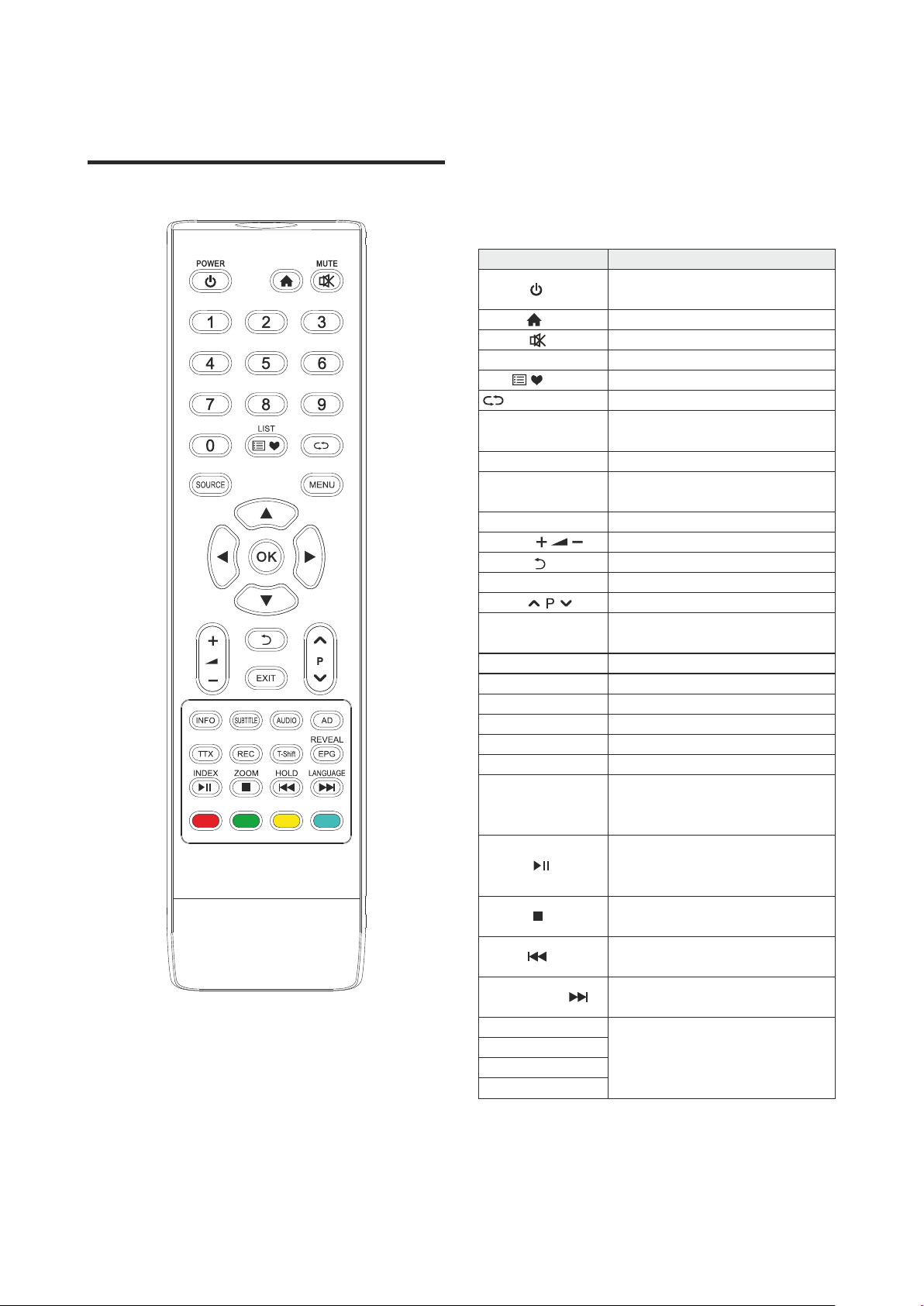
1. The keys operation refers to remote control
operation, for panel control keys operation
please refer to ''Panel Control Keys'' operation
explanation.
● The remote control should be prevented from
strenuous vibration. Besides, please do not set
or place the remote control under direct
sunshine, as heating power may result in
deformation of the remote control.
2. Menu Operation Instruction in this manual is
explained according to TV mode. The operations
in other modes are similar to the one in TV
mode, and users can take it as reference.
3. Before power-on platform, please make sure that
the power supply is stable.
Remark:
● Please do not throw the batteries into fire or
charge or decompose the batteries; do not
charge, short-circuit, disassemble/assemble,
heat or burn used batteries. Please dispose the
waste batteries pursuant to relevant regulations
on environmental protection.
Plug power cord into the electrical socket. Press ''
'' button on the TV set (If it doesn't have this button,
you needn't operate this step), then press [ ] key to
turn on the TV. Press [▲]/[▼] key to select language
which you wish, then select Start and press [OK] key
to confirm. Press [t]/[u] key to select antenna type
which you wish, then select Next and press [OK] key
to next step. (you can also select Skip and press [OK]
key to skip.)
In power on state, press [ ] key to switch to
standby mode.
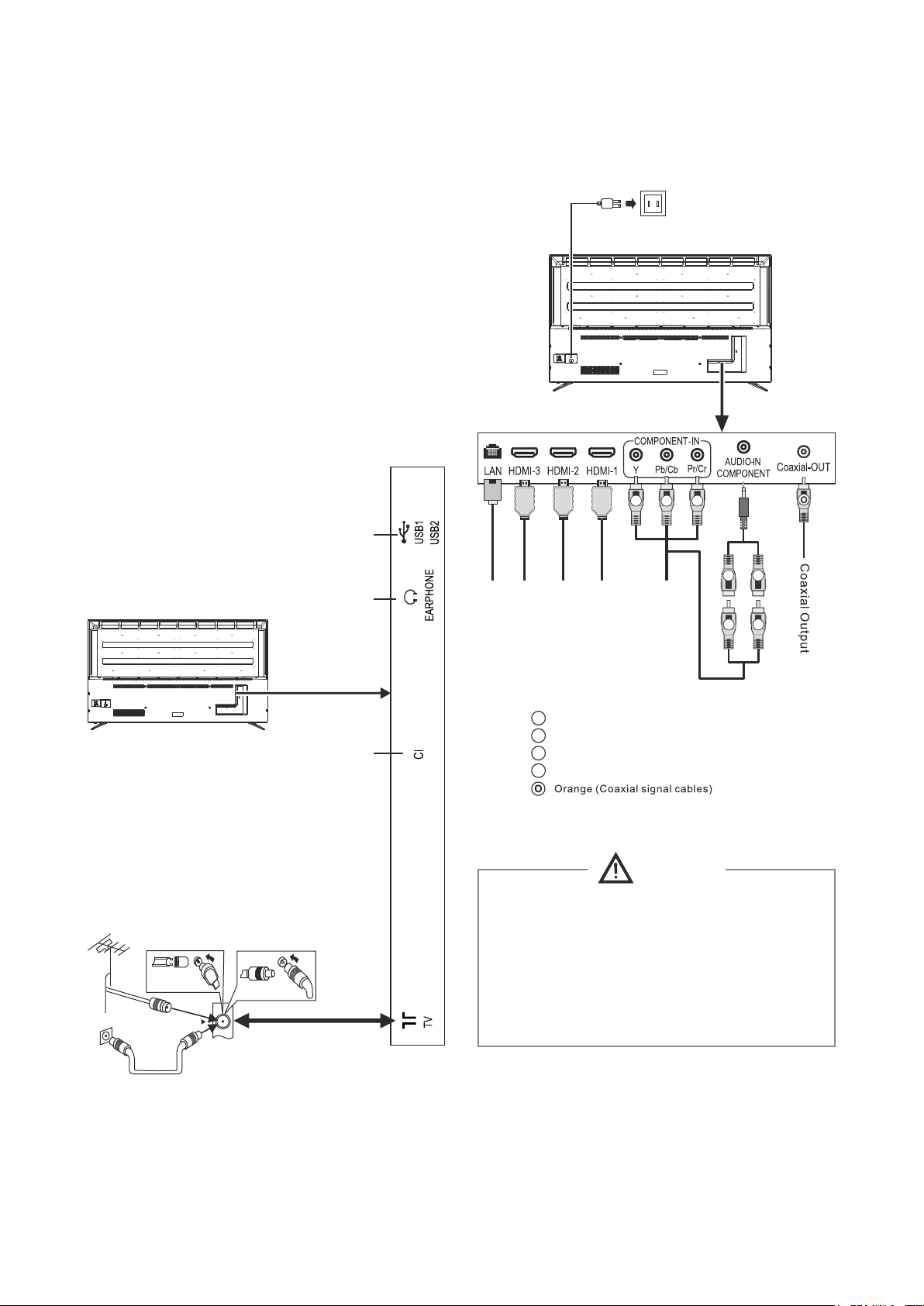
You can connect various devices to the TV set and
view high quality images. If the video device has
HDMI, YPbPr and other video output ports. You can
select one of them and connect to corresponding input
ports of the TV set. After connected, turn on the device
and press [SOURCE] key, then menu of signal source
will display on the screen. Press [▲]/[▼] key to select
an input signal, and press [OK] key to confirm.
Menu operation description
Signal source selection
Turning on/Standby
Press [MENU] key to show the main menu on the
screen:
1. Press [▲]/[▼] key to select a menu from
Parental Control, Setting, Channel, Sound,
Picture and press [OK] key to confirm.
2. Press [▲]/[▼] key to select an item in the menu.
3. Press [OK] key to enter the submenu.
4. Press [t]/[u] key to adjust the value or setting.
5. When the main menu shows on the screen,
press [ ]/[MENU] key to exit the main menu;
In display showing interface, you can select
country where you are by pressing [▲]/[▼]/[t]/[u]
key, then press [OK] key to confirm. The machine
starts automatic searching channel after selecting
Start Scan and pressing [OK] key. (If Antenna Type
is DVB-C, You have to press [t]/[u] key to select
Search Type which include Full and Network. When
you set it as Network, you need to set
Frequency(MHZ), Network ID, Modulation, Symbol
Rate. Then select Start Scan and press [OK] key to
confirm. The machine starts scan.)
★ Special Tips: This device adopts energy saving
technology. If there is no signal input in power on
state, it will enter standby state automatically in five
minutes; The device will enter standby state
automatically at specified sleep time;
Basic Operations
7