14
TROUBLE SHOOTING YOUR BOSS HAND STITCHER:
The following instructions are illustrated in the trouble shooting section of your
instructional and trouble shooting video, which was provided with your machine.
Refer to the machine schematic on pages11 and 12 as you review these trouble
shooting tips.
BEFOREDOING ANY MAINTENANCE OR ADJUSTING OF YOUR BOSS HAND
STITCHER, MAKE SURE THAT YOUR MACHINE IS MOUNTED ON A STURDY
WORK SURFACE.
1. I SEEM TO BE MISSING STITCHES. If you are missing stitches:
• Check to make sure that you have the correct needle size for the size thread
which you are using.
• If you have found that your needle size and thread are correct, try turning your
needle to the left or to the right a couple of degrees, using the allen wrench
provided in your accessory kit.
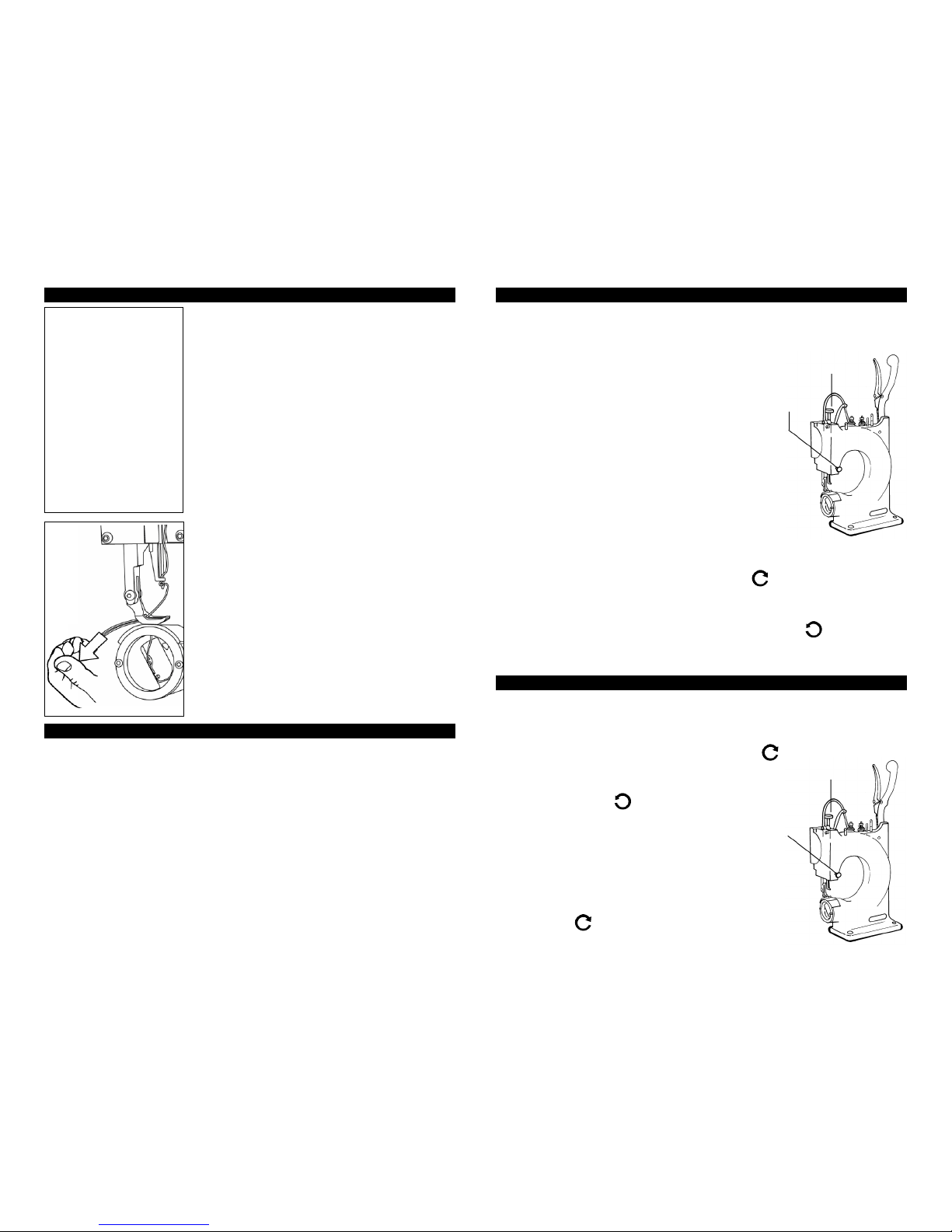
• If you are still missing stitches, you will want to adjust your rack stop 1 to 2 full
turns. The rack stop is located in the lower left hand corner behind cover.
TO ADJUST THE RACK STOP (AR-100-4), DO THE FOLLOWING:
1. Remove back cover
2. Loosen Hex Nut
3. Turn your bolt 1 to 2 full turns
4. Replace back cover
2. MY THREAD IS BINDING OR JAMMING. If your thread is binding or jamming,
the first thing you should do is check your primary and secondary tensions. Refer
to your schematic to locate your primary and secondary tensions.
TO ADJUST THE TENSIONS, DO THE FOLLOWING:
1) Back the nut off until it is no longer touching the spring.
2) Secondary tensions should be set at 2 full turns from the time the nut touches
the spring.
3) Primary tensions should be set at 1&1/2 turns from the time the nut touches
the spring.
3. I HAVE CHECKED MY TENSION, BUT MY THREAD IS STILL JAMMING
AND DOUBLE LOOPING, WHAT SHOULD I DO?
• Make certain that the lever thread take up (AR-12) is coming up all of the way.
• Take the thread out of the needle.
• Hold the stitching handle all of the way forward, while holding your hand on the
stitching handle.
• Apply pressure on the handle and with your other hand, try to move the lever
thread take up, up and down.
• If the lever thread take up (AR-12) moves up and down, while applying pressure
to the handle, you will want to remove the back cover and follow these steps.
1) Look for the shaft needle bar (AR-44) . You will notice there is a bracket on
the shaft itself. You will find the ARM bracket (CAR-11) - thread take up,
attached to the roller.
2) When pressure is being applied to the handle, the roller should be touching
the bottom of the thread take up arm (AR-12).
3) If the roller is not touching the bottom of the thread take up arm (AR-12) ,
loosen the bolt which goes through the thread take up bracket 2 to 3 turns and
rotate until it touches.
4) You will thenwanttoretightenthe boltwhich goes throughthethread takeuparm
bracket (CAR-11).
(CONTINUED ON PAGE 15) 15
You may have to experiment by turning your adjustment a couple of times.
• Make sure your bobbin tension is very loose.
• If you are still having problems, you should go to a larger needle. You will want
to try 1 to 2 sizes larger than the needle you are currently using.
• You will then want to try wrapping the thread another time on the secondary and
primary tensioners.
5. MY TIMING MAY BE OFF, WHAT SHOULD I DO TO REMEDY THIS?
• Make sure the tip of the long ear of the shuttle driver (AR-42) is right at or right
before 12 o’clock when the stitching handle is all of the way forward.
6. MY THREAD IS FRAYING, HOW DO I STOP IT FROM FRAYING?
• Check your thread and make sure that you are using a nylon or polyester thread.
• If you are using a nylon or polyester thread and it is fraying, make sure that it is
not frayed off of the spool. If the thread is frayed off of the spool, call the retailer
where you purchased the thread and let them know.
• If your thread is not frayed off of the spool, you may need to make a minor
adjustment on your machine. You will want to call Tippmann’s toll free service
line and speak to a technician.
7. I AM MISSING STITCHES WHILE SEWING SHEEPSKIN, WHAT SHOULD I DO?
• The easiest way to fix this problem is to put a piece of duct tape over the needle
plate (AR-41), this will to keep the wool out of the cover area.
• You will then want to cut a slot into the duct tape, directly into the slot of the
needle plate.
8. HOW DO I INSTALL MY NEEDLE FOOT?
1) Remove needle from needle bar.
2) Remove presser foot (SM-16-1)
3) Remove needle plate (AR-41)
4) Remove the retainer ring screws (AR-160-5) and the retainer ring (AR-02). You
will notice the shuttle (SM-59) comes out with the retainer ring.
5) Remove the front cover screws (SM-100-3) and the front cover (AR-30).
6) Pull the stitching handle (HS-31) down
7) Remove the 5/64 set screw, located above the slot window in the needle bar.
8) Hold the needle foot (AR-20) while raising the stitching handle, then remove
the needle foot (AR-20), along with the spring.
9) You will replace the spring (AR-52) and the new needle foot (AR-20).
10) Place your small standard screwdriver in the slotted window on top of the
spring (AR-52) and push the needle foot (AR-20) up, then insert the 5/64 set screw.
11) The final step is to replace all other parts.
1. Replace front cover (AR-30).
2.Replace shuttle (SM-59) and retainer ring 9 (AR-02) by:
- Place shuttle (SM-59) into the retainer ring (AR-02).
- Put retainer ring (AR-02) back on.
3. Replace needle plate (AR-41). Note, do not lock down all of the way, leave it
a bit loose.
4. Replace presser foot (SM-16-1).
5. Replace needle.
6.Finally, once your needle is in: align the needle in the center of the slot on the
needle plate (AR-41).
Feel Free to call Tippmann’s Toll Free service line 866-286-8046 for further
instruction on how to repair your Boss Hand Stitcher.
(CONTINUED FROM PAGE 14)
TROUBLE SHOOTING TROUBLE SHOOTING