manuals.online logo
Brands
  1. Home
  2. •
  3. Brands
  4. •
  5. Velleman-Kit
  6. •
  7. Test Equipment
  8. •
  9. Velleman-Kit K8031 User manual

Velleman-Kit K8031 User manual

Other Velleman-Kit Test Equipment manuals
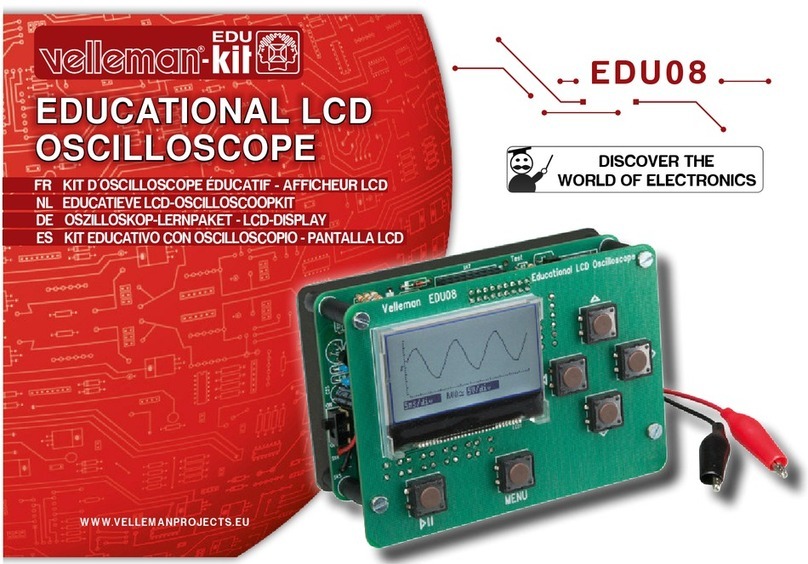
Velleman-Kit EDU08 User manual

Velleman-Kit

Velleman-Kit EDU08 User manual

Velleman-Kit K5203 User manual

Velleman-Kit

Velleman-Kit K5203 User manual

Velleman-Kit K1701 User manual

Velleman-Kit

Velleman-Kit K1701 User manual

Popular Test Equipment manuals by other brands

Ambit P.F. Series instruction manual

Ambit

Ambit P.F. Series instruction manual

Megger BMM500 Series user guide

Megger

Megger BMM500 Series user guide

RJG Lynx Sensor Tester operating instructions

RJG

RJG Lynx Sensor Tester operating instructions

Mark-10 TT02 Series user guide

Mark-10

Mark-10 TT02 Series user guide

Martel 3001 Operator's manual

Martel

Martel 3001 Operator's manual

ElproSys DiagProg4 instruction manual

ElproSys

ElproSys DiagProg4 instruction manual

Redtech TRAILERteck T05 user manual

Redtech

Redtech TRAILERteck T05 user manual

Venmar AVS Constructo 1.0 HRV user guide

Venmar

Venmar AVS Constructo 1.0 HRV user guide

Test Instrument Solutions SafetyPAT operating manual

Test Instrument Solutions

Test Instrument Solutions SafetyPAT operating manual

Hanna Instruments HI 38078 instruction manual

Hanna Instruments

Hanna Instruments HI 38078 instruction manual

Kistler 5495C Series instruction manual

Kistler

Kistler 5495C Series instruction manual

Waygate Technologies DM5E Basic quick start guide

Waygate Technologies

Waygate Technologies DM5E Basic quick start guide

StoneL DeviceNet CK464002A manual

StoneL

StoneL DeviceNet CK464002A manual

Seica RAPID 220 Site preparation guide

Seica

Seica RAPID 220 Site preparation guide

Kingfisher KI7400 Series Training manual

Kingfisher

Kingfisher KI7400 Series Training manual

Kurth Electronic CCTS-03 operating manual

Kurth Electronic

Kurth Electronic CCTS-03 operating manual

SMART KANAAD SBT XTREME 3G Series user manual

SMART

SMART KANAAD SBT XTREME 3G Series user manual

Agilent Technologies BERT Serial Getting started

Agilent Technologies

Agilent Technologies BERT Serial Getting started

manuals.online logo
manuals.online logoBrands
  • About & Mission
  • Contact us
  • Privacy Policy
  • Terms and Conditions

Copyright 2025 Manuals.Online. All Rights Reserved.

Total solder points: 625
Difficulty level: beginner 1 234 5 ⌧advanced
DIGITAL PC SCOPE
ILLUSTRATED ASSEMBLY MANUAL H8031P-1
K8031
K8031
Digitalstorageoscilloscoop,usingacomputer
anditsmonitortodisplaywaveforms.All
standardoscilloscopefunctionsareavailablein
theWindowsprogramsupplied.
2
Features & specifications
Features :
 1 channel
 input impedance: 1Mohm / 30pF
 frequency response: 0Hz to 12MHz (± 3dB)
 step markers for voltage, time and frequency
 vertical resolution: 8 bit
 auto setup function
 optically isolated from computer
 record and display of screens & data
 supply voltage: 9 - 10Vdc / 500mA
 dimensions: 230 x 165 x 45mm (9" x 6.5" x 1.8")
 weight: 400g (14oz)
Minimum system requirements:
• IBM compatible PC
• Windows 95, 98, ME, (Win2000 or NT possible)
• SVGA display card (min. 800x600)
• mouse
• free printer port LPT1, LPT2 or LPT3
• CD Rom player
Specifications
oscilloscope:
• timebase: 0.1µs to 100ms per division
• trigger source: CH1 or free run
• trigger level: adjustable per ½ division
• input sensitivity: 10mV to 3V per division
• record length: 4079 samples
• sampling frequency: 800Hz to 32MHz (Real time)
• true RMS readout (only AC component)
transient recorder:
• timescale: 20ms/div to 2000s/div
• max record time: 9.4hour/screen
• automatic storage of data
• automatic recording for more than 1 year
• markers for time and amplitude
• zoom function
spectrum analyser:
• frequency range: 0 .. 400Hz to 16MHz
• linear or logarithmic timescale
• zoom function
3
Assembly hints
1. Assembly (Skipping this can lead to troubles ! )
Ok, so we have your attention. These hints will help you to make this project
successful. Read them carefully.
1.1 Make sure you have the right tools:
• A good quality soldering iron (25-40W) with a
small tip.
• Wipe it often on a wet sponge or cloth, to keep it clean; then apply solder to
the tip, to give it a wet look. This is called ‘thinning’ and will protect
the tip, and enables you to make good connections. When solder
rolls off the tip, it needs cleaning.
• Thin raisin-core solder. Do not use any flux or grease.
• A diagonal cutter to trim excess wires. To avoid injury when cutting
excess leads, hold the lead so they cannot fly towards the eyes.
• Needle nose pliers, for bending leads, or to hold compo-
nents in place.
• Small blade and Phillips screwdrivers. A basic range
is fine.
For some projects, a basic multi-meter is required, or might
be handy
1.2 Assembly Hints :
⇒ Make sure the skill level matches your experience, to avoid disappointments.
⇒ Follow the instructions carefully. Read and understand the entire step before
you perform each operation.
⇒ Perform the assembly in the correct order as stated in this manual
⇒ Position all parts on the PCB (Printed Circuit Board) as shown on the draw-
ings.
⇒ Values on the circuit diagram are subject to changes.
⇒ Values in this assembly guide are correct*
0.000
4
⇒ Use the check-boxes to mark your progress.
⇒ Please read the included information on safety and customer service
* Typographical inaccuracies excluded. Always look for possible last minute
manual updates, indicated as ‘NOTE’ on a separate leaflet.
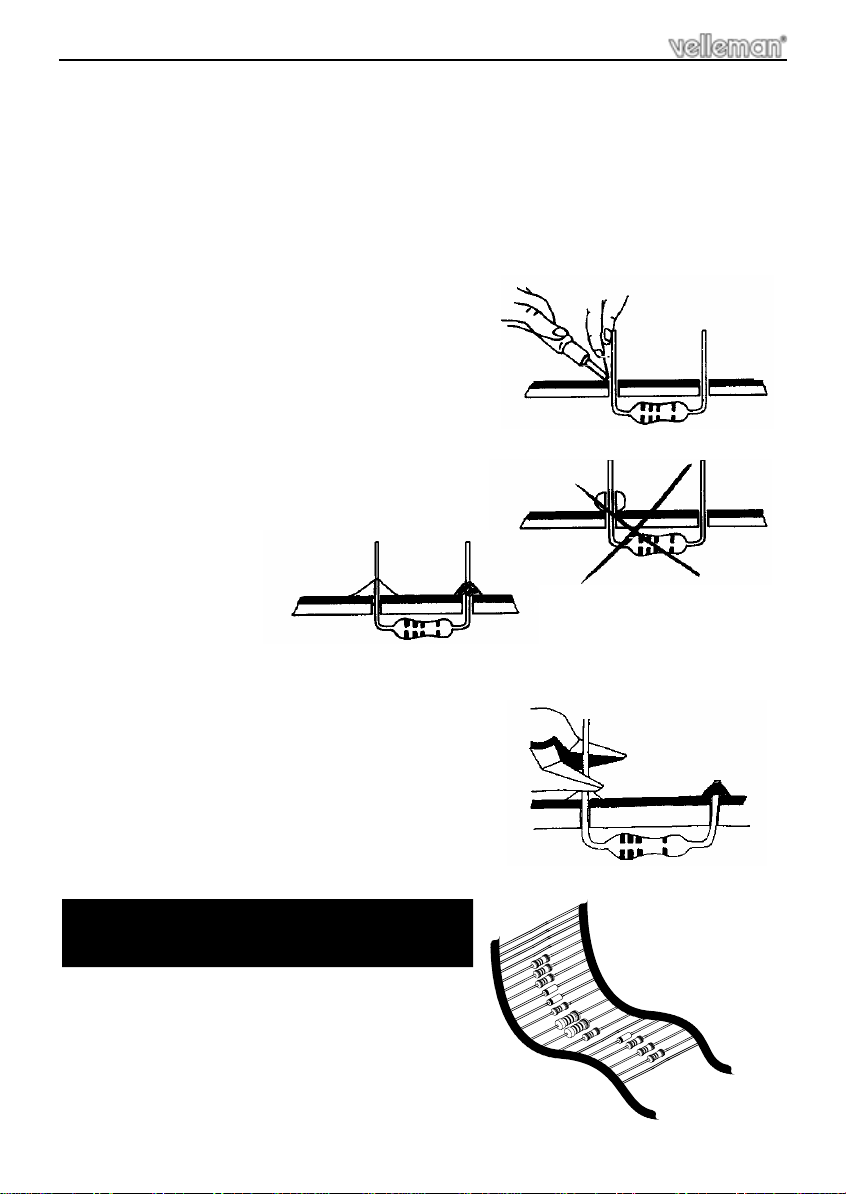
1.3 Soldering Hints :
1- Mount the component against the PCB sur-
face and carefully solder the leads
2- Make sure the solder joints are cone-shaped
and shiny
3- Trim excess leads as close as possible to the
solder joint
REMOVE THEM FROM THE TAPE ONE AT A
TIME !
Assembly hints
AXIAL COMPONENTS ARE TAPED IN
THE CORRECT MOUNTING SEQUENCE !
5
Construction
The unit consists out of one main PCB with all the components
 Tip: The pictures on the packaging can be used as a guideline.
However, due to possible changes it is not 100% reliable.
Mount the components in the order described:
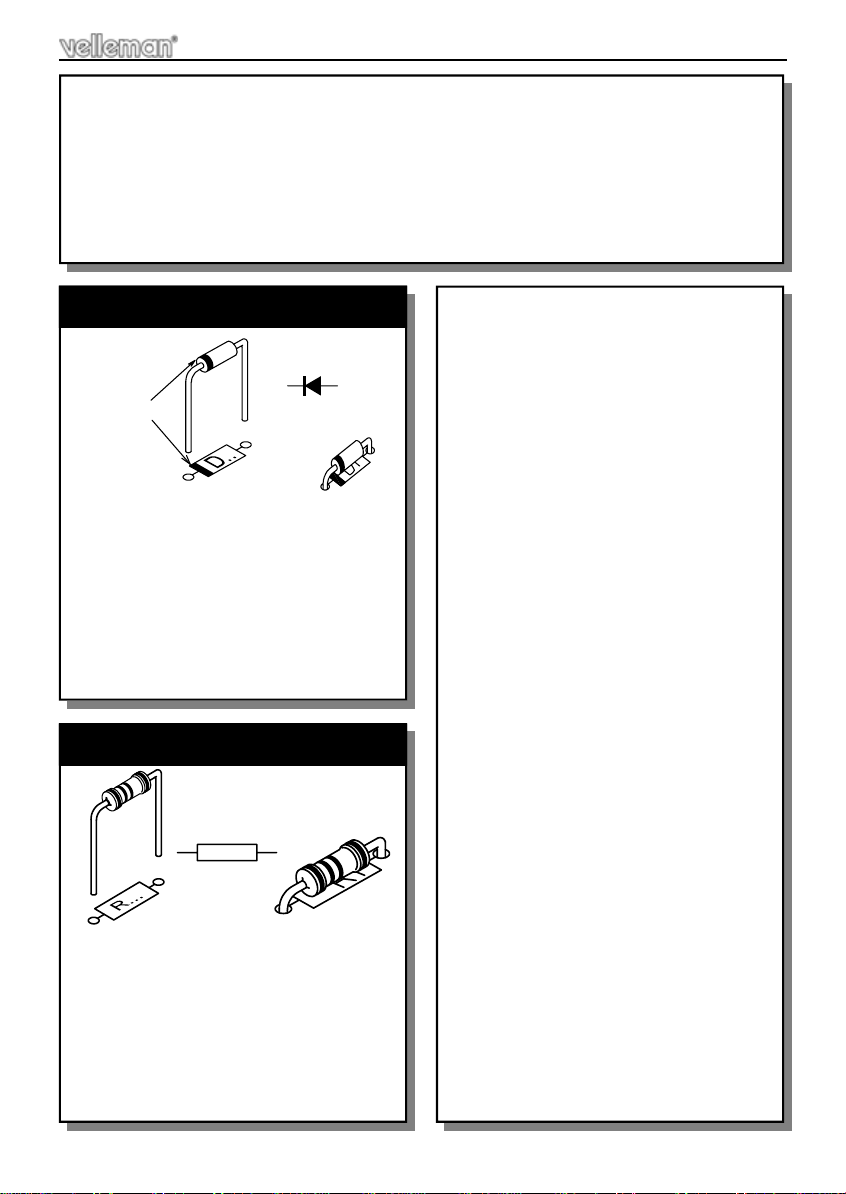
1. Diodes (check the polarity)
CATHODE
D...
 R1 : 150R (1-5-1)
 R2 : 470R (4-7-1)
 R3 : 150R (1-5-1)
 R4 : 47R (4-7-0)
 R5 : 150R (1-5-1)
 R6 : 91K (9-1-0-2) 1%
 R7 : 10K (1-0-3) 1%
2. Resistors (check the color code)
R...
 D1: BAS45A
 D2: BAS45A
 D3: 1N4148
 D4: 1N4148
 D5: 1N4148
 D6: 1N4148
 D7: 1N4148
 D8: 1N4148
 D9 : 1N4148
 D10: 1N4148
 D11: 1N4148
 D12: 1N4148
 D13: 1N4148
 D14: 1N4148
 D15: 1N4148
 D16: 1N4007
 R8 : 91K (9-1-0-2) 1%
 R9 : 3R3 (3-3)
 R10 : 910K (9-1-0-3) 1%
 R11 : 820R (8-2-0-0) 1%
 R12 : 2K2 (2-2-2)
 R13 : 820R (8-2-0-0) 1%
 R14 : 820R (8-2-0-0) 1%
 R15 : 820R (8-2-0-0) 1%
 R16 : 1K8 (1-8-2)
 R17 : 2K2 (2-2-2)
 R18 : 820R (8-2-0-0) 1%
 R19 : 10K (1-0-3) 1%
 R20 : 10K (1-0-3) 1%
 R21 : 10K (1-0-3) 1%
 R22 : 10K (1-0-3) 1%
 R23 : 10K (1-0-3) 1%
 R24 : 10K (1-0-3) 1%
 R25 : 10K (1-0-3) 1%
 R26 : 20K (2-0-0-2) 1%
 R27 : 20K (2-0-0-2) 1%
 R28 : 20K (2-0-0-2) 1%
 R29 : 20K (2-0-0-2) 1%
 R30 : 20K (2-0-0-2) 1%
 R31 : 20K (2-0-0-2) 1%
 R32 : 20K (2-0-0-2) 1%
 R33 : 20K (2-0-0-2) 1%
 R34 : 20K (2-0-0-2) 1%
 R35 : 470R (4-7-1)
 R36 : 2K2 (2-2-2)
 R37 : 2K2 (2-2-2)
 R38 : 2K2 (2-2-2)
 R39 : 100R (1-0-1)
 R40 : 150R (1-5-1)
 R41 : 2K2 (2-2-2)
 R42 : 2K2 (2-2-2)
 R43 : 10K (1-0-0-2)1%
6
Construction
 C1 : 100n (104, 0.1, u1)
 C3 : 100n (104, 0.1, u1)
 C6 : 100n (104, 0.1, u1)
 C8 : 100n (104, 0.1, u1)
 C9 : 100n (104, 0.1, u1)
 C12 : 100n (104, 0.1, u1)
 C13 : 100n (104, 0.1, u1)
 C18 : 100n (104, 0.1, u1)
 C19 : 100n (104, 0.1, u1)
 C21 : 100n (104, 0.1, u1)
 C24 : 100n (104, 0.1, u1)
 C25 : 100n (104, 0.1, u1)
 C27 : 100n (104, 0.1, u1)
 C28 : 100n (104, 0.1, u1)
 C29 : 100n (104, 0.1, u1)
 C30 : 100n (104, 0.1, u1)
 C31 : 100n (104, 0.1, u1)
 C32 : 100n (104, 0.1, u1)
 C33 : 100n (104, 0.1, u1)
 C34 : 100n (104, 0.1, u1)
 C36 : 100n (104, 0.1, u1)
 C38 : 100n (104, 0.1, u1)
 C39 : 100n (104, 0.1, u1)
 C40 : 100n (104, 0.1, u1)
 C41 : 100n (104, 0.1, u1)
 C45 : 100n (104, 0.1, u1)
3. Capacitors
c...
5. IC sockets
 C17 : 100p (101)
 C26 : 100p (101)
 C10 : 220p (221)
 C15 : 22p
 C16 : 22p
 C22 : 22p
 C42 : 22p
 C4 : 2n2 /100V (222, 2200)
 C20 : 2n2 / 100V (222, 2200)
 C14 : 2n7 (272, 2700)
 C5 : 47n/250V (0.047, 473)
4. Capacitors
C...
 IC1: 16P
 IC3: 8P
 IC4: 24P
 IC5: 28P
 IC6: 16P
 IC7: 16P
 IC8: 16P
 IC9: 16P
 IC10: 16P
 IC11: 16P
 IC12: 16P
 IC13: 24P
 IC16: 14P
 IC17: 16P
 IC18: 8P
 IC19: 8P
 IC20: 8P
 IC21: 8P
 IC14: 16P
 IC22: 8P
 R44 : 2K2 (2-2-2)
 R45 : 820R (8-2-0-0) 1%
 R46 : 1K8 (1-8-2)
 R47 : 100R (1-0-1)
 R48 : 100R (1-0-1)
 R49 : 100R (1-0-1)
 R50 : 470R (4-7-1)
 R51 : 470R (4-7-1)
 R52 : 470R (4-7-1)
 R53 : 3R3 (3-3) / 1W
 C47 : 100n (104, 0.1, u1)
 C48 : 100n (104, 0.1, u1)
7
Construction
 C2 : 4µ7
 C7 : 4µ7
 C11 : 4µ7
 C35 : 4µ7
 C37 : 4µ7
 C44 : 4µ7
 C23 : 100µF
 C43 : 100µF
 C46 : 100µF
6. Electrolytic capacitors. Check
the polarity !
C...
 T1 : BC327
7. Transistor
 RV1: 50R (R50, W500)
 RV2: 500R (R500, W501)
In doubt, measure using an ohm meter
between the two outer connections.
8. Multiturn trimmer
RV...
 CV1 : 22p (small type)
 CV2 : 50p
9. Trimmer capacitors
CV...
 X1: 32MHz
Check the position, refer to the PCB
lay out.
10. Oscillator
X...
 FS1: 1A pico
One spare fuse is also supplied
11. Pico fuse
FS...
8
 RY1 : VR05R051AS
 RY2 : VR05R051AS
 RY3 : VR05R051AS
 RY4 : VR05R051AS
 RY5 : VR05R051AS
12. Reed relays (check the posi-
tion of the notch)
RY...
 J4 : PCB tab
This tab serves as square wave out-
put test signal.
13. PCB tab
SK...
J4
 IC15 : UA7805
Mount the regulator like in the
drawing.
 First fix the regulator, then solder
the connections.
14. Voltage regulator.
M3 NUT
LOCK WASHER
M3 BOLT
 J2 : DJ-005
15. DC jack
-
SK... +
SW
 LD: 3mm LED
16. Power indication LED, comes
later through the front panel
LD...
CATHODE
3mm
 J1 : BNC
Carefully solder the connections.
17. BNC connector
Construction
IMPORTANT
Mount this LED exactly like
in the drawing, otherwise
the LED will not fit correctly
in the front panel.
9
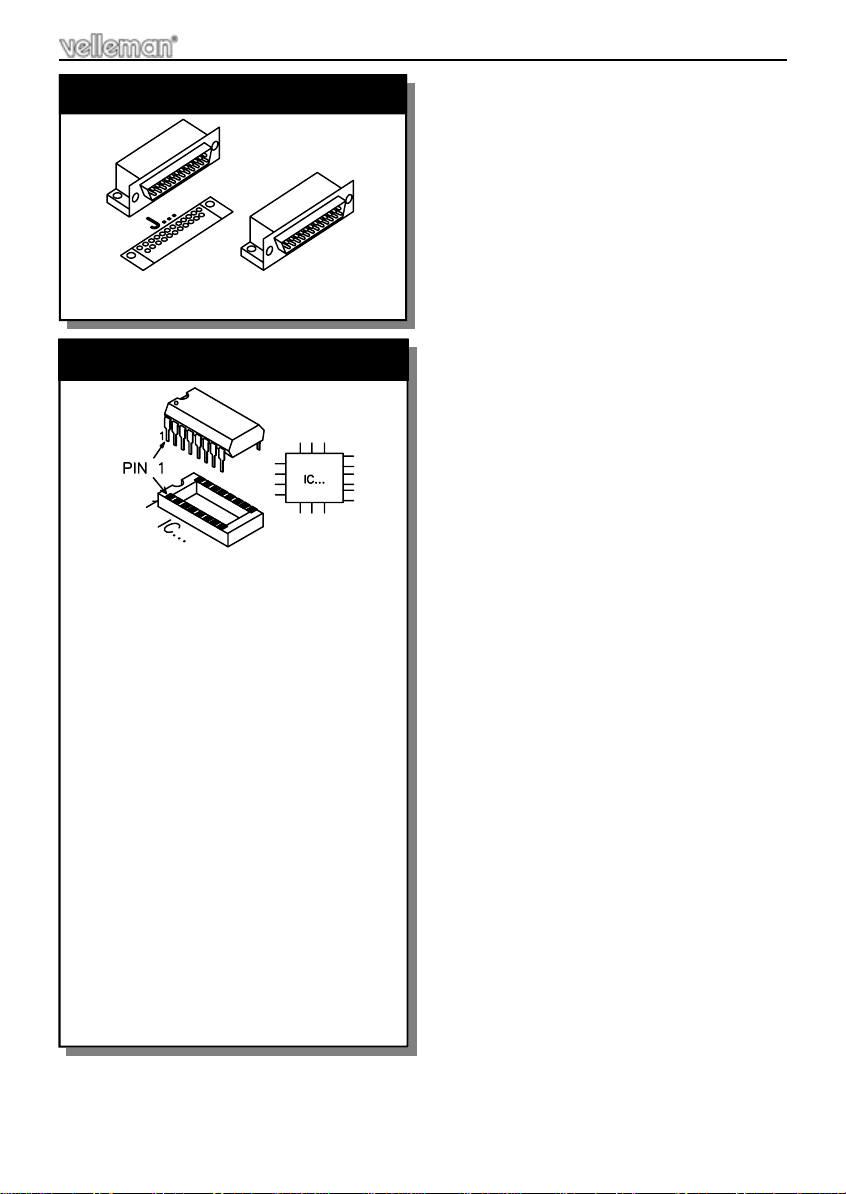
 J6 : 25P sub D male
18. 25P sub D connector
R...
5mm
 IC1 : 74F161
 IC3 : OPA2350PA
 IC4 : TDA8703
 IC5 : 6264 ; CY7C199.....EQ
 IC6 : 74HC153
 IC7 : 74F161
 IC8 : 74F161
 IC9 : 74HC595
 IC10 : 74HC85
 IC11 : 74HC595
 IC12 : 74HC595
 IC13 : VK8031 (PAL22V10)
 IC14 : 74HC390
 IC16 : 74HC14
 IC17 : 74HC390
 IC18 : 6N136
 IC19 : 6N136
 IC20 : 6N136
 IC21 : 6N136
 IC22 : 6N136
19. IC’s check the position !
Construction
10
Construction
Cut the screening foil like in the drawing.
 Make sure the conductive side is faced downwards !!
Position the screen foil into the bottom enclosure.
Use some adhesive tape to fix the screen foil
Make sure the conductive side is faced downwards !!
20. Screen foil preparation
Fig. 1.0
80mm
10mm
20mm
Fig. 2.0