9
V) Common Issues
I can’t connect to the internet.
Do the signal strength and LTE access icons appear on the side
of the router? If they do not:
Re-set the device
Power down the device by sliding the power switch located on the
back of the device to the “OFF” position. Wait 10 seconds. Then, slide
the power switch back to the “ON” position, and wait for the device to
reboot.
Conrm SIM card is inserted properly
Did you remember to insert the SIM card? Is it inserted properly?
Power down the device and open the rubber door. If the SIM card
is sticking out, it may be inserted backwards. Take it out, align the
corner notch as shown in the previous illustration, and insert the SIM.
It should click in securely and not move if inserted properly.
If following the above steps does not resolve your connectivity
issue, navigate to the router’s settings page by opening a new web
browser and entering 192.168.1.1. Press “Enter”, and when prompted
for a username and password, type in “admin” (without the quotation
marks) for BOTH the username and password. Click “Enter”. Once the
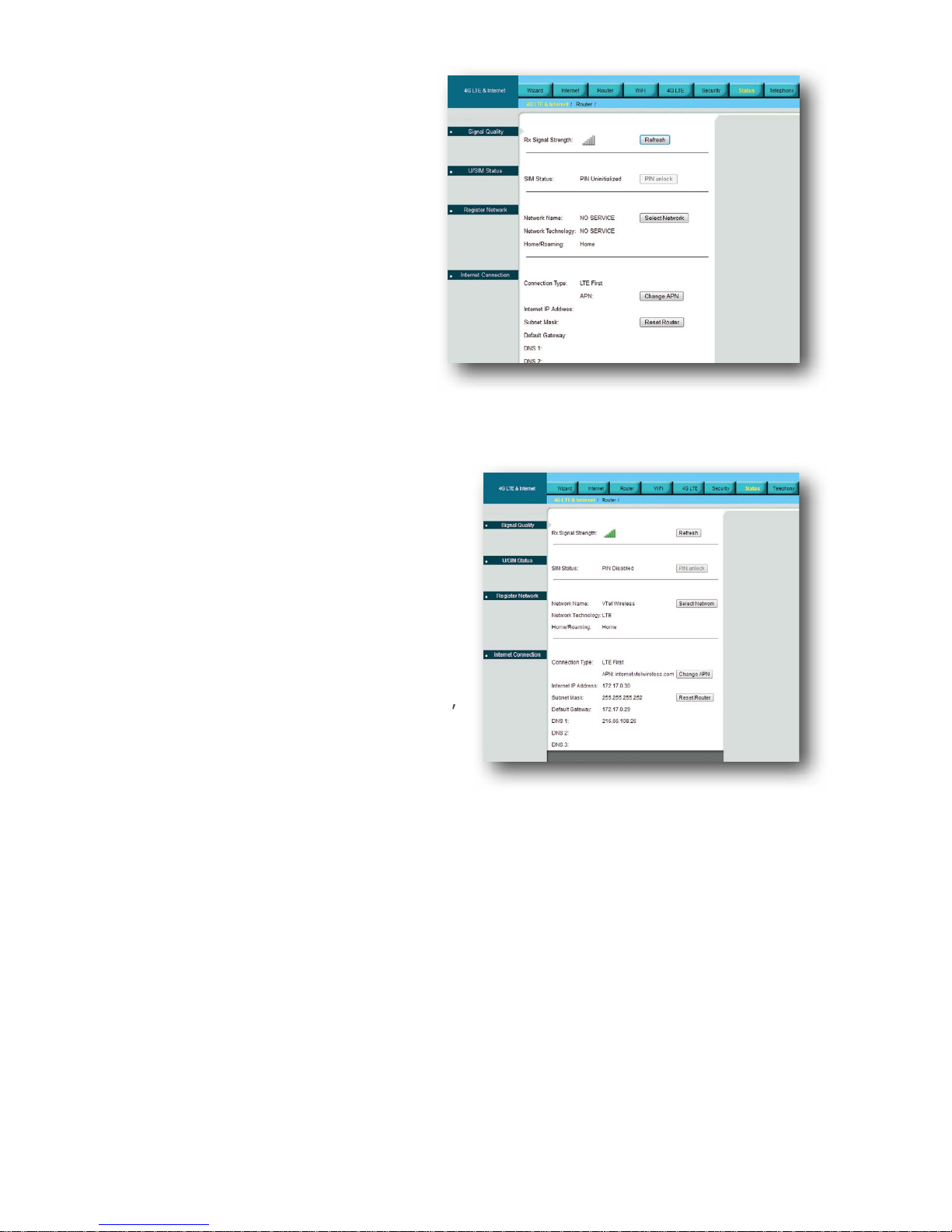
page has loaded, navigate to the “Status” tab shown below. Wait for
the elds to ll in.
If the SIM status reads “PIN
Disabled” but the network name
still reads “NO SERVICE”, the SIM
card is inserted properly, but the
unit is still unable connect to VTel
Wireless for some other reason.
Try moving the device to a dier-
ent location in your home and
see if this status changes. If not,
contact VTel Technical Support.