INSTALLATION
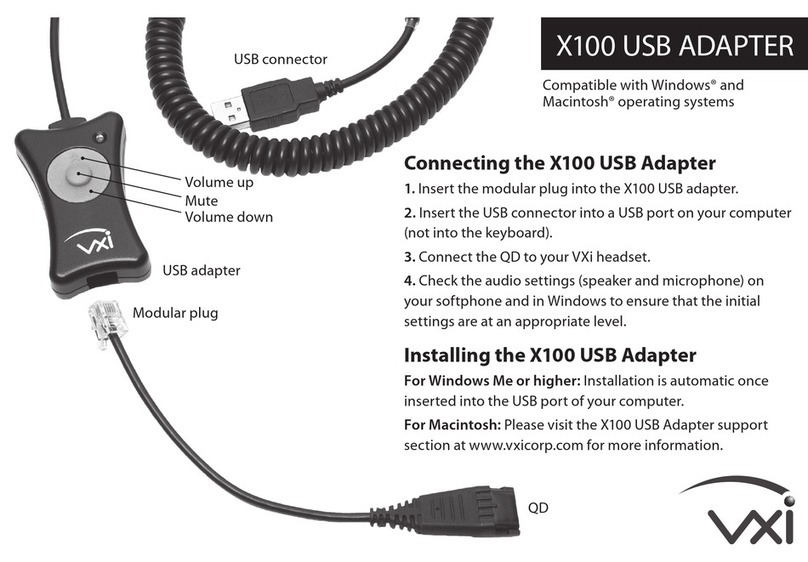
1. Headset Pairing Mode
Put the he dset in to p iring mode. (Refer to the user
guide for your he dset.)
2. Insert the BT2 into a USB Port on the Computer
Plug the d pter into n v il ble USB port on the computer.
3. Pairing Mode
The d pter will initi lize nd enter p iring mode while
the computer lo ds the necess ry driver. The LED will
fl sh quickly while this h ppens.
4. Headset ill Connect to the Adapter
The he dset should connect with the d pter either
during the initi liz tion process or shortly fter.
5. Headset Connected
Once connected, the he dset should indic te it is
connected. The LED on the d pter will now be lit
with long on/short off fl sh sequence.
Note: If the adapter and head et do not pair the fir t time,
unplug the adapter and repeat thi procedure.
6. Configure the PC
It m y be necess ry to configure the PC’s sound settings
to select the ‘VXi BT2’ s the def ult microphone nd/or
spe ker. Ple se visit www.vxicorp.com/usb for
inform tion on configuring your specific oper ting system.
INSTALACIÓN
1. Modo de Sincronización del auricular
Pong el uricul r en modo de sincroniz ción.
(Consulte l guí del usu rio del uricul r.)
2. Inserte el BT2 dentro del Puerto USB en la
computadora
Conecte el d pt dor un puerto USB disponible en l
comput dor .
3. Modo de Sincronización
El dispositivo se inici liz rá y entr rá en modo de
sincroniz ción mientr s l comput dor c rg el driver
neces rio. El LED p rp de rá rápid mente mientr s
esto sucede.
4. El auricular se conectará con el Adaptador
El uricul r debe conect rse con el d pt dor, y se
dur nte el proceso de inici liz ción o poco después.
5. Auricular conectado
Un vez conect do, el uricul r debe indic r que está
conect do. Ahor el LED en el d pt dor est rá ilumin do
y emitirá un secuenci l rg de p rp deos l encenderse
y un secuenci cort l p g rse.
Importante: Si el adaptador y el auricular no e incronizan la
primera vez, de conecte el adaptador y repita el procedimiento.
6. Configure la computadora
Puede ser neces rio configur r los justes de sonido de
l comput dor p r seleccion r el ‘VXi BT2’ como
el micrófono y/o lt voz predetermin do. Visite
www.vxicorp.com/usb p r obtener inform ción sobre
l configur ción de su sistem oper tivo específico.
INSTALLATION
1. Couplage du casque audio
Mettre le c sque udio en mode coupl ge.
(Consulter le mode d’emploi du c sque.)
2. Insertion du BT2 dans le port USB de l’ordinateur
Insérer l’ d pt teur d ns un port USB disponible.
3. Mode couplage
L’ d pt teur initi lise et ctive le mode coupl ge t ndis
que l’ordin teur téléch rge le pilote qui convient. L
lumière u DEL clignoter r pidement pend nt le
processus.
4. Connexion du casque audio à l’adaptateur
Le c sque udio se connecte à l’ d pt teur, soit u
cours de l’initi lis tion, soit peu près.
5. Connexion du casque audio
Une fois l connexion ét blie, le c sque devr it indiquer
qu’il est connecté. L DEL sur l’ d pt teur ser désorm is
llumée p r longs clignotements vec brèves interruptions.
Remarque: i l’adaptateur et le ca que audio ne e connectent
pa la première foi , débrancher et répéter la procédure.
6. Configuration de l’ordinateur personnel
Il est p rfois nécess ire de configurer les p r mètres
son de l’ordin teur personnel pour sélectionner
l’ d pt teur ‘VXi BT2’ comme microphone ou
h ut-p rleur p r déf ut. Pour des renseignements sur
l configur tion d’un système d’exploit tion spécifique,
visitez le site www.vxicorp.com/usb.
EINFÜHRUNG
1. Pairing-Modus des Kopfhörers
Setzen Sie den Kopfhörer in den P iring-Modus. (Siehe
die Bedienungs nleitung für den Kopfhörer.)
2. Schließen Sie den BT2 an einen USB-Anschluss
des Computers an.
Stecken Sie den Ad pter in einen nderen
USB-Anschluss m Computer.
3. Pairing-Modus
Der Ad pter wird initi lisiert und begibt sich in den
P iring-Modus, während der Computer der erforderlichen
Treiber lädt. Die LED blinkt d bei schnell.
4. Kopfhörer stellt Verbindung zum Adapter her
Der Kopfhörer stellt entweder beim Initi lisieren oder
kurz d n ch die Verbindung zum Ad pter her.
5. Kopfhörer angeschlossen
N ch Herstellen der Verbindung sollte Ihr Kopfhörer
nzeigen, d ss er ngeschlossen ist. Die LED m
Ad pter blinkt nun in einer Folge, bei der sie länger
leuchtet und kurz erlischt.
Anmerkung: Wenn Adapter und Kopfhörer beim er ten Mal
keine Verbindung aufnehmen, ziehen Sie den Adapter au dem
An chlu und wiederholen Sie den Vorgang.
6. PC konfigurieren
Sie müssen eventuell die Soundeinstellungen Ihres
PC so konfigurieren, d ss „VXi BT2“ ls
St nd rdmikrofon und/oder St nd rdl utsprecher
usgewählt ist. Weitere Inform tionen zur Konfigur tion für
Ihr Betriebssystem finden Sie unter www.vxicorp.com/usb.
12
LED Light Sequence
Ste dy on/off fl sh
Long on/short off fl sh
F st fl sh
Function
Ad pter not connected to he dset
Ad pter connected to he dset
Ad pter in p iring mode
LED Indicators
Secuencia de luz del LED
P rp deo const nte
encendido/ p g do
Encendido (p rp deo
l rgo)/ p g do (p rp deo
corto)
P rp deo r pido
Función
Ad pt dor desconect do del uricul r
Ad pt dor conect do l uricul r
Ad pt dor en modo de sincroniz ción
Indicadores de Estado LED
Séquence de la DEL
Clignotement régulier
Long clignotement
Clignotement r pide
Fonction
L’ d pt teur n’est p s br nché u c sque
L’ d pt teur est br nché u c sque
L’ d pt teur est en mode coupl ge
Indicateurs DEL
LED-Blinkfolge
Blinkt ständig ein/ us
LED leuchtet länger,
erlischt kurz
Schnelles Blinken
Funktion
Ad pter nicht n Kopfhörer
ngeschlossen
Ad pter n Kopfhörer ngeschlossen
Ad pter im P iring-Modus
LED-Anzeigen