manuals.online logo
Brands
  1. Home
  2. •
  3. Brands
  4. •
  5. Whirlpool
  6. •
  7. Microwave Oven
  8. •
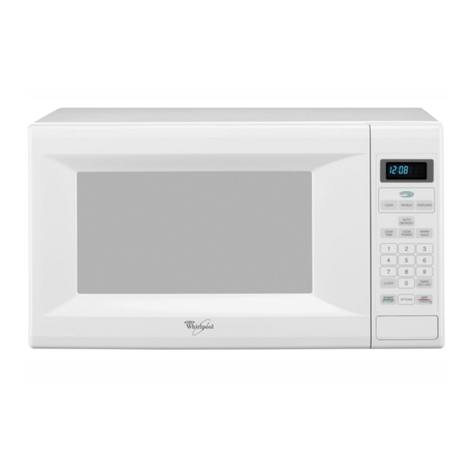
  9. Whirlpool RM778PXT User manual

Whirlpool RM778PXT User manual

Other manuals for RM778PXT

2

This manual suits for next models

1

Other Whirlpool Microwave Oven manuals
Whirlpool MK1130XH User manual

Whirlpool

Whirlpool MK1130XH User manual

Whirlpool YMH1170XSB1 User manual

Whirlpool

Whirlpool YMH1170XSB1 User manual

Whirlpool YMH1141XM User manual

Whirlpool

Whirlpool YMH1141XM User manual

Whirlpool MH1170XSB2 User manual

Whirlpool

Whirlpool MH1170XSB2 User manual
Whirlpool YWMMF7330 User manual
Whirlpool

Whirlpool YWMMF7330 User manual
Whirlpool JT 355 WHITE User manual
Whirlpool

Whirlpool JT 355 WHITE User manual
Whirlpool MAX109/BRZ User manual
Whirlpool

Whirlpool MAX109/BRZ User manual

Whirlpool AMW 160 IX User manual

Whirlpool

Whirlpool AMW 160 IX User manual

Whirlpool MH6600XV User manual

Whirlpool

Whirlpool MH6600XV User manual

Whirlpool RM278BXV0 User manual

Whirlpool

Whirlpool RM278BXV0 User manual

Whirlpool YMH1150XMS0 User manual

Whirlpool

Whirlpool YMH1150XMS0 User manual

Whirlpool MS3001B Installation guide

Whirlpool

Whirlpool MS3001B Installation guide

Whirlpool W10482078A User manual

Whirlpool

Whirlpool W10482078A User manual

Whirlpool AMW 423 Operating and maintenance manual

Whirlpool

Whirlpool AMW 423 Operating and maintenance manual

Whirlpool 8206540 User manual

Whirlpool

Whirlpool 8206540 User manual

Whirlpool AMW 480/IX User manual

Whirlpool

Whirlpool AMW 480/IX User manual

Whirlpool MS3080XY User manual

Whirlpool

Whirlpool MS3080XY User manual

Whirlpool AMW 523 User manual

Whirlpool

Whirlpool AMW 523 User manual

Whirlpool GMC275PRB00 User manual

Whirlpool

Whirlpool GMC275PRB00 User manual

Whirlpool YMH1170XSS User manual

Whirlpool

Whirlpool YMH1170XSS User manual

Whirlpool MT4110RP User manual

Whirlpool

Whirlpool MT4110RP User manual

Whirlpool MH1140XM User manual

Whirlpool

Whirlpool MH1140XM User manual

Whirlpool MH3184XPB6 User manual

Whirlpool

Whirlpool MH3184XPB6 User manual

Whirlpool RJM 7100 User manual

Whirlpool

Whirlpool RJM 7100 User manual

Popular Microwave Oven manuals by other brands

Sharp R-390D manual

Sharp

Sharp R-390D manual

PROFILO MD1000 instruction manual

PROFILO

PROFILO MD1000 instruction manual

Candy MIC 201 EX User instructions

Candy

Candy MIC 201 EX User instructions

PITSOS GMW3101B user manual

PITSOS

PITSOS GMW3101B user manual

Sears 5648744780 Use & care manual

Sears

Sears 5648744780 Use & care manual

BOMANN CB 1272 Instruction manual & guarantee

BOMANN

BOMANN CB 1272 Instruction manual & guarantee

Conrad Electronic 2372935 operating instructions

Conrad Electronic

Conrad Electronic 2372935 operating instructions

GE Spacemaker JVM1440BH datasheet

GE

GE Spacemaker JVM1440BH datasheet

DAEWOO ELECTRONICS KOR-6L8K5S83 Operating instructions & cook book

DAEWOO ELECTRONICS

DAEWOO ELECTRONICS KOR-6L8K5S83 Operating instructions & cook book

DAEWOO ELECTRONICS KOR-1N5A9S Operating instructions & cook book

DAEWOO ELECTRONICS

DAEWOO ELECTRONICS KOR-1N5A9S Operating instructions & cook book

Daewoo KQG-6617G Operating instructions & cook book

Daewoo

Daewoo KQG-6617G Operating instructions & cook book

Samsung M1779 Owner's instructions

Samsung

Samsung M1779 Owner's instructions

GE JES1143 Use and care & cooking guide

GE

GE JES1143 Use and care & cooking guide

Miele H6200BM(TB) Operating and installation instructions

Miele

Miele H6200BM(TB) Operating and installation instructions

Jocel JMO011480 instruction manual

Jocel

Jocel JMO011480 instruction manual

Sharp R-752M Operation manual with cookbook

Sharp

Sharp R-752M Operation manual with cookbook

Electrolux EVL8E00X user manual

Electrolux

Electrolux EVL8E00X user manual

STOVES Q900GRF DO User, installation & servicing instructions

STOVES

STOVES Q900GRF DO User, installation & servicing instructions

manuals.online logo
manuals.online logoBrands
  • About & Mission
  • Contact us
  • Privacy Policy
  • Terms and Conditions

Copyright 2025 Manuals.Online. All Rights Reserved.

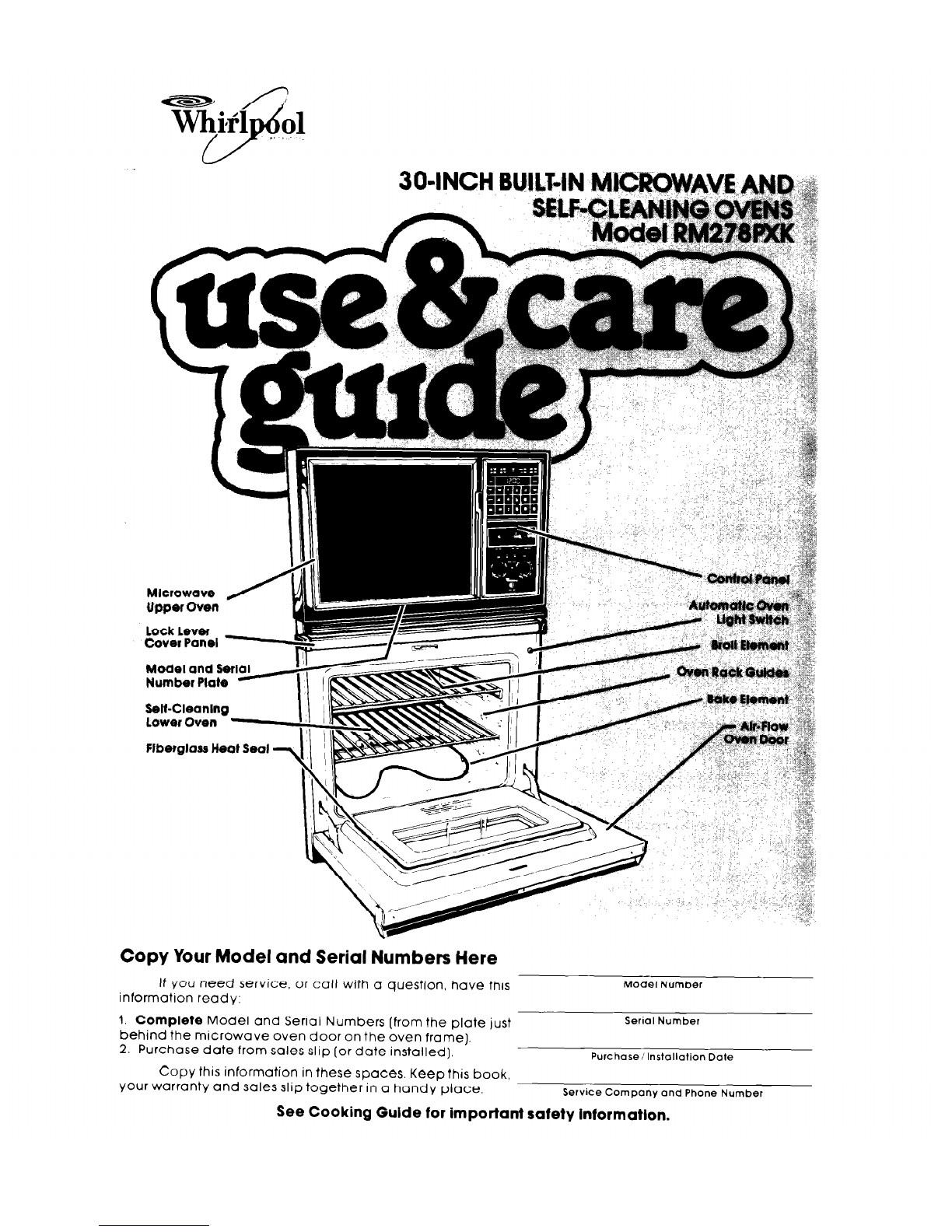
Number Plate
Selt-Cleaning
Lower Oven
flbeigloss Heat Seal -
Copy Your Model and Serial Numbers Here
If you need service, or call with a question, have this
information ready:
Model Number
1. Complete Model and Serial Numbers (from the plate just
Serial Number
behind the microwave oven door on the oven frame).
2. Purchase date from sales slip (or date installed],
Purchase/Installation Date
Copy this information in these spaces. Keep this book.
your warranty and sales slip together in a handy place.
Service Company and Phone Number
See Cooking Guide for important safety information.
Year responstWties...
Proper lnstallatlon and safe use of the oven are your personal
responslbllltles. Read thls “Use and Care Gulde”and the “Cooking
Gulde”carefully for Important use and safety Informatlon.
You must be sure your oven Is...
l
Installed and leveled in a wall or
l
properly connected to the cor-
cablnet that will hold the weight; rect electric supply and
l
installed In a well-ventilated groundlng. (See “lnstallatlon
area protected from the Instructlons.“)
weather;
Properuse
You must b@ sure your oven Is...
l
used only for jobs expected
of home ovens;
l
used only by people who can
operate It properly;
0 properly maintained.
Contents
Your Responsibilities
lnstallotron
Proper Use
Safety
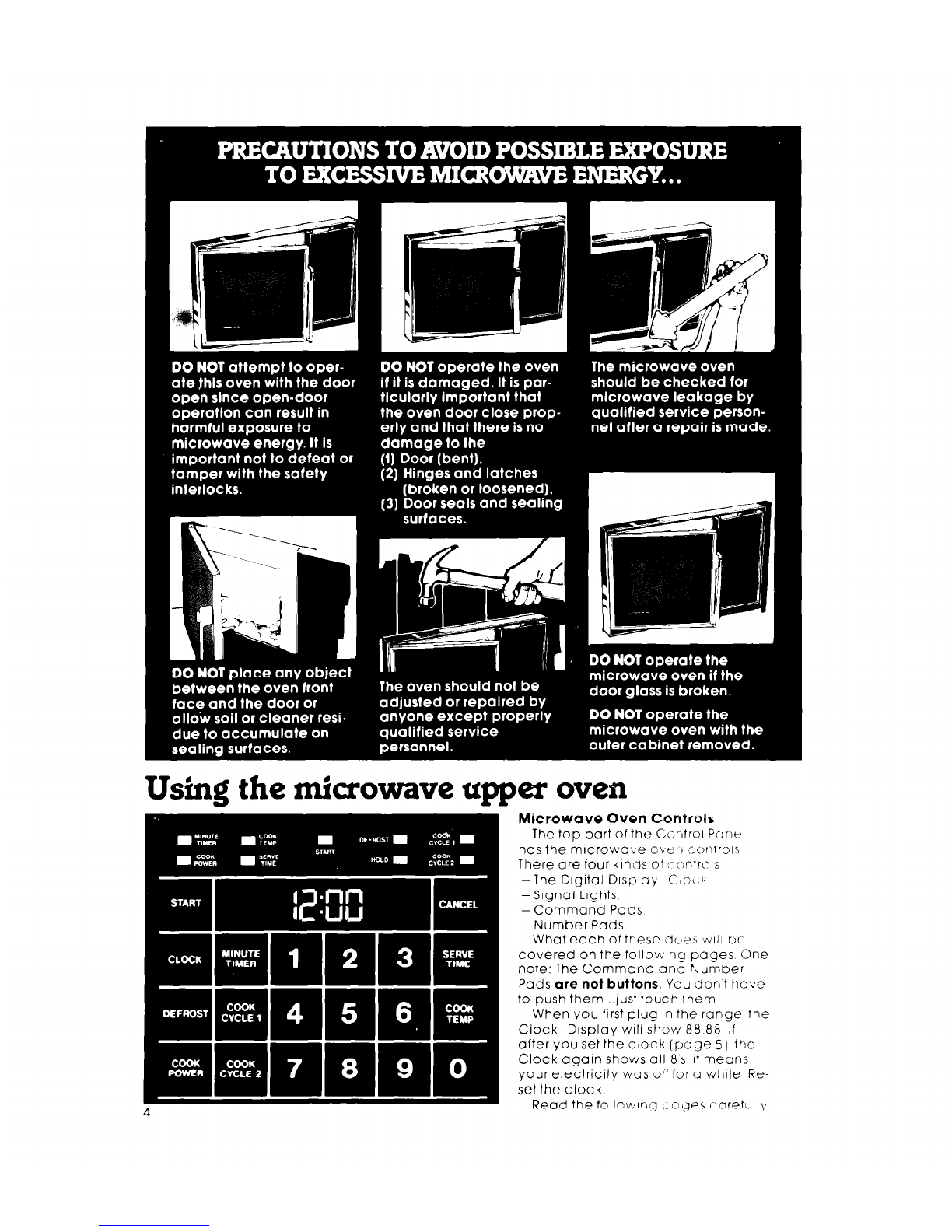
Precautrons to Avord Posstble Exposure to
Excessive Mrcrowave Energy
Using the Microwave Upper Oven
Setting the Clock
Using the Minute nmer
Cookrng In One Cycle
Hugh Cook Power
Lower Cook Powers
Defrosting
Faster or Slower Defrostrng
Cookrng tn Two Cycles
Cookrng Automatrcally After Defrostrng
Cooking to a Serving Time
Serve fime and the Temperature Probe
Cooking wrth the Temperature Probe
Changing or Concelling InstructIons
OtherOperatIng Hunts
Cleaning the Mrcrowove Oven
Important lnlormotron
How Mrcrowove Ovens Work
B-Level Oven Rack
Page
2
2
2
3
4
4
5
6
7
7
7
9
9
10
12
14
15
16
18
18
18
19
21
21
Using Your Lower Oven
The Lower Oven Controls
Boking or Roasting
Adfusting the Oven Tem’peroture Control
Usrng the Automatic MEALTIMER- Clock
Brotltng
Broiling Chart ” :
TheOven Lights
The Oven Vents
Cleaning and Caring for Your &en
Control Panel and Knobs
The Lower Oven Self-Cleaning Cycle
Cleaning Chart
The Optional Rotisserfe
If You Need Service or Help
I. Before You Call for Service
2 If You Need Service
3 If You Have a Problem
Page
22
22
23
23
24
25
25
26
26
26
26
27
30
30
31
31
31
32
3
Using the microwave upper oven
Microwave Oven Controls
The top part of the C,orltrol Furnei
has the microwave ovt?~ cc~nlrols
There are four klncls of ;-:c;ntrols
-The Dtgital Display 00, :I
-Signal Lights
-Command Pads
- Number Pads
What each of these cl02h
~111
UE
covered on the following pages One
note: The Command ana Number
Pads are not buttons. You don t have
to push them lust touch them
When you first plug In the range the
Clock Display WIII show 88 88 If.
after you set the clock (page 5) the
Clock again shows all 8 s It means
your electricity was off for a while Re-
set the clock.
Read the followirig +~gee i:aref~llly
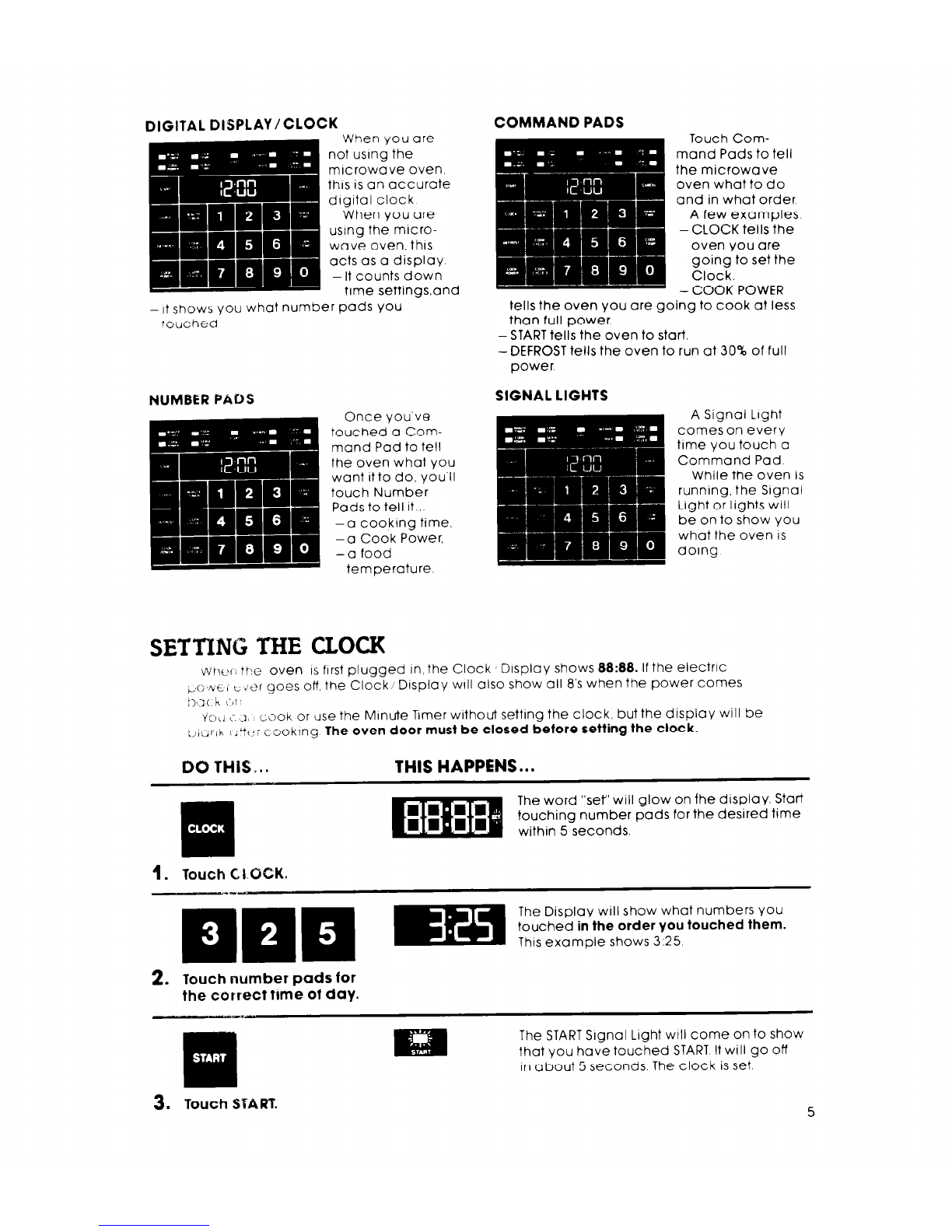
DIGITAL DISPLAY/CLOCK COMMAND PADS
-
It shows you what number pods YOU tells the oven you ore going to cook at less
Touched than full power.
- STARTtells the oven to start
-DEFROST tells the oven to run at 30% of full
power.
NUMBER PADS SIGNAL LIGHTS
SETTING THE CLOCK
injtler the oven
IS
first plugged in, the Clock sD~sploy shows 88:88. If the electric
+: ~\/t:;t-:t?r goes off the Clock, Display WIII also show all 8’s when the power comes
t>t2( h L-HI
i’oll i .-I,, c;i?ok or tise the Minute Timer without setting the clock, but the display will be
t,i(jrlh
;;Yc<; cooklng The oven door must be closed before setting the clock.
DO THIS...
THIS HAPPENS...
The word “ser’will glow on fhe display. Start
touching number pods for the desired time
within 5 seconds.
1. Touch CLOCK.
+- The Display WIII show what numbers you
m This example shows 3.25
touched in the order You touched them.
2. Touch number pads for
the correct time of day.
The STARTSignal Light wtll come on to show
that you hove touched START It will go off
in about 5 seconds. The clock is set.
3.
Vouch START 5
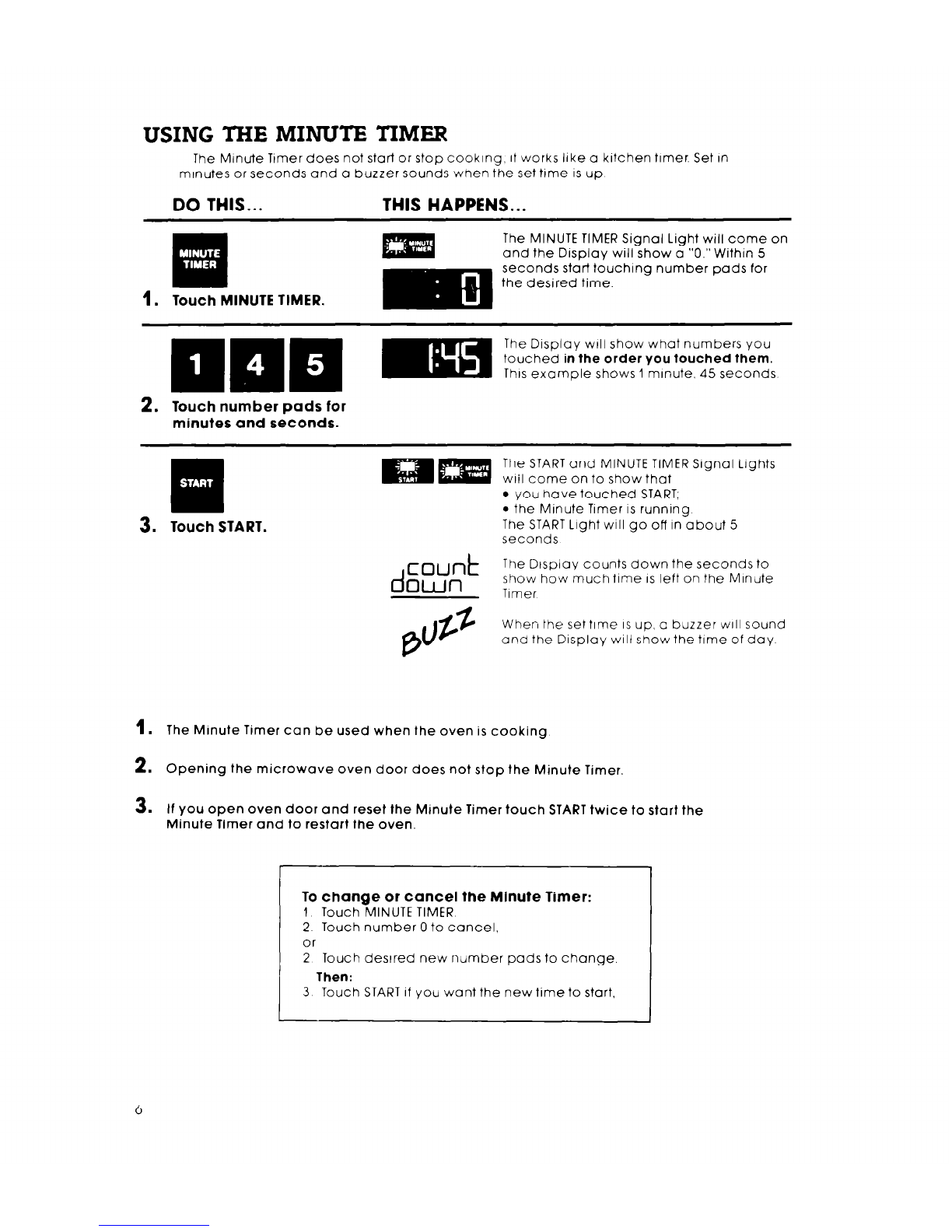
USING THE MINUTE
TIMER
The Minute Tamer does not start or stop cooking, it works like a kitchen timer. Set in
minutes or seconds and a buzzer sounds when the set time ISup
DO THIS... THIS HAPPENS...
The MINUTE TIMER Signal Light will come on
and the Display will show o “0.” Within 5
seconds start touching number pods for
the desired time.
1. Touch MINUTE TIMER.
The D~sploy WIII show what numbers you
touched in the order you touched them.
This example shows 1 minute. 45 seconds
2. Touch number pads for
minutes and seconds.
The STARTand MINUTE TIMER Signal Lights
wail come on to show that
l
you have touched START;
l
the Minute Timer IS running
The START Light will go off in about 5
seconds
d
count
own
The Dtspioy counts down the seconds to
show how much time IS left on the Minute
Timer
When the set time ISup, a buzzer will sound
and the Display will show the time of day
1
. The Minute Timer can be used when the oven is cooking.
2.
Opening the microwave oven door does not stop the Minute Timer.
3.
If you open oven door and reset the Minute Timer touch START twice to start the
Minute Timer and to restart the oven.
To change or cancel the Minute Timer:
1 Touch MINUTE TIMER.
2 Touch number 0 to cancel.
or
2 Touch desired new number pads to change
Then:
3 Touch START if you want the new time to start,
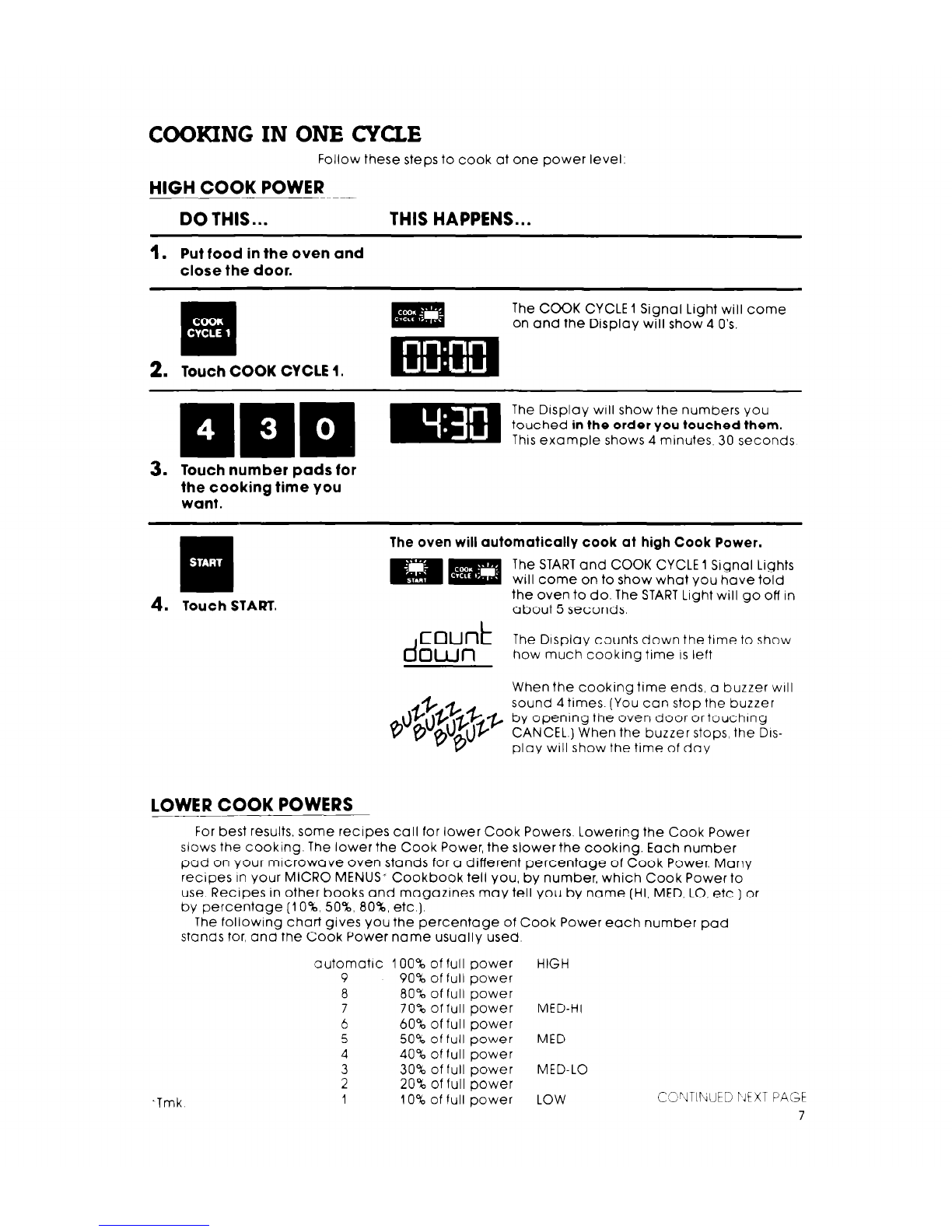
COOKING IN ONE CYCLE
Follow these steps to cook at one power level.
HIGH COOK POWER
DO THIS... THIS HAPPENS...
1.
Put food in the oven and
close the door.
El
. .
2.
Touch COOK CYCLE 1.
The COOK CYCLE 1 Signal Light will come
on and the Display will show 4 0’s.
The Display will show the numbers You
touched in the order you touched them.
This example shows 4 minutes. 30 seconds
3. Touch number pads for
the cooking time You
want.
q
4.
Touch START.
The oven will automatically cook at high Cook Power.
The STARTand COOK CYCLE 1 Signal Lights
will come on to show what you have told
the oven to do. The START Light will go off in
about 5 seconds.
d
count
The Drsplay counts down the time to show
own how much cooking time ISleft
When the cooking time ends, a buzzer WIII
sound 4 times. (You can stop the buzzer
y opening the oven door or touchrng
CANCEL.) When the buzzer stops, the DIS-
play will show the time of day
LOWER COOK POWERS
For best results, some recipes call for lower Cook Powers. Lowering the Cook Power
slows the cooking. The lower the Cook Power, the slower the cooking. Each number
pad on Your microwave oven stands for a different percentage of Cook Power. Many
recipes In your MICRO MENUS- Cookbook tell you, by number, which Cook Power to
use Recipes in other books and magazines may tell You by name (HI, MED, LO, etc ] or
by percentage (IO%, 50%, 80%, etc.).
The following chart gives you the percentage of Cook Power each number pad
stands for, and the Cook Power name usually used.
-Tmk
automatrc 100% of full power HIGH
9 90% of full power
a 80%
of full power
7 70% of full power MED-HI
6 60% of full power
5 50% of full power MED
4 40% of full power
3 30% of full power MED-LO
2 20% of full power
1 10% of full power LOW C!Z!“dTIT\jUtD IJEXT PAGE
7
jB\“,, n .‘,-:l&i Ii’ (~ .,.lI” I:.
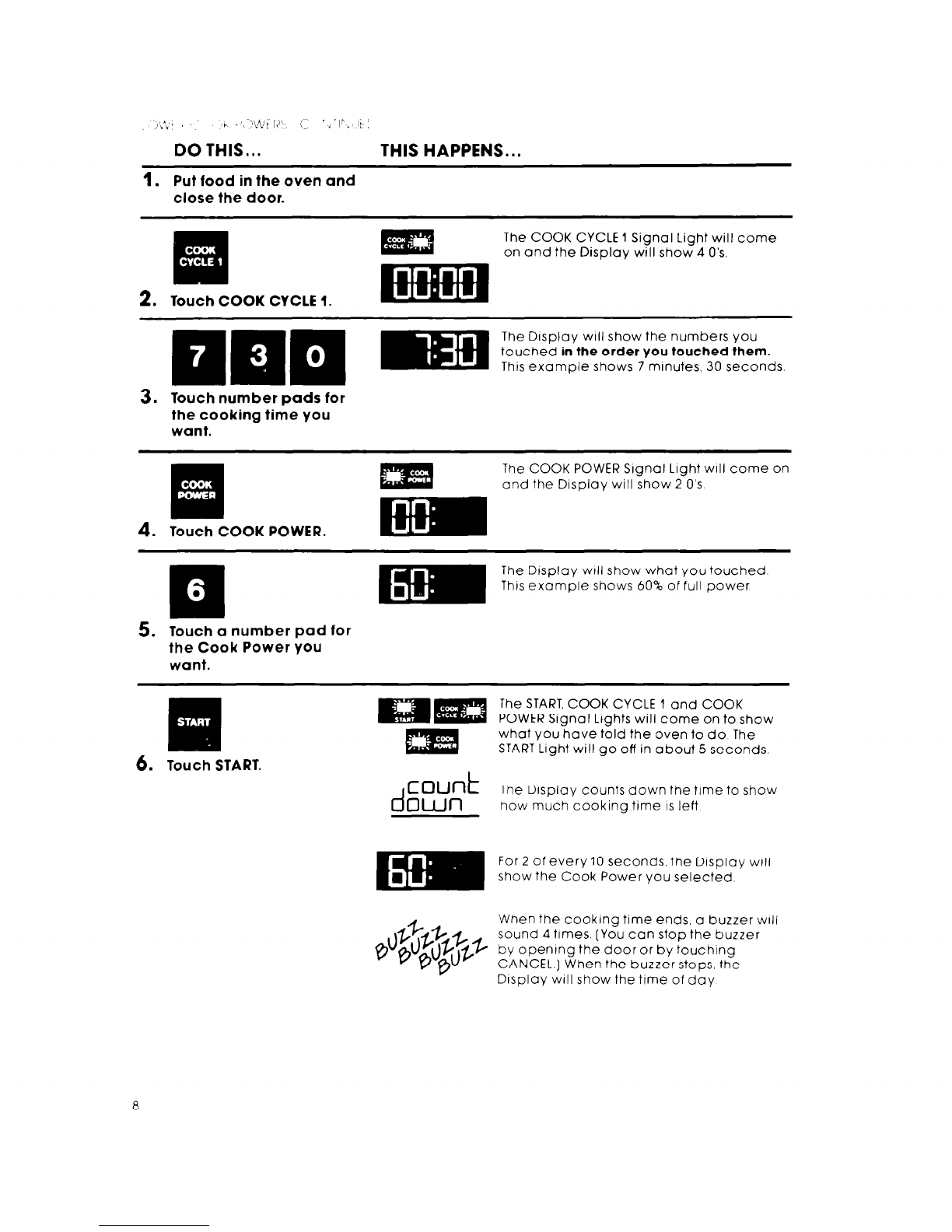
DO THIS... THIS HAPPENS...
1.
Put food in the oven and
close the door.
ill
. .
2.
Touch COOK CYCLE 1.
The COOK CYCLE 1 Signal Light will come
on and the Display will show 4 0’s.
The Display
will
show the numbers you
touched in the order you touched them.
This example shows 7 minutes, 30 seconds
3. Touch number pads for
the cooking time you
want.
The COOK POWER Slgnal Light
will
come on
and the Display will show 2 O’s
4.
Touch COOK POWER.
5. Touch a number pad for
the Cook Power you
want.
6. Touch START.
The START,COOK CYCLE 1 and COOK
POWER Signal Lights will come on to show
what you hove told the oven to do The
START Light will go off in about 5 seconds.
d
count
The Display counts down the time to show
own
how much cooking time
IS
left
For 2 of every IO seconds, the Display WIII
show the Cook Power you selected
‘When the cooking time ends, o buzzer WIII
sound 4 times. [You con stop the buzzer
by opening the door or by touching
CANCEL.) When the buzzer stops, the
D~sploy WIII show the time of day
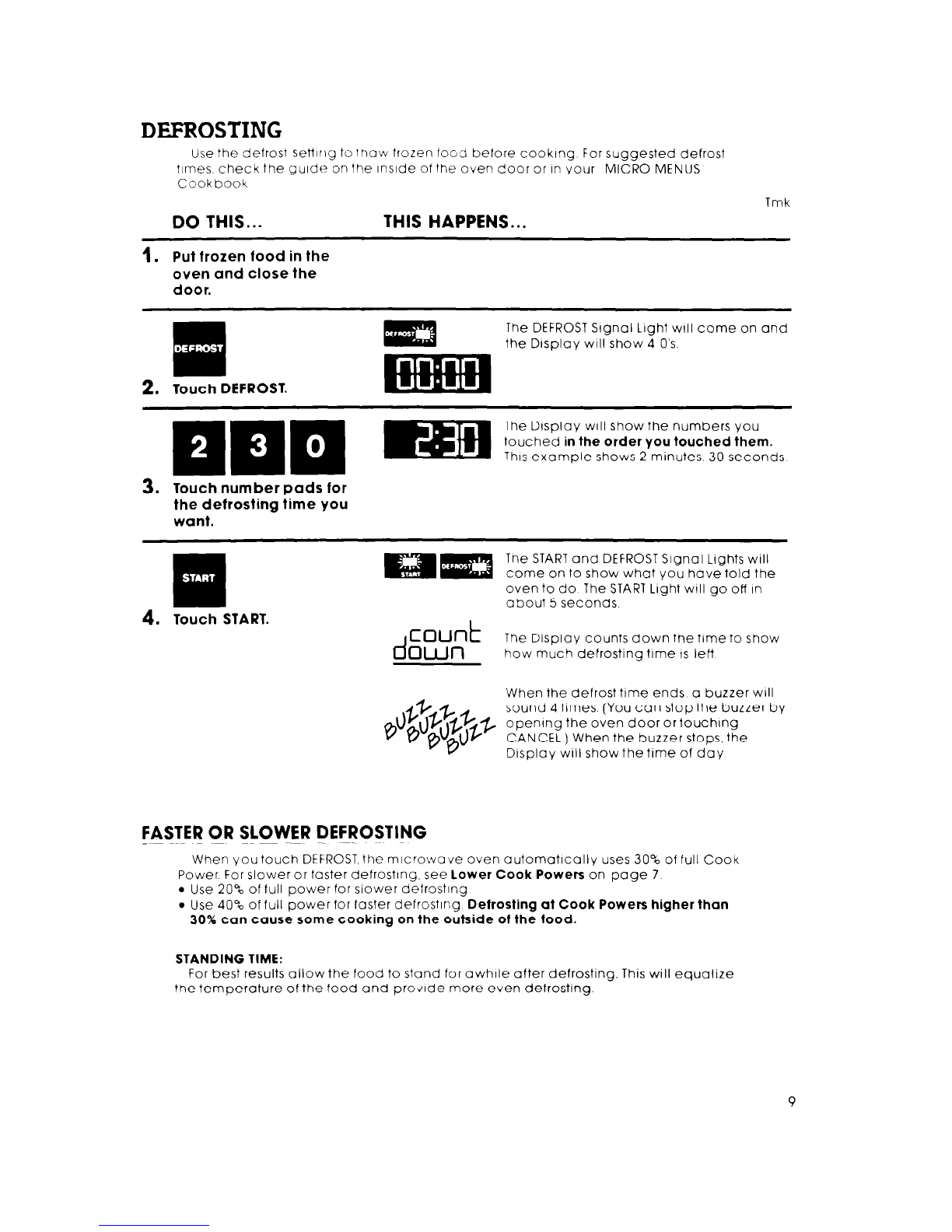
DEFROSTING
Use the defrost setilflg to !how frozen fOGd before cooking For suggested defrost
times. check the gurde on the inside of the oven door or in your MICRO MENUS
Cookbook
DO THIS... THIS HAPPENS...
Tmk
1.
Put frozen food in the
oven and close the
door.
q
.
2.
Touch DEFROST.
The DEFROST Srgnal Light WIII come on and
the Display will show 4 O’s
The Display will show the numbers you
touched
in the order you touched them.
Thusexample shows 2 minutes 30 seconds
3. Touch number pads for
the defrosting time you
want.
q
4.
Touch START.
Tne STARTand DEFROST Signal Lights will
come on to show what you hove told the
oven to do The START Light WIII go off In
about 5 seconds
d
count
The Display counts down the time to show
own
how much defrosting time IS left
When the defrost time ends a buzzer will
sound 4 times (You con stop the buzzer by
opening the oven door or touching
CANCEL) When the buzzer stops, the
Display will show the time of day
FASTER OR SLOWER DEFROSTING
When you touch DEFROST,the microwave oven automatically uses 30% of full Cook
Power For slower or faster defrosttng. see lower Cook Powers on page 7
l
Use 20% of full power for slower defrosting
l
Use 40% of full power for foster defrosting
Defrosting at Cook Powers higher than
30% can cause some cooking on the outside of the food.
STANDING TIME:
For best results allow the food to stand for awhile after defrosting. This will equalize
the temperature of the food and provide more even defrosting.
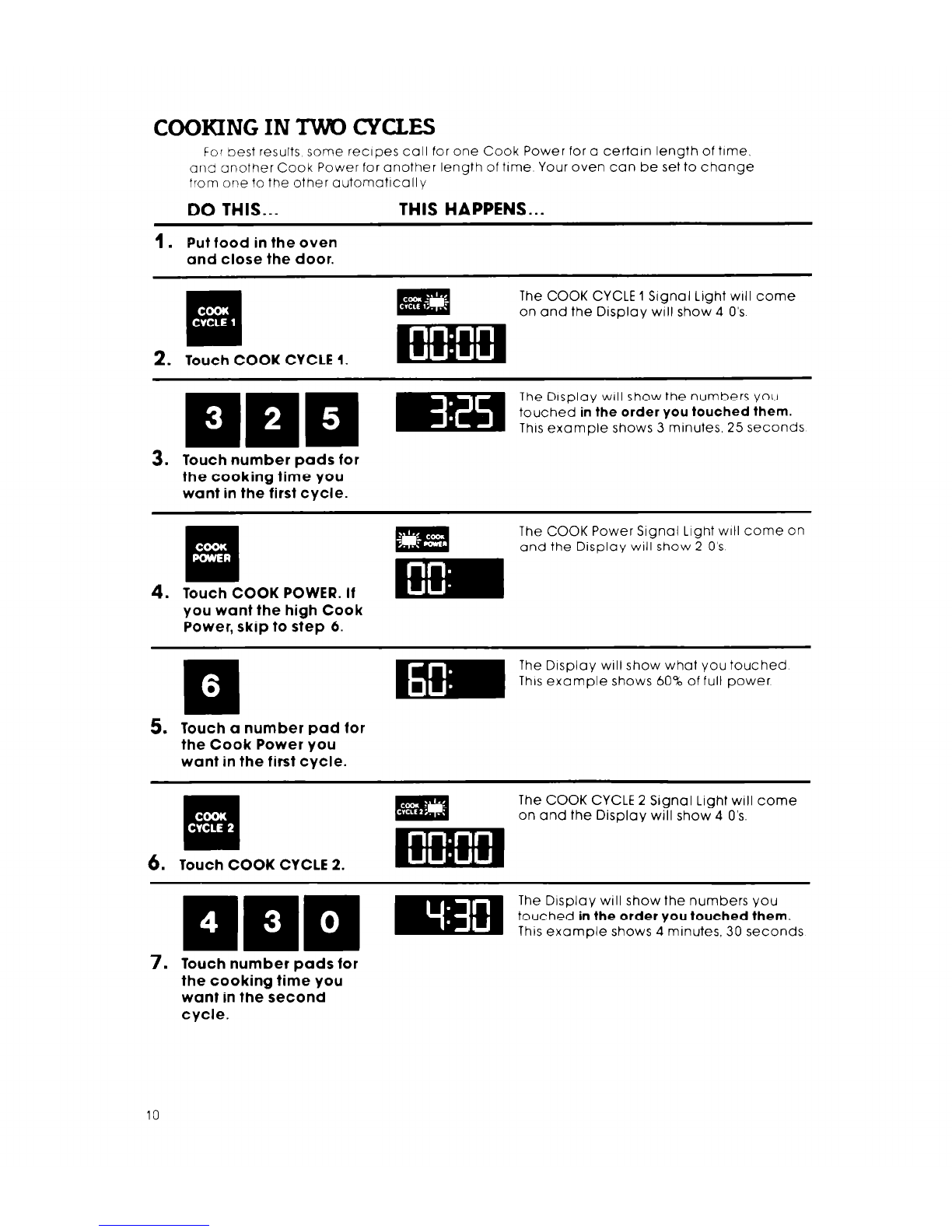
COOKING IN TWO CYCLES
For best results, some recrpes call for one Cook Power for a certain length of time.
and another Cook Power for another length of trme Your oven can be set to change
from one to the other automatlcally
DO THIS... THIS HAPPENS...
1.
Put food in the oven
and close the door.
Iif
. .
2.
Touch COOK CYCLE 1.
The COOK CYCLE 1 Signal Light WIII come
on and the Display will show 4 O’s
The Display will show the numbers You
touched
in the order you touched them.
Thusexample shows 3 minutes, 25 seconds
3. Touch number pads for
the cooking time you
want in the first cycle.
4.
*.
E#
‘.
Touch COOK POWER. If
you want the high Cook
Power, skip to step 6.
The COOK Power Signal Light will come on
and the Display will show 2 O’s
The Display will show what You touched
This example shows 60% of full power
5. Touch a number pad for
the Cook Power you
want in the first cycle.
Eli
.a
6. Touch COOK CYCLE 2.
The COOK CYCLE 2 Signal Light will come
on and the Display will show 4 0’s.
7. Touch number pads for
the cooking time you
want in the second
cycle.
10