Hearing HotSpot Server Installation Manual
6
Network Requirements
The Hearing HotSpot Server can work on an existing network, or it can be supplied with Ruckus access point/s and controller as a complete
independent system� The Ruckus components have proven to give optimal results both for audio transmission and Wi-Fi coverage� The
Hearing HotSpot Server and the access point/s along with a Wi-Fi controller, if necessary, are pre-configured for proper IP addressing and
network processing� For a stand-alone system, the WAN port needs to be connected to a local network or ISP that will provide Internet access
for the Hearing HotSpot Server�
Note: The Hearing HotSpot Server uses the Internet to retrieve content updates, software updates and licensing information. The system does not
broadcast audio over the internet.
Connection Details
The Hearing HotSpot App discovers if there is a Hearing HotSpot Server on the network by sending join request on multicast address
239�192�0�11� The multicast group range starting at 239�192�0�8 must be kept available and allowed on the network�
The Hearing HotSpot Server then accepts the connection of the end point�
When the Hearing HotSpot App selects a channel the server begins to stream the audio on that channel to the device� The access point
should be configured for multicast or multicast to unicast conversion� Refer to the access point or Wi-Fi manufacturer’s documentation for
more information�
The network should support: IGMP, IGMP Snooping, and Multicast�
The network and SSID should also be configured for Voice or Premium QoS, (or other priority QoS depending on Manufacturer)� The Hearing
HotSpot uses similar settings as most VOIP configurations�
Standard Hearing HotSpot System
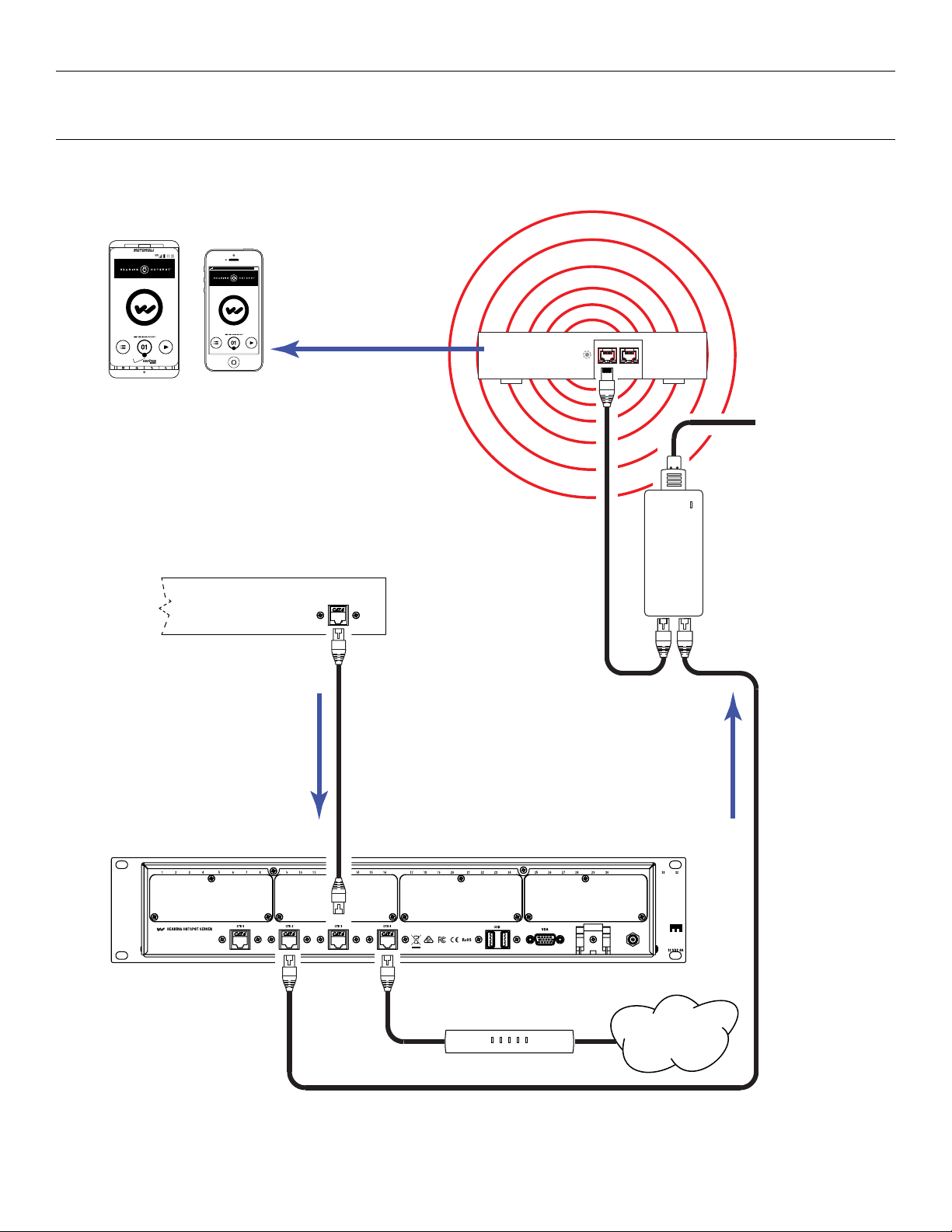
The Hearing HotSpot System is comprised of a Hearing HotSpot Server and a Ruckus access point with Power of Ethernet (PoE) injector�
The Hearing HotSpot Server has its own router/switch built in� The Server has four Ethernet jacks on the rear� One of these jacks is the WAN
port and is configured to receive a DHCP address from the local LAN or ISP to provide the Server and the Hearing HotSpot LAN with internet
access�
On the analog models, two of the other ports are configured as Hearing HotSpot LAN ports and the PoE injector will be connected to one
of these ports� On the Dante model Hearing HotSpot, port #3 is configured and reserved for Dante audio and may not be used for a LAN
connection�
The access point will be connected to the PoE injector� The Server and access point are devices on the Hearing HotSpot LAN� The Server
has a static IP address of 192�168�128�2� The access point has a static IP address of 192�168�128�3� The built in router/switch then assigns
connected Wi-Fi devices with an IP address via DHCP server�
Hearing HotSpot Internal Router - Factory Configuration
The router in the Hearing HotSpot is configured to accept a DHCP address on the WAN port� The router is configured to be a DHCP server
on the Hearing HotSpot network� It is capable of /24 notation network (class C) and can handle 254 address� The configuration reserves �1
to �6 for static addresses, and �0 and �255 are also reserved for the network� If more are needed then the built in DHCP server needs to be
disabled, and a DHCP server added to the network (a network should only have 1 DHCP server)�
Using an Existing Network
The Hearing HotSpot Server can purchased without Wi-Fi components for the purpose of connecting to an existing network�
The network must pass Multicast trac from the Hearing HotSpot Server to the access points� The access points must be able to deliver
multicast to multiple end points simultaneously� Access points and the network switches must be able to handle many multicast connections,
many systems are defaulted to only a single or a few connections�
End points, such as user devices, must be able to communicate with the server� It is required that the Hearing HotSpot Server and the end
points on the same subnet� This can be accomplished in smaller venues with smaller networks easily�
Likewise, the endpoints must not be isolated from the server� The Wi-Fi connections will need to have access to the Hearing HotSpot Server
and vice versa� This can be accomplished either by creating acceptable routes from the Wi-Fi to the Hearing HotSpot server, or by making the
SSID accessible from the LAN that the Hearing HotSpot Server is located on�
If making a Hearing HotSpot Server part of an existing network, the Hearing HotSpot Server should be configured with a static IP address
accommodated on the existing network�
The Hearing HotSpot Server can be configured to receive a DHCP address from a DHCP server on the existing network but it NOT
recommended, unless it is a reserved address in DHCP� DHCP address change from time to time and the Hearing HotSpot Server needs to
maintain a consistent address to function properly�