
WiredTime WT1000 User manual

CALL
MSG
GPS
MENU
SCAN
EMERGENCY PRESS AND HOLD
MERCURY WiredTimeTM
011:21

GPS M = 148
CALL
MSG
GPS
MENU
SCAN
EMERGENCY PRESS AND HOLD
MERCURY WiredTimeTM
GPS M = 148
CALL
MSG
GPS
MENU
SCAN
EMERGENCY PRESS AND HOLD
Replaceable scan lens
Navigation button
Large colour display
W 38mm X L 49mm
Micro USB/charging port
Lithium Ion battery
Replaceable 1300 mah
Replaceable display cover
Service indicator
light
Programeable CCD
scan engine
L 1mm X W 60.5mm X D 31.8mm
Compact size:180 g
Scroll down
Select and/or Next
Back to previous screen
Scroll up
Scan
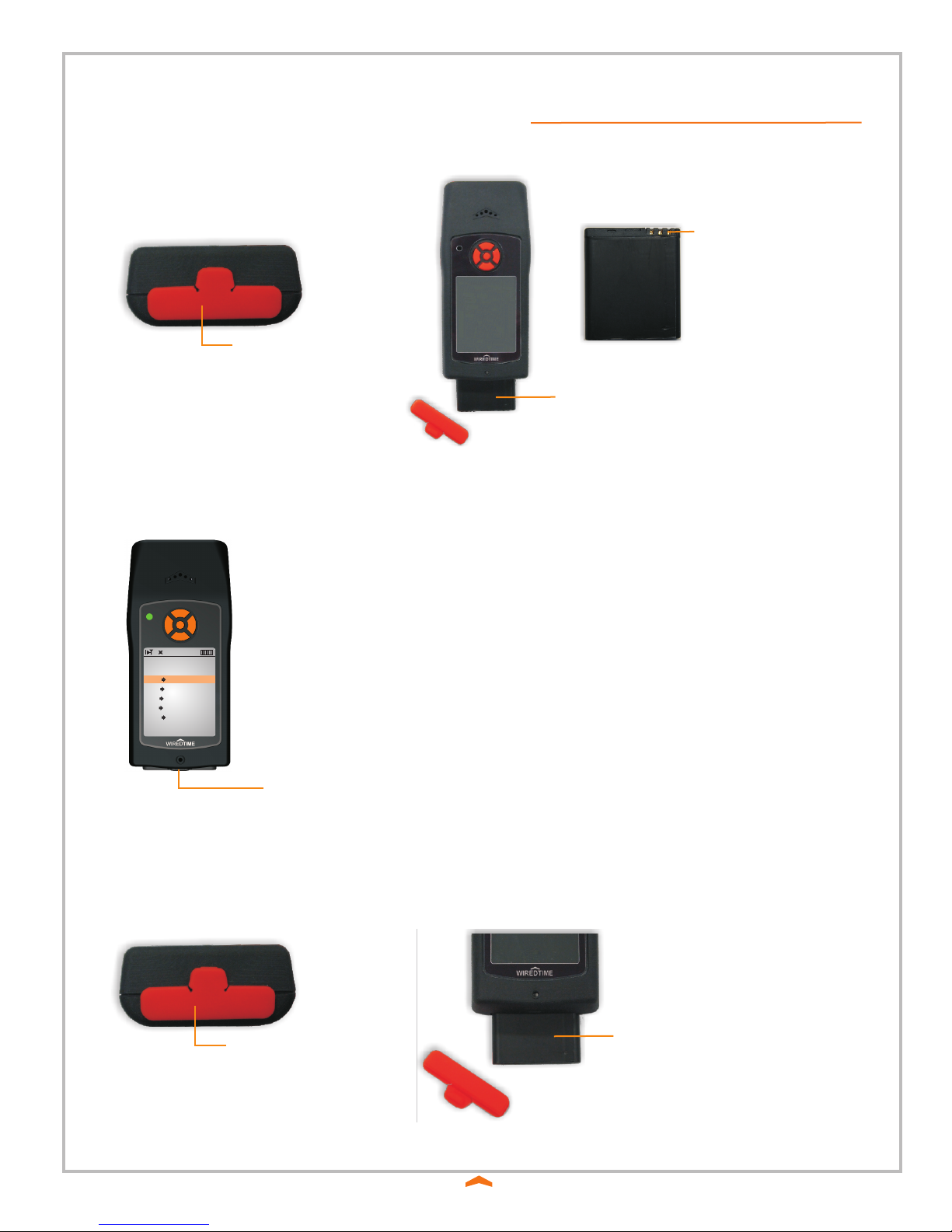
• Keep WT1000 scanner and charger clean and dry.
• When not in use, it is recommended you leave the unit in the charger.
• The charging port is located on the bottom of the scanner, pull back the top part of the plug, and
insert charger.
GPS M = 148
CALL
MSG
GPS
MENU
SCAN
EMERGENCY PRESS AND HOLD
Micro USB/charging port
To reset the scanner remove the battery retainer and slide the battery out part way, wait 10 seconds and re-insert
the battery and retainer.
Remove rubber
battery retainer
Slide battery out part way,
and wait 10 seconds
Remove rubber
battery retainer
Slide battery in, black side up,
battery connectors top right
Battery connectors top right

Scan
1. Press and release the button.
2. Adjust beam over ID barcode.
Optimum scanning distance is 2-10cm depending on light conditions
3. Scanner will beep and beam will turn off when barcode is read.
4. Sending will be displayed at the bottom of the display.
5. When sending is complete the scanner will “beep” and the ID name will be displayed
6. The scanner is now set to your ID until a different ID barcode is scanned
GUARD
Smith, John
Proceed to scan all ‘check’ barcodes at the location as directed.
Follow scanning instructions in Step 1.
Front Door

011:21
WiredTime Office
WiredTime Support
Cell Phones
MERCURY WiredTimeTM
BACK SELECT
WiredTime
MERCURY WiredTimeTM
BACK SELECT
011:21
CALLING...
15195703225
WiredTime
MERCURY WiredTimeTM
END
011:21
WiredTime Office
WiredTime Support
Cell Phones
MERCURY WiredTimeTM
BACK SELECT
011:21
Eric Keller
Tim Birkett
George Dosman
MERCURY WiredTimeTM
BACK SELECT
011:21
CALLING...
15195703225
Eric Keller
MERCURY WiredTimeTM
END
011:21
WiredTime Office
WiredTime Support
Cell Phones
MERCURY WiredTimeTM
BACK SELECT
011:21
WiredTime
MERCURY WiredTimeTM
BACK SELECT
011:21
CALLING...
15195703225
WiredTime
MERCURY WiredTimeTM
END
011:21
CALL
MSG
GPS
MENU
SCAN
EMERGENCY PRESS AND HOLD
MERCURY WiredTimeTM
011:21
Scroll down
Select and/or Next
Back to previous screen
Scroll up
Scan
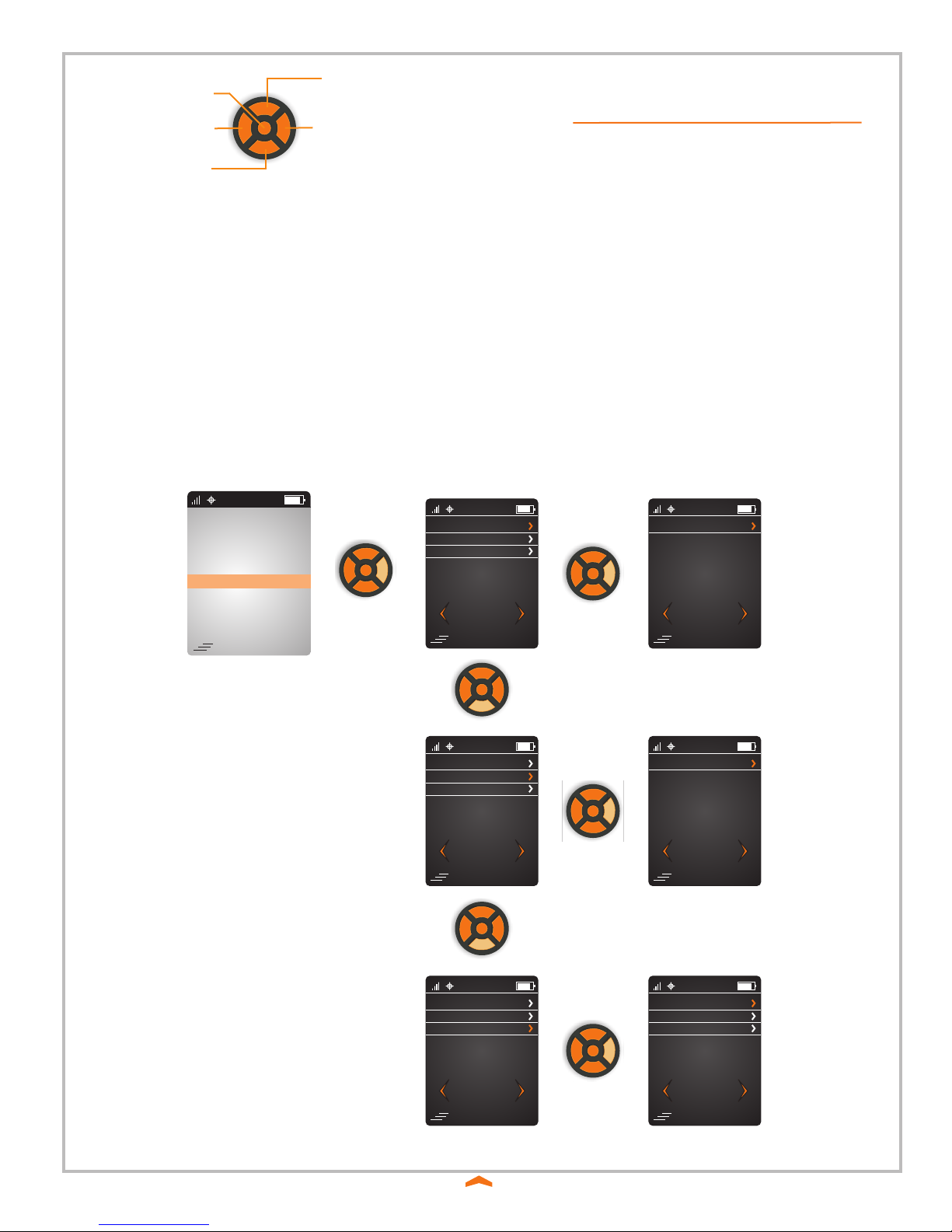
Push the ‘Down’ button until ‘CALL’ on the display is highlighted.
Push the ‘Right’ button to select.
Push the ‘Down and Up buttons the scroll trough the available phone groups.
Push the ‘Down and Up buttons the scroll trough the available phone contacts.
When the name of the call contact is highlighted push the ‘Right’ button to initiate the call.
Push the ‘Right’ button to end the call.
The display will return to the main menu.
The WT1000 has a restricted phone function.
Your personal Phone Book of numbers you are allowed to call will be downloaded to the scanner when you
scan your ID Barcode.
Unread Message
New Message
Read Message
MERCURY WiredTimeTM
BACK SELECT
011:21
No SMS Message
MERCURY WiredTimeTM
BACK SELECT
011:21
Unread Message
New Message
Read Message
MERCURY WiredTimeTM
BACK SELECT
011:21
No SMS Message
MERCURY WiredTimeTM
BACK SELECT
011:21
Unread Message
New Message
Read Message
MERCURY WiredTimeTM
BACK SELECT
011:21
Template 1
Template 3
Template 2
MERCURY WiredTimeTM
BACK SELECT
011:21
CALL
MSG
GPS
MENU
SCAN
EMERGENCY PRESS AND HOLD
MERCURY WiredTimeTM
011:21
Scroll down
Select and/or Next
Back to previous screen
Scroll up
Scan
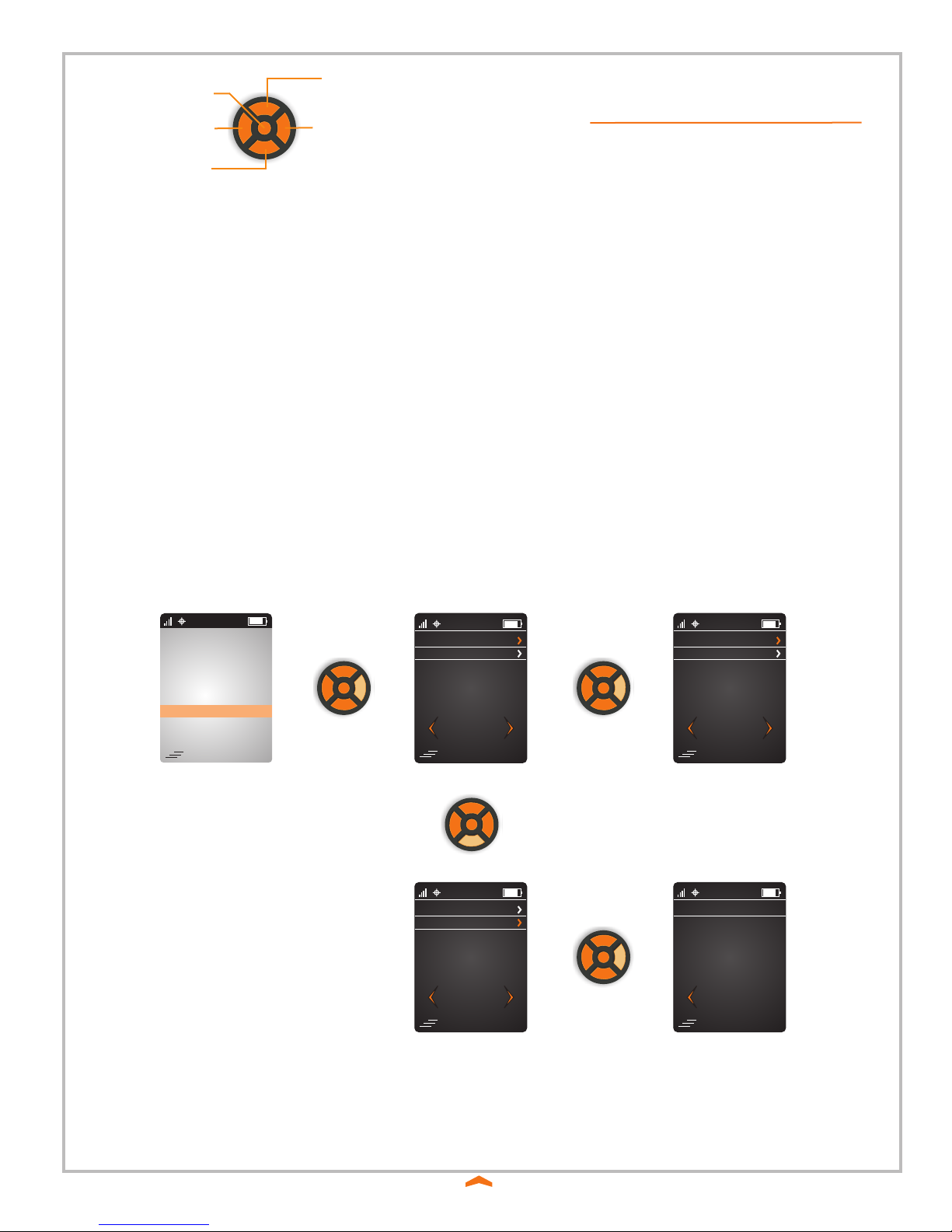
The WT1000 scanner can receive and send SMS text messages.
New messages will automatically display on the screen, the message must be accepted or replied to before returning to the home
screen or proceeding with any other actions.
IF MORE THAN 1 MSG IS RECEIVED, oldest message will display 1st.
When a message is received ‘MSG’ will flash on the main menu.
Push the right button open the message feature.
Unread Messages’ will be highlighted, push the right button to select.
Push the Up and Down button to scroll through the available messages.
When to message to be viewed is highlighted push the right button to open.
CALL
MSG
GPS
MENU
SCAN
EMERGENCY PRESS AND HOLD
MERCURY WiredTimeTM
011:21
GPS Tracking - OFF
GPS Details
MERCURY WiredTimeTM
BACK SELECT
011:21
TURN ON
TURN OFF
MERCURY WiredTimeTM
BACK SELECT
011:21
GPS Tracking - OFF
GPS Details
MERCURY WiredTimeTM
BACK SELECT
011:21
LAT : 0.0
MERCURY WiredTimeTM
BACK
LAT-1 : N
LON : 0.0
LON-1 : W
DIR : 0
SPEED : 0.0
STAT : 0
TIME : 0
011:21
Scroll down
Select and/or Next
Back to previous screen
Scroll up
Scan
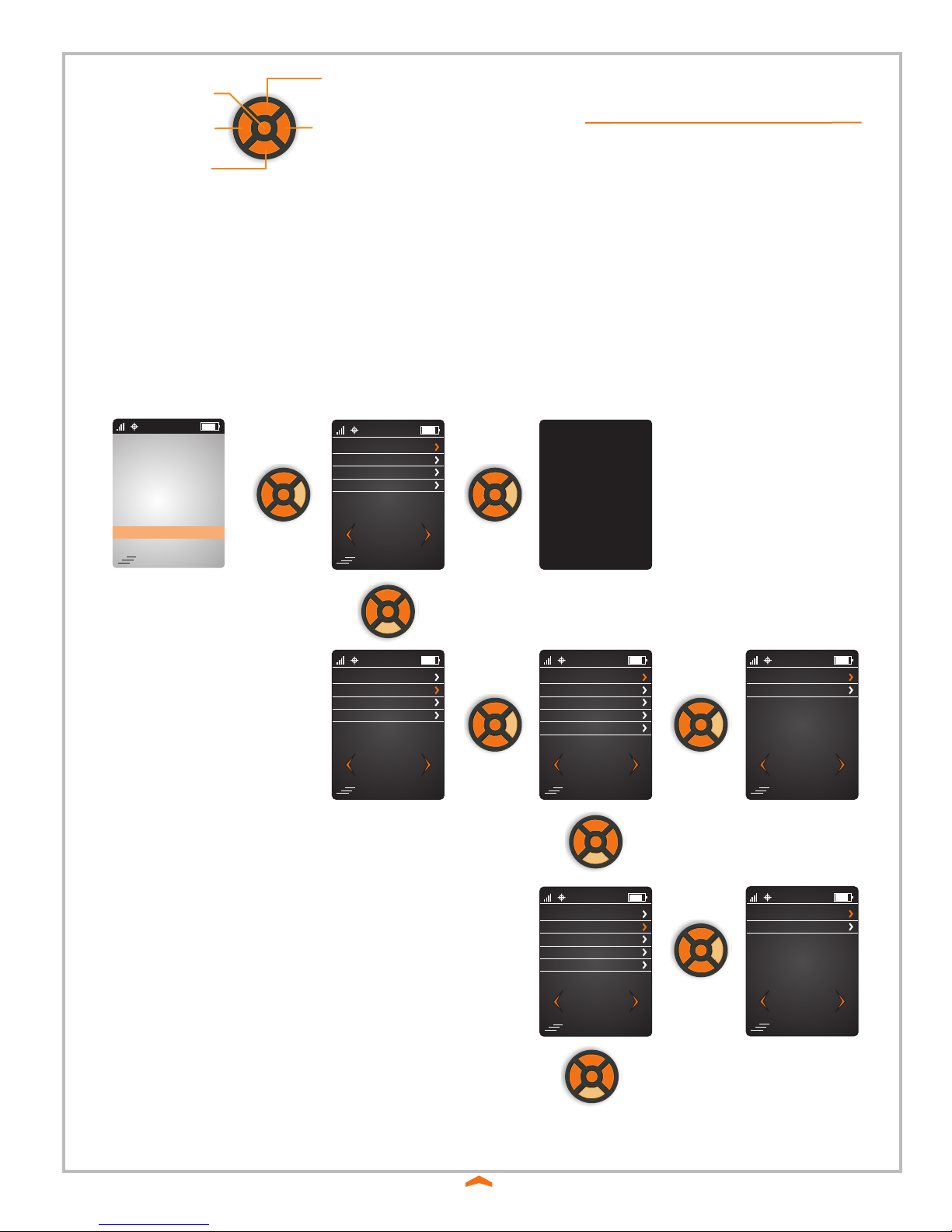
The WT1000 has GPS tracking capability built into the scanner.
The GPS feature can be activated at anytime.
Push the ‘Down’ button until GPS is highlighted.
Push the right button to select GPS.
GPS tracking-Off is highlighted, push the right button to select.
TURN ON is highlighted, push the right button to select.
The display will return to the Main menu.
Push the ‘Down’ button until GPS is highlighted.
Push the right button to select GPS.
GPS tracking-On is highlighted, push the right button to select.
TURN OFF is highlighted, push the right button to select.
The display will return to the Main menu.
Push the ‘Down’ button until GPS is highlighted.
Push the right button to select GPS.
Push the down button to until ‘GPS Details’ is highlighted, push the right button to select.
Details of current GPS stats is displayed.
Push the Left button to return to the Main menu.
Push the Down button until MENU is highlighted.
Push the right button to select the Menu feature.
Push the down button until the required feature is highlighted.
Push the right button to select.
The Menu feature is used to view current parameters of the WT1000.
CALL
MSG
GPS
MENU
SCAN
EMERGENCY PRESS AND HOLD
MERCURY WiredTimeTM
011:21
Turn off LCD
Scanner Info
About WiredTime
Admin Mode
MERCURY WiredTimeTM
BACK SELECT
011:21
Turn off LCD
Scanner Info
About WiredTime
Admin Mode
MERCURY WiredTimeTM
BACK SELECT
011:21
Delete Save Scan
Lock
Modem Profile
Restore Default
MERCURY WiredTimeTM
BACK SELECT
Activate Modem
011:21
Yes
No
MERCURY WiredTimeTM
BACK SELECT
011:21
Delete Save Scan
Lock
Modem Profile
Restore Default
MERCURY WiredTimeTM
BACK SELECT
Activate Modem
011:21
Yes
No
MERCURY WiredTimeTM
BACK SELECT
011:21
CONTINUE TO NEXT PAGE
Scroll down
Select and/or Next
Back to previous screen
Scroll up
Scan
Turn off LCD - Selecting this feature will turn off the dispaly.
Admin Mode - Use Admin Mode to view and change scanner parameters
Delete Saved Scans - Use this function to delete scans saved in memory.
Restore Default - Use this function to restore the scanner to the default parameters.

LOCKED
CALL
MSG
GPS
MENU
SCAN
EMERGENCY PRESS AND HOLD
MERCURY WiredTimeTM
011:21
Turn off LCD
Scanner Info
About WiredTime
Admin Mode
MERCURY WiredTimeTM
BACK SELECT
011:21
Delete Save Scan
Lock
Modem Profile
Restore Default
MERCURY WiredTimeTM
BACK SELECT
Activate Modem
011:21
Delete Save Scan
Lock
Modem Profile
Restore Default
MERCURY WiredTimeTM
BACK SELECT
Activate Modem
011:21
Modem Profile
Profile: 1 Enabled
NAI: sprintembeddedpr58@sprint
psc.com
Home Addr: 0.0.0.0
Primary HA: 255.255.255.255
Secondary HA: 68.28.57.76
MERCURY WiredTimeTM
BACK SELECT
011:21
Delete Save Scan
Lock
Modem Profile
Restore Default
MERCURY WiredTimeTM
BACK SELECT
Activate Modem
011:21
Scroll down
Select and/or Next
Back to previous screen
Scroll up
Scan
Push the Down button until MENU is highlighted.
Push the right button to select the Menu feature.
Push the down button until the required feature is highlighted.
Push the right button to select.
The Menu feature is used to view current parameters of the WT1000.
Lock - Use this function to lock the scanner.
Modem Profile - Use this function to view the modem profile.
Activate Modem - Use this function to re-activate the modems cellular settings.

CALL
MSG
GPS
MENU
SCAN
EMERGENCY PRESS AND HOLD
MERCURY WiredTimeTM
011:21
ESN: F60C8A87
MERCURY WiredTimeTM
BACK SELECT
Ip1: 216.16.230.94
Ip2: 216.16.230.94
POT2: 80
Mode: Real Time
Scan: Single Scan
GPS: Yes
Lang: English
Ver: 1.0.0.0
011:21
Turn off LCD
Scanner Info
About WiredTime
Admin Mode
MERCURY WiredTimeTM
BACK SELECT
011:21
WIREDTIME.COM INC.
MERCURY WiredTimeTM
BACK SELECT
5-350 Shirley Ave.,
Kitchener, Ontario,
Canada N2B2E1
Phone: 519-570-3225
Fax: 519-570-3096
www.wiredtime.com
011:21
Turn off LCD
Scanner Info
About WiredTime
Admin Mode
MERCURY WiredTimeTM
BACK SELECT
011:21
Scroll down
Select and/or Next
Back to previous screen
Scroll up
Scan
Push the Down button until MENU is highlighted.
Push the right button to select the Menu feature.
Push the down button until the required feature is highlighted.
Push the right button to select.
The Menu feature is used to view current parameters of the WT1000.
Scanner Info - Use this function to view the current scanner settings.
About WiredTime - Use this function to access WiredTime’s contact information.
Table of contents

















