manuals.online logo
Brands
  1. Home
  2. •
  3. Brands
  4. •
  5. XM Satellite Radio
  6. •
  7. Car Receiver
  8. •
  9. XM Satellite Radio XpressR XMCK-20P User manual

XM Satellite Radio XpressR XMCK-20P User manual

Other manuals for XpressR XMCK-20P

1

Other XM Satellite Radio Car Receiver manuals

XM Satellite Radio CommanderMT XMRVRFM002 User manual

XM Satellite Radio

XM Satellite Radio CommanderMT XMRVRFM002 User manual

XM Satellite Radio XpressR XMCK-20P User manual

XM Satellite Radio

XM Satellite Radio XpressR XMCK-20P User manual

XM Satellite Radio XMR6910 User manual

XM Satellite Radio

XM Satellite Radio XMR6910 User manual

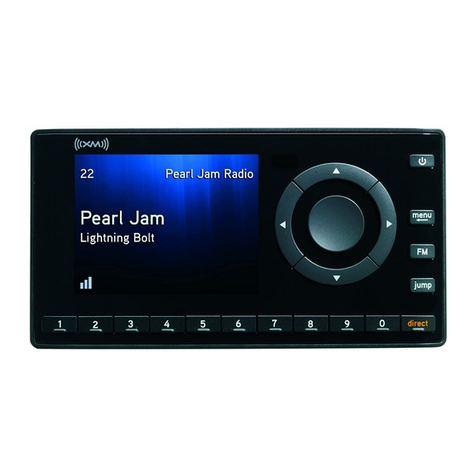
XM Satellite Radio onyX XDNX1 User manual

XM Satellite Radio

XM Satellite Radio onyX XDNX1 User manual

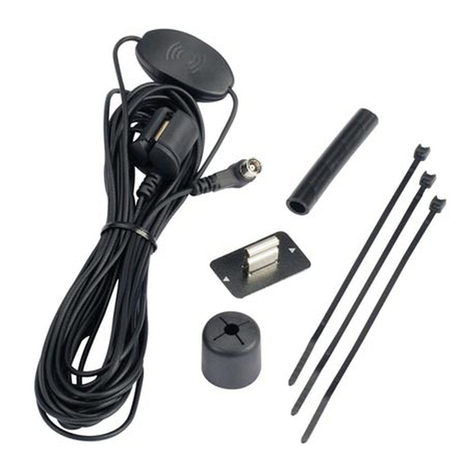
XM Satellite Radio XM SureConnect User manual

XM Satellite Radio

XM Satellite Radio XM SureConnect User manual

XM Satellite Radio XMC10 User manual

XM Satellite Radio

XM Satellite Radio XMC10 User manual

XM Satellite Radio XM-RVR-FM-001 User manual

XM Satellite Radio

XM Satellite Radio XM-RVR-FM-001 User manual

Popular Car Receiver manuals by other brands

Linear Series LS5050 Operation and installation manual

Linear Series

Linear Series LS5050 Operation and installation manual

Kenwood KRC-160 instruction manual

Kenwood

Kenwood KRC-160 instruction manual

Sony XR-CA430X Service manual

Sony

Sony XR-CA430X Service manual

T+A Elektroakustik K1 CD-RECEIVER operating instructions

T+A Elektroakustik

T+A Elektroakustik K1 CD-RECEIVER operating instructions

SoundMax SM-CDM1052 instruction manual

SoundMax

SoundMax SM-CDM1052 instruction manual

Xtrons HD107HD user manual

Xtrons

Xtrons HD107HD user manual

Mopar RB3 manual

Mopar

Mopar RB3 manual

Clarion ADDZEST DMZ615 owner's manual

Clarion

Clarion ADDZEST DMZ615 owner's manual

Sony XAV-601BT Specifications

Sony

Sony XAV-601BT Specifications

PIE GM12-POD/S Operation manual

PIE

PIE GM12-POD/S Operation manual

Hyundai H-910H instruction manual

Hyundai

Hyundai H-910H instruction manual

Sony XR-C6100 Service manual

Sony

Sony XR-C6100 Service manual

Sony CDX-L600X - Fm/am Compact Disc Player Installation/connections

Sony

Sony CDX-L600X - Fm/am Compact Disc Player Installation/connections

Motorola VWA63 Service manual

Motorola

Motorola VWA63 Service manual

Sound Storm STM93R user manual

Sound Storm

Sound Storm STM93R user manual

Nextar D3201 instruction manual

Nextar

Nextar D3201 instruction manual

Alpine CDE-163BT owner's manual

Alpine

Alpine CDE-163BT owner's manual

Kenwood KDC-X303 quick start guide

Kenwood

Kenwood KDC-X303 quick start guide

manuals.online logo
manuals.online logoBrands
  • About & Mission
  • Contact us
  • Privacy Policy
  • Terms and Conditions

Copyright 2025 Manuals.Online. All Rights Reserved.

user guide
XMCK-20P
Quick Start
1. Set up your XpressR
2. Activate your XM subscription online http://activate.xmradio.com or by
phone 1 800 XM RADIO (1-800-967-2346 )
3. Listen to XM*
4. Manage your channels using presets
Quick Start
2
*Hardware and required monthly subscription sold separately. Installation cost and other fees and taxes, including a one-time activation fee
may apply. Subscription fee is consumer only. XM products, programming, services, and fees are subject to change, at any time, without no-
tice. Channels with frequent explicit language are indicated with an XL. Channel blocking is available for XM radio receivers by calling 1-
800-XM-RADIO. Subscriptions subject to Customer Agreement available at xmradio.com. XM service only available in the 48 contiguous
United States. ©2007 XM Satellite Radio Inc. All rights reserved.
Contents
3
IInnttrroodduuccttiioonn.............................................. 4
eatures............................................................ 4
Safety Instructions........................................ 5
What’s in the Box .......................................... 7
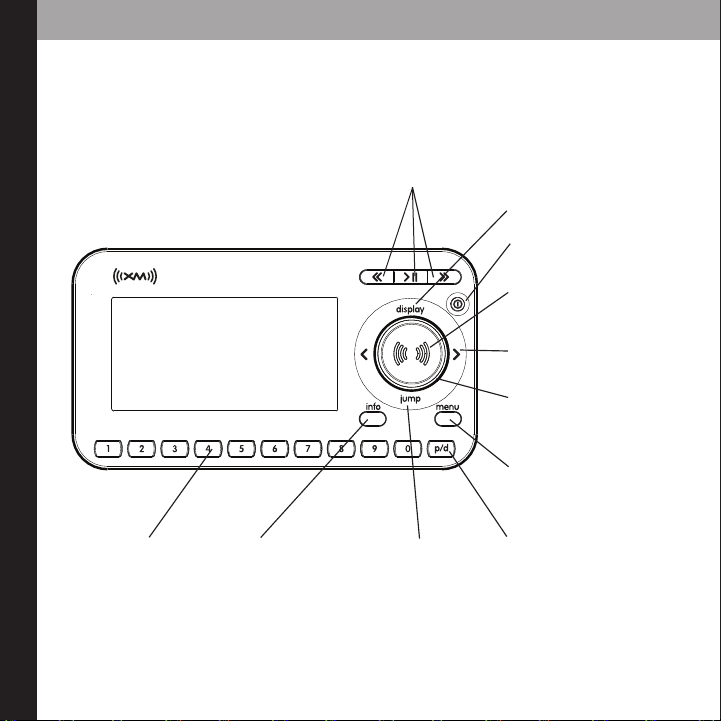
XpressRControls ............................................ 8
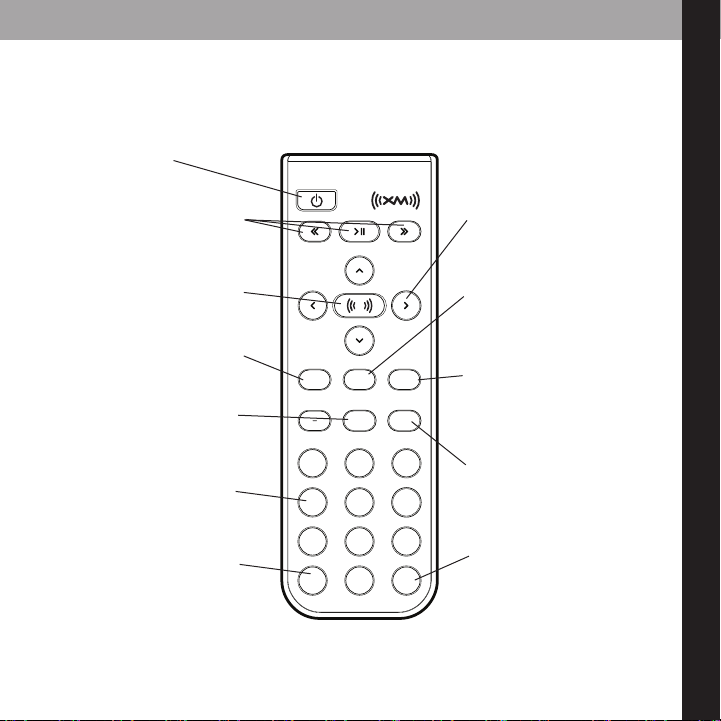
Remote ............................................................ 9
Using this Guide ........................................ 10
VVeehhiiccllee IInnssttaallllaattiioonn............................ 11
Mounting the XM Antenna .................... 14
Installing the Vent or Swivel Mount .... 15
How to Receive XM Through your Car’s
Stereo ............................................................ 17
Making Your M Radio an XM Radio .. 20
AAccttiivvaattiioonn..................................................23
UUssiinngg yyoouurr XXpprreessssRR............................ 25
XXpprreessssRRCCoonnttrroollss
Listening to Live XM.................................. 26
Direct Entry .................................................. 27
Using Presets................................................ 27
Categories .................................................... 28
Jump .............................................................. 28
Info .................................................................. 29
Display............................................................ 29
30-Minute Replay ...................................... 31
TuneSelect .................................................... 34
MMeennuu OOppttiioonnss............................................ 35
Change Display .......................................... 35
Edit Alerts...................................................... 37
Stocks ............................................................ 39
Info Extras .................................................... 40
Channel Access .......................................... 41
Antenna Aiming ........................................ 44
Set Time ........................................................ 44
actory Defaults.......................................... 47
M Modulator.............................................. 47
Line Out ........................................................ 49
Set Tone ........................................................ 50
CCuussttoommeerr uuppppoorrtt.............................. 51
Troubleshooting ........................................ 52
Specifications .............................................. 54
Product Registration ................................ 56
Patent Information .................................... 57
FFCCCC ttaatteemmeenntt...................................... 58
WWaarrrraannttyy.................................................... 59

4
introduction
Features
Congratulations on your purchase of the Audiovox XpressR. Your new XpressR
includes:
Multi channel monitoring, view six channels at once
View current and previous channels at the same time
Shortcut to M frequencies
Scan music category
30 minute Replay- Pause and replay up to 30 mintues of live broadcast.
GameSelect- inds your favorite sport and team events.
TuneSelect- inds your favorite songs by song title or artist name if they are currently
playing on any XM channel.
Personalized Stock and Sports Tickers- Track your favorite stocks and sports scores on
your XpressR’s display while listening to your favorite music.
A bright, white LED backlit display with “Auto Dimming” capabilities.
Enjoy XM’s 170 channels from coast to coast, with over 80,000 hours of entertainment
each month. XM offers musical choice, variety, and discovery – worlds beyond your
own collection – plus a wide range of news, sports, talk, comedy, kids, and entertain-
ment channels. Hear XM live, or replay what you missed.
We recommend that you read the entire manual before using your XpressR.
introduction
5
Safety Instructions
Plea e read and under tand all the in truction to avoid injury to your elf and/or damage
to your Xpre R. Plea e be aware that XM claim no re pon ibility for damage from data
lo due to breakdown, repair, or
other cau e .
XXpprreessssRRDDiiggiittaall AAuuddiioo PPllaayyeerr
 Do not expose to extreme temperatures (above 140° or below -4° , or above 60°C
or below -20°C).
 Do not expose to moisture. Do not use XpressRnear or in water.
 Do not let any foreign matter spill into XpressR.
 Do not expose to chemicals such as benzene and thinners. Do not use liquid or
aerosol cleaners. Clean with a soft damp cloth only.
 Do not expose to direct sunlight, fire, flame or other heat sources for a prolonged
period.
 Do not try to disassemble and/or repair XpressRyourself.
 Do not drop your XpressRor subject it to severe impact.
 Do not place heavy objects on XpressR.
 Do not subject XpressRto excessive pressure.
 Do not touch the XpressRwith wet hands.
 Do not store in dusty areas.
6
CCaauuttiioonn::Opening the case may result in electric shock.
CCaauuttiioonn::The uninsulated parts inside the power adapter and cradle may cause electric
shock or fire. or your safety, please do not open these components. Do not let metallic
objects, such as necklaces or coins, come into contact with the power adapter plugs.
CCaauuttiioonn::To avoid electric shock, use the power adapter only with an outlet that
matches the shape of the adapter’s plug.
CCaauuttiioonn::Make sure that you insert the adapter’s plug all the way into the outlet.
CCaauuttiioonn::Do not plug several devices into the same electrical outlet.
IImmppoorrttaanntt::Always read and understand the user guide to prevent problems.
WWaarrnniinngg::Use the power adapter and cradle away from water sources to avoid fire or
electric shock.
EEnnvviirroonnmmeennttaall IInnffoorrmmaattiioonn
ollow local guidelines for waste disposal when discarding packaging and electronic
appliances.
Your Satellite Radio receiver is packaged with cardboard, polyethylene, etc., and does
not contain any unnecessary materials.
WWaarrnniinnggss
When using this product it is always important to keep your eyes on the road and
hands on the wheel. Not doing so could result in personal injury, death, and/or dam-
age to your XpressRReceiver, accessories, and/or to your vehicle or other property.
XpressRshould be placed in your vehicle where it will not interfere with the function of
safety features, e.g., deployment of airbags. ailure to correctly place XpressRmay re-
sult in injury to you or others if the unit becomes detached during an accident and/or
obstructs the deployment of an airbag.
introduction
introduction
7
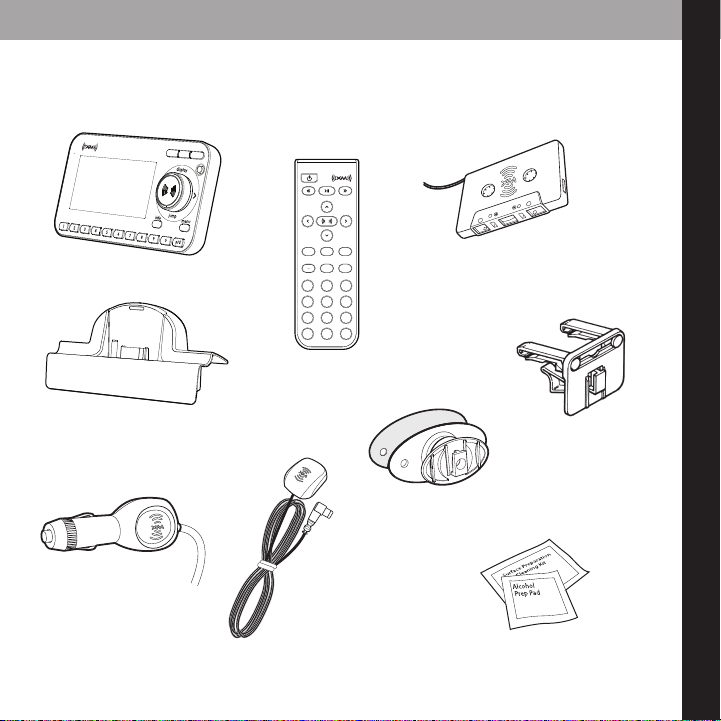
What’s in the Box?
8
5
2
7
4
1
9
6
3
mute
info menu
display
0
jump p/d
+
XpressR
Car Cradle
Car Power Adapter
Remote Control
XM Car Antenna
Cassette Adapter
Swivel Mount
Vent Mount
Swivel Mount Preparation Kit
introduction
8
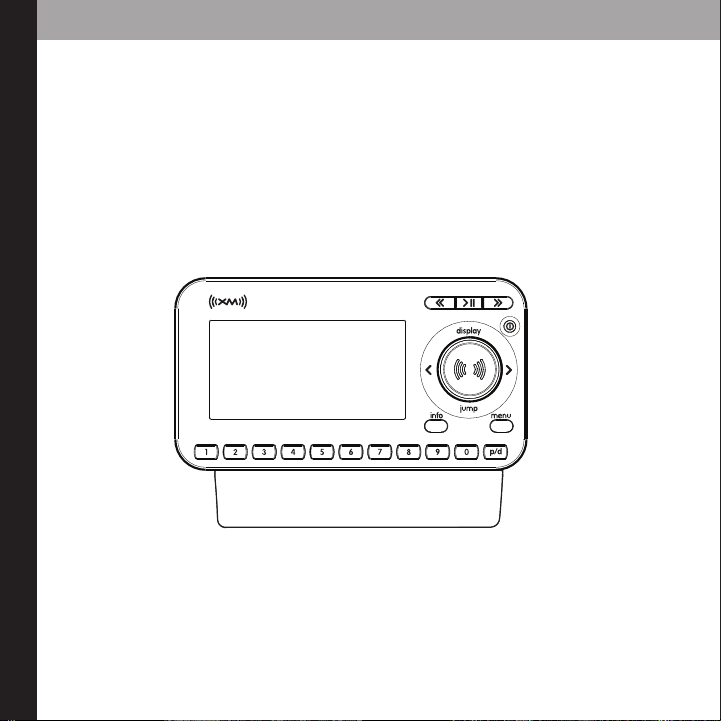
3300--MMiinnuuttee RReeppllaayy BBuuttttoonnss
Pause and replay up to 30
minutes of live XM broadcast.
XpressRFunctions
PPoowweerr BBuuttttoonn
DDiissppllaayy
Changes the way content is
viewed on the display.
LLeefftt aanndd RRiigghhtt AArrrroowwss
Search for channels by
category.
55--wwaayy NNaavviiggaattiioonn KKnnoobb
Previews channels; also selects
various menu options.
MMeennuu
Access advanced features
and configuration options.
XXMM BBuuttttoonn
Confirms selection for chan-
nel and menu items also press
and hold to TuneSelect.
PPrreesseett//DDiirreecctt
Selects between direct
channel entry and up to 30
presets.
JJuummpp
Switches between
current channel and
previous channel.
IInnffoo
Displays either your
personal stock or info
extras information.
NNuummbbeerr KKeeyyss
Enter a channel di-
rectly or select your
favorite preset.
introduction
9
8
5
2
7
4
1
9
6
3
mute
info menu
display
0
jump p/d
+
Remote Control Functions
3300--MMiinnuuttee RReeppllaayy BBuuttttoonnss
Pause and replay up to 30
minutes of live XM broadcast
PPoowweerr BBuuttttoonn
DDiissppllaayy
Changes the way content
is viewed on the display
AArrrrooww BBuuttttoonnss
Select menu entries,
change channels.
MMeennuu
Access advanced features
and configuration options.
XXMM BBuuttttoonn
Confirms selected channel
or menu options.
PPrreesseett//DDiirreecctt
Selects between direct
channel entry and up to 30
presets.
JJuummpp
Switches between current
channel and previous chan-
nel
iinnffoo
Displays either your personal
stock or info extras informa-
tion.
NNuummbbeerr KKeeyyss
Enter a channel directly
or select your favorite
preset.
++ aanndd --
Change channels or control
volume for audio system
(sold separately)
MMuuttee
Silences live or replayed
XM content.
introduction
10
Usin the 5-way Navi ation Knob
The knob not only rotates, but it toggles. To toggle the knob, press on the edge and in the
direction you want to toggle.
Usin This Guide
Throughout this guide, you will see instructions such as Select MMeennuuAAnntteennnnaa AAiimmiinngg.
This tells you to perform the following actions:
1. Press the MMeennuubutton.
2. You will see a menu icon that represents “Antenna Aiming.” Rotate knob to highlight
Antenna Aiming, then press the XM button to select it.
Not all of the menu items described in this guide may appear on your XpressRdisplay.
Some menu items will only be seen when XpressRis used in an accessory home kit or
boombox (Sold Separately).