manuals.online logo
Brands
  1. Home
  2. •
  3. Brands
  4. •
  5. Zanussi Electrolux
  6. •
  7. Dishwasher
  8. •
  9. Zanussi Electrolux ZDT 6053 User manual

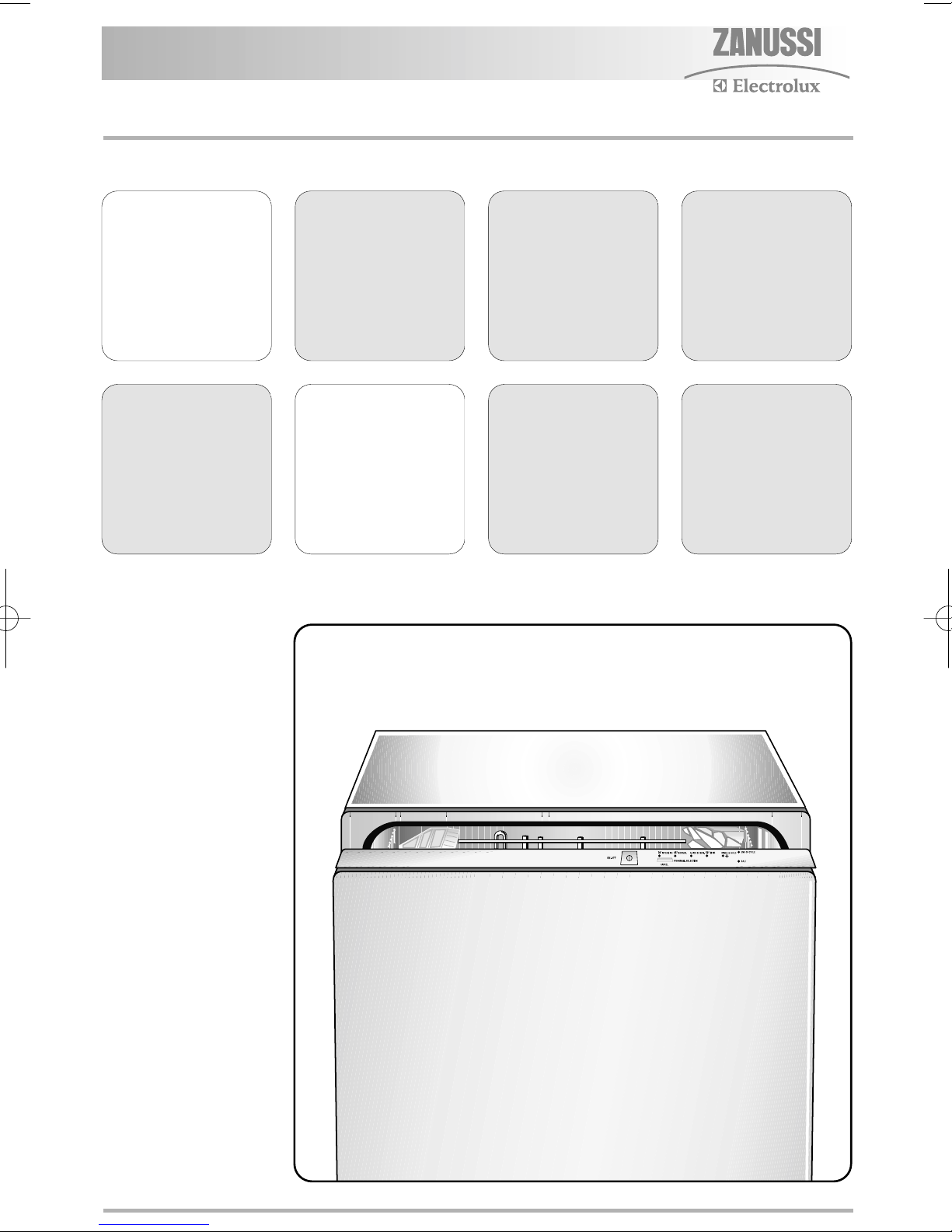
Zanussi Electrolux ZDT 6053 User manual

Other Zanussi Electrolux Dishwasher manuals

Zanussi Electrolux ZSF 2420 User manual

Zanussi Electrolux

Zanussi Electrolux ZSF 2420 User manual

Zanussi Electrolux ZDF 601 User manual

Zanussi Electrolux

Zanussi Electrolux ZDF 601 User manual

Zanussi Electrolux DA4441 User manual

Zanussi Electrolux

Zanussi Electrolux DA4441 User manual

Zanussi Electrolux DCS 12 W User manual

Zanussi Electrolux

Zanussi Electrolux DCS 12 W User manual

Zanussi Electrolux ZSF 6120 User manual

Zanussi Electrolux

Zanussi Electrolux ZSF 6120 User manual

Zanussi Electrolux ZSF 2440 User manual

Zanussi Electrolux

Zanussi Electrolux ZSF 2440 User manual

Zanussi Electrolux DX 6450 User manual

Zanussi Electrolux

Zanussi Electrolux DX 6450 User manual

Zanussi Electrolux ZDF 121 User manual

Zanussi Electrolux

Zanussi Electrolux ZDF 121 User manual

Zanussi Electrolux ZDS 231 User manual

Zanussi Electrolux

Zanussi Electrolux ZDS 231 User manual

Zanussi Electrolux DE6344 User manual

Zanussi Electrolux

Zanussi Electrolux DE6344 User manual

Zanussi Electrolux ZSF 4123 S User manual

Zanussi Electrolux

Zanussi Electrolux ZSF 4123 S User manual

Zanussi Electrolux DE 6554 User manual

Zanussi Electrolux

Zanussi Electrolux DE 6554 User manual

Zanussi Electrolux ZDF 221 User manual

Zanussi Electrolux

Zanussi Electrolux ZDF 221 User manual

Zanussi Electrolux DCE5655 User manual

Zanussi Electrolux

Zanussi Electrolux DCE5655 User manual

Zanussi Electrolux ZSF 6126 User manual

Zanussi Electrolux

Zanussi Electrolux ZSF 6126 User manual

Zanussi Electrolux DE 4554 User manual

Zanussi Electrolux

Zanussi Electrolux DE 4554 User manual

Zanussi Electrolux ZSF 6128 User manual

Zanussi Electrolux

Zanussi Electrolux ZSF 6128 User manual

Zanussi Electrolux DE 6955 User manual

Zanussi Electrolux

Zanussi Electrolux DE 6955 User manual

Zanussi Electrolux DE 540 X User manual

Zanussi Electrolux

Zanussi Electrolux DE 540 X User manual

Zanussi Electrolux DE 6865 User manual

Zanussi Electrolux

Zanussi Electrolux DE 6865 User manual

Zanussi Electrolux DE6444 User manual

Zanussi Electrolux

Zanussi Electrolux DE6444 User manual

Zanussi Electrolux ZDF 501 User manual

Zanussi Electrolux

Zanussi Electrolux ZDF 501 User manual

Zanussi Electrolux ZSF 6171 Operation manual

Zanussi Electrolux

Zanussi Electrolux ZSF 6171 Operation manual

Zanussi Electrolux ZSF 6066 User manual

Zanussi Electrolux

Zanussi Electrolux ZSF 6066 User manual

Popular Dishwasher manuals by other brands

Samsung DW-FN320T user manual

Samsung

Samsung DW-FN320T user manual

LG LDS 5811WW Service manual

LG

LG LDS 5811WW Service manual

Elba EDW-B1462D owner's manual

Elba

Elba EDW-B1462D owner's manual

VESTEL NOVUS Series Service manual

VESTEL

VESTEL NOVUS Series Service manual

Bosch SMS4EMW00E Instructions for use

Bosch

Bosch SMS4EMW00E Instructions for use

Global-Tek GT-CR 2 manual

Global-Tek

Global-Tek GT-CR 2 manual

Smeg Dishwasher 85028 Instructions for installation and use

Smeg

Smeg Dishwasher 85028 Instructions for installation and use

LG LD-4080W Service manual

LG

LG LD-4080W Service manual

Bauknecht GCF 625 operating instructions

Bauknecht

Bauknecht GCF 625 operating instructions

Sharp QW-HX13F47EI-EU user manual

Sharp

Sharp QW-HX13F47EI-EU user manual

Asko D5536XLFI operating instructions

Asko

Asko D5536XLFI operating instructions

Modena WP 7134 WVM User manual book

Modena

Modena WP 7134 WVM User manual book

Beko DFN39340X instruction manual

Beko

Beko DFN39340X instruction manual

AEG FAVORIT 65050 VI1P user manual

AEG

AEG FAVORIT 65050 VI1P user manual

Siemens SN23HI37VE user manual

Siemens

Siemens SN23HI37VE user manual

Maytag MDB4651AWB - Tall Tub Dishwasher User instructions

Maytag

Maytag MDB4651AWB - Tall Tub Dishwasher User instructions

Hotpoint Ariston LL 42 Instruction book

Hotpoint Ariston

Hotpoint Ariston LL 42 Instruction book

Siemens SN45ZW56CS user manual

Siemens

Siemens SN45ZW56CS user manual

manuals.online logo
manuals.online logoBrands
  • About & Mission
  • Contact us
  • Privacy Policy
  • Terms and Conditions

Copyright 2025 Manuals.Online. All Rights Reserved.

User
manual
Dishwasher
ZDT 6053
156997 18/0en 27-10-2006 15:39 Pagina 1
2
Content
Safety information - - - - - - - - - - - - - - - - - -3
Control panel and functions - - - - - - - - - - -4
Audible si nals - - - - - - - - - - - - - - - - - - - -6
Pro ramme table - - - - - - - - - - - - - - - - - - -7
Before the first use - - - - - - - - - - - - - - - - -8
Settin the water softener - - - - - - - - - - - - -8
Fillin with dishwasher salt - - - - - - - - - - -11
Fillin with rinse aid - - - - - - - - - - - - - - - -12
Adjustin the dosa e of rinse aid - - - - - - -12
Loadin cutlery and dishes - - - - - - - - - - -13
Fillin with deter ent - - - - - - - - - - - - - - -15
Unloadin the dishwasher - - - - - - - - - - - -15
Cleanin and care - - - - - - - - - - - - - - - - - 16
Environmental concerns - - - - - - - - - - - - - 17
Somethin not workin - - - - - - - - - - - - - - 18
Technical data- - - - - - - - - - - - - - - - - - - - 20
Consumption values - - - - - - - - - - - - - - - 20
Hints for Test Institutes- - - - - - - - - - - - - - 21
Installation - - - - - - - - - - - - - - - - - - - - - - 22
Service and Spare Parts- - - - - - - - - - - - - 25
Guarantee conditions- - - - - - - - - - - - - - - 26
156997 18/0en 27-10-2006 15:39 Pagina 2
3
Safety information
Correct use
●This dishwasher is only intended for washin
household utensils suitable for machine
washin .
●Do not put any solvents in the dishwasher.
This could cause an explosion.
●Knives and other items with sharp points
must be loaded in the cutlery basket with
their points down or placed in a horizontal
position in the upper basket.
●Only use products (deter ent, salt and rinse
aid) suitable for dishwashers.
●Avoid openin the door whilst the appliance
is in operation, hot steam may escape.
●Do not take any dishes out of the dishwasher
before the end of the dishwashin cycle.
●After use, isolate the appliance from the
power supply and turn off the water supply.
●This product should be serviced only by an
authorised service en ineer, and only
enuine spare parts should be used.
General safety
●Dishwasher deter ents can cause chemical
burns to eyes, mouth and throat. Could
endan er life! Comply with the safety
instructions of the dishwasher deter ent
manufacturer.
●The water in your dishwasher is not for
drinkin . Deter ent residues may still be
present in your machine.
●Ensure that the door of the dishwasher is
always closed when it is not bein loaded or
unloaded. In this way you will avoid anybody
trippin over the open door and hurtin
themselves.
●Do not sit or stand on the open door.
Child safety
●This appliance is desi ned to be operated by
adults. Don’t allow children to use the
dishwasher unsupervised.
●Keep all packa in well away from children.
There is risk of suffocation.
●Keep all deter ents in a safe place out of
children’s reach.
●Keep children well away from the dishwasher
when the door is open.
Installation
●Check your dishwasher for any transport
dama e. Never connect a dama ed
machine. If your dishwasher is dama ed
contact your supplier.
●All packa in must be removed before use.
●Any electrical and plumbin work required to
install this appliance must be carried out by
a qualified and competent person.
●For safety reasons it is dan erous to alter
the specifications or attempt to modify this
product in any way.
In the interest of your safety and to ensure the correct use, before installin and first usin the
appliance, read this user manual carefully, includin its hints and warnin s. To avoid unnecessary
mistakes and accidents, it is important to ensure that all people usin the appliance are thorou hly
familiar with its operation and safety features. Save these instructions and make sure that they
remain with the appliance if it is moved or sold, so that everyone usin it throu h its life will be
properly informed on appliance use and safety.

156997 18/0en 27-10-2006 15:39 Pagina 3
4
Control panel and functions
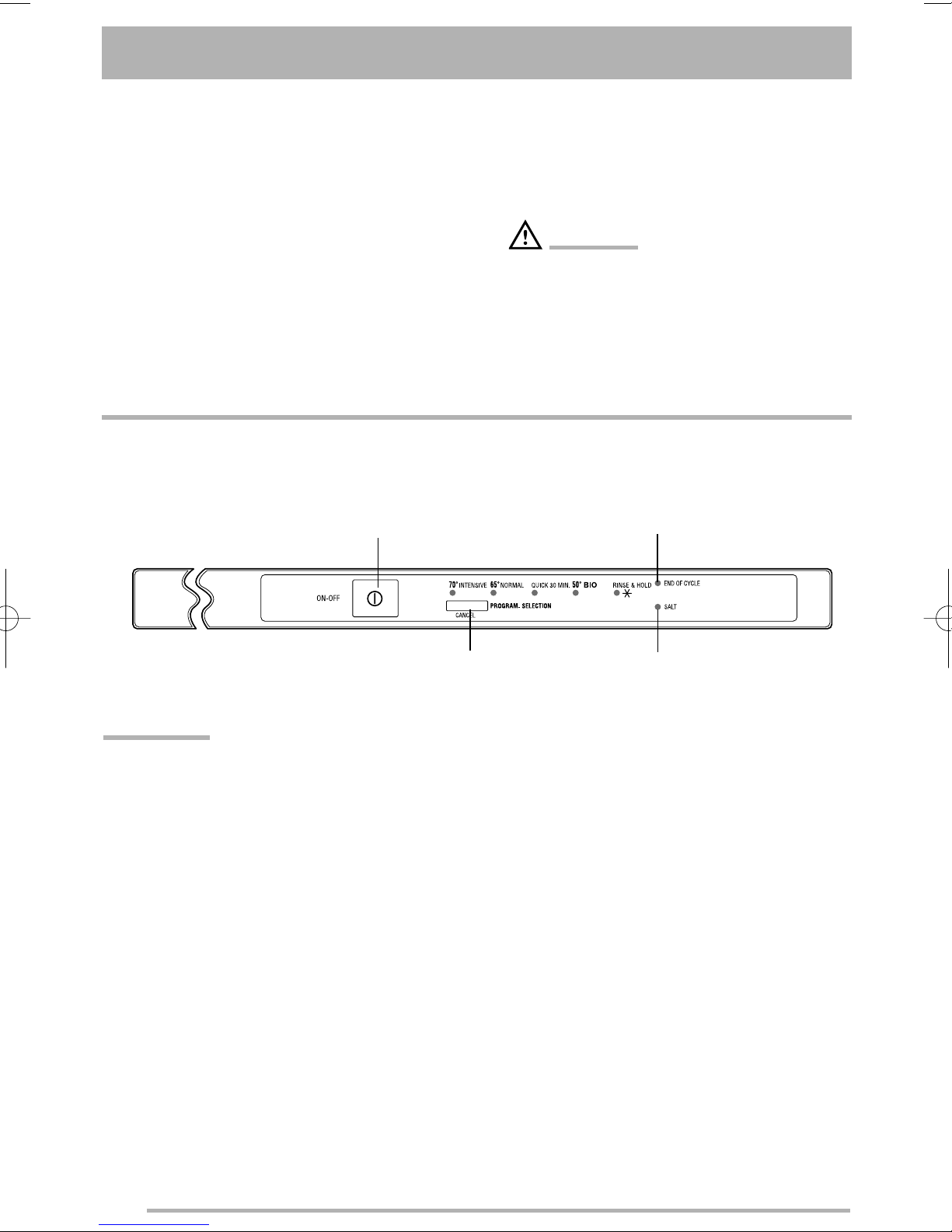
Programme/Cancel button
On-Off button End of cycle li ht
In this fully inte rated appliance the controls are located on the top of the door. When selectin a
washin pro ramme, the door needs to be sli htly open.
●Never use the dishwasher if the electrical
supply cable and water hoses are dama ed;
or if the control panel, work top or plinth area
are dama ed such that the inside of the
appliance is freely accessible. Contact your
local Service Force centre, in order to avoid
hazard.
●All sides of the dishwasher must never be
drilled to prevent dama e to hydraulic and
electric components.
ARNING!
For electrical and water connection carefully
follow the instructions iven in specific
para raphs.
IMPORTANT!
Always remember that when performin
operations such as:
- selectin a washin pro ramme,
- deactivation/activation of the audible si nals,
- settin the water softener,
the appliance MUST be in settin mode:
●Press On-Off button, no pro ramme li hts
are illuminated and End of cycle li ht
flashes = appliance in setting mode.
●Press On-Off button, a pro ramme li ht is
illuminated and End of cycle li ht is
illuminated with fixed li ht = last performed
programme still set.
In this case the pro ramme has to be
cancelled (see instructions “Cancel a
washin pro ramme in pro ress”).
Salt refilling li ht
156997 18/0en 27-10-2006 15:39 Pagina 4
5
Programme/Cancel
button
●Starting the washing programme:
1. Press the On-Off button.
2. Press the Programme/Cancel once, the li ht of the last performed
washin pro ramme illuminates and the End of cycle li ht flashes.
3. Press the Programme/Cancel as many times as necessary to
illuminate the li ht correspondin to the desired pro ramme.
4. Close the dishwasher’s door, the pro ramme will start automatically.
IMPORTANT!
Once the pro ramme has started, if you want to chan e the selection made
you must cancel the washin pro ramme in pro ress.
●Cancel the washing programme in progress:
1. Open the door.
2. Press and hold the Programme/Cancel button until the li ht
of the runnin pro ramme turns off and the End of cycle li ht is
flashin .
3. Release the Programme/Cancel button.
4. Switch off the machine by pressin the On-Off button or select a new
washin pro ramme (check that there is deter ent in the deter ent
dispenser.
End of cycle li ht
Illuminates when the washin pro ramme has ended (visible with opened
door). Switch off the dishwasher by pressin the On-Off button.
It also has added functions of visual si nallin as:
- the settin of the water softener,
- deactivation/activation of the audible si nals.
- intervention of an alarm due to the malfunction of the machine.
Salt refilling li ht Illuminates when special salt needs to be filled.
It can remain illuminated several hours after the salt has been filled.
156997 18/0en 27-10-2006 15:39 Pagina 5
6
Audible signals
Audible si nals have been introduced to help
indicate which operations the dishwasher is
performin .
- end of the washin pro ramme,
- malfunction of the appliance.
Factory settin : audible si nals activated.
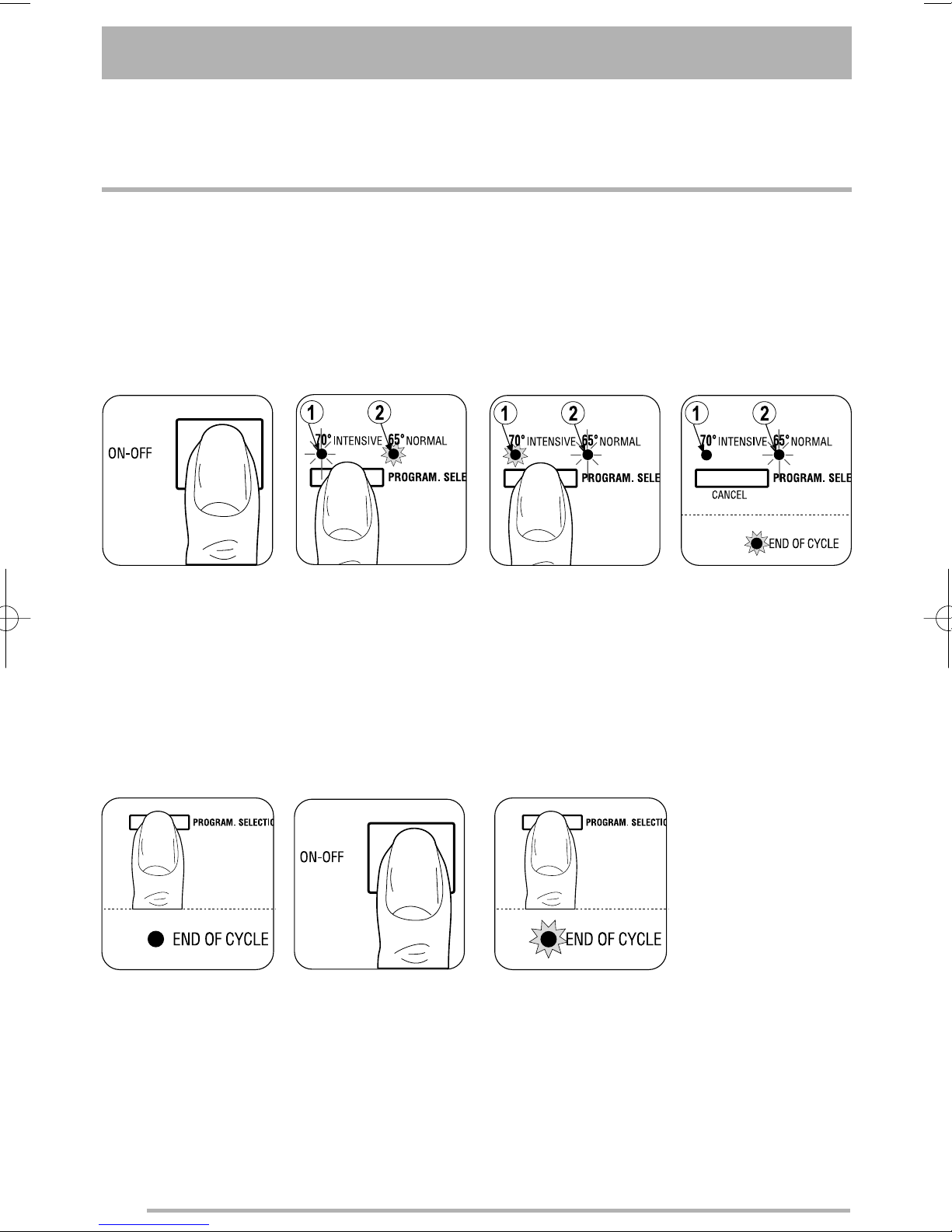
Deactivation/activation of the audible signals
2.Press and hold
Programme/Cancel
button until
pro ramme li ht 1
flashes and
pro ramme li ht 2
illuminates with fixed
li ht.
6.To memorise the
operation, switch off
the dishwasher by
pressin the On-Off
button.
3.Press
Programme/Cancel
button a ain:
pro ramme li ht 1
becomes fixed and
pro ramme li ht 2
starts flashin .
1.The dishwasher must
be switched off.
Switch on the
dishwasher by
pressin the On-Off
button.
4.After a few seconds
pro ramme li ht 1
turns off, pro ramme
li ht 2oes on
flashin and End of
cycle li ht illuminates
with fixed li ht.
The illumination of the
End of cycle li ht
means that the
audible si nals are
active.
5.To deactivate the
audible si nals, press
the Programme/-
Cancel button, the
End of cycle li ht
turns off indicatin
that the audible
si nals have been
deactivated.
7.To reactivate a ain the
audible si nals, follow
the instructions till point
4. Wait a few seconds
and then press the
Programme/Cancel
button, the End of
cycle li ht illuminates
indicatin that the
audible si nals have
been reactivated.
156997 18/0en 27-10-2006 15:39 Pagina 6
7
Programme table
Programme Use Cycle description
70° INTENSIVE Normal soil. Prewash - Main wash
Crockery, cutlery, pots and pans 2 intermediate rinses - Final rinse
Dry
50° BIO Normal soil. Prewash - Main wash
Crockery and cutlery 1 intermediate rinse - Final rinse
Dry
65° NORMAL Normal soil Prewash - Main wash
Crockery and cutlery 2 intermediate rinses - Final rinse
Dry
QUICK 30 MIN. Li ht soil. Main wash - Final rinse
Crockery and cutlery
RINSE & HOLD Any. Prewash
Partial load (to be completed later in the
day). This pro ramme does not require the
use of deter ent.
156997 18/0en 27-10-2006 15:39 Pagina 7
8
Before the first use
hen using separate special
(dishwasher) salt, rinse aid and
detergent:
- set the water softener
- add special salt
- fill up with rinse aid
hen using tablets that integrate
rinse aid and detergent:
there is no need to fill up with rinse aid
- set the water softener
- add special (dishwasher) salt
hen using tablets that integrate
rinse aid, detergent, salt function
and other additives:
there is no need to fill up with special salt or
rinse aid.
Check whether these deter ents are suitable
for your water hardness. Follow the
manufacturers instructions.
- Set the water hardness to level 1.
IMPORTANT!
If the dryin results are not satisfactory we
recommend that you:
1. Fill up the rinse aid dispenser with rinse aid.
2. Set the rinse aid dosa e to position 2.
If you decide in future to use separated
deter ents, we advise that you:
- Fill up the salt and rinse aid container.
- Adjust the water hardness settin to the
hi hest level and perform 1 normal washin
pro ramme without loadin any dishes.
- Adjust the water hardness settin accordin
to the hardness of the water in your area.
- Adjust the rinse aid dosa e
Setting the water softener
The dishwasher is equipped with a water
softener desi ned to remove minerals and salts
from the water supply, which would have a
detrimental or adverse effect on the operation
of the appliance.
The softener should be adjusted accordin to
the hardness of the water in your area. Your
local Water Authority can advise you on the
hardness of the water in your area.
IMPORTANT!
The water softener must be set in both ways:
manually and electronically.
156997 18/0en 27-10-2006 15:39 Pagina 8
9
ater hardness Number of flashes of the Adjustment of the water
“end of programme” light hardness setting
in Clarke1) in °TH2) in mmol/l3) manually electronically
64 - 88 91 - 125 9,0 - 12,5 10 2 level 10
53 - 63 76 - 90 7,6 - 8,9 9 2 level 9
46 - 52 65 - 75 6,5 - 7,5 8 2 level 8
36 - 45 51 - 64 5,1 - 6,4 7 2 level 7
28 - 35 40 - 50 4,0 - 5,0 6 2 level 6
18 - 22 26 - 32 2,6 - 3,2 4 1 level 4
5 - 12 7 - 18 0,7 - 1,8 2 1 level 2
23 - 27 33 - 39 3,3 - 3,9 5 2 level 5
13 - 17 19 - 25 1,9 - 2,5 3 1 level 3
< 5 < 7 < 0,7 1 1 level 1
no salt necessary
1) Clarke de ree, measure of the water hardness.
2) (°TH) French de ree, measure of the water hardness.
3) (mmol/l) millimol per litre, international unit for water hardness
The water softener is factory set at position 2.
Setting the water softener manually (see table)
Set switch to position 1
or 2
factory
settin
156997 18/0en 27-10-2006 15:39 Pagina 9
10
Setting the water softener electronically (see table)
The water softener is factory set at position 5.
The dishwasher must
be switched off.
Switch on the
dishwasher by pressin
the On-Off button.
The End of cycle li ht
mi ht flash 5 times, for
example. The flashin is
repeated every 5
seconds.
To chan e the level,
press the
Programme/Cancel
button. Each time the
button is pressed the
level increases. (Level 1
follows level 10).
The End of cycle li ht
indicates the new
settin .
To memorise the
operation, switch off the
dishwasher by pressin
the On-Off button.
Press and hold
Programme/Cancel
button until pro ramme
li ht 1flashes and
pro ramme li ht 2
illuminates with fixed
li ht.
Wait until pro ramme
li ht 2turns off,
pro ramme li ht 1oes
on flashin and
simultaneously End of
cycle li ht starts
flashin . The number of
flashes of the End of
cycle li ht corresponds
to current level set
156997 18/0en 27-10-2006 15:39 Pagina 10