AES uScope Manual
www.AESwave.com Copyright 2015 by Automotive Electronics Services, Inc. Page 8
Quick Start - How To:
Waveform Capture using a PreSet:
All presets are stored and loaded onto the SD card.
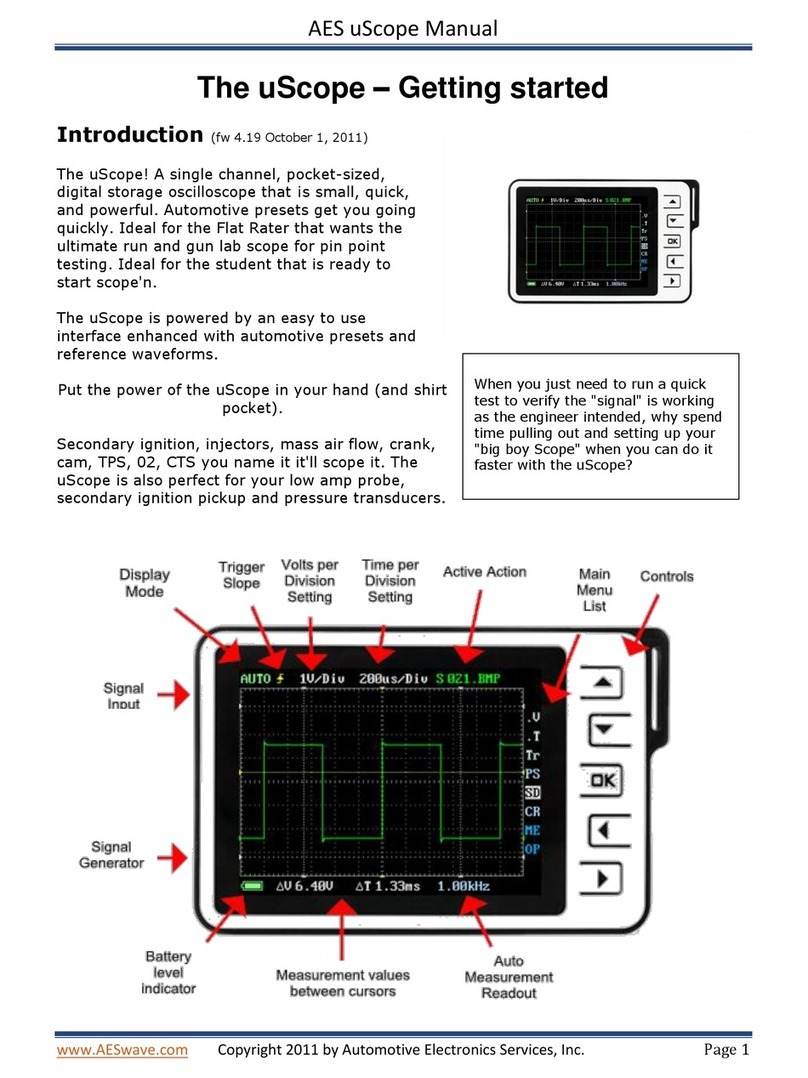
Turn on the uScope by sliding the switch located on the bottom right of unit.
11. Use the LEFT | RIGHT arrow keys and highlight the “Menu” icon. Press “OK” to open the menu
windows.
12. Use the UP | DOWN arrow keys and highlight the “Presets”menu item.
13. Press “OK”and the menu will open.
14. Use the UP | DOWN arrow keys to highlight the desired preset “Group.”
a. Sensors, Actuators, Amp, Ignition, Charging, User Set Ups
15. Press the LEFT | RIGHT arrow keys to select the desired preset in the “Group“(File name will
appear on the top right corner of the screen).
16. Press and Hold the “OK”button to activate the preset.
17. Connect your test leads and fine tune Time/Voltage/Trigger adjustments if desired.
18. Note: To select Auto Setup, highlight Auto Setup, and press & hold “OK” to activate it.
Waveform Capture not using a PreSet:
1. Turn on the uScope by sliding the switch located on the bottom right of unit to the right.
2. Use the LEFT | RIGHT arrow keys and highlight the “AUTO” menu.
3. Use the UP | DOWN arrow keys to select between AUTO, NORM, & SING. Note the trigger
mode will display in the icon.
a. AUTO trigger type will allow the uScope to update the screen regardless of other trigger
settings. This is a great first step to get the signal on the display. Reference chart on
page 13 for more detail on trigger modes.
4. Press “OK”to exit the menu
5. Connct test leads to the signal.
6. If the signal is to short or too tall:
a. Use the LEFT | RIGHT arrow keys and highlight the Voltate icon with the V value “1V”.
b. Use the UP | DOWN arrow keys while the Voltage icon is highlighted to make the
waveform taller or shorter.
7. To see more of the signal or less of the signal:
a. Use the LEFT | RIGHT arrow keys to highlight the Time icon. The scope will default to
200us.
b. Use the UP | DOWN arrow keys
c. Use the UP arrow key to go to a faster time setting showing less time of the signal but in
greater detail –like a magnifying glass. For example, see one injector pulse instead of
three.
d. Use the DOWN arrow key to go to a slower time setting showing more time of the signal
but in less detail. For example, display three injector pulses instead of one.
8. To stablize the signal: