Advanced Setup
MOUNT AND WIRE
A Select a mounting position and location.
• Mount the translator at least 5 feet from the Control Panel’s
receiver.
• Do NOT mount the translator in a metal can or on a metal
surface.
• Verify adequate RF signal strength at the panel before
permanently mounting.
B Wire the zones.
• End of line resistors are not required.
• Normally closed zones may have end of line resistors up to
15k ohms.
• Normally open zones may have end of line resistors down
to 750 ohms.
• Do NOT put power on zone input terminals.
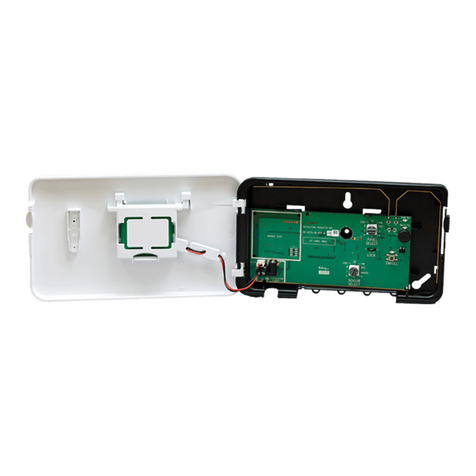
• The plastic loops along the bottom edge of the translator
housing may be used to secure the zone wiring with tie
wraps.
C Connect 12VDC output to powered zones, if any.
• 12VDC output of the translator must be used to power any
powered zones. Do NOT use an external power supply to
power zones.
DConnect the power supply to the translator using either the
supplied barrel connector or ying leads.
• Translator has a 90 second lockout after power up.
During this time no zone activity will be transmitted and the
green and red LEDs will alternate on and off every second.
• Rotate the barrel plug down to the right so the wires exit the
enclosure through the strain relief area.
• Ensure the backup battery connector is plugged into the
translator.
• Do not connect to a receptacle controlled by a switch.
Ne pas se connecter à une prise contrôlée par un interrupt-
eur.
• In the United States, the transformer must be secured to
an outlet.
• In Canada, the transformer must NOT be secured to an
outlet.
TRANSLATOR CONFIGURATION
ASelect the brand of panel that the translator must talk to
using the “PANEL SELECT” knob.
B Congure Zones:
• Zone conguration is not necessary for installations with
normally closed zones that don’t require tamper detection.
Installations with other zone types: Follow steps below.
a) Put all zones into normal (non-alarm) state.
b) Press and release the CONFIGURE button to enter
translator conguration mode. The yellow LED will turn on
when conguration mode is entered. Conguration mode
can not be entered during the 90 second power up lockout.
• Translator will learn normal state for each zone.
• Zone tampers will now be detected, but are transmitted
to the panel as “alarm.”
c) [Optional] Cycle each zone to alarm and back to normal.
• Zone tampers will now be transmitted to the panel as
“tamper.”
d) Press CONFIGURE button to exit translator conguration
mode. The yellow LED will turn off when the translator
conguration mode is exited.
• Normally closed zones can be cycled at the sensor, or
by a break-and-make at the connection to the translator.
• Normally open zones can be cycled at the sensor, or by
a shorting across the connection to the translator.
TRANSLATOR CONFIGURATION (continued)
• Conguration mode ends automatically when the cover is
closed or 30 minutes after the last action.
• When re-entering translator conguration mode, zones must be
in their normal state. However, previously programmed
settings are retained for each zone. There is no need to re-
congure every zone if the intention is to modify a subset of
the zones.
• Conguration mode is locked out 24 hours after power-up.
To re-enable conguration mode, the translator must be power-
cycled by removing both the 12VDC input power and backup
battery for at least 5 seconds.
PANEL ENROLLMENT
A Enroll Translator into Panel:
• Trip the cover tamper to enroll the translator into the panel.
-or-
• Enter ID into panel. The translator’s base ID is printed on
the bar code label and ends with a 0.
(For Honeywell® and 2GIG® panels, select loop 1)
BEnroll Zones into panel (non-Cryptix Installations):
• With the cover open, trip each zone to send an enrollable
zone transmission to the panel.
-or-
• Enter ID into panel. The zone ID is the translator’s base ID
with the last digit replaced with zone number 1-8.
C Finish setup of each zone at the panel. Below are guidelines
on how to enroll the translator and zones into your panel.
Refer to the panel installation manual for complete panel
instructions.
Cryptix ® (Connect+)
ATranslator and Zone enrollment:
a) Press the enroll button on the panel.
b) Trip the translator cover tamper to enroll the translator.
c) Finish setup of each zone at the online portal.
Interlogix ® (formerly GE ®)
ATranslator enrollment:
a) Enter Learn Sensor mode.
b) At the Trip Sensor prompt: Trip the translator’s cover
tamper to enroll the translator into the panel.
c) Select Group 13 instant perimeter
BSensor enrollment:
a) Enter Learn Sensor mode.
b) At the Trip Sensor prompt: With the translator cover
open, trip each zone to enroll it.
• For the rst 24 hours after powerup, all GE zone trips
will transmit a temporary tamper for enrollment if the
translator cover is open.
c) Setup sensor for desired behavior.
Honeywell ®
ATranslator enrollment:
a) Enter Programming mode.
• Zone Type: 3 (Perimeter).
• Input Type: 3 (Supervised RF).
b) When prompted: Trip the translator’s cover tamper
multiple times or enter the translator’s ID number, which
is printed on the unit.
c) Use loop 1 for translator itself.
BSensor enrollment:
a) Enter Programming mode.
• Set up the sensor for the desired behavior.
b) When prompted: Perform the typical Honeywell
enrollment sequence or enter the zone ID number.
• Ensure loop 1 is selected.
1
2
3
2