FUNCTION OF CONTROLS
MAIN FUNCTION CONTROLS
RESET FUNCTIONS
10 www.aquaticav.com
23
www.aquaticav.com
MP3/WMA OPERATION
PLAYING & CONTROLLING MP3/WMA FILES
TRACK SELECT or
The player plays the first track automatically. When the track is finished the second track will
begin playing and the displayed track number will be updated.
Press the TRACK UP or TRACK DOWN button for less than one second to skip to
the next or previous track on the CD. The selected track number will appear on the display.
Press and hold Press the TRACK UP or TRACK DOWN button for 2 seconds to
fast forward or fast reverse through the disc.
PAUSE/PLAY BUTTON
Press to pause playback. Press again to resume normal playback.
FAST FORWARD & FAST REVERSE or
Press FAST FORWARD to fast forward through the disc. Each time the button is
pressed a new speed (2X,4X,8X or 20X) is selected.
Press PLAY to resume normal playback.
Press FAST REVERSE to fast reverse through the disc. Each time the button is
pressed a new speed(2X,4X,8X or 20X) is selected.
Press PLAY to resume normal playback.
REPEAT PLAYBACK BUTTON
Press RPT button to active the repeat function. The current song will be repeatly
played.
Press RPT again to active the REPEAT DIR function. All files in the current folder will
be played repeatly.
Press RPT a third time to disable the repeat function.
PREVIEW/INTRO BUTTON
Short press INT button to play first ten seconds of each file in the current folder and
“INTRO DIR” will appear on the LCD.
Press INT button for a second time to play first ten seconds of each file and “INTRO
ALL” will appear on the LCD.
Press INT button for a third time to exit intro mode.
AQ-CD-4
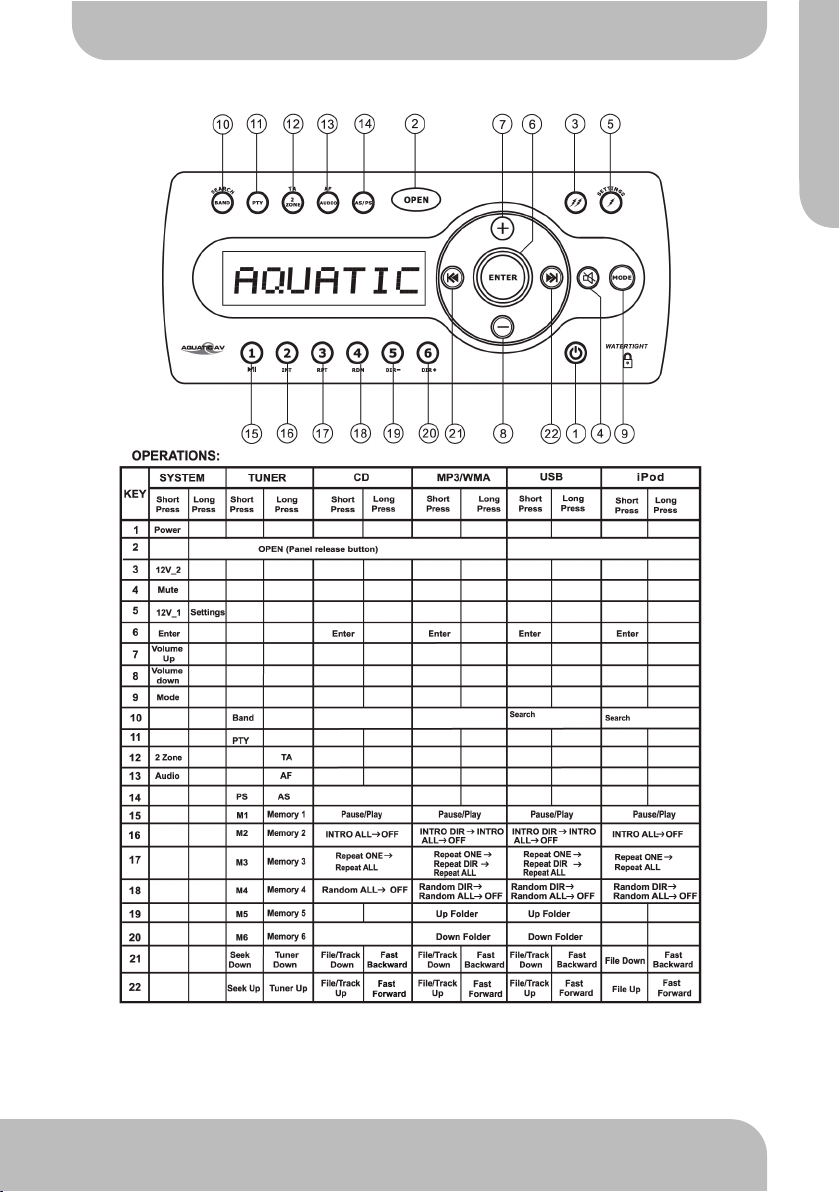
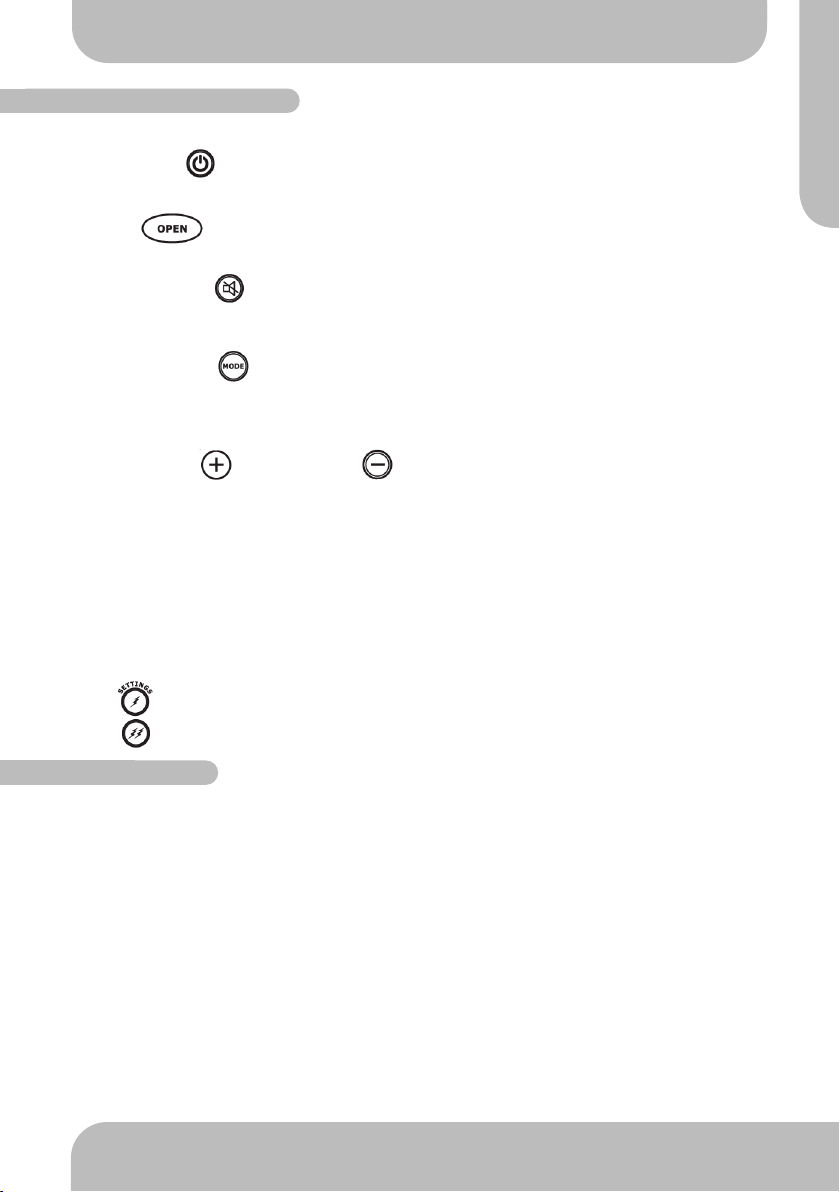
POWER ON/OFF
Press the POWER button to turn the unit ON or OFF
PANEL OPEN
Press OPEN button to open the front panel/fascia and reveal disc slot.
MUTE
Short press the MUTE button to mute the audio output and “MUTE” will appear on the
display. Press the MUTE button again to restore the audio output to the previous level.
MODE
Short press the MODE button to cycle through the available modes of operation as indi-
cated on the display panel. Available modes are RADIO, DISC, AV IN, USB, IPOD.
VOLUME UP/DOWN
Press the volume up or volume down buttons to control volume to the desired level.
When the volume is adjusted the level is shown on the display panel as a number and
guage bar ranging from 00 (lowest) to 50 (highest).
12V DC EXTERNAL TRIGGERS
This unit has two buttons 12V trigger buttons named 12V-1 and 12V-2. These can be used
to transmit switching or ‘trigger’ signals, capable of driving 12VDC/350mA and operating re-
lays for external equipment (not supplied) such as deck lighting etc.
The 2 triggers will be activated ON/OFF via the following.
●Trigger 1 : Short press
●Trigger 2 : Short press
To reset the main unit
Open the front panel/fascia and use a pencil or any non-metallic object to press & hold the
reset button for five seconds to reset the main unit and the unit will return to the factory de-
fault settings.
To reset the CD settings
When the CD is playing press AS/PS button to enter the Menu. Select DEFAULT then select
RESTORE and press ENTER to confirm. The CD Setting will resume to factory default
value.
Ejecting the Disc
Open the front panel and press the EJECT button to eject the disc. Close the front panel
manually.
AQCD4 Manual_V5:Layout 1 12/07/2012 13:05 Page 19
MODE
Short press the MODE button to cycle through the available modes of operation as
indicated on the display panel. Available modes are DISC, AUX, USB/IPOD, FM1, FM2, FM3,
AM1, AM2
FUNCTION OF CONTROLS
AQ-CD-4B