manuals.online logo
Brands
  1. Home
  2. •
  3. Brands
  4. •
  5. Axema
  6. •
  7. Recording Equipment
  8. •
  9. Axema C12 Instruction manual

Axema C12 Instruction manual

This manual suits for next models

1

Popular Recording Equipment manuals by other brands

ThermoFisher Scientific Dionex DRS 600 Installation checklist

ThermoFisher Scientific

ThermoFisher Scientific Dionex DRS 600 Installation checklist

Shure ANIUSB-Matrix user guide

Shure

Shure ANIUSB-Matrix user guide

Nady Audio HE-1 user guide

Nady Audio

Nady Audio HE-1 user guide

AUDAC APM 01 User manual & installation guide

AUDAC

AUDAC APM 01 User manual & installation guide

Teac GF-350 owner's manual

Teac

Teac GF-350 owner's manual

Fractal Audio MFC-101 MARK III owner's manual

Fractal Audio

Fractal Audio MFC-101 MARK III owner's manual

bmcm USB-OI16 manual

bmcm

bmcm USB-OI16 manual

HHB BurnIT CDR-830 Service manual

HHB

HHB BurnIT CDR-830 Service manual

GE VersaMax IC200CPUE05 manual

GE

GE VersaMax IC200CPUE05 manual

IntesisBox MH-RC-MBS-1 user manual

IntesisBox

IntesisBox MH-RC-MBS-1 user manual

Attero Tech unD4l user manual

Attero Tech

Attero Tech unD4l user manual

Sennheiser UI 765 instruction manual

Sennheiser

Sennheiser UI 765 instruction manual

Sony RCD-W1 Operating Instructions  (primary... Service manual

Sony

Sony RCD-W1 Operating Instructions (primary... Service manual

Roland Planet-P  MKS-10 owner's manual

Roland

Roland Planet-P MKS-10 owner's manual

Roland BOSS GT-PRO Turbostart

Roland

Roland BOSS GT-PRO Turbostart

8x8 Inc Valcom V-2001A manual

8x8 Inc

8x8 Inc Valcom V-2001A manual

Waves SUB Align user guide

Waves

Waves SUB Align user guide

Mitsubishi Electric MAC-334IF-E installation manual

Mitsubishi Electric

Mitsubishi Electric MAC-334IF-E installation manual

manuals.online logo
manuals.online logoBrands
  • About & Mission
  • Contact us
  • Privacy Policy
  • Terms and Conditions

Copyright 2025 Manuals.Online. All Rights Reserved.

Axema Access Control AB | Box 90215 | 120 23 Stockholm, Sweden | +46 (0)8-722 34 40 | i[email protected] | www.axema.se
Sound module C12, 2-3120
Module to connect external speakers for spoken messages in VAKA.
Connection instructions
Updated11/26/2020
Introduction
C12 sound module is designed to give spoken messages when arming and disarming from VAKA.
The C12 is equipped with a high-level output for driving passive speakers.
The messages that can be played are "Alarm activation started", "Alarm activation interrupted" and
"The alarm is activated in ..." with countdown every full minute and the last 30 and 15 seconds.
Rev. 1 and 2 are used with B26.
Rev. 3 is used with B27.
Rev. 4 is used with B27 or B28.
Connection
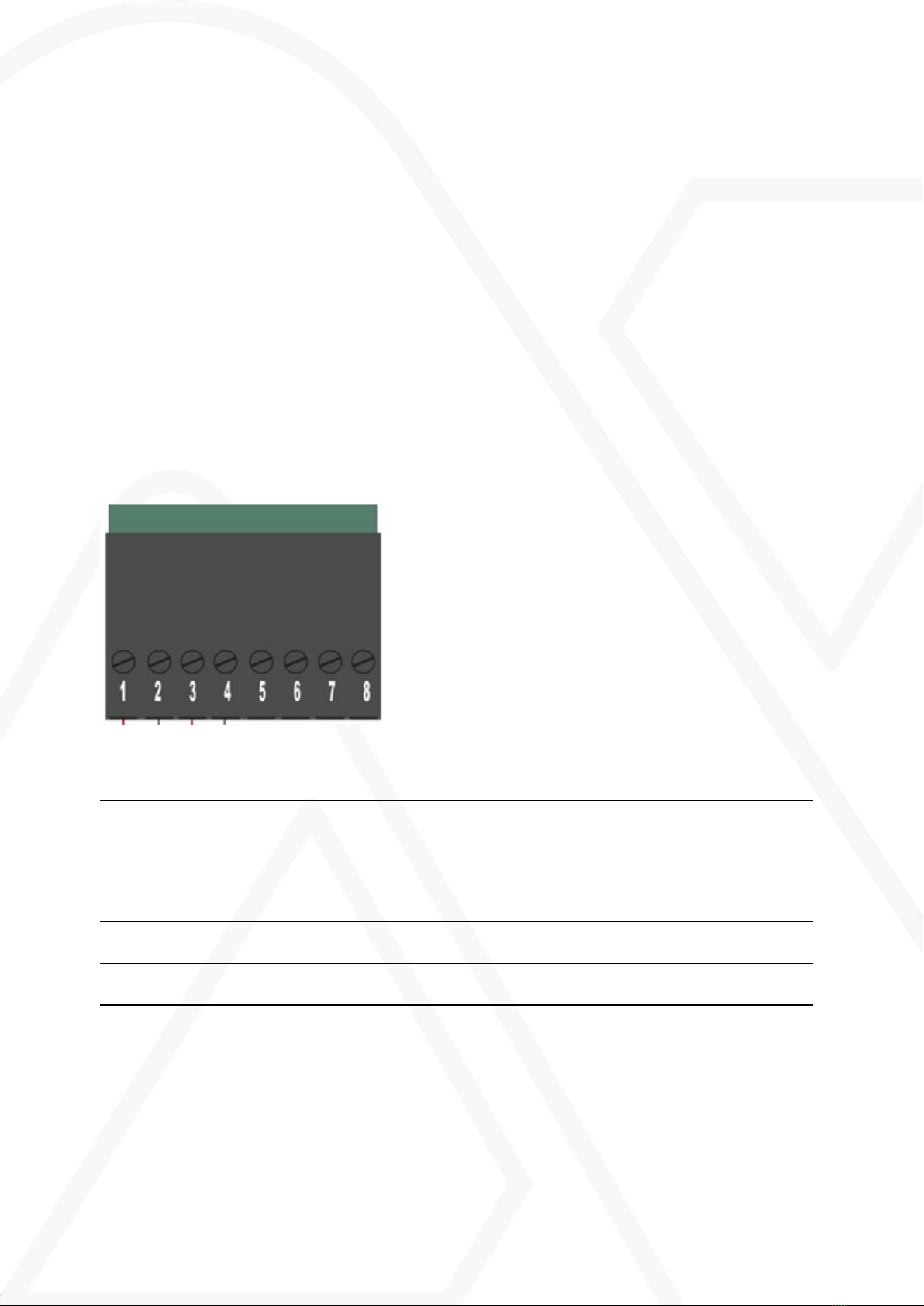
Connector Function Cable
1-2 High level output for passive speakers. 3 W 4-8
Ω. 1 is negative and 2 is positive.
Noin twisted cable, 2 x 0.75
mm2, max 200 m.
Cat. 5/6, 1 pair for each pole,
max 150 m.
Double pairs EKKX, 1 x 4 x
0.5, max 150 m.
7 Connects to CAN bus B (Terminal 11 at the
door controller)
Same cable as between door
controller and reader.
8 Connects to CAN bus B (Terminal 11 at the
door controller)
Same cable as between door
controller and reader.
2(4) Connection instructionsC12

Connection examples and cable lengths
High level with one speaker
High level with two speakers
3(4) Connection instructionsC12

Commissioning
1. Power off the controller.
2. Mount the module at any module location in the door controller.
3. Install the supplied terminal below the module and power up the controller.
Installation and configuration
This manual only deals with the assembly and connection of the unit.
For configuration of C12, see the sectionVolume settings in the commissioning manual.
(https://info.axema.se?commissioning)
4(4) Connection instructionsC12














