2.Charging the battery pack
Plug the mains adaptorinto
a 230V AC ,50Hzmain socket
with the switch onthe socket
set to OFF.
Then switch ON themain socket.
Battery Life
The PMR has a built inpower saver feature to make thebatteries
last longer. Butwhen you are notusing the PMR ,it's better to
switch itoff to save thebattery power.
Battery Meter
The battery meter islocated in the lowerleft side of the LCDpanel.
These dicate the amount ofpower available.As the power isused
the barswill disappear. Whenthe battery level reach it minimum level
in PMRon mode, unit willemit two beep tonesand automatically turn
off thepower and proceeds towatch mode.
in
The PMR must beused withmains adaptor,
provided with the unit.
Using any other adaptorwill resultin non -Compliance
with the EN60065 andwill invalidateany approval to this
Apparatus.
Lift the charge jackcover
located on the sideof yourunit.
Insert the round
connector of
the 7.5V DC/200mA
adaptor into the
charge jack.
During Charging, the battery levelindicator icon will start scrolling
on the display inboth clockmode and PMR onmode.
It takes about 10hours torecharge the battery fully ifthey've
become completely run down. Newbattery take up to 12 hours to
charge fully.
Binatone Help Line: 0845 345 9677
DCM VOX
SC
TX RX
Adventurer 100
Personal Mobile Radio(PMR)
User Guide
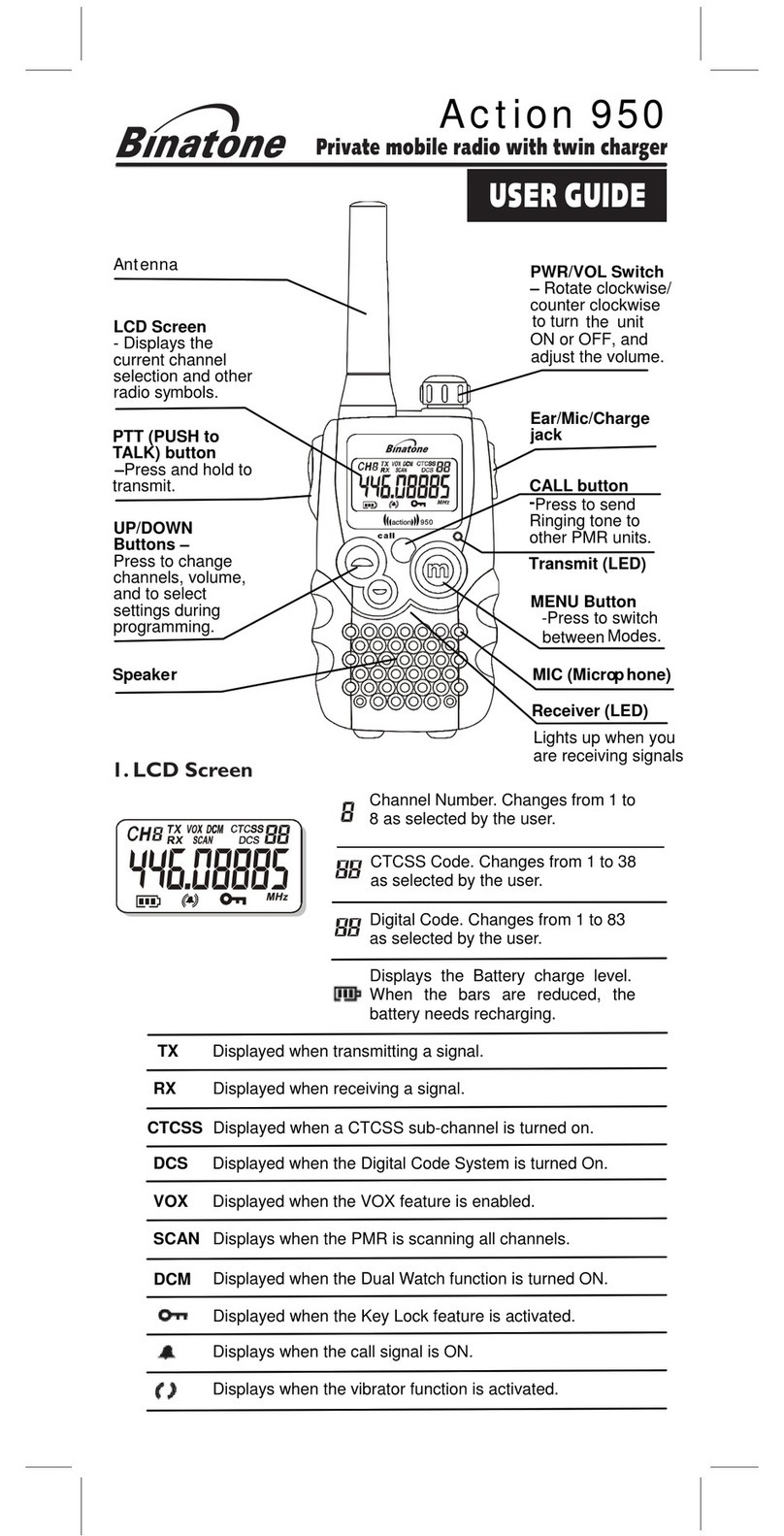
CALL button
Press to send Ring
tones to other
handsets
TALK button
Press and hold while
you' re transmitting Socket for hands-
free kit(headset)
and charge
under the hinged
cover
ON/OFF button
MENU button
Press to change
Channels and
sub-channels, and
to switch between
modes
Microphone
Up and Down buttons
Press to change the
speaker Volume. Press
after menu button
to change the channels
What' s on the display
Channel number(1to8)
Sub-channel number(0 to38)
Battery power level. when the barsdisapper
charge the batteries
Shown when youare transmitting thesignal
1. If the unit is instandby mode
Time
2. If the unit power ON
Stop watch
DCM VOX
SC
TX RX
Effective Range
The Transmission range of theproduct iswholly dependent on the
environment or terrain in whichit is being used,the following
diagram attempts to guidethe useron the sort of performance to
expect in everyday use.
Signal Strength Optimum(open area)(1)
Medium ground based
obstruction(2)
Heavily built up area(3)
Range Slope0 Range(Km) 3
_
Important read these
Safety Warning before
you charge thebattery
When charging the handset,use onlythe rechargeable
Ni-NH battery packsupplied with the PMR.
Don't try tocharge the non-rechargeable batteries.
Make sure the battery compartment cover is securely locked in
place when you are chargingthe battery pack.
Disposed of used batteriessafely and in a way that willnot harm
_
the environment never try toburn them or put them anywhere, they
could get burnt or punctured.
Don't leave dead batteriesin yourPMR .
Your PMRincludes 1.2V AA x 3 rechargeable
battery pack for eachunits.
1.Fitting the Battery pack
Press MENU button again to setthe minutes.The minutes
segment start to flash.
Press UP or DOWN button to increase ordecrease the
minutes number displayed.
Press and hold the MENU button for3 seconds to confirm
the time setting and exit thetime setting mode.
Using Stop Watch
In watch mode, press and hold CALL button for3 Seconds.
The stop watch appear on thedisplay.
Press UP button once to start the stop watch.
Press UP button once to stop the stopwatch.
Press DOWN button once to re-set the timer.
Press and hold CALL button for3 secondto exit from the
Stopwatch mode.
4.Using the Personal Mobile Radio To switchthe PMR OFF
Press and hold the ON/OFF button untilthe channel display
goes off.
You hear amusical tone each time to confirm.
3.Using the Stopwatch
Standby mode(Clock Mode)
Installing the battery will automatically turn-on and proceeds
to Watch mode.
To set the Time
yourWatch has a 24 hourTime clock.
In watch mode, press and holdthe MENU button for 3
Seconds.The Hour segment in display willflash.
Press UP or Down button to increase ordecrease thehour
number displayed.
Changing the channels andsub-channels
PMR has eight channels, numbered1to8. To communicatewith
otherPMR users within range, you mustall haveyour PMR watch
tuned to the same channel.
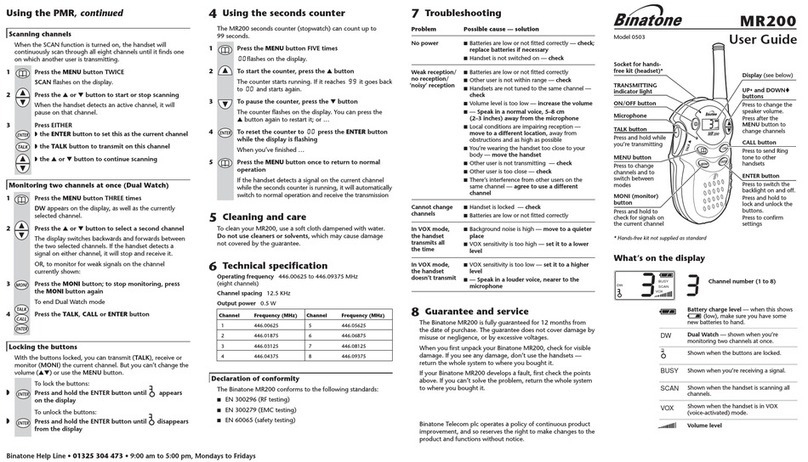
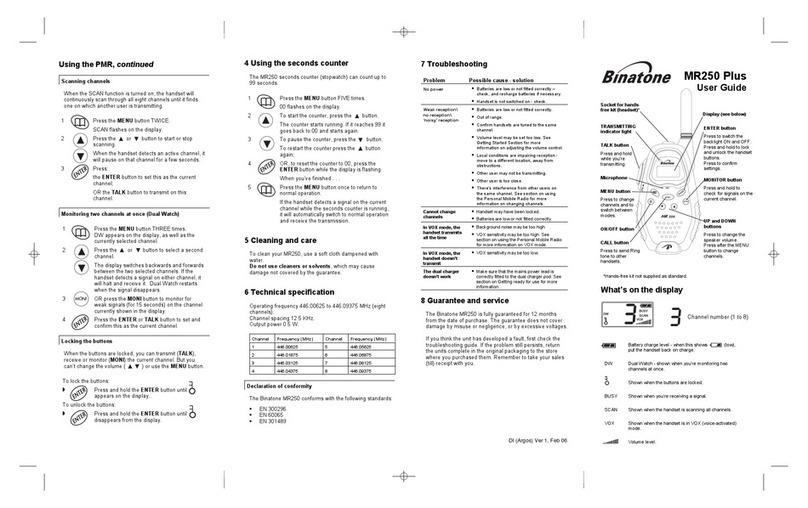
Press the MENU button once
The current channel number flashes on thedisplay
Press UP or Down button to go tothe channelyou want
Press TALK button toconfirm.
1
2
3
Volume control
To adjustthe loudspeaker volume
Press the UP or Down button.
The volume level isshown bythe bars on thedisplay. Youcan
change the volume eitherWhile you'reusing your PMR
handset, or while thehandset isidle (switched on butnot in
Use).
Transmitting range
The talk range dependson environmentaland terrain. It will be
greatest (up to about3km or1 3/4 miles) in wide open spaces,
without obstructions suchas hillsor buildings. Don't try touse two
PMR handsets which areless than1.5m (5feet)apart.If you do, you
may get interference.
To listen toanother PMRuser
Make sureyou are not pressingthe TALK button
Receiving symbol( )is shownon the display whenthe other
person isspeaking. Don't try to transmituntil they have finished.
Monitoring the current channel
Normally Watch PMR will notpick up very weak signals.But you can
monitor thecurrent channel for all sounds.
To activate themonitoring feature
Press the MENU and DOWN button at the same time
Your handset willpick up any signals on the current channel,
Including background noise.
Press TALK button to stop monitoring.
communicate only with otherusers tunedto the same channeland
sub-channel.
To turn thesub-channel functionoff, simply set thesub-channel to
0(zero).Then you can communicatewith anyPMR user on thesame
channel who also turned offsub-channel operation(or whose PMR
does not have thefeature).
Press the MENU button twice
The current sub-channel number flashes on thedisplay.
Press the UP or Down button to go to the sub-channelyou
want.
Press the TALK button to confirm.
Transmitting and Receiving. _
PMR transmission is 'one way-at-a-time' while youare speaking,
you can not receivea transmission.
_
PMR is an open-license band always identify yourselfwhen
transmitting, as other peoplemay becommunicating on the same
channel.
To speak toanother PMRuser
Press and hold the TALK button sothat the Transmitting
symbol ( ) appear onthe LCDpanel.
Speak clearly into the microphone, ina normal tone - don't
shout
When you're finished speaking, release the TALKbutton.
Each channel also has38 sub-channels(sometimecalled CTCSS
codes) letting you setup groupof users within thesame channels, for
more private communication.If youhave aset a sub-channel, youcan
VOX(voice activated transmission)mode
In VOX mode your PMR will transmit whenever it detects your
voice (orother noise) without theTALK button pressed. It will
transmit for2 seconds even ifyou stop talking.
1
2
3
1
2
3
Note: Once you removethe battery fromthe unit, clock will
reset to default time12:00
Dual watch-shown whenyou are monitoring
two channels atonce.
Shown when theunit is in VOX (voice activated
mode)
Shown when theunit is scanningall channels
Shown when thebuttons are locked
Volume level
Shown when youare receiving thesignal
Shown when youare sending thecall tone
SC
To remove the beltclip
It is easierto fit thebatteries without thebelt clip
in place.
Pull the tabforward(away from the handset)
to release thebelt clip. Then lift the beltclip
off.
To fit the batteries
Insert your
fingernail
behind the tab
Lift the belt
clip off
1.Loosen the screwcounter
clock wisedirection by using
a cionor your fingers.Open the
battery compartment
2.Insert the battery pack
facing battery contact
plate in.
4.Replace the cover and
close thescrew clock wise.
3.Make sure theup
arrow isshowing,
and pointingtowards
the topof the handset.
To replace the beltclip
Slide the belt clip down intothe slot until it clicks
into place.
Range Check
The transmission rangewill be affected as shown inthe diagram
above. The transmittingrange typical values for different environment
conditions will be (1) 3km (2) 1.5km(3) 750m. It shouldbe
remembered that these are onlyguide valuesas actual achieved
distances will be dependent onthe environmentand terrain.
Important safety warning
If you are usinga headset, to protect yourhearing, do not turn the
volume to the highestlevel .
To reduce radiofrequency exposure when you'reusing your
adventure-100, hold the handsetat least 5cm(2inches)from yourface.
Never use your PMR outdoors ina thunderstorm.
Don't use yourPMR inthe rain.
If your PMR everget wet,turn it off and remove the battery.
Dry the battery compartment and leavethe cover off forfew hours.
Don't use the PMR until itis completely dry.
Keep the PMR outof the reach of babies and young children.
Turning ON and OFF your PMR
To switchthe PMR ON, Press and hold theON/OFF button
until the channel display comes.
Note: To obtain the betterreception, repositionthe
Antenna.
The levelof VOX sensitivity isshown by numbers onthe display. At
the highestlevel(level 3), the handsetwill pickup softer noise
(including backgroundnoise); at the lowestlevel, it will pickup only
quite loud noise.
To turn VOXmode ON and OFF:
Press MENU button Three times
VOX icon display and OF flashes on the LCDpanel.
Press UP button to set thelevel ofsensitivity.
If you press the Down button until OF appear on the display,
you can turn off the VOX mode.
Press TALK button to confirm the setting.
As long as thehandset inVOX mode, VOX is shownsteadily
on the display.
1
2
3
Ring tone
Youcan send ring toneto other handsets withinrange and tuned to
the samechannel,(and sub-channel if applicable),to alert them you
want tocommunicate with them.
Press and release the CALL button
You can hearring tone for about two seconds, while the
transmitting symbol( )and call signal( )appearon the LCD
panel. Any other PMR handset withinthe range and tuned to
same channel will hearRing tone, and may decide to
to you.
the
transmit
1
Setting Call-Ring tones
Press MENU button for Four times, the unit willenter to
Call-Ring setting mode. The LCD will displayCA while 1
is flashing.
PTT
PTT
PTT
PTT
PTT
battery
pack
8
8
Mic/spk jack
Charge jack
Binatone Help Line: 0845 345 9677 Binatone Help Line: 0845 345 9677 Binatone Help Line: 0845 345 9677 Binatone Help Line: 0845 345 9677Binatone Help Line: 0845 345 9677