1
ENGLISH
INTRODUCTION
Thank you for choosing Bowers and Wilkins.
Please read this manual fully before unpacking
and installing the product. It will help you to
optimise its performance.
B&W maintains a network of dedicated
distributors in over 60 countries who will be able
to help you should you have any problems your
dealer cannot resolve.
UNPACKING
(figure 1)
•Fold the carton flaps right back and invert the
carton and contents. Lift the carton clear of the
contents. Remove the inner packing from the
product.
•Check in the carton for:
1 Bookshelf stand
1 Wall bracket
We suggest you retain the packaging for future
use.
POSITIONING
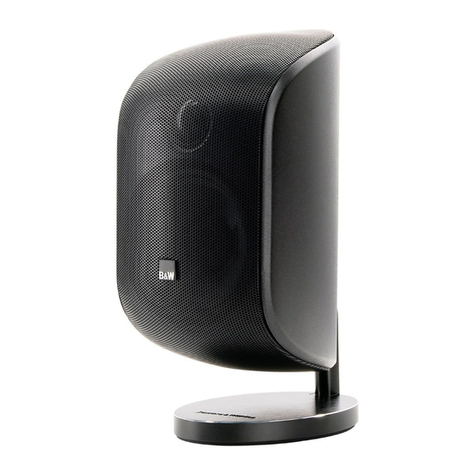
The speaker may be used in either vertical or
horizontal orientation. It can be mounted on the
stand, bracket or placed on its side.
OTE: The badge on the grille can be rotated
through 90 degrees to suite the orientation of the
speaker and is held in with a spring. To rotate
gently pull the badge away from grille set the
orientation and reposition in the grille.
Home Theatre
As a front centre speaker position it directly
above or below the screen, whichever is closest
to ear level. Align the front of the speaker
approximately level with the screen.
As a front left and right speaker:
Make the height of the centre of the speaker
approximately the same as the TV or the centre
speaker.
Space the speaker between 0.5m and 1m from
the side of the screen.
As a surround speaker:
There are two ways of presenting surround
information. You can either attempt to get good
imaging in all directions or go for a more diffuse
ambient effect.
In both cases position the speakers to the sides
and behind the listeners. For a more diffuse
effect, mount the speakers higher and point them
along either the rear or side wall.
2-Channel Audio
(figure 2)
Mount the speakers so that the centre of each
speaker is approximately at ear level.
As an initial guide:
•Position the speakers and the centre of the
listening area approximately at the corners of
an equilateral triangle.
•Keep the speakers at least 1.5m apart to
maintain left right separation.
Keep the speaker baffles at least 0.5m clear of
walls.
If the central image is poor, try moving the
speakers closer together and adjusting the
degree of toe-in.
Stra magnetic fields
The speaker drive units are magnetically shielded
such that the stray magnetic field outside the
boundaries of the cabinet, except the front, is
too low to cause distortion of the television
picture in the vast majority of cases.
There are, however, some extremely sensitive
televisions – some that even have to be adjusted
according to their alignment with the earth’s
magnetic field. If you have a problem, first
degauss the television set with the speaker in
place. Some have a button especially for this
purpose. If not, switch off the set at the mains for
15 minutes and switch on again. Merely putting
the set into standby mode is not sufficient. If you
still have a problem, try moving the speaker
either forwards or backwards a little to get a
more favourable juxtaposition, or space the
speaker further from the television until the
distortion disappears.
Because of the higher stray magnetic field in
front of the speaker, we recommend you keep
magnetically sensitive articles (computer discs,
audio and video tapes, swipe cards and the
like) at least 0.2m from the speaker.
MOUNTING
Assembling and Fixing the Bracket and bookshelf
Stand.
Stand
(figures 3 & 4)
The stand can be fitted so the speaker can be
positioned either horizontally or vertically, using
either of the mounting slots on the rear of the
speaker. Determine your choice of orientation
and then slide the speaker onto the stand. An
Allen key is located in the bottom of the stand,
remove the Allen Key to tighten the bolt at the
rear of the stand once in position to secure the
speaker. Return the Allen key to its position in the
base of the stand for future use.
Bracket
(figure 5)
Using the bracket, mark the four screw positions
on the mounting surface carefully. Offer the
bracket to the wall, screw in the two screws
used for the top two holes, leaving
approximately 5mm (0.2in) of the screw
protruding from the wall, screw in the two
remaining screws at the bottom of the mounting
base, finally tighten the screws. Again the
speaker can be fitted so the orientation is either
horizontal or vertical, using either of the
mounting slots fitted onto the rear of the speaker.
Determine your choice of orientation and then
slide the speaker onto the bracket.
Take the Allen key from the bottom of the
bookshelf stand. The bracket allows the speaker
to swivel left and right. This is then locked in
place by tightening the bolt that is located at the
swivel joint at the top of the bracket. Return the
Allen key to its position in the base of the stand
for future use.
WAR I G: YOU SHOULD USE SUFFICIE T
QUALITY, SIZE A D UMBER OF CORROSIO
PROOF FIXI GS TO A AREA OF WALL OF
SUFFICIE T STRE GTH TO E SURE THAT THE
SPEAKER IS SAFELY SUPPORTED.
CONNECTIONS
(figure 6)
All connections should be made with the
equipment switched off.
Ensure the positive terminal on the speaker
(marked + and coloured red) is connected to the
positive output terminal of the amplifier and
negative (marked – and coloured black) to
negative. Incorrect connection can result in poor
imaging and loss of bass.
Ask your dealer for advice when choosing
cable. Keep the total impedance below
maximum recommended in the specification and
use a low inductance cable to avoid attenuation
of the highest frequencies.
Home Theatre
Refer to your decoder manual and set the levels
and delay times for all speakers. Check the
settings to obtain the best average result at all
probable listen positions. Except for special
effects, the general level of the surround field
should not be too obvious.
Adjust the spacing of the front left and right
speakers so that the size of the acoustic image
matches the size of the screen.
Adjust the toe-in of the front left and right
speakers to get a smooth transition of sounds that
pan from one side to the other.
Adjust the angle of the surround speakers to give
the best results with a variety of material. Use
both movies and music videos.
AFTER CARE
The cabinet surface usually only requires dusting.
If you wish to use an aerosol cleaner, spray onto
the cleaning cloth, not the cabinet.
Do not attempt to remove the grille, as damage
will result.