CABASSE Stream Amp 100 User manual

OWNER'S MANUAL
STREAM
AMP 100
www.cabasse.com

e n g l i s h
2424

25
218
190
91
218

e n g l i s h
2626
1
11
8
3
4
10
2
9
IDENTIFYING
CONTROLS
1
LED DISPLAY ON (white LED) / ECO (red LED)
2 VOL - Volume DOWN
3 VOL + Volume UP
4Mute on/off
8Source selection
9 SOURCES BLUETOOTH - WIFI (WLAN/LAN) - RCA ANA-
LOG 1 - RCA ANALOG 2 - OPTICAL
10 Position of the NFC patch

27
1
2
5
7
3
4
6
8
IDENTIFYING
CONTROLS
1
ON / ECO
2 VOL - Volume DOWN
3 VOL + Volume UP
4Mute on/off
5Previous title
of the played album
6Next title
of the played album
7 Pause/Play
8Source selection
FEATURES
Bluetooth
connection
WIFI/ETHERNET
via internet router
WIFI direct to
smartphone/tablet
Loss less audio playback 4 4
Access to any audio from
WLAN network (desktop...) 4
Multi-room 4
Tracks playback from
smartphone/tablet 4 4 4
Playback smartphone/
tablet a audio applications
(youtube…)
4
Playback from USB device 4 4
Web radio /DEEZER 4
Manufactured under licence from Dolby Laboratories.
Dolby and the double D symbol are trademarks of Dolby Laboratories.

e n g l i s h
28
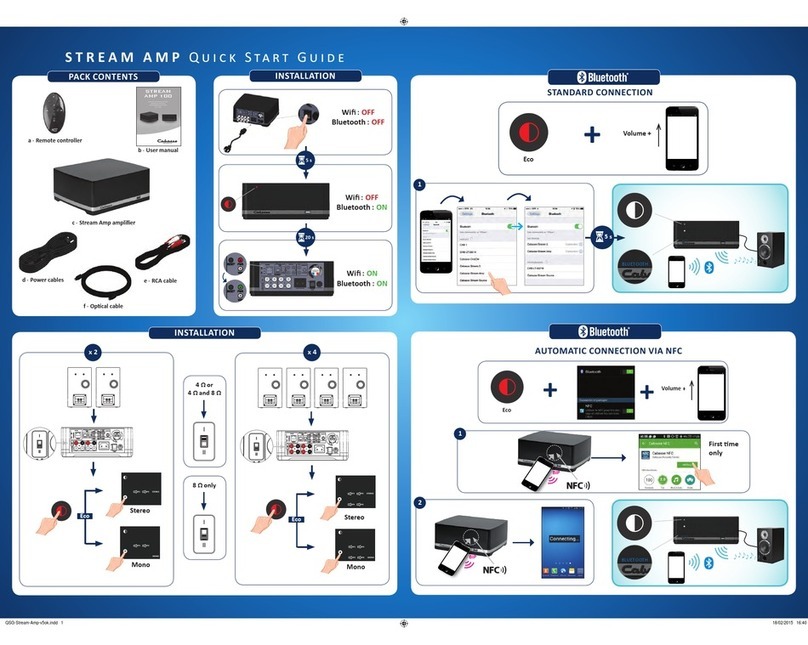
QUICK PLUG & PLAY
Place the STREAM AMP on a solid shelf
close to a mains plug, with enough available
headroom above, under and around, for the
optimum efciency of the Bluetooth and
WIFI antennas and proper ventilation of the
amplier.
Connect 2 or 4 loudspeakers to the
STREAM AMP. For a single pair of
loudspeakers, use SP1 (right speaker) and SP2
(left speaker) binding posts.
CAUTION: be assured that all “+” inputs are
effectively connected to “+” outputs as well as
all left outputs to left inputs.
Impedance range selector:
Position “I” (factory preset): power output is 2
x 50 W or 4 x 25 W RMS for loudspeakers with
a minimum impedance value below 6.4 ohms.
It goes down to 2 x 25 W and 4 x 12.5 W for
loudspeakers with minimum impedance value
above (or equal to) 6.4 ohms.
Position “II” : use this position to get 2 x 50 W
or 4 x 25 W RMS with minimum impedance value above (or equal to) 6.4 ohms, for instance
Cabasse Antigua IW or Archipel models.
Connect the power cable to the STREAM AMP, plug it to the mains and position the POWER
ON/OFF switch on "ON". STREAM AMP is ready to play when the LED
1
turns on. Press key
1
either on the STREAM AMP or the remote to get STREAM AMP on.
NOTE: the DLNA mode of STREAM AMP is available when the PWR (Power) LED has turned
from red to green, around 40 seconds after powering on the STREAM AMP.
2
1

29
3
Settings of the loudspeakers outputs .
Press to select between the 4 possible set-ups:
- 1 STEREO pair of loudspeakers (default mode). The SP1, SP2, STEREO LEDs are on.
- 2 STEREO pairs of loudspeakers. The SP1, SP2, SP3, SP4 and STEREO LEDs are on.
- 2 loudspeakers playing MONO. The SP1,SP2 and MONO LEDs are on.
- 4 loudspeakers playing MONO. The SP1,SP2, SP3,SP4 and MONO LEDs are on.
Before rst use, loosen the screw (PH00 screwdriver), remove the back cover, remove the battery
protection tab, replace the cover, retighten the screw.
Replacement of the CR-2025 type battery in the Stream remote control: loosen the screw, remove the
rear lid, remove the old battery and load the new battery properly with the "+" side on the clasp side,
put the rear cover back on, retighten the screw.
4

e n g l i s h
30
ANALOG INPUTS 1 AND 2
Select an audio source tted with an analogue output, either RCA or mini-jack type.
Get a RCA/mini-jack if the source is tted with a mini-jack output.
USB INPUT
Plug in an USB stick or a hard-drive to this input to get all the stored audio les available on
the domestic network. All the audio les, under formats compatible with the built-in DLNA
server of STREAM AMP, will be listed in the Stream Audio Control apps and can be played
by any Cabasse Stream player connected to the same domestic network. The USB input is
tted with a 1 ampere power output enabling the use of a portable hard drive with no need
of an external power supply.
5
6
7
Once the Bluetooth and Wi-Fi connections activated, press the
8
key of the remote control or on the front panel until you get the
requested source, with the appropriate LED on the panel being
on. The Wi LED stands for the Wi/WLAN source, the ETH LED
stands for the Ethernet/LAN source.

31
BLUETOOTH CONNECTION
STREAM AMP is set in on open mode for Bluetooth connections.
Select "Cabasse STREAM AMP" in the available Bluetooth devices list. Select the BLUETOOTH input
with
8
key on the Stream remote or on the Stream Amp. If a Bluetooth source is already connected
to STREAM AMP, disconnect this item before selecting a new one.
BLUETOOTH CONNECTION WITH AN ANDROID TABLET: see the English explanation on page 38.
CONNECTION AND USE OF STREAM AMP WITH AN APPLE COMPUTER: see the English version
page 39.
INSTANT NFC BLUETOOTH CONNECTION WITH A NFC SMARTPHONE
1) Installation of the Cabasse NFC application
a) Enable the NFC function in the set up of the NFC smartphone.
b) Check/activate the wi or 3G connection of the smartphone to Internet.
c) Touch the smartphone together with the NFC patch
10
in the middle of the front panel of
STREAM AMP.
d) Accept the installation of the Cabasse NFC app from Google Play.
e) Your smartphone is now ready for instant Bluetooth NFC connections.
2) Using the Cabasse Bluetooth NFC application
a) Tap your smartphone on the NFC patch
10
in the middle of the STREAM AMP for instant
Bluetooth pairing; if necessary the STREAM AMP turns on, then the Bluetooth input is automatically
selected and the rst cut of the smartphone’s playlist is being played by STREAM AMP.
b) Tap again to unpair both items and before pairing another smartphone to the STREAM AMP.
NOTE: The Cabasse NFC application runs in background once installed in the smartphone. This
application can be found in the list of applications, but there is no icon on the desktop.

e n g l i s h
32
LAN WIRE CONNECTION TO THE ETHERNET NETWORK
The LAN wire connection ensures a constant and optimum transfer rate. Use it if music reproduction
stops or is erratic under Wi-Fi mode, because of a saturated Wi-Fi bandwidth or the distance between
the router and the Stream unit being too long.
Use a RJ45 type cable to connect STREAM AMP to the domestic router.
The connection is running when the blue LED “ETH” stops ashing and remains on.
ATTENTION: set up the router on DHCP mode.
Press "RESET" before starting a new
connection process (wired, auto, easy,
manual) or connecting to a new router.
WIFI DIRECT MODE
Wi-Fi direct allows to play with wi quality all the audio tracks available in the tablet or the smartphone
as well as those availble in the hard-disk or USB-stick connect to the USB input of STREAM AMP,
without need of a wi network. Internet sources such as Vtuner, Deezer and the STREAM AMP rmware
updates are not available.
Activate the STREAM AMP, Install and open the Cabasse app on your tablet/smartphone and select
"Use this device in standalone mode" instead of "congure this audio device". Follow the instructions
and start playing your music.
Table of contents
Other CABASSE Amplifier manuals